



 该博客展示了如何使用Python的requests和BeautifulSoup库从网站抓取天气预报数据,并利用正则表达式定位元素。数据包括日期、最高和最低温度,最终将这些信息写入CSV文件。
老被审核,废话不多说 直接贴
#!/usr/bin/python3
# -*- coding:utf-8 -*-
import os.path

import requests
from bs4 import BeautifulSoup
import re
import csv

#文件路径
path=r'D:\\'
target=r'D:\\weather_files'
if os.path.exists(target):
  print("文件夹已存在!")
else:
  os.mkdir(target)

#要抓取的目标网址
wea_url='http://www.weather.com.cn/weather/101010600.shtml'
#某度随便搜索的代理IP
proxies = {
  'https': 'http://210.77.87.71:3128',
}
#这个信息全部来源于浏览器的F12,挨个复制即可
headers={
"Accept":"text/html,application/xhtml+xml,application/xml;q=0.9,image/avif,image/webp,image/apng,*/*;q=0.8,application/signed-exchange;v=b3;q=0.9",
"Accept-coding":"gzip, deflate",
"Accept-language":"zh-CN,zh;q=0.9,en-GB;q=0.8,en-US;q=0.7,en;q=0.6",
"Cache-Control":"max-age=0",
"Connection":"keepalive",
"Host":"www.weather.com.cn",
"Refer":"http://www.weather.com.cn/weather40d/101010600.shtml",
"Upgrade-Insecure-Requests":"1",
"User-Agent":"Mozilla/5.0 (Windows NT 10.0; Win64; x64) AppleWebKit/537.36 (KHTML, like Gecko) Chrome/99.0.4844.51 Safari/537.36",

}
#请求对象
r=requests.get(wea_url, headers=headers,proxies=proxies)
#对创建的对象进行解析
soup=BeautifulSoup(r.content,'html.parser',from_encoding='utf-8')

#网页的元素定位有很多种方式,我随便测试了一下
#测试获取第一天的 --------------
li=soup.find('ul',class_='t clearfix').find('li',class_='sky skyid lv3 on').h1.string
highTem=soup.find('ul',class_='t clearfix').find('li',class_='sky skyid lv3 on').find('p',class_='tem').span.string
lowTem=soup.find('ul',class_='t clearfix').find('li',class_='sky skyid lv3 on').find('p',class_='tem').i.string

print('日期是: {}  最高温度 : {}  最低温度 :{}'.format(li ,highTem, lowTem))
#第一天的 ---------------------这部分可以删除,仅为了测试

#后几天
second=soup.find_all(name='li',attrs={"class": re.compile(r"sky skyid lv[0-9]")})
data=[['日期','最高温度','最低温度']]
for item in second:
  save=[]
  #print("日期是: " +item.h1.string)
  #print("最高温度: "+item.span.string)
  #print("最低温度: "+item.i.string)
  #print('------------------')
  save.append(item.h1.string)
  save.append(item.span.string)
  save.append(item.i.string)
  data.append(save)

with open('D:\weather_files\weather.csv','w',newline='') as f:
  file=csv.writer(f)
  file.writerows(data)
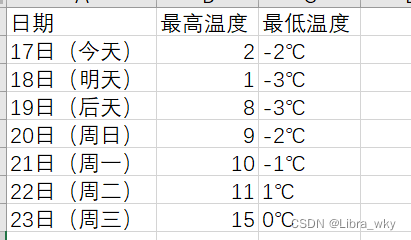
结果如下:
PS:补充下注释。





 扫一扫
扫一扫


 733
733

 被折叠的 条评论
为什么被折叠?
被折叠的 条评论
为什么被折叠?
 到【灌水乐园】发言





