


体验小程序:

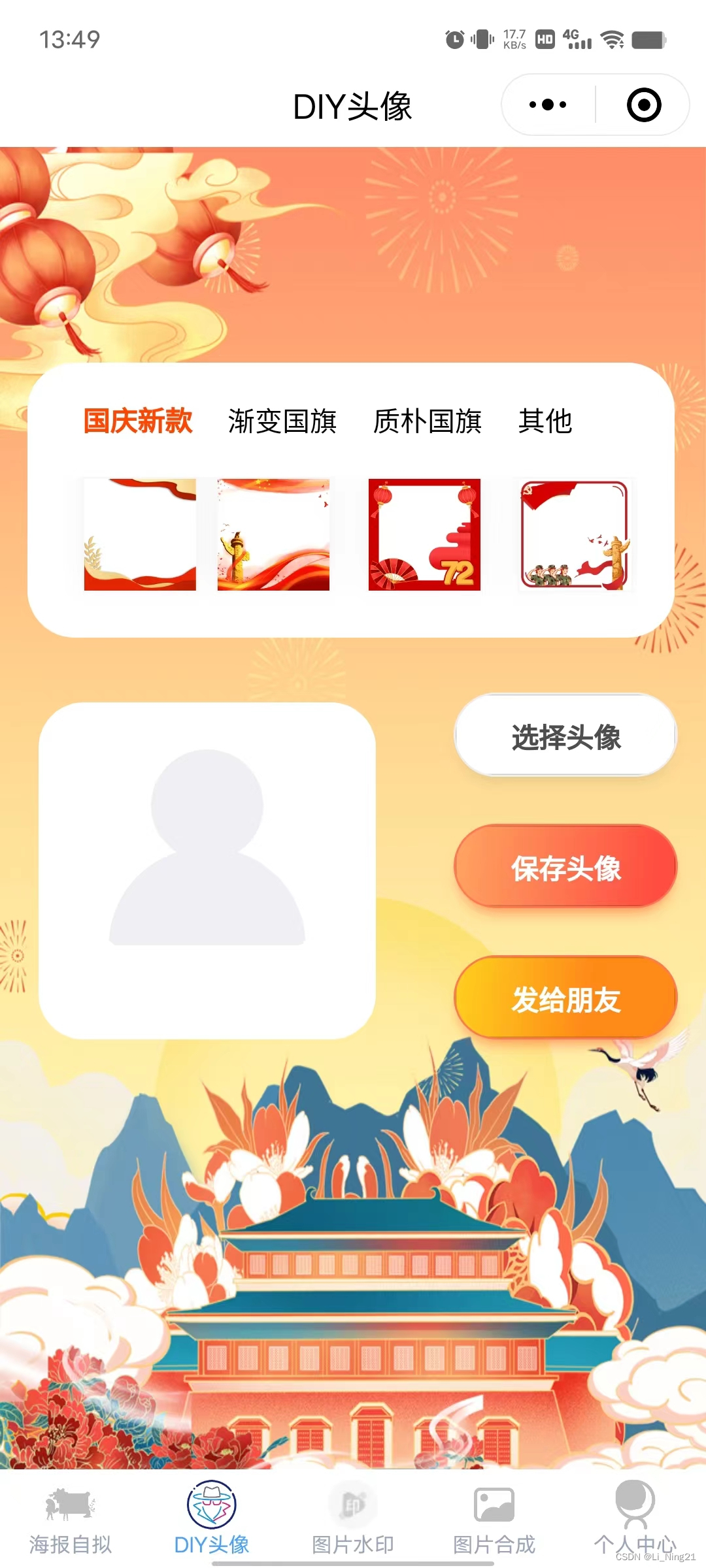
鸣谢:万能节日头像小程序
进入正题:
对于此类图片合成的功能要明确页面展示与实际的图片操作是两部分,小程序中大多以canvas合成为主。
- 设计界面,其中换肤图片为半透明图片,选中后可透出头像部分。
- 换肤图和头像图都选中后,通过canvas对图像进行绘制,并合成。
直接上代码:
<template>
	<view class="content">
		<image src="../../static/images/background.jpg" class="all-back"></image>
		<view class="top-content">
			<view class="top-title">
				<view class="title-unit" :class="{ 'title-select': item.selected }" v-for="(item, index) in categoriesList"
					:key="item._id" @click="itemClick(item, index)">
					{{ item.name }}
				</view>
			</view>
			<scroll-view scroll-x :show-scrollbar="false" class="scroll-view">
				<view class="image-div">
					<image
						:class="{ 'image-margin': index !== 0 }"
						@click="imageClick(item, index)"
						v-for="(item, index) in imageList"
						:src="item.image_url"
						:key="index"
					></image>
				</view>
			</scroll-view>
		</view>

		<view class="image-card">
			<view class="photo-main-view">
				<!--  -->
				<view class="avatar-div " id="avatar-container">
					<image class="img" id="avatar-img" :src="avatarImage"></image>

					<view class="empty-view " v-if="!avatarImage"><image class="empty"
					 src="../../static/images/avatar_empty.svg"></image></view>

					<image class="avatar-default " :src="currentFrame" v-if="currentFrame"></image>
				</view>

				<view class="ctlbtn">
					<button class="avatar-wrapper action-btn btn-margin" open-type="chooseAvatar"
					@chooseavatar="onChooseAvatar">
					  选择头像
					</button>
					<button class="action-btn btn-primary btn-margin" @click="shareFc()">保存头像</button>
					<button open-type="share" class="action-btn share-btn">发给朋友</button>
				</view>
			</view>
		</view>

		<view class="hideCanvasView">
			<canvas
				class="hideCanvas"
				id="default_PosterCanvasId"
				canvas-id="default_PosterCanvasId"
				:style="{ width: (poster.width || 10) + 'px', height: (poster.height || 10) + 'px' }"
			></canvas>
		</view>
	</view>
</template>
<style lang="scss">
.content {
	background-size: 100% 100%;
	padding-top: 200rpx;

	.all-back {
		position: fixed;
		top: 0;
		left: 0;
		right: 0;
		bottom: 0;
		min-height: 100vh;
		width: 100%;
	}
	.top-content {
		width: 610rpx;
		background-color: #ffffff;
		margin: 30rpx;
		border-radius: 50rpx;
		padding: 0 40rpx 30rpx;
		position: relative;
		.top-title {
			display: flex;
			align-items: center;
			.title-unit {
				padding: 40rpx 20rpx;
				font-size: 30rpx;
			}
			.title-select {
				font-size: 30rpx;
				font-weight: bold;
				color: #ff4500;
			}
		}
		.image-div {
			display: flex;
			align-items: center;
			padding-left: 20rpx;
			padding-bottom: 20rpx;
			background-color: #ffffff;
			image {
				width: 120rpx;
				height: 120rpx;
				border: 1rpx solid #f8f8f8;
				box-shadow: 0px -5px 15px 0px rgba(224, 224, 224, 0.4);
				flex-shrink: 0;
			}
			.image-margin {
				margin: 0 20rpx;
			}
		}
	}
	.image-card {
		display: flex;
		justify-content: center;
		align-items: center;
		position: relative;
		.image-center {
			width: 300rpx;
			height: 300rpx;
			border-radius: 50rpx;
			margin: 0 70rpx;
		}
		.iconfont {
			color: #f7f8fa;
			font-size: 80rpx;
			font-weight: bold;
		}
	}
	.btn-div {
		padding: 50rpx;
		display: flex;
		justify-content: space-between;
		.btn-left {
			background-color: #f7f8fa;
			box-shadow: 0px 4px 54px 0px rgba(108, 108, 108, 0.14);
			padding: 0 70rpx;
			height: 100rpx;
			line-height: 100rpx;
			border-radius: 80rpx;
			color: #646566;
			font-weight: bold;
		}
		.btn-right {
			background-image: linear-gradient(90deg, #ff8c00, #ff4500);
			padding: 0 100rpx;
			height: 100rpx;
			line-height: 100rpx;
			border-radius: 80rpx;
			color: #ffffff;
			font-weight: bold;
		}
	}
}

.title {
	font-size: 36rpx;
	color: #8f8f94;
}

.avatar-div {
	height: 380rpx;
	margin-right: 40rpx;
	position: relative;
	width: 380rpx;
}

.avatar-div,
.empty-view {
	-webkit-box-orient: vertical;
	-webkit-box-direction: normal;
	-webkit-box-pack: center;
	-webkit-box-align: center;
	align-items: center;
	display: flex;
	flex-direction: column;
	justify-content: center;
	z-index: 1;
}

.empty {
	height: 100px;
	margin-bottom: 24px;
	width: 100px;
}

.img {
	background-color: #fff;
	border-radius: 48rpx;
	height: 360rpx;
	position: absolute;
	width: 360rpx;
	z-index: 0;
}

.avatar-default {
	border-radius: 48rpx;
	height: 100%;
	left: 0;
	position: absolute;
	top: 0;
	width: 100%;
	z-index: 10;
}

.container {
	background-color: #fbebe1;
	min-height: 100vh;
	overflow: hidden;
}
.photo-main-view {
	display: flex;
	justify-content: space-between;
	width: 690rpx;
	margin: 30rpx 30rpx 0;
}
.icon-div {
	position: relative;
	height: 80rpx;
	.icon-zuo {
		position: absolute;
		left: 0;
	}
	.icon-you {
		position: absolute;
		right: 0;
	}
}
.action-btn {
	background: #fff;
	border: 1rpx solid #efefef;
	border-radius: 48rpx;
	box-shadow: 0 12rpx 16rpx -8rpx rgba(0, 0, 0, 0.1);
	color: #4d4d4d;
	font-weight: bolder;
	height: 90rpx;
	line-height: 90rpx;
	font-size: 30rpx;
	padding: 0 60rpx;
}
.share-btn {
	display: inline-block;
	background: linear-gradient(97.71deg, #ffd01e, #ff8917 60%);
	border: 1rpx solid #ff7852;
	border-radius: 48rpx;
	box-shadow: 0 12rpx 16rpx -8rpx rgba(255, 88, 35, 0.6);
	color: #fff;
	font-size: 30rpx;
	height: 90rpx;
	line-height: 90rpx;
}
.btn-margin {
	margin-bottom: 50rpx;
}
.btn-primary {
	background: linear-gradient(97.71deg, #ffa462, #ff4d42 88.36%);
	border: 1rpx solid #ff7852;
	border-radius: 48rpx;
	box-shadow: 0 12rpx 16rpx -8rpx rgba(255, 88, 35, 0.6);
	color: #fff;
}

.hideCanvasView {
	position: relative;
}

.hideCanvas {
	position: fixed;
	top: -99999rpx;
	left: -99999rpx;
	z-index: -99999;
}
</style>
<script>
import { imageCat, categoriesList, shareInfo } from './index.js';
const ctx = uni.createCanvasContext("default_PosterCanvasId", this); // 创建 canvas 的绘图上下文 CanvasContext 对象
let IMG_REAL_W = 190, // 图片实际的宽度
	IMG_REAL_H =  190, // 图片实际的高度
  INNER_PADDING = 10 // 内边距
export default {
	data() {
		return {
			poster: {
		        width: IMG_REAL_W,
		        height: IMG_REAL_H,
		    },
			posterImage: '',
			canvasId: 'default_PosterCanvasId',
			userInfo: '',
			avatarImage: '',
			currentFrame: '',
			currentIndex: 0,
      		canvasTemImg: '',
			imageList: imageCat['new'],
			categoriesList,
			imageInfo: {},
			shareInfo
		};
	},
  	onShareAppMessage: function() {
		return this.shareInfo;
	},
	onShareTimeline: function() {
		return this.shareInfo;
	},
  methods: {
		/**
		 * 获取头像信息
		 * @param {} e
		 */
    	async onChooseAvatar(e) {
		  	let avatarUrl = e.detail.avatarUrl
      	  	this.avatarImage = avatarUrl;
		},
    	imageClick(item, index) {
			this.currentIndex = index;
      		this.handleImageMask(item.parse_url);
			// this.currentFrame = item.image_url;
			this.imageInfo = {
				_id: item._id
			}
		},
    	itemClick(item, num) {
      		console.log('itemClick', item, num);
			this.currentIndex = 0;
			let info = this.categoriesList.findIndex(el => el.selected);
      		console.log('info', info);
			this.categoriesList[info].selected = false;
      		this.categoriesList[num].selected = true;
			this.getImagesList(item, num);
		},
    	/**
		 * @param {Object} id
		 * 获取头像
		 */
		getImagesList({ dir, _id }, num) {
      		this.imageList = imageCat[dir]
    	},
    /**
     * 获取图片信息
     */
    getImageInfo(src) {
      return new Promise((resolve, reject) => {
        uni.getImageInfo({
          src,
          success:(res) => {
            resolve(res)
          },
          fail: (err) => {
            reject(err)
          }
        });
      })
    },
    /**
     * 处理选中的背景图
     */
    handleImageMask(src) {
      this.handleStaticImg(src, (path) => {
        console.log(path);
				this.currentFrame = path;
			})
    },
    /**
     * 获取图片的信息,用于后续canvas绘制。
     */
    handleStaticImg(src, callback) {
			uni.getImageInfo({
				src, //服务器返回的图片地址
				success: res => {
					callback(res.path);
				},
				fail: () => {
					uni.showToast({
						title: '本地图片信息获取失败',
						icon: 'none'
					})
				}
			});
		},
    shareFc() {
			if(!this.currentFrame || !this.avatarImage) {
				uni.showToast({
					title: '未选择头像或背景图',
					icon: 'none'
				})
				return
			}
      console.log('shareFc')
      uni.showLoading({
				title: "图片生成中...",
			});
      // 清理画布
      ctx.clearRect(0, 0, IMG_REAL_W, IMG_REAL_H);
			// 先绘制头像区域
      const half = INNER_PADDING / 2
      ctx.drawImage(this.avatarImage, half, half, IMG_REAL_W - INNER_PADDING, IMG_REAL_H - INNER_PADDING);
			ctx.save();
			ctx.beginPath();
      // 绘制底色区域
      ctx.drawImage(this.currentFrame, 0, 0, IMG_REAL_W, IMG_REAL_H);
      // reserve 参数为 false,则在本次调用绘制之前 native 层会先清空画布再继续绘制
      ctx.draw(false, (e) => {
        uni.canvasToTempFilePath({
          canvasId: 'default_PosterCanvasId',
          success: res => {
            this.canvasTemImg = res.tempFilePath
            this.showShare(this.canvasTemImg)
            uni.hideLoading()
          },
          fail: res => {
            console.log('error', res)
            uni.hideLoading()
          }
        }, this);
      })
    },
    /**
     * 生成展示图片
     */
    showShare(path) {
			if (uni.canIUse('showShareImageMenu')) {
				uni.showShareImageMenu({
					path,
					success: (res) => {
						console.log(res)
						uni.showToast({
							title: '生成成功!',
							icon: 'success',
							duration: 2000//持续的时间
						})
					},
					fail: (err)=> {
						console.log(err)
						uni.showToast({
							title: '生成失败!',
							icon: 'success',
							duration: 2000//持续的时间
						})
					}
				})
				return
			}
			this.saveFile(path)
    },
		/**
		 * 普通存储图像
		 */
		 saveFile(filePath) {
			//获取相册授权
			uni.getSetting({
				success: (res) => {
					if (!res.authSetting['scope.writePhotosAlbum']) {
						uni.authorize({
							scope: 'scope.writePhotosAlbum',
							success: () => {
								//这里是用户同意授权后的回调
								this.saveImgToLocal(filePath);
							},
							fail: (e) => {
								uni.hideLoading();
								uni.showModal({
									content: '检测到您没打开下载图片功能权限,是否去设置打开?',
									confirmText: '确认',
									cancelText: '取消',
									success: function(res) {
										//点击“确认”时打开设置页面
										if (res.confirm) {
											uni.openSetting();
										}
									}
								});
							}
						});
					} else {
						//用户已经授权过了
						this.saveImgToLocal(filePath);
					}
				}
			});
		},
		saveImgToLocal(filePath) {
			uni.saveImageToPhotosAlbum({
				filePath,
				success: () => {
					uni.showToast({
						title: '保存成功',
						icon: 'success',
						duration: 2000//持续的时间
					})
					uni.hideLoading();
				},
				fail: () => {
					uni.hideLoading();
					uni.showToast({
						title: '保存失败',
						icon: 'none'
					});
				}
			});
		},
  }
}
</script>
export const categoriesList = [
  { name: '国庆新款', selected: true, _id: "u2cmc5dd", dir: 'new' },
  { name: '渐变国旗', selected: false, _id: "akpxbnde", dir: 'gradual' },
  { name: '质朴国旗', selected: false, _id: "ab2flncf", dir: 'simple' },
  { name: '其他', selected: false, _id: "o50mypkj", dir: 'other' }
]

const baseUrl = getApp().globalData.baseUrl
export const imageCat = {
 new: Array.from({length: 11}, (x, i) => {
   return {
     image_url: `${baseUrl}/new/` + (i+1) + '.png',
     parse_url: `${baseUrl}/new/` + (i+1) + '.png',
     _id: '47s0sm0lnew' + (i+1),
   }
 }),
 gradual: Array.from({length: 6}, (x, i) => {
   return {
     image_url: `${baseUrl}/gradual/` + (i+1) + '.png',
     parse_url: `${baseUrl}/gradual/` + (i+1) + '.png',
     _id: '47s0sm0lgradual' + (i+1),
   }
 }),
 simple: Array.from({length: 7}, (x, i) => {
   return {
     image_url: `${baseUrl}/simple/` + (i+2) + '.png',
     parse_url: `${baseUrl}/simple/` + (i+2) + '.png',
     _id: '47s0sm0lsimple' + (i+2),
   }
  }),
  other: Array.from({length: 2}, (x, i) => {
    return {
      image_url: `${baseUrl}/other/` + (i+1) + '.png',
      parse_url: `${baseUrl}/other/` + (i+1) + '.png',
      _id: '47s0sm0lother' + (i+1),
    }
  })
}

export const shareInfo = {
  title: '我刚刚换上了国庆头像,你也来领取一个吧',
  desc: '领取你的国庆头像,为祖国加油',
  imageUrl: `${baseUrl}/share.jpg`,
  path: '/pages/photo/index',
  success: function(e) {
    console.log(e);
  }
}
图片存储可参考
图床搭建
自己建立图床,可替换上文中的baseUrl
更多详细代码请关注公众号索取(备注:公众号):





 扫一扫
扫一扫


 到【灌水乐园】发言




