



 本文解决了一个关于NullPointerException的异常错误,详细介绍了如何在IDEA中正确配置assets文件夹并解析XML文件,通过调整代码引用方式,成功避免了空指针异常。
异常错误:
Caused by: java.lang.NullPointerException: Attempt to invoke interface method 'java.lang.Object java.util.List.get(int)' on a null object reference
解决方案:
①在项目的main文件夹下创建assets,把需要解析的xml文件放进去
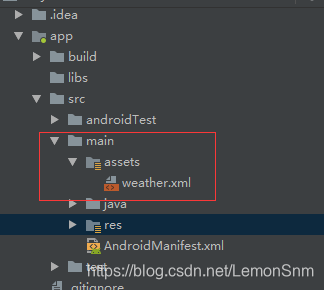
二、改
/*    List<WeatherInfo> infos = WeatherService.getWeatherInfos(MainActivity.class.getClassLoader().getResourceAsStream("com/szxy/lemonsnm/weather/weather.xml"));*/
为:

List<WeatherInfo> infos = WeatherService.getWeatherInfos(this.getAssets().open("weathers.xml"));
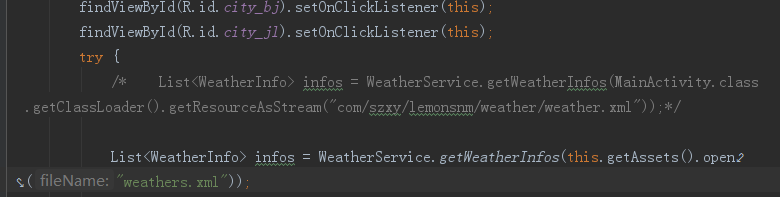
成功。。。
总结:
IDEA和eclispe+ADT工作方式不同,解析需要创建assets文件夹
使用List<WeatherInfo> infos = WeatherService.getWeatherInfos(this.getAssets().open("weathers.xml"));
该方法this.getAssets().open("weathers.xml")






 扫一扫
扫一扫


 1万+
1万+

 被折叠的 条评论
为什么被折叠?
被折叠的 条评论
为什么被折叠?
 到【灌水乐园】发言





