



 本文解决了Node.js及npm版本过旧导致Taiko安装失败的问题,提供了卸载旧版Node.js的方法,并介绍了如何配置Taiko环境变量。
坑一:node.js 和npm版本太旧,导致linux上装了不了taiko
通过源的方式下载node.js 和npm,再安装taiko,npm install -g taiko
导致报如下的错误:网上百度了好多,基本上全是复制粘贴的文章,太悲伤了。
npm ERR! Linux 4.15.0-136-generic
npm ERR! argv "/usr/bin/node" "/usr/bin/npm" "install" "truffle" "-g"
npm ERR! node v8.10.0
npm ERR! npm  v3.5.2
npm ERR! code EMISSINGARG

npm ERR! typeerror Error: Missing required argument #1
npm ERR! typeerror     at andLogAndFinish (/usr/share/npm/lib/fetch-package-metadata.js:31:3)
npm ERR! typeerror     at fetchPackageMetadata (/usr/share/npm/lib/fetch-package-metadata.js:51:22)
npm ERR! typeerror     at resolveWithNewModule (/usr/share/npm/lib/install/deps.js:456:12)
npm ERR! typeerror     at /usr/share/npm/lib/install/deps.js:457:7
npm ERR! typeerror     at /usr/share/npm/node_modules/iferr/index.js:13:50
npm ERR! typeerror     at /usr/share/npm/lib/fetch-package-metadata.js:37:12
npm ERR! typeerror     at addRequestedAndFinish (/usr/share/npm/lib/fetch-package-metadata.js:82:5)
npm ERR! typeerror     at returnAndAddMetadata (/usr/share/npm/lib/fetch-package-metadata.js:117:7)
npm ERR! typeerror     at pickVersionFromRegistryDocument (/usr/share/npm/lib/fetch-package-metadata.js:134:20)
npm ERR! typeerror     at /usr/share/npm/node_modules/iferr/index.js:13:50
npm ERR! typeerror This is an error with npm itself. Please report this error at:
npm ERR! typeerror     <http://github.com/npm/npm/issues>

npm ERR! Please include the following file with any support request:
npm ERR!     /root/go/src/github.com/ethereum/go-ethereum/build/bin/npm-debug.log
坑二:卸载不了node.js
版本太旧,按照网上大都数copy的文章,没有一个能卸载成功的,总是有残留的文件。
解决思路:
- 先卸载,再装node.js 14的版本
- 直接升级到node.js 最新版本
坑三:taiko安装后,找不到taiko命令

先找出taiko的路径:

再将taiko的环境变量配置好
terminal中输入:
export PATH=/usr/local/sbin:/usr/local/bin:/sbin:/bin:/usr/sbin:/usr/bin:/root/bin:/home/long/npm-global/bin

source /etc/profile // 更新配置(不用重启系统) ----若未运行,重启后需要每次配置一次
node和npm最全卸载方式:
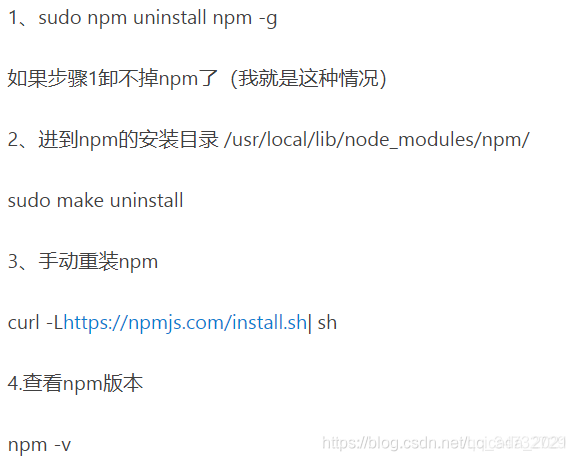
第一步卸载不掉,第二步没有目录。
解决方案:(如下三步解救了我啊,啊,啊 !!!!!!!)
sudo apt remove nodejs
sudo apt remove npm
sudo apt remove node
三步搞定。
然后输入 : node -v 和 npm -v 就没有这两个安装包了。
ubantu上安装node
如下是安装node.js V12的版本,版本可更改的
curl -sL https://deb.nodesource.com/setup_12.x | sudo -E bash -
sudo apt-get install -y nodejs





 扫一扫
扫一扫


 被折叠的 条评论
为什么被折叠?
被折叠的 条评论
为什么被折叠?
 到【灌水乐园】发言





