



ddt数据驱动
在Web UI自动化测试实例(登入网易云音乐账户)——(二)Python+unittest+selenium,实现了测试用例、页面代码分析。
在实际测试中,每个测试用例,需要用多种不同的测试数据进行,是实现测试用例、数据、页面代码分离,提高复用性。此时引入ddt数据驱动
ddt的基本用法:
在测试用例类前面定义@ddt,用于表示要使用ddt了,再基于实际的应用,选择对应的装饰器来使用。
其中:
@data :用于设定参数
@unpack:用于解析参数,unpack不能单独使用,一般跟着data一起使用
@file_data:用于读取文件(json、yaml)中的参数
ddt的数据解析方式:解析一个,传参一个
网易云音乐账户登入实例
测试场景:测试网易云账户登入
测试case:
①输入无效的手机号码+任意密码 ,期望:登入失败,提示请输入正确的手机号
②输入有效的手机号码,且号码已被注册过+错误的密码,期望:登入失败,提示手机号或密码错误 (注意:如果是连续5次登入,则会提示数据次数限制之类的提示语)
测试策略:
策略1->用ddt数据驱动中unpack+data实现
策略2->用ddt数据驱动,测试数据放到json文件中,通过file_data实现读取
1. unpack+data
当测试用例中定义了多个需要传值的变量,需要传入多个参数,仅仅使用data,data会将其传入的参数全部当成第一个实参,一一传递到测试用例中,导致测试用例其他形参未传递值,而报错。
data负责获取数据,unpack负责将数据拆分匹配到用例中
测试用例代码,test_login.py
#coding:utf-8
import unittest
from wangyi_music_web import Login_163_Music
from ddt import ddt,data,unpack,file_data

@ddt
class TestLogin(unittest.TestCase):

    @data(('https://music.163.com/','165564999840654','huudff',u'请输入正确的手机号'),('https://music.163.com/','15970456721','mimacuowula',u'该手机号尚未注册'))
    @unpack
    def test_login_wangyiyun(self,url,phone_number,password,expext_result):
            print ('input phone number:{}'.format(phone_number))
            print ('input password:{}'.format(password))
            print ('expect result:{}'.format(expext_result.encode('utf-8')))
            login = Login_163_Music(url)
            login.click_login()
            login.select_other_login_mode()
            login.check_privacy_policy_checkout()
            login.phone_number_login()
            login.input_phone_number_account(phone_number)
            login.input_password(password)
            login.click_login_button()
            actual_login_result = login.get_actual_login_status()
            #self.assertTrue(expext_result == actual_login_result, 'Test Failed') #断言
            if expext_result.encode('utf-8') == actual_login_result:
                print ('Test Pass')
            else:
                print ('Test Failed,actual_login_result:{}'.format(actual_login_result))
            login.close_window()

if __name__ =='__main__':
    unittest.main()
页面代码,wangyi_music.py
#coding: utf-8
from selenium import  webdriver
from selenium.webdriver.common.by import By
import time

class Login_163_Music():

	_login_locator = (By.CSS_SELECTOR, 'a.link.s-fc3')
	_other_login_mode_locator =(By.CSS_SELECTOR ,'a.u-btn2.other')
	_phone_number_login_locator = (By.CSS_SELECTOR ,'a.u-btn2.u-btn2-2')
	_privacy_policy_checkout_loactor = (By.CSS_SELECTOR ,'input#j-official-terms')
	_input_phone_number_locator = (By.CSS_SELECTOR , 'input.j-phone.txt.u-txt')
	_input_password_locator = (By.CSS_SELECTOR , 'input#pw.j-pwd.u-txt')
	_login_button_locator = (By.CSS_SELECTOR, 'a.j-primary.u-btn2.u-btn2-2')
	_locate_mark_locator = (By.CSS_SELECTOR, 'i.u-icn.u-icn-25')
	_get_login_failed_reason_locator = (By.CSS_SELECTOR,'div.j-err.u-err span')


	def __init__(self,url):
		self.driver = webdriver.Chrome()
		self.driver.implicitly_wait(4)
		self.driver.maximize_window()
		self.driver.get(url)

	def click_login(self):
		self.driver.find_element(*self._login_locator).click()

	def select_other_login_mode(self):
		self.driver.find_element(*self._other_login_mode_locator).click()

	def check_privacy_policy_checkout(self):
		if not self.driver.find_element(*self._privacy_policy_checkout_loactor).is_selected():
			self.driver.find_element(*self._privacy_policy_checkout_loactor).click()

	def phone_number_login(self):
		self.driver.find_element(*self._phone_number_login_locator).click()

	def input_phone_number_account(self,phone_number):
		self.driver.find_element(*self._input_phone_number_locator).send_keys(phone_number)

	def input_password(self,password):
		self.driver.find_element(*self._input_password_locator).send_keys(password)

	def click_login_button(self):
		self.driver.find_element(*self._login_button_locator).click()

	def close_window(self):
		self.driver.quit()

	def get_login_failed_reason(self):#查看页面上登入失败的原因
		#self.driver.implicitly_wait(5)
		time.sleep(3)
		return self.driver.find_element(*self._get_login_failed_reason_locator).text.encode('utf-8')

	def get_actual_login_status(self): #主要是看账户登入真实情况
		if self.driver.find_element(*self._locate_mark_locator).is_displayed: #如果页面上显示出!
			return self.get_login_failed_reason() #打印登入失败的原因
		else:
			return '登入成功' #否则登入成功
测试结果:
input phone number:165564999840654
input password:huudff
expect result:请输入正确的手机号
Test Pass
.input phone number:15970456721
input password:mimacuowula
expect result:该手机号尚未注册
Test Pass
.
----------------------------------------------------------------------
Ran 2 tests in 34.147s

OK
2. json文件+ file_data
当测试数据很多10多组的时候,可以采用将数据放到yaml、json文件中,通过ddt中file_data装饰器去读取数据,本次实例,仅传了2组数据。
测试用例代码,test_login.py
#coding:utf-8
import unittest
from wangyi_music_web import Login_163_Music
from ddt import ddt,data,unpack,file_data

@ddt
class TestLogin(unittest.TestCase):

    @file_data('./data.json')
    def test_login_wangyiyun(self,url,phone_number,password,expext_result):
            print ('input phone number:{}'.format(phone_number))
            print ('input password:{}'.format(password))
            print ('expect result:{}'.format(expext_result.encode('utf-8')))
            login = Login_163_Music(url)
            login.click_login()
            login.select_other_login_mode()
            login.check_privacy_policy_checkout()
            login.phone_number_login()
            login.input_phone_number_account(phone_number)
            login.input_password(password)
            login.click_login_button()
            actual_login_result = login.get_actual_login_status()
            #self.assertTrue(expext_result == actual_login_result, 'Test Failed') #断言
            if expext_result == actual_login_result:
                print ('Test Pass')
            else:
                print ('Test Failed,actual_login_result:{}'.format(actual_login_result.encode('utf-8')))
            login.close_window()

if __name__ =='__main__':
    unittest.main()
页面代码,wangyi_music_web.py
#coding: utf-8
from selenium import  webdriver
from selenium.webdriver.common.by import By
import time

class Login_163_Music():
	_login_locator = (By.CSS_SELECTOR, 'a.link.s-fc3')
	_other_login_mode_locator =(By.CSS_SELECTOR ,'a.u-btn2.other')
	_phone_number_login_locator = (By.CSS_SELECTOR ,'a.u-btn2.u-btn2-2')
	_privacy_policy_checkout_loactor = (By.CSS_SELECTOR ,'input#j-official-terms')
	_input_phone_number_locator = (By.CSS_SELECTOR , 'input.j-phone.txt.u-txt')
	_input_password_locator = (By.CSS_SELECTOR , 'input#pw.j-pwd.u-txt')
	_login_button_locator = (By.CSS_SELECTOR, 'a.j-primary.u-btn2.u-btn2-2')
	_locate_mark_locator = (By.CSS_SELECTOR, 'i.u-icn.u-icn-25')
	_get_login_failed_reason_locator = (By.CSS_SELECTOR,'div.j-err.u-err span')


	def __init__(self,url):
		self.driver = webdriver.Chrome()
		self.driver.implicitly_wait(4)
		self.driver.maximize_window()
		self.driver.get(url)

	def click_login(self):
		self.driver.find_element(*self._login_locator).click()

	def select_other_login_mode(self):
		self.driver.find_element(*self._other_login_mode_locator).click()

	def check_privacy_policy_checkout(self):
		if not self.driver.find_element(*self._privacy_policy_checkout_loactor).is_selected():
			self.driver.find_element(*self._privacy_policy_checkout_loactor).click()

	def phone_number_login(self):
		self.driver.find_element(*self._phone_number_login_locator).click()

	def input_phone_number_account(self,phone_number):
		self.driver.find_element(*self._input_phone_number_locator).send_keys(phone_number)

	def input_password(self,password):
		self.driver.find_element(*self._input_password_locator).send_keys(password)

	def click_login_button(self):
		self.driver.find_element(*self._login_button_locator).click()

	def close_window(self):
		self.driver.quit()

	def get_login_failed_reason(self):#查看页面上登入失败的原因
		#self.driver.implicitly_wait(5)
		time.sleep(3)
		return self.driver.find_element(*self._get_login_failed_reason_locator).text

	def get_actual_login_status(self): #主要是看账户登入真实情况
		if self.driver.find_element(*self._locate_mark_locator).is_displayed: #如果页面上显示出!
			return self.get_login_failed_reason() #打印登入失败的原因
		else:
			return '登入成功' #否则登入成功
文件数据,data.json
{
	"test1":{"url":"https://music.163.com/","phone_number":"14654948946456","password":"458496","expext_result":"请输入正确的手机号"},
	"test2":{"url":"https://music.163.com/","phone_number":"18070496814","password":"hahaha","expext_result":"手机号或密码错误"}
}
测试结果:
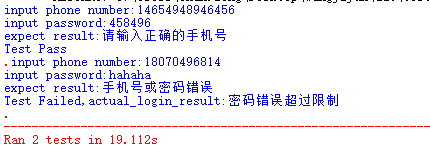
第二个测试用例失败的原因:我自己对这个手机号码尝试登入了好多次,超过5次后,会有错误超过限制。正常执行,会是pass的。
代码问题以及优化
- 部分元素定位时,未加上等待时间,比如:登入失败的原因提示这个元素,需要加入等待,不然可能定位不到,所以加入time.sleep(), 后续会更改成为显示等待
- 代码耦合度,页面代码这一块,比较乱,全部写在一个类中。后续会根据不同的页面,采用 page object ,对于每一个页面的元素及其操作进行一一封装
- 测试结果输出,对于测试结果没有无更加直观的输出,后续会将每一条测试用例的结果,输出到excel文件里(思考,可能会采用)






 扫一扫
扫一扫


 2423
2423

 被折叠的 条评论
为什么被折叠?
被折叠的 条评论
为什么被折叠?
 到【灌水乐园】发言





