



目录
1.张量是什么
- 如何初始化张量
- 用原生python列表数据初始化
- 用numpy数组形式初始化
- 用其他张量初始化
- 随机初始化张量中的值
- 获得张量的属性
- 对张量的操作
- 索引和切片
- 拼接
- 算数操作
- 主元素
- 单元素tensor的python item化
- 就地操作(直接改变原数据)
- 与numpy数据的关联性
- 修改的互通性
1. Tensor(张量)
Tensor,中文名叫张量。理论上任何维度的数据都属于张量。只不过我们对于一些常见的张量有习惯的叫法,比如:
- 零维的数据叫
Scalar,也就是标量 - 一维的数据叫
Vector,也就是向量,其中还分为行向量和列向量 - 二维的数据叫
Matrix,也就是矩阵 - 在上面几个常用语存在的情况下,在日常DL/ML语境中,张量一般指3维及以上的数据。
![[Pasted image 20250729214158.png]]
张量是pytorch特有的一种数据类型,和numpy的ndarry类似,但不同之处在于tensor可以在GPU上加速运行。
2. 初始化一个张量
2.1 直接从python列表数据初始化一个张量
python的list列表嵌套可以在逻辑上存储n维度的数据。要想把它转换为tensor类型,直接执行如下代码即可。
data = [[1, 2], [3, 4]]
x_data = torch.tensor(data)
2.2 用numpy array创建tensor
np_array = np.array(data)
x_np = torch.from_numpy(np_array)
主要注意的是,这里对np_array或者x_np的任何修改都会映射到另外一个,因为它们是共享内存的。这个之后会详细说这是什么情况。
2.3 用其他tensor初始化tensor
x_ones = torch.ones_like(x_data) # retains the properties of x_data
print(f"Ones Tensor: \n {x_ones} \n")

x_rand = torch.rand_like(x_data, dtype=torch.float) # overrides the datatype of x_data
print(f"Random Tensor: \n {x_rand} \n")
ones_like会创建元素全1的,其他属性例如尺寸,数据类型都和原来的tensor一样的tensorrand_like则是每个随机初始化每个元素,其他的属性都和原来的tensor一样。
![![[Pasted image 20250729223857.png]]](https://i-blog.csdnimg.cn/direct/a16ff78e4d1542749b9f12e5f6a30ff6.png)
2.4 指定尺寸后随机初始化tensor元素
- torch.rand(shape)
- torch.ones(shape)
- torch.zeros(shape)
shape = (2,3,)
rand_tensor = torch.rand(shape)
ones_tensor = torch.ones(shape)
zeros_tensor = torch.zeros(shape)

print(f"Random Tensor: \n {rand_tensor} \n")
print(f"Ones Tensor: \n {ones_tensor} \n")
print(f"Zeros Tensor: \n {zeros_tensor}")
3. 获得Tensor的属性
可以获得tensor的属性有
- shape:tensor的形状
- dtype:tensor元素的数据类型
- device:现在这个tensor在cpu侧还是在gpu侧
tensor = torch.rand(3,4)

print(f"Shape of tensor: {tensor.shape}")
print(f"Datatype of tensor: {tensor.dtype}")
print(f"Device tensor is stored on: {tensor.device}")
4. 对Tensor的操作
对于tensor,pytorch提供了1200种操作,包括常规算术,线性代数,矩阵乘法等等,你可以从这个链接找到所有操作的文档:here.
4.1 把tensor搬到GPU上
所有的这些操作都可以在CPU或者有CUDA的GPU上运行。默认情况下,tensors会在CPU上被创建。要想让GPU加速计算过程,就得使用.to方法来把tensor从CPU搬到GPU上。
if torch.accelerator.is_available():
	tensor = tensor.to(torch.accelerator.current_accelerator())
在做这个操作的的时候,一定要记住:越大的tensor,搬到GPU上的时间开销和空间开销都会越大!
4.2 索引和切片操作
tensor = torch.ones(4, 4)
print(f"First row: {tensor[0]}")
print(f"First column: {tensor[:, 0]}")
print(f"Last column: {tensor[..., -1]}") # 这个和tensor[:, -1]是一样的
tensor[:,1] = 0
print(tensor)
![![[Pasted image 20250729225355.png]]](https://i-blog.csdnimg.cn/direct/86edd3dd22f043ef9bda915448950804.png)
4.3 拼接操作
torch.cat
这是一个比较重要的操作,你可以使用torch.cat来把一系列tensors在指定的,已存在的维度上进行拼接
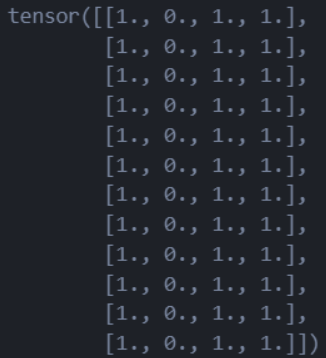
t1 = torch.cat([tensor, tensor, tensor], dim=1)
这一句就是在列方向上把tensor拼接3次,结果如下:

t2 =  torch.cat([tensor, tensor, tensor], dim=0) # 在行方向上进行拼接
print(t2)
这个就是在行方向上拼接3次:
torch.stack
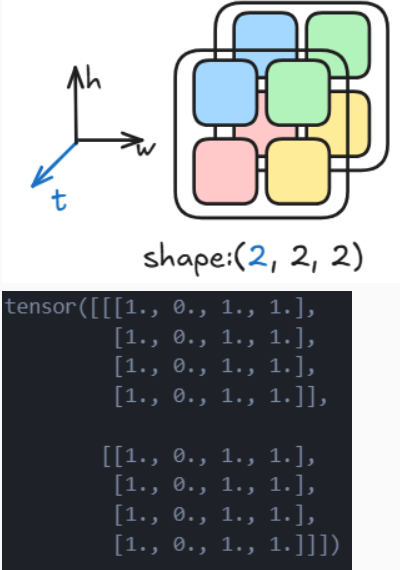
这个操作是一种升维操作,最常见的就是二维图片的堆叠成为一个视频块。
t3 = torch.stack([tensor, tensor], dim=0) # 在0维插入一个维度
print(t3)
4.4 算术操作
矩阵类操作
y1 = temsor @ tensor.T
y2 = tensor.matmul(tensor.T)
y3 = torch.rand_like(y1)
torch.matmul(tensor, tensor.T, out=y3)
element-wise类操作
# This computes the element-wise product. z1, z2, z3 will have the same value
z1 = tensor * tensor
z2 = tensor.mul(tensor)

z3 = torch.rand_like(tensor)
torch.mul(tensor, tensor, out=z3)
4.5 单元素tensor的item化
当tensor只有一个元素的时候,可以使用.item()方法把它转换回pytorch的数据类型。
agg = tensor.sum()
agg_item = agg.item()
print(agg_item, type(agg_item))

4.6 就地操作
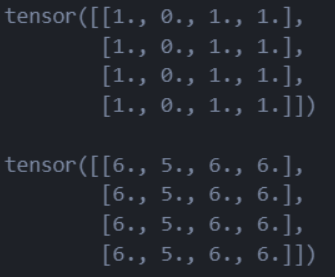
可以理解为直接对向量本身进行值的修改,而不返回副本。所有这种方法都有一个_作为后缀
print(f"{tensor} \n")
tensor.add_(5)
print(tensor)
5. Ndarray和Tensor的互通性
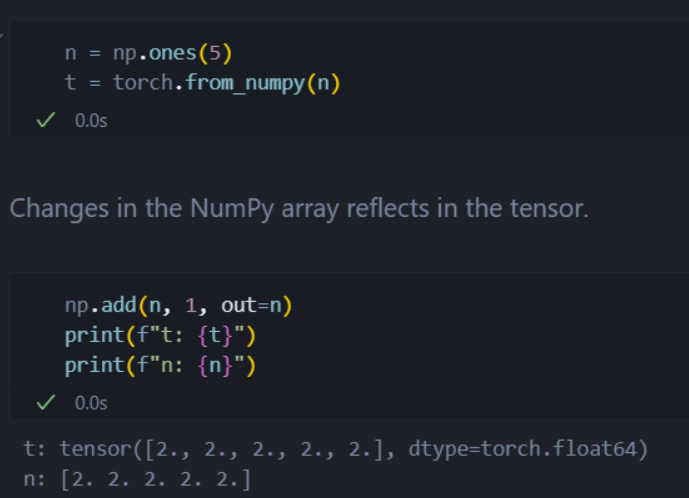
当tensors在GPU上的时候,如果使用t.numpy()方法返回一个ndarray副本,那么此时tensor和ndarray是 共享内存 的,对其中任意一个的修改都会影响另外一个。
![![[Pasted image 20250730091629.png]]](https://i-blog.csdnimg.cn/direct/fa5ad8bc4fc74c74af84abacdd5e5e7b.png)
同理,对ndarray使用torch.from_numpy()也是一样的。






 扫一扫
扫一扫


 4359
4359

 被折叠的 条评论
为什么被折叠?
被折叠的 条评论
为什么被折叠?
 到【灌水乐园】发言





