from flask import Flask, render_template, request, redirect, url_for, flash
import pymysql
from datetime import datetime
app = Flask(__name__)
# 配置数据库连接
app.config['MYSQL_HOST'] = 'localhost'
app.config['MYSQL_USER'] = 'root'
app.config['MYSQL_PASSWORD'] = '1'
app.config['MYSQL_DB'] = 'message_board'
app.config['MYSQL_CURSORCLASS'] = 'DictCursor'
# 配置会话密钥
app.secret_key = 'your_secret_key'
# 首页 - 分页显示留言
@app.route('/')
@app.route('/page/<int:page>')
def index(page=1):
# 每页显示的留言数量
per_page = 5
# 计算偏移量
offset = (page - 1) * per_page
# 连接数据库
conn = pymysql.connect(
host=app.config['MYSQL_HOST'],
user=app.config['MYSQL_USER'],
password=app.config['MYSQL_PASSWORD'],
database=app.config['MYSQL_DB'],
cursorclass=pymysql.cursors.DictCursor
)
try:
# 创建游标
cur = conn.cursor()
# 获取总留言数
cur.execute("SELECT COUNT(*) as total FROM messages")
total_data = cur.fetchone()
total_messages = total_data['total']
# 计算总页数
total_pages = (total_messages + per_page - 1) // per_page
# 获取当前页的留言
cur.execute("SELECT * FROM messages ORDER BY created_at DESC LIMIT %s OFFSET %s", (per_page, offset))
messages = cur.fetchall()
return render_template('index.html', messages=messages, page=page, total_pages=total_pages)
finally:
# 关闭游标和连接
cur.close()
conn.close()
# 添加留言
@app.route('/add', methods=['POST'])
def add_message():
if request.method == 'POST':
name = request.form['name']
content = request.form['content']
created_at = datetime.now()
# 连接数据库
conn = pymysql.connect(
host=app.config['MYSQL_HOST'],
user=app.config['MYSQL_USER'],
password=app.config['MYSQL_PASSWORD'],
database=app.config['MYSQL_DB'],
cursorclass=pymysql.cursors.DictCursor
)
try:
# 创建游标
cur = conn.cursor()
cur.execute("INSERT INTO messages (name, content, created_at) VALUES (%s, %s, %s)",
(name, content, created_at))
conn.commit()
flash('留言添加成功!')
return redirect(url_for('index'))
finally:
# 关闭游标和连接
cur.close()
conn.close()
# 修改留言 - 显示修改表单
@app.route('/edit/<int:id>')
def edit_message(id):
# 连接数据库
conn = pymysql.connect(
host=app.config['MYSQL_HOST'],
user=app.config['MYSQL_USER'],
password=app.config['MYSQL_PASSWORD'],
database=app.config['MYSQL_DB'],
cursorclass=pymysql.cursors.DictCursor
)
try:
# 创建游标
cur = conn.cursor()
cur.execute("SELECT * FROM messages WHERE id = %s", (id,))
message = cur.fetchone()
return render_template('edit.html', message=message)
finally:
# 关闭游标和连接
cur.close()
conn.close()
# 修改留言 - 处理表单提交
@app.route('/update/<int:id>', methods=['POST'])
def update_message(id):
if request.method == 'POST':
name = request.form['name']
content = request.form['content']
updated_at = datetime.now()
# 连接数据库
conn = pymysql.connect(
host=app.config['MYSQL_HOST'],
user=app.config['MYSQL_USER'],
password=app.config['MYSQL_PASSWORD'],
database=app.config['MYSQL_DB'],
cursorclass=pymysql.cursors.DictCursor
)
try:
# 创建游标
cur = conn.cursor()
cur.execute("UPDATE messages SET name = %s, content = %s, updated_at = %s WHERE id = %s",
(name, content, updated_at, id))
conn.commit()
flash('留言修改成功!')
return redirect(url_for('index'))
finally:
# 关闭游标和连接
cur.close()
conn.close()
# 删除留言
@app.route('/delete/<int:id>')
def delete_message(id):
# 连接数据库
conn = pymysql.connect(
host=app.config['MYSQL_HOST'],
user=app.config['MYSQL_USER'],
password=app.config['MYSQL_PASSWORD'],
database=app.config['MYSQL_DB'],
cursorclass=pymysql.cursors.DictCursor
)
try:
# 创建游标
cur = conn.cursor()
cur.execute("DELETE FROM messages WHERE id = %s", (id,))
conn.commit()
flash('留言删除成功!')
return redirect(url_for('index'))
finally:
# 关闭游标和连接
cur.close()
conn.close()
if __name__ == '__main__':
app.run(debug=True, use_reloader=False)
这个代码运行报错,帮我修改它



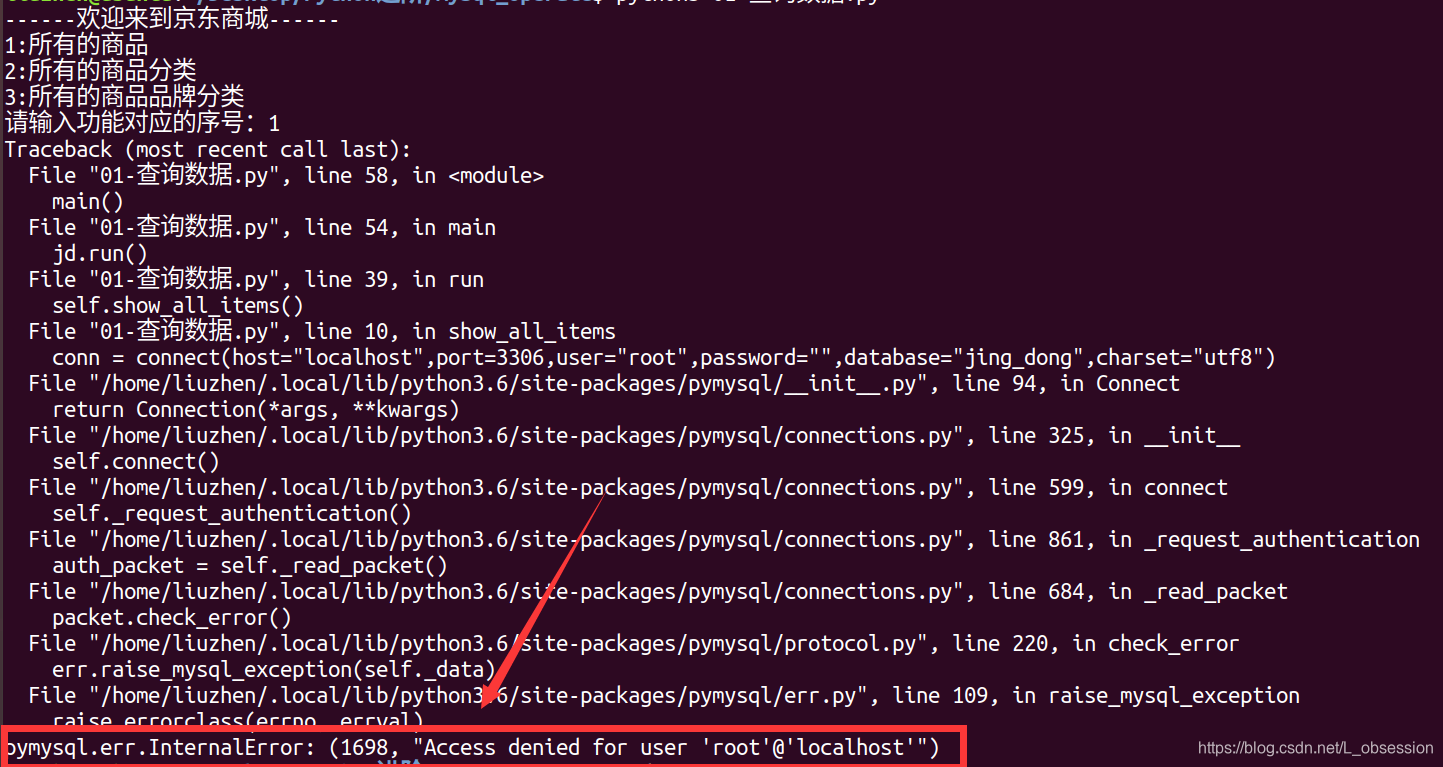
 本文介绍了一种常见的Python连接MySQL错误:pymysql.err.InternalError:(1698,Access denied for user 'root'@'localhost')。详细解释了在Ubuntu环境下安装MySQL时未设置密码导致的问题,并提供了设置MySQL密码的解决方案。





 扫一扫
扫一扫


 3494
3494

 被折叠的 条评论
为什么被折叠?
被折叠的 条评论
为什么被折叠?
 到【灌水乐园】发言





