


 本文详细介绍JavaScript的基础知识,包括语言概念、基本语法、变量与数据类型、运算符、流程控制、数组操作及函数定义等,适合初学者快速掌握JavaScript核心内容。
JavaScript基础
-
概念:是一门客户端脚本语言
- 运行在客户端浏览器中的。每一个浏览器都有JavaScript的解析引擎
- 脚本语言:不需要编译,直接就可以被浏览器解析执行了
-
功能:
- 可以来增强用户和html页面的交互过程,可以来控制html元素,让页面有一些动态的效果,增强用户的体验。
- 内部方式
在标签下通过
- 使用步骤
- 创建一个 HTML。
- 在标签下面编写一个
1.注释
// 单行注释
/*
多行注释
*/
2.输入输出语句
- prompt(“输入提示内容”)
- alert(), 弹出窗口显示内容
- 控制台打印:
console.log(“具体内容”)
查看:- F12打开调试界面
- 选择Console窗口
- document.write(“内容”)
<!DOCTYPE html>
<html lang="en">
<head>
    <meta charset="UTF-8">
    <meta name="viewport" content="width=device-width, initial-scale=1.0">
    <title>输入输出语句</title>
</head>
<body>

</body>
<script>
    //1.输入框
    //prompt("请输入数据");

    //2.弹出警告框
    //alert("hello");

    //3.控制台输出
    //console.log("hello js");

    //4.页面内容输出
    document.write("hello js");
    document.write("<br>");
    document.write("hello js");
</script>
</html>
3.变量和常量
1.js里面定义变量不区分数据类型, 直接赋值对应需要的类型即可
2.变量的类型
- 局部变量
let name = 值 - 全局变量
- 直接写变量名 = 值
name = 值 - 也可在变量名之前可以加上 var
var name = 值
- 常量(赋值之后不能修改 和java中final类似)
const name = 值
3.变量类型
- String
- Number
- boolean
- undefined
- function
<script>
    //1.定义局部变量
    let name = "张三";
    let age = 23;
    document.write(name + "," + age +"<br>");

    //2.定义全局变量
    {
        let l1 = "aa";
        l2 = "bb";
    }
    //document.write(l1);
    document.write(l2 + "<br>");

    //3.定义常量
    const PI = 3.1415926;
    //PI = 3.15;
    document.write(PI);
</script>
4.typeof 获取变量类型的方法
<script>
    let l1 = true;
    document.write(typeof(l1) + "<br>");    // boolean

    let l2 = null;
    document.write(typeof(l2) + "<br>");    //    object  js原始的一个错误

    let l3;
    document.write(typeof(l3) + "<br>");    // undefined

    let l4 = 10;
    document.write(typeof(l4) + "<br>");    // number

    let l5 = "hello";
    document.write(typeof(l5) + "<br>");    // string

    let l6 = 100n;
    document.write(typeof(l6) + "<br>");    // bigint
</script>
4.运算符
字符串类型数字进行运算,会自动类型转换
算数运算符:
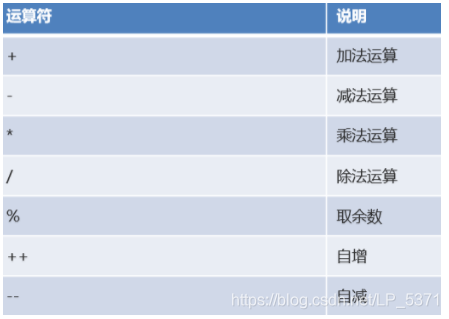
(+):两个不动类型之间还起连接作用
赋值运算符:
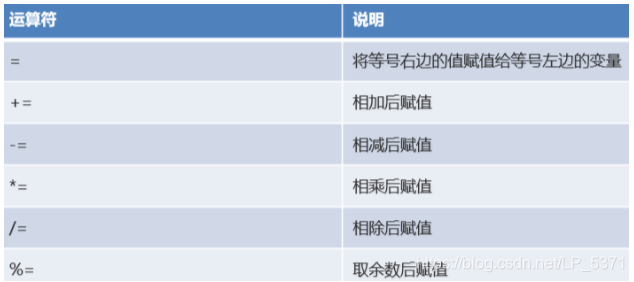
比较运算符:
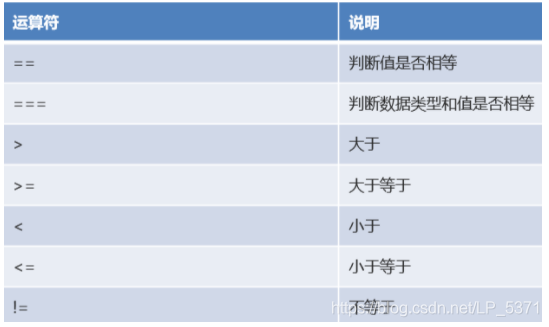
逻辑运算符:
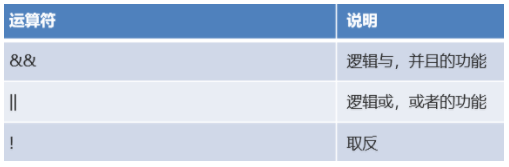
三元运算符:
- 三元运算符格式:
- (比较表达式) ? 表达式1 : 表达式2;
- 执行流程:
- 如果比较表达式为true,则取表达式1
- 如果比较表达式为false,则取表达式2
5.流程控制和循环语句
if 语句
switch 语句
for 循环
while 循环
和java语言同样用法
<script>
    //if语句
    let month = 3;
    if(month >= 3 && month <= 5) {
        document.write("春季");
    }else if(month >= 6 && month <= 8) {
        document.write("夏季");
    }else if(month >= 9 && month <= 11) {
        document.write("秋季");
    }else if(month == 12 || month == 1 || month == 2) {
        document.write("冬季");
    }else {
        document.write("月份有误");
    }

    document.write("<br>");

    //switch语句
    switch(month){
        case 3:
        case 4:
        case 5:
            document.write("春季");
            break;
        case 6:
        case 7:
        case 8:
            document.write("夏季");
            break;
        case 9:
        case 10:
        case 11:
            document.write("秋季");
            break;
        case 12:
        case 1:
        case 2:
            document.write("冬季");
            break;
        default:
            document.write("月份有误");
            break;
    }

    document.write("<br>");

    //for循环
    for(let i = 1; i <= 5; i++) {
        document.write(i + "<br>");
    }

    //while循环
    let n = 6;
    while(n <= 10) {
        document.write(n + "<br>");
        n++;
    }
</script>
6.数组
1.定义数组
-
let 数组名 = [元素1,元素2,…];
2.高级特性(…)
- 复制数组
arr=[…arr1] - 合并数组
arr=[…arr1,…arr2] - 将字符串转为数组
arr=[…“zhangsan”]
<script>
    //定义数组
    let arr = [10,20,30];
    //arr[3] = 40;  js中的数组长度可变
    //遍历数组
    for(let i = 0; i < arr.length; i++) {
        document.write(arr[i] + "<br>");
    }
    document.write("==============<br>");

    // 数组高级运算符 ...
    //复制数组
    let arr2 = [...arr];
    //遍历数组
    for(let i = 0; i < arr2.length; i++) {
        document.write(arr2[i] + "<br>");
    }
    document.write("==============<br>");

    //合并数组
    let arr3 = [40,50,60];
    let arr4 = [...arr2 , ...arr3];
    //遍历数组
    for(let i = 0; i < arr4.length; i++) {
        document.write(arr4[i] + "<br>");
    }
    document.write("==============<br>");

    //将字符串转成数组
    let arr5 = [..."heima"];
    //遍历数组
    for(let i = 0; i < arr5.length; i++) {
        document.write(arr5[i] + "<br>");
    }
</script>
7.函数
函数类似于java 中的方法,可以将一些代码进行抽取,达到复用的效果。
1.定义格式
function 方法名(参数列表) {
方法体;
return 返回值;
}
2.定义函数步骤
-
函数名 -
是否有参数 -
是否有返回值
<script>
    //无参无返回值的方法
    function println(){
        document.write("hello js" + "<br>");
    }
    //调用方法
    println();

    //有参有返回值的方法
    function getSum(num1,num2){
        return num1 + num2;
    }
    //调用方法
    let result = getSum(10,20);
    document.write(result + "<br>");
    </script>
可变参数 :
function 方法名(…参数名) {
方法体;
return 返回值;
}
<script>
    //可变参数  对n个数字进行求和
    function getSum(...params) {
        let sum = 0;
        for(let i = 0; i < params.length; i++) {
            sum += params[i];
        }
        return sum;
    }
    //调用方法
    let sum = getSum(10,20,30);
    document.write(sum + "<br>");
    </script>
匿名函数
function(参数列表) {
方法体;
}
3.匿名函数
<script>
    //匿名函数
    let fun = function(){
        document.write("hello");
    }
    fun();
</script>
4.参数为函数的函数
<script>
    //匿名函数
    let fun = function(){
        document.write("hello");
    }
    // fun();

    // 定义一个函数,函数参数是函数类型
    function myfunction(reciveFunc) {
        reciveFunc();
    }

    myfunction(fun);
</script>
基本语法小结
- 注释:单行 // 多行 /**/
- 输入输出语句:prompt()、alert()、console.log()、document.write()
- 变量和常量:let、const
- 数据类型:boolean、null、undefined、number、string、bigint
- typeof 关键字:用于判断变量的数据类型
- 运算符:算数、赋值、逻辑、比较、三元运算符
- 流程控制和循环语句:if、switch、for、while
- 数组:数据类型和长度没有限制,let 数组名 = [长度/元素]
- 函数:类似方法,抽取代码,提高复用性





 扫一扫
扫一扫


 2036
2036

 被折叠的 条评论
为什么被折叠?
被折叠的 条评论
为什么被折叠?
 到【灌水乐园】发言





