


Advanced REST Client是 Chrome 浏览器下的一个插件,通过它可以发送 http、https、WebSocket 请求。
1.下载:
1.1 谷歌应用商店(https://chrome.google.com/webstore/category/apps)里面搜索advanced rest client.
1.2 百度云盘下载Advanced-REST-client_v3.1.9.zip:链接:http://pan.baidu.com/s/1c0vUnJi 密码:z34d
2.打开谷歌浏览器,加载此插件
2.1打开扩展程序
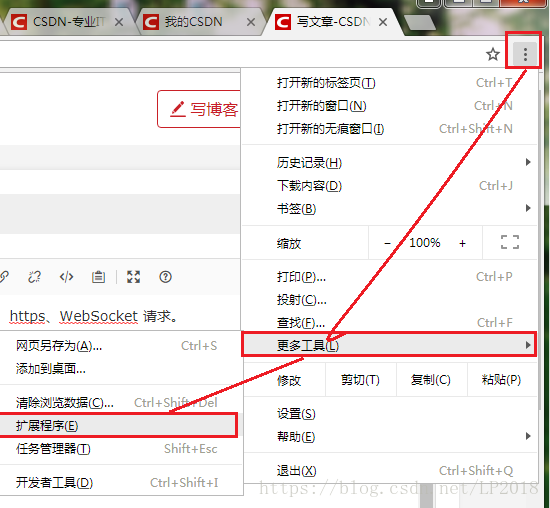
2.2 添加插件
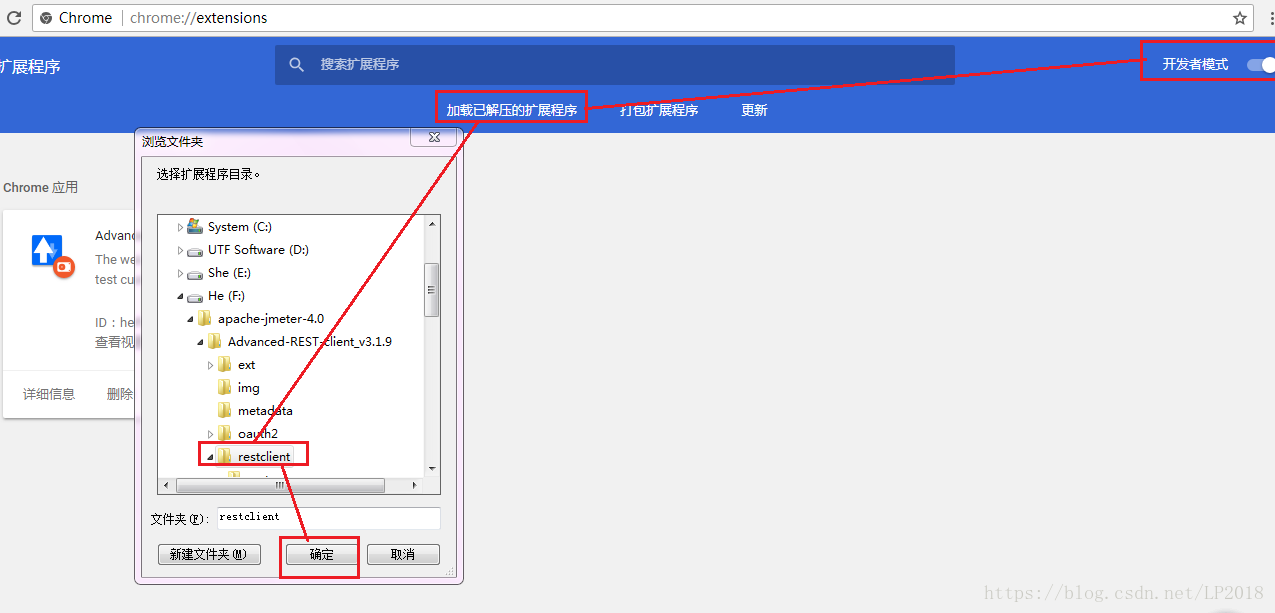
2.3打开插件加载配置文件,由于没有翻墙所以不会下载成功,需要等一会会看到选择配置文件的页面。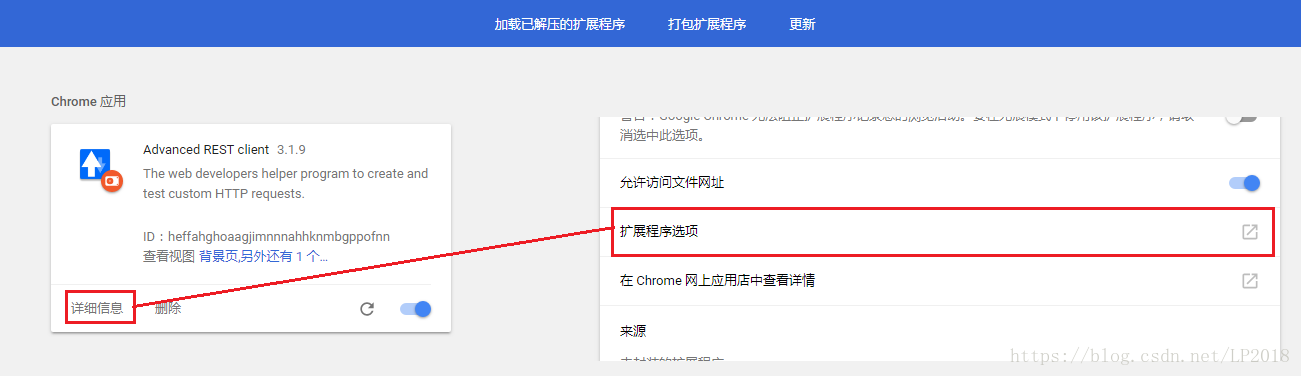
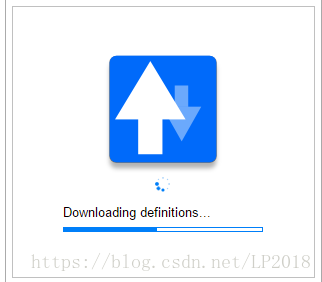
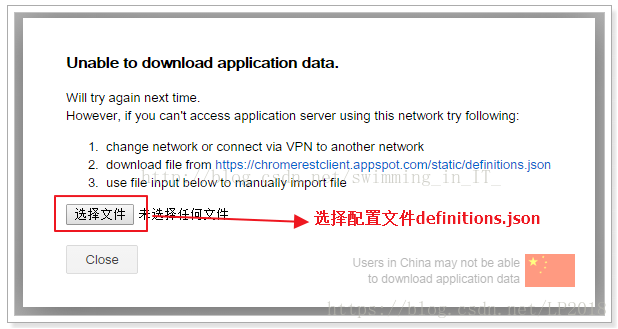
2.4 选择文件可以是txt文件,将如下内容保存到随意命名的txt文件中,然后点击选择文件上传成功。然后点击插件的详细信息-扩展程序选项打开插件来使用了。
{
'requests':[
{'key':'Accept','desc':'Content-Types that are acceptable.','example':'Accept: text/plain'},
{'key':'Accept-Charset','desc':'Character sets that are acceptable','example':'Accept-Charset: utf-8'},
{'key':'Accept-Encoding','desc':'Acceptable encodings','example':'Accept-Encoding: '},
{'key':'Accept-Language','desc':'Acceptable languages for response','example':'Accept-Language: en-US'},
{'key':'Authorization','desc':'Authentication credentials for HTTP authentication','example':'Authorization: Basic QWxhZGRpbjpvcGVuIHNlc2FtZQ=='},
{'key':'Cache-Control','desc':'Used to specify directives that MUST be obeyed by all caching mechanisms along the request/response chain','example':'Cache-Control: no-cache'},
{'key':'Connection','desc':'What type of connection the user-agent would prefer','example':'Connection: close'},
{'key':'Cookie','desc':'an HTTP cookie previously sent by the server with Set-Cookie','example':'Cookie: $Version=1; Skin=new;'},
{'key':'Content-Length','desc':'The length of the request body in octets (8-bit bytes)','example':'Content-Length: 348'},
{'key':'Content-Type','desc':'The mime type of the body of the request (used with POST and PUT requests)','example':'Content-Type: application/x-www-form-urlencoded'},
{'key':'Date','desc':'The date and time that the message was sent','example':'Date: Tue, 15 Nov 1994 08:12:31 GMT'},
{'key':'Expect','desc':'Indicates that particular server behaviors are required by the client','example':'Expect: 100-continue'},
{'key':'From','desc':'The email address of the user making the request','example':'From: user@example.com'},
{'key':'Host','desc':'The domain name of the server (for virtual hosting), mandatory since HTTP/1.1','example':'Host: en.wikipedia.org'},
{'key':'If-Match','desc':'Only perform the action if the client supplied entity matches the same entity on the server. This is mainly for methods like PUT to only update a resource if it has not been modified since the user last updated it.','example':'If-Match: '737060cd8c284d8af7ad3082f209582d''},
{'key':'If-Modified-Since','desc':'Allows a 304 Not Modified to be returned if content is unchanged','example':'If-Modified-Since: Sat, 29 Oct 1994 19:43:31 GMT'},
{'key':'If-None-Match','desc':'Allows a 304 Not Modified to be returned if content is unchanged, see HTTP ETag','example':'If-None-Match: '737060cd8c284d8af7ad3082f209582d''},
{'key':'If-Range','desc':'If the entity is unchanged, send me the part(s) that I am missing; otherwise, send me the entire new entity','example':'If-Range: '737060cd8c284d8af7ad3082f209582d''},
{'key':'If-Unmodified-Since','desc':'Only send the response if the entity has not been modified since a specific time.','example':'If-Unmodified-Since: Sat, 29 Oct 1994 19:43:31 GMT'},
{'key':'Max-Forwards','desc':'Limit the number of times the message can be forwarded through proxies or gateways.','example':'Max-Forwards: 10'},
{'key':'Pragma','desc':'Implementation-specific headers that may have various effects anywhere along the request-response chain','example':'Pragma: no-cache'},
{'key':'Proxy-Authorization','desc':'Authorization credentials for connecting to a proxy.','example':'Proxy-Authorization: Basic QWxhZGRpbjpvcGVuIHNlc2FtZQ=='},
{'key':'Range','desc':'Request only part of an entity. Bytes are numbered from 0.','example':'Range: bytes=500-999'},
{'key':'Referer','desc':'This is the address of the previous web page from which a link to the currently requested page was followed.','example':'Referer: http://en.wikipedia.org/wiki/Main_Page'},
{'key':'TE','desc':'The transfer encodings the user agent is willing to accept: the same values as for the response header Transfer-Encoding can be used, plus the 'trailers' value (related to the 'chunked' transfer method) to notify the server it accepts to receive additional headers (the trailers) after the last, zero-sized, chunk.','example':'TE: trailers, deflate'},
{'key':'Upgrade','desc':'Ask the server to upgrade to another protocol','example':'Upgrade: HTTP/2.0, SHTTP/1.3, IRC/6.9, RTA/x11'},
{'key':'User-Agent','desc':'The user agent string of the user agent','example':'User-Agent: Mozilla/5.0 (Linux; X11)'},
{'key':'Via','desc':'Informs the server of proxies through which the request was sent.','example':'Via: 1.0 fred, 1.1 nowhere.com (Apache/1.1)'},
{'key':'Warning','desc':'A general warning about possible problems with the entity body.','example':'Warning: 199 Miscellaneous warning'}
],
'responses': [
{'key':'Accept-Ranges','desc':'What partial content range types this server supports','example':'Accept-Ranges: bytes'},
{'key':'Age','desc':'The age the object has been in a proxy cache in seconds','example':'Age: 12'},
{'key':'Allow','desc':'Valid actions for a specified resource. To be used for a 405 Method not allowed','example':'Allow: GET, HEAD'},
{'key':'Cache-Control','desc':'Tells all caching mechanisms from server to client whether they may cache this object','example':'Cache-Control: max-age'},
{'key':'Content-Encoding','desc':'The type of encoding used on the data','example':'Content-Encoding: gzip'},
{'key':'Content-Language','desc':'The language the content is in','example':'Content-Language: da'},
{'key':'Content-Length','desc':'The length of the response body in octets (8-bit bytes)','example':'Content-Length: 348'},
{'key':'Content-Location','desc':'An alternate location for the returned data','example':'Content-Location: /index.htm'},
{'key':'Content-Disposition','desc':'An opportunity to raise a 'File Download' dialogue box for a known MIME type','example':'Content-Disposition: attachment; filename=fname.ext'},
{'key':'Content-MD5','desc':'A Base64-encoded binary MD5 sum of the content of the response','example':'Content-MD5: Q2hlY2sgSW50ZWdyaXR5IQ=='},
{'key':'Content-Range','desc':'Where in a full body message this partial message belongs','example':'Content-Range: bytes 21010-47021/47022'},
{'key':'Content-Type','desc':'The mime type of this content','example':'Content-Type: text/html; charset=utf-8'},
{'key':'Date','desc':'The date and time that the message was sent','example':'Date: Tue, 15 Nov 1994 08:12:31 GMT'},
{'key':'ETag','desc':'An identifier for a specific version of a resource, often a Message Digest, see ETag','example':'ETag: '737060cd8c284d8af7ad3082f209582d''},
{'key':'Expires','desc':'Gives the date/time after which the response is considered stale','example':'Expires: Thu, 01 Dec 1994 16:00:00 GMT'},
{'key':'Last-Modified','desc':'The last modified date for the requested object, in RFC 2822 format','example':'Last-Modified: Tue, 15 Nov 1994 12:45:26 GMT'},
{'key':'Link','desc':'Used to express a typed relationship with another resource, where the relation type is defined by RFC 5988','example':'Link: ; rel='alternate''},
{'key':'Location','desc':'Used in redirection, or when a new resource has been created.','example':'Location: http://www.w3.org/pub/WWW/People.html'},
{'key':'P3P','desc':'This header is supposed to set P3P policy, in the form of P3P:CP='your_compact_policy'. However, P3P did not take off[2], most browsers have never fully implemented it, a lot of websites set this header with fake policy text, that was enough to fool browsers the existence of P3P policy and grant permissions for third party cookies.','example':'P3P: CP='This is not a P3P policy! Seehttp://www.google.com/support/accounts/bin/answer.py?hl=en&answer=151657 for more info.''},
{'key':'Pragma','desc':'Implementation-specific headers that may have various effects anywhere along the request-response chain.','example':'Pragma: no-cache'},
{'key':'Proxy-Authenticate','desc':'Request authentication to access the proxy.','example':'Proxy-Authenticate: Basic'},
{'key':'Refresh','desc':'Used in redirection, or when a new resource has been created. This refresh redirects after 5 seconds.(This is a proprietary/non-standard header extension introduced by Netscape and supported by most web browsers.)','example':'Refresh: 5; url=http://www.w3.org/pub/WWW/People.html'},
{'key':'Retry-After','desc':'If an entity is temporarily unavailable, this instructs the client to try again after a specified period of time.','example':'Retry-After: 120'},
{'key':'Server','desc':'A name for the server','example':'Server: Apache/1.3.27 (Unix) (Red-Hat/Linux)'},
{'key':'Set-Cookie','desc':'an HTTP cookie','example':'Set-Cookie: UserID=JohnDoe; Max-Age=3600; Version=1'},
{'key':'Trailer','desc':'The Trailer general field value indicates that the given set of header fields is present in the trailer of a message encoded with chunked transfer-coding.','example':'Trailer: Max-Forwards'},
{'key':'Transfer-Encoding','desc':'The form of encoding used to safely transfer the entity to the user. Currently defined methods are: chunked, compress, deflate, gzip, identity.','example':'Transfer-Encoding: chunked'},
{'key':'Vary','desc':'Tells downstream proxies how to match future request headers to decide whether the cached response can be used rather than requesting a fresh one from the origin server.','example':'Vary: *'},
{'key':'Via','desc':'Informs the client of proxies through which the response was sent.','example':'Via: 1.0 fred, 1.1 nowhere.com (Apache/1.1)'},
{'key':'Warning','desc':'A general warning about possible problems with the entity body.','example':'Warning: 199 Miscellaneous warning'},
{'key':'WWW-Authenticate','desc':'Indicates the authentication scheme that should be used to access the requested entity.','example':'WWW-Authenticate: Basic'}
],
'codes':[
{'key':100, 'label':'Continue','desc':'This means that the server has received the request headers, and that the client should proceed to send the request body (in the case of a request for which a body needs to be sent; for example, a POST request). If the request body is large, sending it to a server when a request has already been rejected based upon inappropriate headers is inefficient. To have a server check if the request could be accepted based on the request's headers alone, a client must send Expect: 100-continue as a header in its initial request and check if a 100 Continue status code is received in response before continuing (or receive 417 Expectation Failed and not continue).'},
{'key':101, 'label':'Switching Protocols','desc':'This means the requester has asked the server to switch protocols and the server is acknowledging that it will do so'},
{'key':102, 'label':'Processing','desc':'As a WebDAV request may contain many sub-requests involving file operations, it may take a long time to complete the request. This code indicates that the server has received and is processing the request, but no response is available yet. This prevents the client from timing out and assuming the request was lost.'},
{'key':200, 'label':'OK','desc':'Standard response for successful HTTP requests. The actual response will depend on the request method used. In a GET request, the response will contain an entity corresponding to the requested resource. In a POST request the response will contain an entity describing or containing the result of the action.'},
{'key':201, 'label':'Created','desc':'The request has been fulfilled and resulted in a new resource being created.'},
{'key':202, 'label':'Accepted','desc':'The request has been accepted for processing, but the processing has not been completed. The request might or might not eventually be acted upon, as it might be disallowed when processing actually takes place.'},
{'key':203, 'label':'Non-Authoritative Information (since HTTP/1.1)','desc':'The server successfully processed the request, but is returning information that may be from another source.'},
{'key':204, 'label':'No Content','desc':'The server successfully processed the request, but is not returning any content.'},
{'key':205, 'label':'Reset Content','desc':'The server successfully processed the request, but is not returning any content. Unlike a 204 response, this response requires that the requester reset the document view.'},
{'key':206, 'label':'Partial Content','desc':'The server is delivering only part of the resource due to a range header sent by the client. The range header is used by tools like wget to enable resuming of interrupted downloads, or split a download into multiple simultaneous streams.'},
{'key':207, 'label':'Multi-Status (WebDAV) (RFC 4918)','desc':'The message body that follows is an XML message and can contain a number of separate response codes, depending on how many sub-requests were made.'},
{'key':300, 'label':'Multiple Choices','desc':'Indicates multiple options for the resource that the client may follow. It, for instance, could be used to present different format options for video, list files with different extensions, or word sense disambiguation.'},
{'key':301, 'label':'Moved Permanently','desc':'This and all future requests should be directed to the given URI.'},
{'key':302, 'label':'Found','desc':'This is an example of industrial practice contradicting the standard. HTTP/1.0 specification (RFC 1945) required the client to perform a temporary redirect (the original describing phrase was 'Moved Temporarily'), but popular browsers implemented 302 with the functionality of a 303 See Other. Therefore, HTTP/1.1 added status codes 303 and 307 to distinguish between the two behaviours. However, the majority of Web applications and frameworks still use the 302 status code as if it were the 303.'},
{'key':303, 'label':'See Other (since HTTP/1.1)','desc':'The response to the request can be found under another URI using a GET method. When received in response to a PUT, it should be assumed that the server has received the data and the redirect should be issued with a separate GET message.'},
{'key':304, 'label':'Not Modified','desc':'Indicates the resource has not been modified since last requested. Typically, the HTTP client provides a header like the If-Modified-Since header to provide a time against which to compare. Using this saves bandwidth and reprocessing on both the server and client, as only the header data must be sent and received in comparison to the entirety of the page being re-processed by the server, then sent again using more bandwidth of the server and client.'},
{'key':305, 'label':'Use Proxy (since HTTP/1.1)','desc':'Many HTTP clients (such as Mozilla and Internet Explorer) do not correctly handle responses with this status code, primarily for security reasons.'},
{'key':306, 'label':'Switch Proxy','desc':'No longer used.'},
{'key':307, 'label':'Temporary Redirect (since HTTP/1.1)','desc':'In this occasion, the request should be repeated with another URI, but future requests can still use the original URI. In contrast to 303, the request method should not be changed when reissuing the original request. For instance, a POST request must be repeated using another POST request.'},
{'key':400, 'label':'Bad Request','desc':'The request cannot be fulfilled due to bad syntax.'},
{'key':401, 'label':'Unauthorized','desc':'Similar to 403 Forbidden, but specifically for use when authentication is possible but has failed or not yet been provided. The response must include a WWW-Authenticate header field containing a challenge applicable to the requested resource. See Basic access authentication and Digest access authentication.'},
{'key':402, 'label':'Payment Required','desc':'Reserved for future use. The original intention was that this code might be used as part of some form of digital cash or micropayment scheme, but that has not happened, and this code is notusually used. As an example of its use, however, Apple's MobileMe service generates a 402 error ('httpStatusCode:402' in the Mac OS X Console log) if the MobileMe account is delinquent.'},
{'key':403, 'label':'Forbidden','desc':'The request was a legal request, but the server is refusing to respond to it. Unlike a 401 Unauthorized response, authenticating will make no difference.'},
{'key':404, 'label':'Not Found','desc':'The requested resource could not be found but may be available again in the future. Subsequent requests by the client are permissible.'},
{'key':405, 'label':'Method Not Allowed','desc':'A request was made of a resource using a request method not supported by that resource; for example, using GET on a form which requires data to be presented via POST, or using PUT on a read-only resource.'},
{'key':406, 'label':'Not Acceptable','desc':'The requested resource is only capable of generating content not acceptable according to the Accept headers sent in the request.'},
{'key':407, 'label':'Proxy Authentication Required','desc':'This code is similar to 401 (Unauthorized), but indicates that the client must first authenticate itself with the proxy.'},
{'key':408, 'label':'Request Timeout','desc':'The client did not produce a request within the time that the server was prepared to wait. The client MAY repeat the request without modifications at any later time.'},
{'key':409, 'label':'Conflict','desc':'Indicates that the request could not be processed because of conflict in the request, such as an edit conflict.'},
{'key':410, 'label':'Gone','desc':'Indicates that the resource requested is no longer available and will not be available again.[2] This should be used when a resource has been intentionally removed and the resource should be purged. Upon receiving a 410 status code, the client should not request the resource again in the future.'},
{'key':411, 'label':'Length Required','desc':'The request did not specify the length of its content, which is required by the requested resource.'},
{'key':412, 'label':'Precondition Failed','desc':'The server does not meet one of the preconditions that the requester put on the request.'},
{'key':413, 'label':'Request Entity Too Large','desc':'The request is larger than the server is willing or able to process.'},
{'key':414, 'label':'Request-URI Too Long','desc':'The URI provided was too long for the server to process.'},
{'key':415, 'label':'Unsupported Media Type','desc':'The request entity has a media type which the server or resource does not support.[2] For example, the client uploads an image as image/svg+xml, but the server requires that images use a different format.'},
{'key':416, 'label':'Requested Range Not Satisfiable','desc':'The client has asked for a portion of the file, but the server cannot supply that portion. For example, if the client asked for a part of the file that lies beyond the end of the file.'},
{'key':417, 'label':'Expectation Failed','desc':'The server cannot meet the requirements of the Expect request-header field.'},
{'key':418, 'label':'I'm a teapot','desc':'This code was defined in 1998 as one of the traditional IETF April Fools' jokes, in RFC 2324, Hyper Text Coffee Pot Control Protocol, and is not expected to be implemented by actual HTTP servers.'},
{'key':422, 'label':'Unprocessable Entity (WebDAV) (RFC 4918)','desc':'The request was well-formed but was unable to be followed due to semantic errors.'},
{'key':423, 'label':'Locked (WebDAV) (RFC 4918)','desc':'The resource that is being accessed is locked.'},
{'key':424, 'label':'Failed Dependency (WebDAV) (RFC 4918)','desc':'The request failed due to failure of a previous request (e.g. a PROPPATCH).'},
{'key':425, 'label':'Unordered Collection (RFC 3648)','desc':'Defined in drafts of 'WebDAV Advanced Collections Protocol', but not present in 'Web Distributed Authoring and Versioning (WebDAV) Ordered Collections Protocol''},
{'key':426, 'label':'Upgrade Required (RFC 2817)','desc':'The client should switch to a different protocol such as TLS/1.0.'},
{'key':444, 'label':'No Response','desc':'An Nginx HTTP server extension. The server returns no information to the client and closes the connection (useful as a deterrent for malware).'},
{'key':449, 'label':'Retry With','desc':'A Microsoft extension. The request should be retried after performing the appropriate action.'},
{'key':450, 'label':'Blocked by Windows Parental Controls','desc':'A Microsoft extension. This error is given when Windows Parental Controls are turned on and are blocking access to the given webpage.'},
{'key':499, 'label':'Client Closed Request','desc':'An Nginx HTTP server extension. This code is introduced to log the case when the connection is closed by client while HTTP server is processing its request, making server unable to send the HTTP header back.'},
{'key':500, 'label':'Internal Server Error','desc':'A generic error message, given when no more specific message is suitable.'},
{'key':501, 'label':'Not Implemented','desc':'The server either does not recognise the request method, or it lacks the ability to fulfill the request.'},
{'key':502, 'label':'Bad Gateway','desc':'The server was acting as a gateway or proxy and received an invalid response from the upstream server.'},
{'key':503, 'label':'Service Unavailable','desc':'The server is currently unavailable (because it is overloaded or down for maintenance). Generally, this is a temporary state.'},
{'key':504, 'label':'Gateway Timeout','desc':'The server was acting as a gateway or proxy and did not receive a timely response from the upstream server.'},
{'key':505, 'label':'HTTP Version Not Supported','desc':'The server does not support the HTTP protocol version used in the request'},
{'key':506, 'label':'Variant Also Negotiates','desc':'Transparent content negotiation for the request results in a circular reference.'},
{'key':507, 'label':'Insufficient Storage (WebDAV) (RFC 4918)','desc':'The 507 status code means the method could not be performed on the resource because the server is unable to store the representation needed to successfully complete the request.'},
{'key':509, 'label':'Bandwidth Limit Exceeded (Apache bw/limited extension)','desc':'This status code, while used by many servers, is not specified in any RFCs.'},
{'key':510, 'label':'Not Extended (RFC 2774)','desc':'Further extensions to the request are required for the server to fulfill it.'}
]
}
3.插件界面
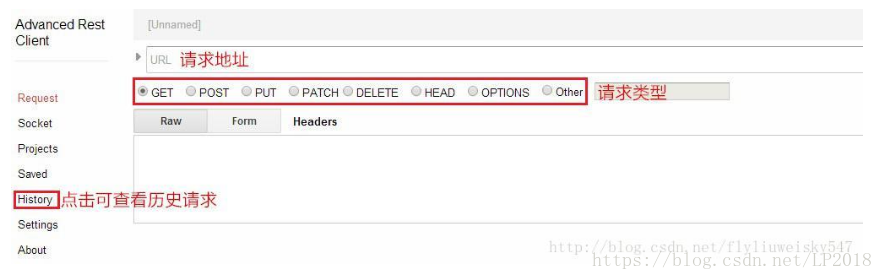
3.1发送http请求,http://httpbin.org/ 有现成的get、post请求。
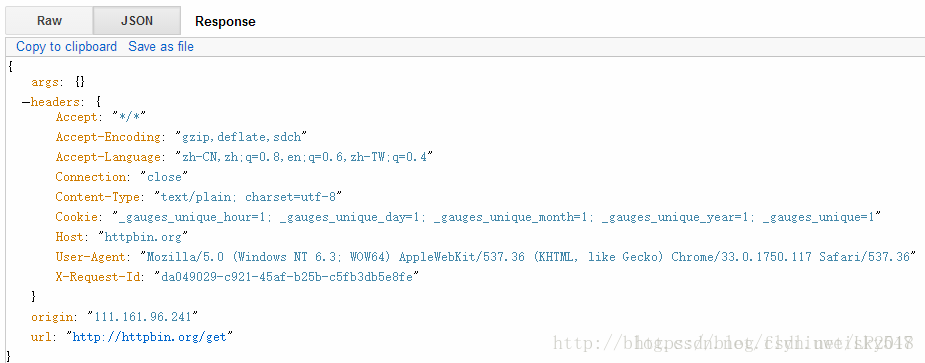
3.1.1 http get请求:http://httpbin.org/get
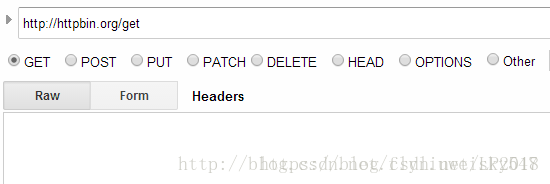
点"Send"按钮。发送成功后,Advanced REST Client会列出Request/Response headers:
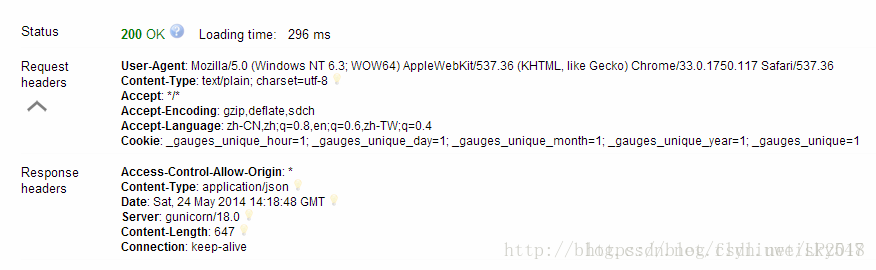
返回结果:
3.1.2 http post请求:http://httpbin.org/post
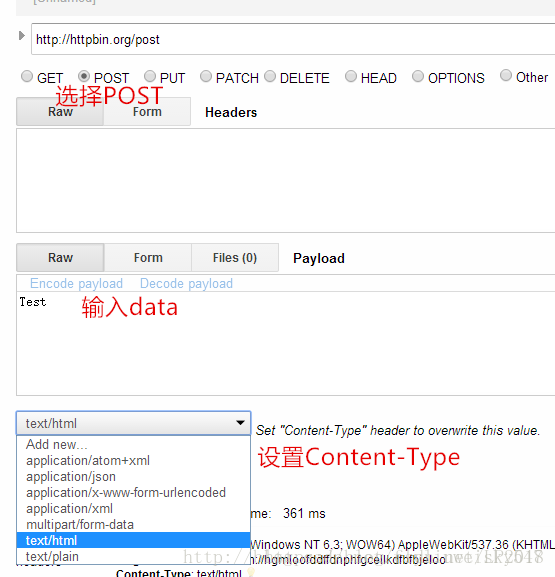
返回结果:

3.2 WebSocket请求:ws://echo.websocket.org
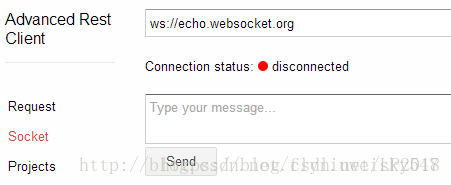
点击右侧的”Connect”按钮。连接成功后,即可发送消息

输入"Test",然后点"Send"按钮
第一个”Test”是Advanced REST Client发送的request,第二个”Test”是Server返回的response

点击”Disconnect”按钮,即可断开连接
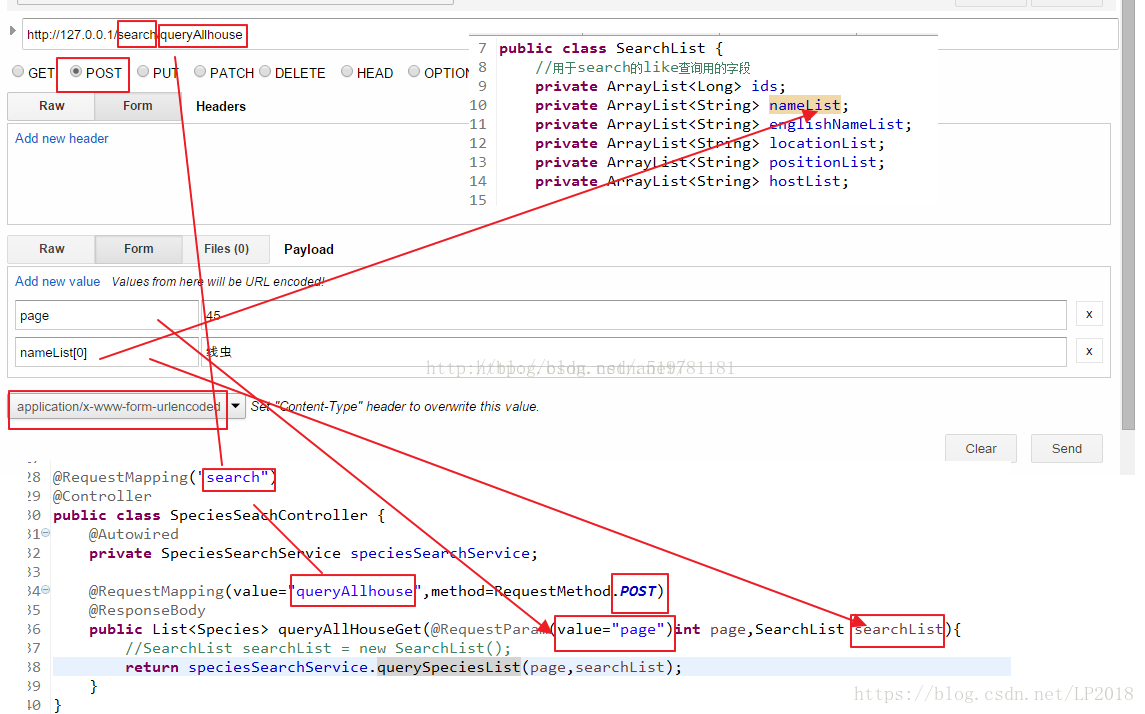
示例:

 1231


 扫一扫


 被折叠的 条评论
为什么被折叠?
 到【灌水乐园】发言


