



 本文介绍了一种将轮播图与二级菜单相结合的网页设计方法,详细展示了具体的HTML、CSS和JavaScript代码实现,包括如何通过z-index解决层级显示问题。
1.html 轮播图+二级菜单制作
2.sunny前面写过二级菜单的制作以及轮播图的制作,这一次sunny把他们结合在一起了ヾ(≧▽≦*)o😊
可以点击下方的链接快速查看哟
1.二级菜单制作
2.轮播图制作
3.究极变身版1
4.究极变身版2
5.我个人对position中 relative和position 的理解
3.下面我们来看看他们的结合体吧ヾ(≧▽≦*)o
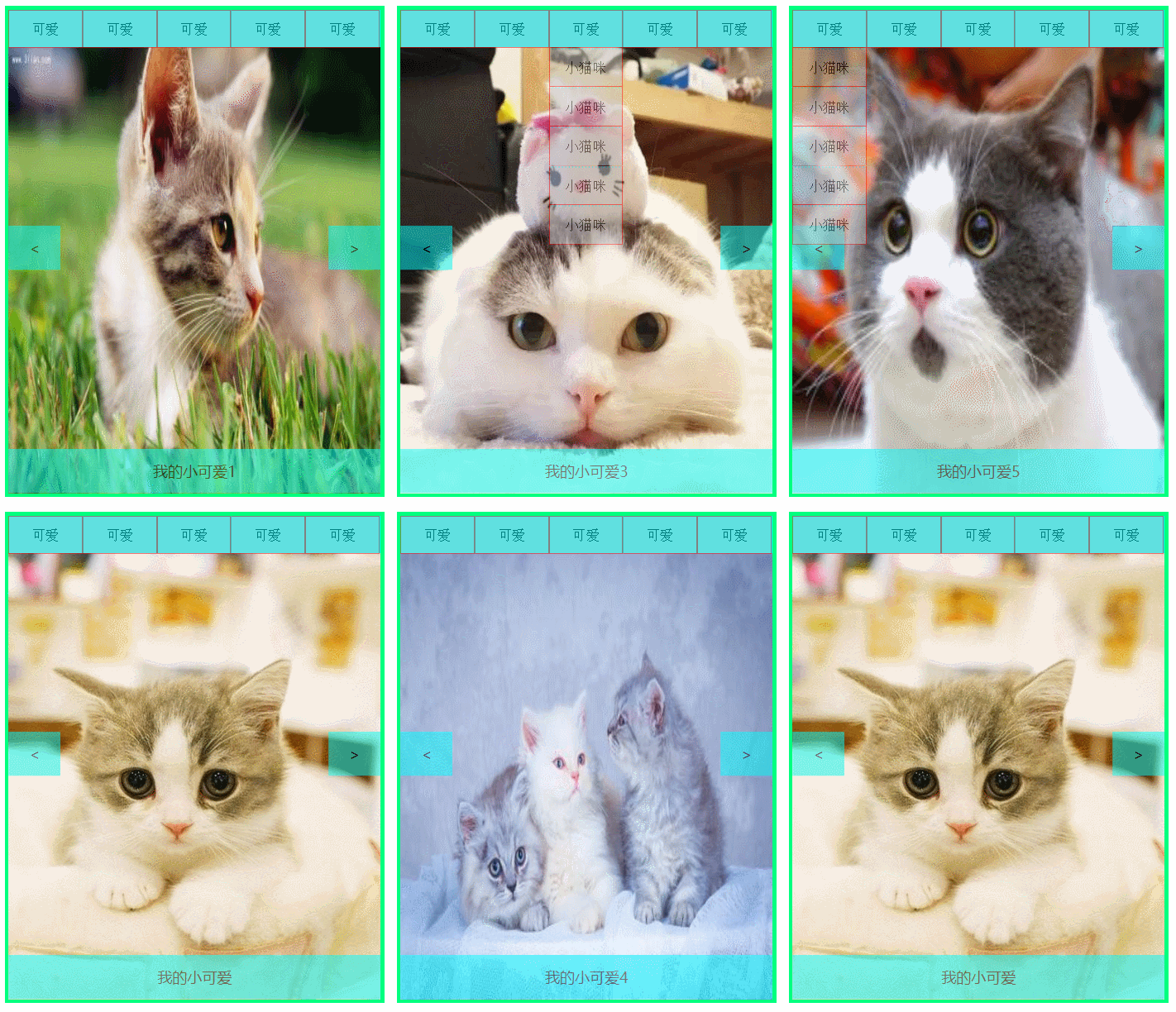
4.下面是具体代码ヾ(≧▽≦*)o:
<!DOCTYPE html>
<html lang="en">
<head>
	<meta charset="UTF-8">
	<title>轮播图+二级菜单</title>
	<style>
		*{margin: 0px;padding:0px;}
	    .biggestbox{
	    	width: 500px;
			height:650px;
			background-color: aqua;
			border:solid springgreen 5px;
			margin:50px  auto auto 20%;
			position: relative;
	    }
		.box{
			width: 500px;
			height: 600px;
			background-color: pink;
			position: absolute;
			bottom: 0px;
			left:0px;

		}
		img{
			width: 100%;
			height: 100%;
		}
		#text{
			width: 100%;
			height: 60px;
			font-size: 20px;
			font-family: 微软雅黑;
			text-align: center;
			line-height: 60px;
			background-color: aqua;
			color:#000000;
			opacity: 0.5;
			position: absolute;
			left:0px;
			bottom: 0px;


		}
		#left,#right{
			width: 70px;
			height: 60px;
			font-size: 20px;
			font-family: 微软雅黑;
			text-align: center;
			line-height: 60px;
			color:#000000;
			background-color: aqua;
			opacity: 0.5;

		}
		#left{
			position: absolute;
			left:0px;
			top:240px;
		}
		#right{
			position: absolute;
			right:0px;
			top:240px;
		}
		.caidan{
			z-index: 30;
			width: 500px;
			height: 50px;
			/*background-color: tomato;*/
			position: absolute;
			top:0px;
			left:0px;
		}
		a{text-decoration: none;}
		ul,li{list-style: none;}
		ul li{float:left;}
		ul li a{
			width:98px;
			height:50px;
			font-size: 18px;
			font-family: 宋体;
			text-align: center;
			line-height: 50px;
			color:black;
			display:block;
			background-color:silver;
			opacity: 0.5;
			border: solid 0.8px red;
		}
		ul li ul {display: none; position: absolute;}
		ul li ul li {float: none;}
		ul li:hover ul{display: block;}
		ul li ul li a{border-top:dotted 2px aqua;}
		ul li ul li a:hover{text-decoration: underline;color:red;}

	</style>
</head>
<body>
	<div class="biggestbox">
		<div class="caidan">
			<ul>
				<li><a href="#">可爱</a>
					<ul>
						<li><a href="#">小猫咪</a></li>
						<li><a href="#">小猫咪</a></li>
						<li><a href="#">小猫咪</a></li>
						<li><a href="#">小猫咪</a></li>
						<li><a href="#">小猫咪</a></li>
					</ul>
				</li>
				<li><a href="#">可爱</a>
					<ul>
						<li><a href="#">小猫咪</a></li>
						<li><a href="#">小猫咪</a></li>
						<li><a href="#">小猫咪</a></li>
						<li><a href="#">小猫咪</a></li>
						<li><a href="#">小猫咪</a></li>
					</ul>
				</li>
				<li><a href="#">可爱</a>
					<ul>
						<li><a href="#">小猫咪</a></li>
						<li><a href="#">小猫咪</a></li>
						<li><a href="#">小猫咪</a></li>
						<li><a href="#">小猫咪</a></li>
						<li><a href="#">小猫咪</a></li>
					</ul>
				</li>
				<li><a href="#">可爱</a>
					<ul>
						<li><a href="#">小猫咪</a></li>
						<li><a href="#">小猫咪</a></li>
						<li><a href="#">小猫咪</a></li>
						<li><a href="#">小猫咪</a></li>
						<li><a href="#">小猫咪</a></li>
					</ul>
				</li>
				<li><a href="#">可爱</a>
					<ul>
						<li><a href="#">小猫咪</a></li>
						<li><a href="#">小猫咪</a></li>
						<li><a href="#">小猫咪</a></li>
						<li><a href="#">小猫咪</a></li>
						<li><a href="#">小猫咪</a></li>
					</ul>
				</li>

			</ul>
		</div>
	    <div class="box" id="box">
		    <img src="images/00.jpg" alt="" id="img1">
		    <div id="left" id="left"><</div>
		    <div id ="right" id ="right">></div>
		    <div id="text" id ="right">我的小可爱</div>
	    </div>
	</div>
</body>
</html>
<script>
	var box =document.getElementById('box')
	var img =document.getElementById('img1')
	var left =document.getElementById('left')
	var right =document.getElementById('right')
	var text =document.getElementById('text')

	var arr_img = ['images/00.jpg','images/01.jpg','images/02.jpg','images/03.jpg','images/04.jpg','images/05.jpg',]
	var arr_text =['我的小可爱','我的小可爱1','我的小可爱2','我的小可爱3','我的小可爱4','我的小可爱5',]

	var currentIndex =1;
	function slide (){
		currentIndex =++currentIndex%6;
		img.src = arr_img[currentIndex];
		text.innerText =arr_text[currentIndex] ;
	}
	var pause = setInterval(slide,2000)

	box.addEventListener('mouseover',function(){
		clearInterval(pause);
	})
	box.addEventListener('mouseout',function(){
		pause = setInterval(slide,2000);
	})
	left.addEventListener('click',function(){
		currentIndex =--currentIndex%6;
		if(currentIndex<0){
			currentIndex +=6;
		}
		img.src = arr_img[currentIndex];
		text.innerText =arr_text[currentIndex];
	})
	right.addEventListener('click',function(){
		currentIndex =++currentIndex%6;
		img.src = arr_img[currentIndex];
		text.innerText =arr_text[currentIndex];
	})
</script>





 扫一扫
扫一扫


 2825
2825

 被折叠的 条评论
为什么被折叠?
被折叠的 条评论
为什么被折叠?
 到【灌水乐园】发言





