



Linux 进程管理
进程介绍
进程是什么
进程是已启动的可执行程序的运行中实例。
进程由以下组成部分:
-
已分配内存的地址空间
-
安全属性,包括所有权凭据和特权
-
程序代码的一个或多个执行线程
-
进程状态
进程的环境包括:
- 本地和全局变量
- 当前调度上下文
- 分配的系统资源,如文件描述符和网络端口
程序:静态的可以执行文件
进场:程序运行起来后,称之为进程,会消耗资源
查看进程-ps
**作用:**查看系统中进程信息。
ps 命令选项分为两类:
- 限定查看哪些进程
- 对选定的进程查看他们哪些属性
支持三种版本选项:
- UNIX,使用单个
- - GNU,使用两个
-- - BSD,不使用
-
[yy@centos7 tmp 15:31:01]$ ps -e
   PID TTY          TIME CMD
     1 ?        00:00:03 systemd
     2 ?        00:00:00 kthreadd
[yy@centos7 tmp 16:40:00]$ ps -ef |head -n 5
UID         PID   PPID  C STIME TTY          TIME CMD
root          1      0  0 12:36 ?        00:00:03 /usr/lib/systemd/systemd --switched-root --system --deserialize 22
root          2      0  0 12:36 ?        00:00:00 [kthreadd]
root          4      2  0 12:36 ?        00:00:00 [kworker/0:0H]
root          6      2  0 12:36 ?        00:00:03 [ksoftirqd/0]

#**查看特定用户运行的进程**
[yy@centos7 tmp 16:40:16]$ ps -u yy u
USER        PID %CPU %MEM    VSZ   RSS TTY      STAT START   TIME COMMAND
yy         3736  0.0  0.1 317664  6144 ?        Sl   12:56   0:00 /usr/bin/gnome-keyring-daemon --daemonize --
yy         3781  0.0  0.2 819072 11496 ?        Ssl  12:56   0:00 /usr/libexec/gnome-session-binary --session
yy         3790  0.0  0.0  59016   968 ?        S    12:56   0:00 dbus-launch --sh-syntax --exit-with-session
yy         3791  0.0  0.0  69192  2604 ?        Ssl  12:56   0:00 /usr/bin/dbus-daemon --fork --print-pid 5 --
yy         3820  0.0  0.1 286120  6080 ?        Sl   12:56   0:00 /usr/libexec/imsettings-daemon
yy         3824  0.0  0.1 388932  4148 ?        Sl   12:56   0:00 /usr/libexec/gvfsd


#**查看特定终端中进程**
[yy@centos7 tmp 16:40:26]$ ps -t pts/1 u
error: TTY could not be found

Usage:
 ps [options]

 Try 'ps --help <simple|list|output|threads|misc|all>'
  or 'ps --help <s|l|o|t|m|a>'
 for additional help text.

For more details see ps(1).
#**查看所有进程**
[yy@centos7 tmp 16:40:40]$ ps axu
USER        PID %CPU %MEM    VSZ   RSS TTY      STAT START   TIME COMMAND
root          1  0.0  0.1 128404  7148 ?        Ss   12:36   0:03 /usr/lib/systemd/systemd --switched-root --s
root          2  0.0  0.0      0     0 ?        S    12:36   0:00 [kthreadd]
root          4  0.0  0.0      0     0 ?        S<   12:36   0:00 [kworker/0:0H]
root          6  0.0  0.0      0     0 ?        S    12:36   0:03 [ksoftirqd/0]
root          7  0.0  0.0      0     0 ?        S    12:36   0:00 [migration/0]

#**查看进程树**
[yy@centos7 tmp 16:40:47]$ ps axf
   PID TTY      STAT   TIME COMMAND
     2 ?        S      0:00 [kthreadd]
     4 ?        S<     0:00  \_ [kworker/0:0H]
     6 ?        S      0:03  \_ [ksoftirqd/0]
     7 ?        S      0:00  \_ [migration/0]
     8 ?        S      0:00  \_ [rcu_bh]
     9 ?        S      0:01  \_ [rcu_sched]
    10 ?        S<     0:00  \_ [lru-add-drain]
查看特定进程特定属性
[yy@centos7 tmp 16:41:02]$ ps -o pid,%cpu,%mem,command 1159
   PID %CPU %MEM COMMAND
[yy@centos7 tmp 16:54:44]$ ps -o pid,%cpu,%mem,command 4185
   PID %CPU %MEM COMMAND
  4185  0.0  0.2 /usr/libexec/gsd-datetime
对进程进行排序,–sort %cpu升序 ,–sort -%cpu降序
[yy@centos7 tmp 16:51:25]$ ps axu --sort -%cpu
USER        PID %CPU %MEM    VSZ   RSS TTY      STAT START   TIME COMMAND
root        747  0.1  0.1 295564  5312 ?        Ssl  12:37   0:16 /usr/bin/vmtoolsd
yy         4379  0.1  0.6 608644 25548 ?        Sl   12:56   0:16 /usr/bin/vmtoolsd -n vmusr
root          1  0.0  0.1 128404  7148 ?        Ss   12:36   0:03 /usr/lib/systemd/systemd --switched-root --s
root          2  0.0  0.0      0     0 ?        S    12:36   0:00 [kthreadd]
root          4  0.0  0.0      0     0 ?        S<   12:36   0:00 [kworker/0:0H]
控制 jobs
前台进程和后台进程
作业控制允许单个shell实例运行和管理多个命令。
- 前台进程,一个终端中只有一个前台进程,该进程可以终端窗口中读取输入和响应键盘生成的信号。
- 后台进程,在后台运行的进程,该进程不能从终端读取输入或接收键盘产生的中断。后台进程可能暂停,也可能正在运行。如果正在运行的后台作业尝试从终端读取,它将自动暂停。在ps列表中,tty终端列显示的是?号,那么该进程肯定是后台进程,但并代表显示为其他终端的进程就不是后台进程。
对于图形化运行的程序,当前窗口的程序称为活动程序
给进程发信号
信号介绍
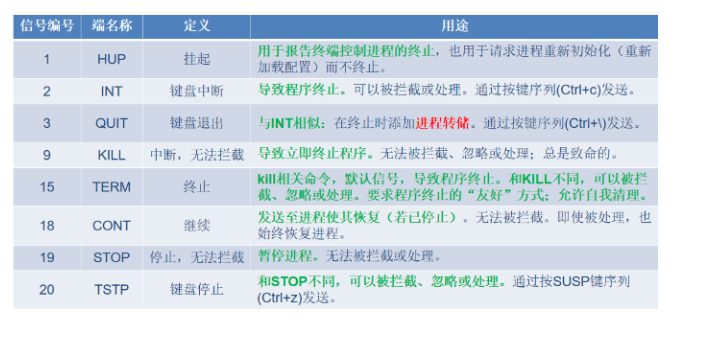
signal 是传递给进程的软中断。
生成信号的事件可以是错误,外部事件或者使用信号发送命令或键盘序列。
kill 命令
作用:给单个进程发信号。
[yy@centos7 ~ 09:04:56]$ vim output
[yy@centos7 ~ 10:16:33]$ touch output.log

[yy@centos7 ~ 10:16:55]$ tail -f output.log

[yy@centos7 ~ 10:18:23]$ chmod +x output
[yy@centos7 ~ 10:19:16]$ ./output hello1 &
[1] 2902
[yy@centos7 ~ 10:19:47]$ ./output hello2 &
[2] 2945

[yy@centos7 ~ 10:19:51]$ kill -l
 1) SIGHUP	 2) SIGINT	 3) SIGQUIT	 4) SIGILL
 6) SIGABRT	 7) SIGBUS	 8) SIGFPE	 9) SIGKILL
11) SIGSEGV	12) SIGUSR2	13) SIGPIPE	14) SIGALRM
16) SIGSTKFLT	17) SIGCHLD	18) SIGCONT	19) SIGSTOP
21) SIGTTIN	22) SIGTTOU	23) SIGURG	24) SIGXCPU
26) SIGVTALRM	27) SIGPROF	28) SIGWINCH	29) SIGIO
31) SIGSYS	34) SIGRTMIN	35) SIGRTMIN+1	36) SIGRTMI
38) SIGRTMIN+4	39) SIGRTMIN+5	40) SIGRTMIN+6	41) SIGRTMI
43) SIGRTMIN+9	44) SIGRTMIN+10	45) SIGRTMIN+11	46) SIGRTMI
48) SIGRTMIN+14	49) SIGRTMIN+15	50) SIGRTMAX-14	51) SIGRTMA
53) SIGRTMAX-11	54) SIGRTMAX-10	55) SIGRTMAX-9	56) SIGRTMA
58) SIGRTMAX-6	59) SIGRTMAX-5	60) SIGRTMAX-4	61) SIGRTMA
63) SIGRTMAX-1	64) SIGRTMAX

[yy@centos7 ~ 10:20:04]$ kill -19 %1

[1]+  已停止               ./output hello1
[yy@centos7 ~ 10:20:21]$ jobs
[1]+  已停止               ./output hello1
[2]-  运行中               ./output hello2 &

[yy@centos7 ~ 10:20:26]$ kill -18 %1
[yy@centos7 ~ 10:20:40]$ jobs
[1]+  运行中               ./output hello1 &
[2]-  运行中               ./output hello2 &

[yy@centos7 ~ 10:20:43]$ kill -SIGTERM %2
[yy@centos7 ~ 10:21:12]$ jobs
[1]+  运行中               ./output hello1 &
[2]-  已终止               ./output hello2
[yy@centos7 ~ 10:21:15]$ jobs
[1]+  运行中               ./output hello1 &

[yy@centos7 ~ 10:21:27]$ kill %1
[yy@centos7 ~ 10:21:35]$ jobs
[1]+  已终止               ./output hello1
[yy@centos7 ~ 10:21:40]$ jobs

[yy@centos7 ~ 10:21:44]$ ./output hello3 &
[1] 3153
[yy@centos7 ~ 10:22:09]$ ps axu | grep while
yy         3197  0.0  0.0 112824   980 pts/1    S+   10:22

[yy@centos7 ~ 10:22:43]$ kill 3153
[yy@centos7 ~ 10:23:23]$ jobs
[1]+  已终止               ./output hello3
pkill 和 pgrep 命令
作用:给多个进程发信号。
[yy@centos7 ~ 10:26:09]$ sleep 1231 &
[1] 3272
[yy@centos7 ~ 10:27:21]$ sleep 1232 &
[2] 3273
[yy@centos7 ~ 10:27:29]$ sleep 1233 &
[3] 3282
# 根据进程名查找进程
[yy@centos7 ~ 10:27:44]$ pgrep sleep
3272
3273
3281
3282
[yy@centos7 ~ 10:27:56]$ pgrep  -l sleep
3272 sleep
3273 sleep
3281 sleep
3282 sleep
[yy@centos7 ~ 10:28:27]$ ps axu | grep sleep
yy         3272  0.0  0.0 108052   360 pts/0    S    10:27   0:00 sleep 1231
yy         3273  0.0  0.0 108052   356 pts/0    S    10:27   0:00 sleep 1232
yy         3282  0.0  0.0 108052   360 pts/0    S    10:27   0:00 sleep 1233
root       3300  0.0  0.0 108052   356 ?        S    10:29   0:00 sleep 60
yy         3302  0.0  0.0 112824   980 pts/0    R+   10:29   0:00 grep --color=auto sleep
# 给sleep相关进程发默认信号
[yy@centos7 ~ 10:29:50]$ pkill sleep
pkill: killing pid 3300 failed: 不允许的操作
[1]   已终止               sleep 1231
[2]-  已终止               sleep 1232
[3]+  已终止               sleep 1233
[yy@centos7 ~ 10:30:16]$ ps axu | grep sleep
root       3300  0.0  0.0 108052   356 ?        S    10:29   0:00 sleep 60
yy         3317  0.0  0.0 112824   976 pts/0    S+   10:30   0:00 grep --color=auto sleep
# 根据用户名匹配程序
[yy@centos7 ~ 10:30:31]$ ps -u yy
   PID TTY          TIME CMD
  1910 ?        00:00:00 sshd
  1914 pts/0    00:00:00 bash
  2782 ?        00:00:00 sshd
  2785 pts/1    00:00:00 bash
  3326 pts/0    00:00:00 ps
  # kill相应用户所有进程,也就是注销用户
[yy@centos7 ~ 10:30:43]$ pgrep -u yy
1910
1914
2782
2785
[yy@centos7 ~ 10:31:10]$ pkill -u yy
Connection closing...Socket close.

Connection closed by foreign host.

Disconnected from remote host(yy@centos7) at 10:31:38.

Type `help' to learn how to use Xshell prompt.
[C:\~]$

Connecting to 10.1.8.10:22...
Connection established.
To escape to local shell, press 'Ctrl+Alt+]'.

Last login: Sun Jul 27 10:16:02 2025 from 10.1.8.1
# 根据终端匹配
[yy@centos7 ~ 10:31:44]$ sleep 1231 &
[1] 3450
[yy@centos7 ~ 10:32:04]$ sleep 1232 &
[2] 3451
[yy@centos7 ~ 10:32:15]$ tty
/dev/pts/0
[yy@centos7 ~ 10:32:17]$ pgrep -t pts/0 -l
3360 bash
3450 sleep
3451 sleep
[yy@centos7 ~ 10:32:45]$ pkill -t pts/0
[1]-  已终止               sleep 1231
[2]+  已终止               sleep 1232
# 给bash发默认信号,bash进程屏蔽了
[yy@centos7 ~ 10:33:02]$ pkill 3360
# 根据PPID,给子进程发信号
[yy@centos7 ~ 10:40:40]$ sleep 1231 &
[1] 3552
[yy@centos7 ~ 10:40:51]$ sleep 1232 &
[2] 3553
[yy@centos7 ~ 10:41:02]$ ps jf
  PPID    PID   PGID    SID TTY       TPGID STAT   UID   TIME COMMAND
  3408   3411   3411   3411 pts/1      3411 Ss+   1000   0:00 -bash
  3357   3360   3360   3360 pts/0      3554 Ss    1000   0:00 -bash
  3360   3552   3552   3360 pts/0      3554 S     1000   0:00  \_ sleep 1231
  3360   3553   3553   3360 pts/0      3554 S     1000   0:00  \_ sleep 1232
  3360   3554   3554   3360 pts/0      3554 R+    1000   0:00  \_ ps jf
[yy@centos7 ~ 10:41:49]$ pkill -P 3360
[1]-  已终止               sleep 1231
[2]+  已终止               sleep 1232
[yy@centos7 ~ 10:50:32]$ sleep 1231 &
[1] 3660
[yy@centos7 ~ 10:50:46]$ sleep 1232 &
[2] 3661
[yy@centos7 ~ 10:51:04]$ sleep 1233 &
[3] 3662
[yy@centos7 ~ 10:51:16]$ ps axu |grep sleep
root       3659  0.0  0.0 108052   356 ?        S    10:50   0:00 sleep 60
yy         3660  0.0  0.0 108052   360 pts/0    S    10:50   0:00 sleep 1231
yy         3661  0.0  0.0 108052   356 pts/0    S    10:51   0:00 sleep 1232
yy         3662  0.0  0.0 108052   360 pts/0    S    10:51   0:00 sleep 1233
yy         3664  0.0  0.0 112824   980 pts/0    R+   10:51   0:00 grep --color=auto sleep
[yy@centos7 ~ 10:51:29]$ ps -C sleep -f | grep 123
yy         3660   3360  0 10:50 pts/0    00:00:00 sleep 1231
yy         3661   3360  0 10:51 pts/0    00:00:00 sleep 1232
yy         3662   3360  0 10:51 pts/0    00:00:00 sleep 1233
[yy@centos7 ~ 10:52:28]$ ps -C sleep -f | grep 123 | awk '{print $2}'
3660
3661
3662
[yy@centos7 ~ 10:52:47]$ kill $(ps -C sleep -f | grep 123 | awk '{print $2}')
last—系统中用户登录记录
[yy@centos7 ~ 10:53:00]$ last
yy       pts/1        10.1.8.1         Sun Jul 27 10:31   still logged in
yy       pts/0        10.1.8.1         Sun Jul 27 10:31   still logged in
yy       pts/1        10.1.8.1         Sun Jul 27 10:16 - 10:31  (00:15)
yy       pts/0        10.1.8.1         Sun Jul 27 09:04 - 10:31  (01:26)
reboot   system boot  3.10.0-1160.71.1 Sun Jul 27 09:04 - 10:53  (01:49)
yy       pts/1        10.1.8.1         Thu Jul 24 17:44 - 17:46  (00:01)
yy       pts/1        10.1.8.1         Thu Jul 24 17:38 - 17:43  (00:04)
yy       pts/0        10.1.8.1         Thu Jul 24 17:15 - 17:45  (00:30)
yy       pts/3        10.1.8.1         Thu Jul 24 14:59 - 17:44  (02:45)
yy       pts/5        10.1.8.1         Thu Jul 24 13:46 - 14:59  (01:12)
yy       pts/4        10.1.8.1         Thu Jul 24 13:46 - 17:14  (03:28)
yy       pts/3        10.1.8.1         Thu Jul 24 13:06 - 13:47  (00:40)
yy       pts/2        10.1.8.1         Thu Jul 24 13:06 - 15:46  (02:39)
yy       pts/1        10.1.8.1         Tue Jul 22 15:51 - 15:08 (1+23:16)
yy       :0           :0               Tue Jul 22 15:42 - crash (4+17:21)
案例:kill 不掉的进程
一个进程杀掉之后,又出现了。怎么让这个程序永久kill掉?
模拟:
[yy@centos7 ~ 10:53:48]$ mkdir bin
[yy@centos7 ~ 11:20:23]$ vim bin/mm
[yy@centos7 ~ 11:20:53]$ chmod +x bin/mm
[yy@centos7 ~ 11:21:09]$ nohup mm &
[1] 4007
[yy@centos7 ~ 11:21:28]$ nohup: 忽略输入并把输出追加到"nohup.out"

[yy@centos7 ~ 11:21:36]$ ps axo pid,%cpu,command --sort -%cpu |head -n 5
   PID %CPU COMMAND
  4008  101 md5sum /dev/zero
   749  0.1 /usr/bin/vmtoolsd
     1  0.0 /usr/lib/systemd/systemd --switched-root --system --deserialize 22
     2  0.0 [kthreadd]
[yy@centos7 ~ 11:22:17]$ kill 4008
[yy@centos7 ~ 11:22:37]$ ps axo pid,%cpu,command --sort -%cpu |head -n 5
   PID %CPU COMMAND
  4020 85.3 md5sum /dev/zero
   749  0.1 /usr/bin/vmtoolsd
     1  0.0 /usr/lib/systemd/systemd --switched-root --system --deserialize 22
     2  0.0 [kthreadd]
[yy@centos7 ~ 11:22:41]$ ps axf -f | grep -e md5sum -e ppid
yy         4020   4007 99 11:22 pts/0    R      0:50  |           |   \_ md5sum /dev/zero
yy         4034   3360  0 11:23 pts/0    S+     0:00  |           \_ grep --color=auto -e md5sum -e ppid
[yy@centos7 ~ 11:23:29]$ kill 4007
[yy@centos7 ~ 11:24:03]$ kill 4020
[1]+  已终止               nohup mm
[yy@centos7 ~ 11:24:09]$ ps axo pid,%cpu,command --sort -%cpu |head -n 5
   PID %CPU COMMAND
   749  0.1 /usr/bin/vmtoolsd
     1  0.0 /usr/lib/systemd/systemd --switched-root --system --deserialize 22
     2  0.0 [kthreadd]
     4  0.0 [kworker/0:0H]
僵尸进程
僵尸进程介绍
如果一个进程退出了,立马X状态,作为父进程没有机会拿到子进程的退出结果。所以在Linux中,一般进程不会立即退出,而是要维持一个状态叫做Z,也叫做僵尸状态,方便后续父进程读取该子进程的退出结果。
僵尸状态会以终止状态保持在进程列表中,并且会一直等待父进程读取退出状态码。所以只要子进程退出,父进程还在运行,但是父进程没有读取子进程状态,子进程就进入Z状态。
僵尸进程模拟
可以使用实验来模拟僵尸状态:fork一个子进程,让子进程先退出,但是不要回收子进程。
写一段代码,让父进程运行60s,子进程运行10s,此时子进程先退出,父进程还在运行,同时父进程没有获取到子进程的退出码,子进程进入僵尸状态。
vim 粘贴模式 防止粘贴过程中格式发生变化。
:set paste
[yy@centos7 ~ 11:36:05]$ yum install -y gcc
[root@centos7 ~ 11:40:30]# touch zombies
[root@centos7 ~ 11:40:53]# vim zombies.c
[root@centos7 ~ 11:40:50]# gcc zombies.c -o zombies
[root@centos7 ~ 11:42:32]# chmod +x zombies
[root@centos7 ~ 11:42:47]# ./zombies
parent[4379] is sleeping ...
child[4380] is begin Z ...
[yy@centos7 ~ 11:46:28]$ while true;do ps -C zombies u;sleep 1; echo;done
USER        PID %CPU %MEM    VSZ   RSS TTY      STAT START   TIME COMMAND
root       4509  0.0  0.0   4216   356 pts/0    S+   11:46   0:00 ./zombies
root       4510  0.0  0.0   4216    88 pts/0    S+   11:46   0:00 ./zombies

USER        PID %CPU %MEM    VSZ   RSS TTY      STAT START   TIME COMMAND
孤儿进程
孤儿进程介绍
父进程如果提前退出,子进程后退出,子进程就称为孤儿进程。子进程退出后处于Z状态,系统如何处理?
此时,子进程被1号进程systemd领养,由systemd回收。
孤儿进程模拟
写一段代码,让子进程运行30s,父进程运行3s,父进程先退出,子进程由1号进程收养。
孤儿进程危害
**虽然孤儿进程由systemd直接管理了,但如果仍然不停产生新的孤儿进程则会导致占用过多系统资源。**需要开发人员检查代码,避免这个问题。如果孤儿进程没有实际意义,则可以通过kill或pkill终止。
0 ./zombies
root 4510 0.0 0.0 4216 88 pts/0 S+ 11:46 0:00 ./zombies
USER PID %CPU %MEM VSZ RSS TTY STAT START TIME COMMAND
### 孤儿进程

#### 孤儿进程介绍

父进程如果提前退出,子进程后退出,子进程就称为孤儿进程。子进程退出后处于Z状态,系统如何处理?

此时,子进程被1号进程systemd领养,由systemd回收。

#### 孤儿进程模拟

写一段代码,让子进程运行30s,父进程运行3s,父进程先退出,子进程由1号进程收养。

#### 孤儿进程危害

**虽然孤儿进程由systemd直接管理了,但如果仍然不停产生新的孤儿进程则会导致占用过多系统资源。**需要开发人员检查代码,避免这个问题。如果孤儿进程没有实际意义,则可以通过kill或pkill终止。





 扫一扫
扫一扫


 7875
7875

 被折叠的 条评论
为什么被折叠?
被折叠的 条评论
为什么被折叠?
 到【灌水乐园】发言





