



offset() & position()
offset()获取元素距离document的位置,position()获取元素距离有定位的父元素(offsetParent)的位置
<!DOCTYPE html>
<html lang="en">

<head>
  <meta charset="UTF-8">
  <meta name="viewport" content="width=device-width, initial-scale=1.0">
  <meta http-equiv="X-UA-Compatible" content="ie=edge">
  <title>Document</title>
  <script src="https://apps.bdimg.com/libs/jquery/2.1.4/jquery.min.js"></script>
  <style>
    * {
      margin: 0;
      padding: 0;
    }

    body {
      width: 2000px;
      height: 2000px;
    }

    div {
      width: 200px;
      height: 200px;
      border: 1px solid salmon;
      overflow: auto;
    }

    img {
      vertical-align: top;
      width: 400px;
      height: 400px;
    }
  </style>
</head>

<body>
  <input type="button" value="按钮" id="btn">
  <div>
    <img src="demoimg_2.jpeg">
  </div>
</body>

<script>
  $(function () {
    $('#btn').click(function () {
      // 获取值:滑动滚动条之后可以显示出来 元素内容 被卷曲的值
      // $('div').scrollTop();   // 被卷曲的高度
      // $('div').scrollLeft();   // 被卷曲的宽度

      // 设置值:设置 元素内容 被卷曲的值
      // $('div').scrollTop(100);
      // $('div').scrollLeft(100);

      // 获取页面滑动后被卷曲的值
      // $(window).scrollTop();
      // $(window).scrollLeft();

      // 设置页面滑动后被卷曲的值
      $(window).scrollTop(1000);
      $(window).scrollLeft(1000);
    })
  })
</script>

</html>
scrollTop & scrollLeft-滑动到一定距离后固定导航栏demo
<!DOCTYPE html>
<html lang="en">

<head>
  <meta charset="UTF-8">
  <meta name="viewport" content="width=device-width, initial-scale=1.0">
  <meta http-equiv="X-UA-Compatible" content="ie=edge">
  <title>Document</title>
  <script src="https://apps.bdimg.com/libs/jquery/2.1.4/jquery.min.js"></script>
  <style>
    * {
      margin: 0;
      padding: 0;
    }

    .top {
      height: 100px;
      background-color: aliceblue;
    }

    .nav {
      height: 100px;
    }

    .main {
      height: 1000px;
      background-color: #ccc;
    }
  </style>
</head>

<body>
  <div class="top"></div>
  <div class="nav">
    <img src="navBackColor.png" alt="" style="height: 100px">
  </div>
  <div class="main"></div>
</body>

<script>
  $(function () {
    // 思路:
    // 如果页面滚出去的高度大于top的高度,就将页面固定住
    // 如果页面滚出去的高度小于top的高度,就将页面还原

    // 计算第一部分top的高度
    var topHeight = $('.top').height();
    // 计算第二部分nav的高度
    var navHeight = $('.nav').height();

    $(window).scroll(function () {
      // 获取页面滚出去的距离(被卷曲的距离)
      var scrollTopValue = $(window).scrollTop();
      // 判断scrollTopValue的值是否大于第一部分top的值
      if (scrollTopValue >= topHeight) {
        // 大于时固定第二部门nav的定位
        $('.nav').css({
          position: 'fixed',
          top: 0,
          left: 0,
          backgroundColor: 'salmon'
        })
        // 设置第三部分margin-top的值为第二部分的高度
        $('.main').css({
          'margin-top': navHeight
        })
      } else {
        $('.nav').css({
          position: 'static',
          top: 0,
          left: 0,
          backgroundColor: 'salmon'
        })
        // 设置第三部分margin-top的值为原来的值
        $('.main').css({
          'margin-top': 0
        })
      }
    })
  })
</script>

</html>
了解jQuery注册事件
- 1.简单事件绑定 click()
- 2.bind() 注册事件
- 3.delegate() 注册委托事件,原理是事件冒泡
- 4.jQuery1.7之后,用 on() 来统一注册事件
- 4.1 简单注册
- 4.2 委托注册
- 5.事件解绑 off()
<!DOCTYPE html>
<html lang="en">

<head>
  <meta charset="UTF-8">
  <meta name="viewport" content="width=device-width, initial-scale=1.0">
  <meta http-equiv="X-UA-Compatible" content="ie=edge">
  <title>Document</title>
  <script src="https://apps.bdimg.com/libs/jquery/2.1.4/jquery.min.js"></script>
  <style>
    div {
      height: 200px;
      width: 200px;
      margin-top: 10px;
    }

    .one {
      border: 1px solid lightcoral;
    }

    .two {
      border: 1px solid cornflowerblue;
    }
  </style>
</head>

<body>
  <input type="button" value="btn" id="btn">
  <div class="one" id="one"></div>


  <input type="button" value="注册事件" id="btn1">
  <input type="button" value="解绑事件" id="btn2">
  <div class="two" id="two"></div>

</body>

<script>
  $(function () {
    // 用原生js给div注册单击事件
    // 原生js注册相同的事件,后面的会把前面的覆盖,所以alert只会显示后面的ahhhh~

    // document.getElementById('one').onclick = function(){
    //   alert("原生注册单击事件");
    // }
    // document.getElementById('one').onclick = function(){
    //   alert("ahhhhh~");
    // }

    // jQuery给div注册单击事件
    // 给容一个元素注册同样的单击事件,后面的不会覆盖前面的。所以第一个alert显示完后会显示第二个alert
    // $('#one').click(function(){
    //   alert("jQuery注册单击事件")
    // })

    // $('#one').click(function(){
    //   alert("jQuery  ahhhhh~ ")
    // })
    // -----------------------------------------------------
    // 给按钮设置点击事件,创建一个div
    // $('#btn').click(function () {
    //   var $divNew = $('<div class="two"></div>')
    //   $('body').append($divNew);
    // })


    // -----------------------------------------------------

    // jQuery注册事件的发展历程:

    // 1. 简单事件绑定click()
    // 1.1 不支持同时注册(一前一后是两个分开写的事件)
    // 1.2 不支持动态注册(如果动态创建了一个div👆,这时这个div是没有下面的click事件和mouseenter事件的)
    // $('div').click(function(){
    //   console.log("单击事件")
    // })
    // $('div').mouseenter(function(){
    //   console.log("移入事件")
    // })

    // 2.bind方式注册事件
    // 1.1 支持同时注册(在同一个事件中写)
    // 1.2 不支持动态注册
    // $('div').bind({
    //   mouseenter: function () {
    //     console.log("移入事件")
    //   },
    //   click: function () {
    //     console.log("单击事件")
    //   }
    // })

    // 3. delegate注册委托事件,原理是事件冒泡
    // 3.1 支持同时注册
    // 3.2 支持动态注册
    // 因为是委托事件,所以要给该父元素body下的div绑定事件
    // $('body').delegate('div', {
    //   mouseenter: function () {
    //     console.log("移入事件")
    //   },
    //   click: function () {
    //     console.log("单击事件")
    //   }
    // })


    // 4. jQuery1.7之后,用on来统一注册事件
    // 4.1 简单注册
    // 表示给$(selector)绑定事件,并由自己触发,不支持动态绑定
    // $(selector).on('click', function(){})
    // $('div').on('click', function(){
    //   console.log("我是单击事件...")
    // })

    // 4.2 委托注册
    // 表示给$(selector)绑定事件,当必须是他的内部元素span才能触发这个事件,支持动态绑定
    // 就是给span注册事件时需要委托给他的父亲selector
    // $(selector).on('click', 'span', function(){})
    // $('body').on('click', 'div', function () {
    //   console.log("我是单击事件///")
    // })

    // $('body').on('click', 'div,span', function () {
    //   console.log("我是单击事件///")
    // })


    // 5 事件解绑 off()
    // jQuery用on来注册事件,就用off来解绑事件
    // 5.1 解绑匹配元素的所有事件 $(selector).off()
    // 5.2 解绑匹配元素的所有click事件 $(selector).off('click')

    // 注册事件
    $('#btn1').on('click', function () {
      $('#two').on({
        'click': function () {
          console.log("我是单击事件///")
        },
        'mouseenter': function () {
          console.log("我是移入事件///");
        }
      })
    })

    // 移除事件
    $('#btn2').on('click', function () {
      // 给div解绑事件
      $('#two').off(); // 解绑所有事件
      $('#two').off('click'); // 解绑单击事件
    })
  })
</script>
</html>
⚠️⚠️⚠️
| $(选择器).click(function(){}) | $(ducument).on(‘click’,‘要选择的元素’,function(){}) |
|---|---|
| 页面中已经存在的DOM | $(ducument).on(‘click’,‘要选择的元素’,function(){}):动态创建的元素也能触发事件,且ducument在页面已经存在,而不是动态添加的 |
下面这个demo是之前的获取或设置表单内容val()-动态数据添加和删除demo
主要看4.2的那个delete方法,使用on委托注册的方式来添加删除方法
<!DOCTYPE html>
<html lang="en">

<head>
  <meta charset="UTF-8">
  <meta name="viewport" content="width=device-width, initial-scale=1.0">
  <meta http-equiv="X-UA-Compatible" content="ie=edge">
  <title>Document</title>
  <script src="https://apps.bdimg.com/libs/jquery/2.1.4/jquery.min.js"></script>
  <style>
    .warp {
      width: 300px;
      margin: 50px auto 0;
    }

    table,
    th,
    td {
      border: 1px solid lightcoral;
    }

    a {
      text-decoration: none;
    }

    .mask {
      position: absolute;
      left: 0px;
      top: 0px;
      background: rgba(0, 0, 0, 0.4);
      width: 100%;
      /*宽度设置为100%,这样才能使隐藏背景层覆盖原页面*/
      height: 100%;
      filter: alpha(opacity=60);
      opacity: 0.7;
      display: none;
      z-Index: 1;
    }

    .formAdd {
      position: absolute;
      width: 500px;
      height: 300px;
      top: 20%;
      left: 34%;
      border: 1px solid lightseagreen;
      background-color: #fff;
      display: none;
      cursor: pointer;
      z-Index: 2;
    }

    .formAddTitle {
      height: 30px;
      border-bottom: 1px solid lightseagreen;
      padding: 5px 10px 0 10px;
      display: flex;
      justify-content: space-between;
    }

    .formItem {
      height: 30px;
      padding: 30px;
    }

    .formSubmit input {
      width: 60px;
      margin: 30px;
    }
  </style>
</head>

<body>
  <div class="warp">
    <div>
      <input type="button" value="添加数据" id="j_btnAddData" class="btnAdd">
    </div>
    <table>
      <thead>
        <tr>
          <th>标题</th>
          <th>地址</th>
          <th>操作</th>
        </tr>
      </thead>
      <tbody id="tbodyData">
        <tr>
          <td>name1</td>
          <td>https://name1.xxx.com</td>
          <td><a href="javascript:;" class="get">DELETE</a></td>
        </tr>
        <tr>
          <td>name2</td>
          <td>https://name2.xxx.com</td>
          <td><a href="javascript:;" class="get">DELETE</a></td>
        </tr>
        <tr>
          <td>name3</td>
          <td>https://name3.xxx.com</td>
          <td><a href="javascript:;" class="get">DELETE</a></td>
        </tr>
      </tbody>
    </table>
  </div>

  <div id="j_mask" class="mask"></div>
  <div id="j_formAdd" class="formAdd">
    <div class="formAddTitle">
      <span>添加数据</span>
      <div id="j_hideFormAdd">X</div>
    </div>
    <div class="formItem">
      <label for="j_txtTitle" class="lb">标题:</label>
      <input type="text" class="txt" id="j_txtTitle" placeholder="请输入标题...">
    </div>
    <div class="formItem">
      <label for="j_txtAddress" class="lb">地址:</label>
      <input type="text" class="txt" id="j_txtAddress" placeholder="https://www.xxx.com">
    </div>
    <div class="formSubmit">
      <input type="button" value="添加" id="j_btnAdd">
    </div>
  </div>

</body>

<script>
  $(function () {
    // 需求
    // 1. 点击添加数据按钮,显示添加面板和遮罩层
    // 2. 点击添加面板里面的关闭按钮,隐藏添加面板和遮罩层
    // 3. 点击添加面板里面的添加按钮,会把输入的内容生成一个tr,这个tr添加到body中
    // 4. 点击delete这些a标签,会删除对应的tr

    // 1
    $('#j_btnAddData').click(function () {
      $('#j_mask').show();
      $('#j_formAdd').show();
    })

    // 2
    $('#j_hideFormAdd').click(function () {
      $('#j_mask').hide();
      $('#j_formAdd').hide();
    })

    // 3
    $('#j_btnAdd').click(function () {
      // 先获取input中输入的值
      var txtTitle = $('#j_txtTitle').val();
      var txtAddress = $('#j_txtAddress').val();

      // 把用户输入的值创建成一个tr
      var $trNew = $('<tr>' +
        '<td>' + txtTitle + '</td>' +
        '<td>' + txtAddress + '</td>' +
        '<td><a href="javascript:;" class="get">DELETE</a></td>' +
        '</tr>');

      // 给新添加的 $trNew 中的a标签添加一个事件,可以删除新添加的tr
      $trNew.find('.get').click(function () {
        $(this).parent().parent().remove();
        // 这两个效果一样
        $trNew.remove();
      })

      // 把新创建的tr标签添加到tbody中
      $('#tbodyData').append($trNew);

      // 隐藏添加数据面板和遮罩层  可以直接调用2的点击事件
      $('#j_hideFormAdd').click();
    })

    // 4
    // 4.1
    // $('.get').click(function () {
    //   // 可以删除已经一开始就有的数据,但不能删除后面弹框中添加的数据
    //   // 因为后面添加的数据事件没有注册。所以在添加新的数据时,需要将添加进来的tr注册一下(添加一个事件)👆
    //   $(this).parent().parent().remove();
    // })
    // 4.2 使用on委托注册的方式来添加删除方法
    // 支持动态注册的
    $('#tbodyData').on('click', '.get', function () {
      // jQuery为了使用方便,将this给修改了。
      // 正常情况下指的是tbodyData
      // console.log($(this));   //这里的this指的是a标签
      $(this).parent().parent().remove();
    })
  })
</script>

</html>
事件触发trigger()
<!DOCTYPE html>
<html lang="en">

<head>
  <meta charset="UTF-8">
  <meta name="viewport" content="width=device-width, initial-scale=1.0">
  <meta http-equiv="X-UA-Compatible" content="ie=edge">
  <title>Document</title>
  <script src="https://apps.bdimg.com/libs/jquery/2.1.4/jquery.min.js"></script>
  <style>
    div {
      width: 200px;
      height: 200px;
      border: 1px solid salmon;
      margin-top: 100px;
    }
  </style>
</head>

<body>
  <input type="button" value="btn1" id="btn1">
  <input type="button" value="btn2" id="btn2">
  <div class="one" id="one"></div>
</body>

<script>
  $(function () {
    // 事件触发trigger
    // 代码的方式触发事件
    // 可以使用它来触发自定义事件


    // 给div注册一个单击事件
    // $('div').on('click', function () {
    //   console.log("单击事件...");
    // })

    // 1. 给按钮注册事件
    // var i = 0;
    // $('#btn1').on('click', function () {
    //   i++;
    //   if (i === 3) {
    //     // 条件满足,触发div的单击事件
    //     // $('#one').click();

    //     // 而这里说的事件触发trigger👇,就像是用代码的方式来触发事件
    //     $('#one').trigger('click');
    //   }
    // })


    // --------------------------------
    // 2. 给div注册一个自定义事件

    // 但是这个自定义事件没有触发时机,就是不知道什么时候什么动作下会触发它
    $('#one').on('doris', function(){
      console.log("hello, doris");
    })

    // 怎么实现触发呢?
    // 可以给btn2
    $('#btn2').on('click', function(){
      var res = confirm("hi?");
      if(res){
        // 如果res值为true时,触发上面自定义的doris事件
        $('#one').trigger('doris');
      }
    })

  })
</script>

</html>
jQuery事件对象
- 什么是事件对象❓
- 注册一个事件的时候,系统就会帮我们生成一个对象记录这个事件触发时候的一些信息(比如触发这个事件时有没有按哪个键,或者触发这个事件时的一些坐标信息)
jQuery事件对象就是js事件对象的一个封装,处理了兼容性。
<!DOCTYPE html>
<html lang="en">

<head>
  <meta charset="UTF-8">
  <meta name="viewport" content="width=device-width, initial-scale=1.0">
  <meta http-equiv="X-UA-Compatible" content="ie=edge">
  <title>Document</title>
  <script src="https://apps.bdimg.com/libs/jquery/2.1.4/jquery.min.js"></script>
  <style>
    * {
      margin: 0;
      padding: 0;
    }

    .one {
      position: relative;
      top: 100px;
      left: 100px;
      width: 200px;
      height: 200px;
      border: 1px solid salmon;
    }
  </style>
</head>

<body>
  <div class="one" id="one">
    <input type="button" value="btn" id="btn">
    <br><br>
    <a href="https://www.baidu.com">baidu</a>
  </div>
</body>

<script>
  $(function () {
    // 什么是事件对象?
    // 注册一个事件的时候,系统就会帮我们生成一个对象记录这个事件触发时候的一些信息(比如触发这个事件时有没有按哪个键,或者触发这个事件时的一些坐标信息)
    // jQuery中用事件参数e来获取
    // jQuery事件对象就是js事件对象的一个封装。帮你处理好了兼容性
    $('#one').on('click', function (e) {
      console.log(e);

      alert("我是div的单击事件");
    })

    // 给按钮注册一个单击事件
    $('#btn').on('click', function (e) {
      alert("我是btn的单击事件");
      // 正常情况下点击这个btn之后,会先出来btn的alert,然后出现div的alert
      // 那怎么阻止后面div的alert呢?可以使用 阻止事件冒泡方法
      e.stopPropagation(); // 阻止事件冒泡
    })

    // 给a标签注册一个单击事件
    // $('a').on('click', function(e){
    //   alert("我是a标签的点击事件");
    //   // e.stopPropagation();  // 阻止事件冒泡
    //   // e.preventDefault();   // 阻止默认行为
    //   return false;   // 阻止事件冒泡 & 阻止默认行为
    // })

    // 给页面注册键盘按下事件
    $(document).on('keydown', function (e) {
      // e.keyCode()可以获取按的是哪个键
      e.keyCode();
    })
  })
</script>

</html>
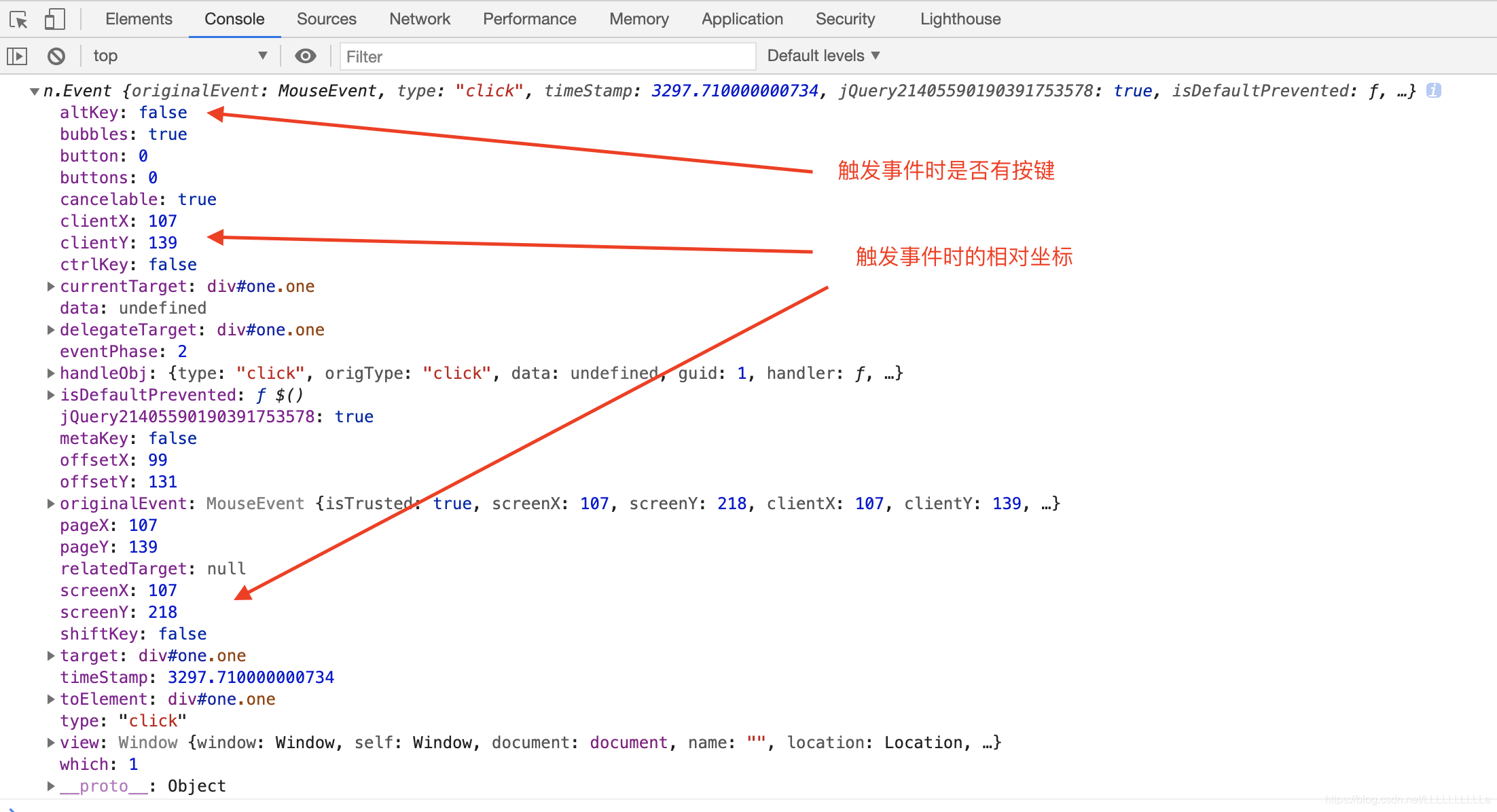
参数e的打印值展示
-
事件对象中有常用的三个坐标:
- screenX / screenY 对应屏幕最左上角的值
- clientX / clientY 距离页面左上角的位置(触发事件那一点距离可视区左上角的值)(忽视滚动条)
- pageX / pageY 距离页面最顶部的左上角的位置(会计算滚动条的距离)
-
阻止事件冒泡
-
阻止浏览器默认行为
-
即阻止事件冒泡,又阻止浏览器默认行为
jQuery事件对象demo-按键变色
<!DOCTYPE html>
<html lang="en">

<head>
  <meta charset="UTF-8">
  <meta name="viewport" content="width=device-width, initial-scale=1.0">
  <meta http-equiv="X-UA-Compatible" content="ie=edge">
  <title>Document</title>
  <script src="https://apps.bdimg.com/libs/jquery/2.1.4/jquery.min.js"></script>
  <style>
    .warp h1 {
      text-align: center;
    }

    .warp div {
      width: 400px;
      height: 300px;
      background: lightgoldenrodyellow;
      text-align: center;
      margin: auto;
      font-size: 30px;
      line-height: 300px;
    }
  </style>
</head>

<body>
  <div class="warp">
    <h1>按键改变颜色</h1>
    <div id="bgChange">
      keyCode为:
      <span id="keyCodeSpan"></span>
    </div>
  </div>
</body>

<script>
  $(function () {
    // 获取div
    var $div = $('#bgChange');
    // 获取显示按键的span
    var $showCode = $('#keyCodeSpan');
    // 给页面注册一个键盘按下事件
    $(document).keydown(function (e) {
      // console.log(e.keyCode);  // a: 65  b: 66  l: 76 w:87 r:82
      switch (e.keyCode) {
        case 65:
          $div.css('backgroundColor', 'red');
          $showCode.text(65);
          break;
        case 66:
          $div.css('backgroundColor', 'pink');
          $showCode.text(66);
          break;
        case 76:
          $div.css('backgroundColor', 'lightsalmon');
          $showCode.text(76);
          break;
        case 87:
          $div.css('backgroundColor', 'lightseagreen');
          $showCode.text(87);
          break;
        case 82:
          $div.css('backgroundColor', 'lightcoral');
          $showCode.text(82);
          break;
        default:
          $div.css('backgroundColor', 'lightgoldenrodyellow');
          $showCode.text('查无此键');
          break;
      }
    })
  })
</script>

</html>
五角星评分demo
- 鼠标移入到li上面,当前li和它前面的li都变成实心,后面的都是空心
- 鼠标离开li都变成空心
- 点击li,鼠标离开后,刚才点击的li和它前面的li都是实心,后面的都是空心
<!DOCTYPE html>
<html lang="en">

<head>
  <meta charset="UTF-8">
  <meta name="viewport" content="width=device-width, initial-scale=1.0">
  <meta http-equiv="X-UA-Compatible" content="ie=edge">
  <title>Document</title>
  <script src="https://apps.bdimg.com/libs/jquery/2.1.4/jquery.min.js"></script>
  <style>
    .comment {
      font-size: 30px;
      color: lightcoral;
    }

    ul {
      list-style: none;
      display: flex;
    }
  </style>
</head>

<body>
  <ul class="comment">
    <li>☆</li>
    <li>☆</li>
    <li>☆</li>
    <li>☆</li>
    <li>☆</li>
  </ul>
</body>

<script>
  $(function () {
    // 需求
    // 1. 鼠标移入到li上面,当前li和它前面的li都变成实心,后面的都是空心
    // 2. 鼠标离开li都变成空心
    // 3. 点击li,鼠标离开后,刚才点击的li和它前面的li都是实心,后面的都是空心

    // prev(); 上一个兄弟
    // prevAll(); 找之前所有的兄弟
    // next();  下一个兄弟
    // mextAll(); 后面所有的兄弟

    var sx_wjx = '★';
    var kx_wjx = '☆';
    // 1
    $('.comment>li').on('mouseenter', function () {
      $(this).text(sx_wjx).prevAll().text(sx_wjx);
    }).on('mouseleave', function () {

      // 2
      $('.comment>li').text(kx_wjx);

      // 3
      // 获取刚才点击的那个li
      $('.comment>li[clickCurrent]').text(sx_wjx).prevAll().text(sx_wjx);
    }).on('click', function () {
      // 给当前点击的五角星做一个记号,记录鼠标离开的时候,刚才点击的是哪个
      // 给当前点击的这个li添加一个属性
      $(this).attr('clickCurrent', 'current').siblings().removeAttr('clickCurrent');
    })
  })
</script>

</html>
链式编程
通俗点说,如果给元素调用一个方法,这个方法有返回值,并且返回值是一个jQuery对象,那就可以继续在点出jQuery方法
-
end()
筛选选择器会改变jQuery对象的DOM对象,想要恢复到上一次的状态,并且返回匹配元素之前的状态。通俗点说就是回到上一个状态
$(function(){
  // 链式编程

  // 1 通俗点说,如果给元素调用一个方法,这个方法有返回值,并且返回值是一个jQuery对象,那就可以继续在点出jQuery方法
  $('div').width(300).height(300);

  // 2 必须是jQuery对象才能点出jQuery方法
  $('div').width(300).width();  // 后面的这个width()是获取这个div的width的意思
  $('div').width(300).width().height(300); // 报错了,因为数值不能点出jQuery方法

  // 3 有时候一个方法返回的是一个jQuery对象,但是这个对象不是我们想要的对象,这时就不用再继续点下去了

  // end() 回到上一个状态
  // $('div').width(300).width() 返回的是一个数值
  $('div').width(300).width().end().height(300); // 报错。end()方法也是jQuery方法,它也需要一个jQueryfan对象才能点出来
})
</script>
显示迭代each()方法
jQuery的隐式迭代会对所有的DOM对象设置相同的值,但是如果我们需要给不同的对象设置不同的值的话,就需要自己进行迭代了
作用:遍历jQuery对象集合,为每个匹配的元素执行一个函数
$selector.each(function (index, element) {})
<!DOCTYPE html>
<html lang="en">

<head>
  <meta charset="UTF-8">
  <meta name="viewport" content="width=device-width, initial-scale=1.0">
  <meta http-equiv="X-UA-Compatible" content="ie=edge">
  <title>Document</title>
  <script src="https://apps.bdimg.com/libs/jquery/2.1.4/jquery.min.js"></script>
  <style>
    ul {
      list-style: none;
    }

    li {
      width: 200px;
      height: 200px;
      float: left;
      background-color: pink;
      text-align: center;
      line-height: 200px;
      margin: 0 20px 20px 0;
    }
  </style>
</head>

<body>
  <ul id="ulList">
    <li>can't see</li>
    <li>can't see</li>
    <li>can't see</li>
    <li>can't see</li>
    <li>can't see</li>
    <li>can't see</li>
    <li>can't see</li>
    <li>can't see</li>
    <li>can't see</li>
    <li>can't see</li>
  </ul>
</body>

<script>
  $(function () {
    // 需求
    // 找到所有的li标签,分别设置透明度,透明度递增到1

    // 获取所有的li标签
    var $lis = $('#ulList').children();

    // 给$lis中的每个li标签设置透明度
    $lis.css("opacity", 0.5); // 如果这样设置的话,由于隐式迭代,这样的话每个li标签的透明度都会是0.5

    //
    $lis.each(function (index, element) {
      // index 是每个li标签的索引
      // e  是每个li标签的dom对象

      $(element).css('opacity', (index + 1) / 10)
    })
  })
</script>

</html>
多库共存
<script>
  $(function () {
    // 1. 如何查看jQuery版本
    // 通过jQuery文件名来查看版本是不靠谱的,所以..可以通过以下四种方式来查看版本
    console.log(jQuery.fn.jquery);
    console.log(jQuery.prototype.jquery);
    console.log($.fn.jquery);
    console.log($.prototype.jquery);
    console.log('-------');

    // 2. 如果引入了多个jQuery文件,那使用的$是哪个文件中的?
    // 哪个文件后引入,使用的$就是谁的
    console.log($.fn.jquery, "$.fn.jquery");


    // 如果引入了多个jQuery库,后面引入的会把前面引入的覆盖掉,这就叫做多库冲突。那怎样让他们不冲突呢?
    // 👇
    // 3. 多库共存
    // jQuery 中有一个 noConflict() 方法,就是解决 $ 不冲突的方法。

    // $.noConflict();  // 意思就是后面引入的jQuery文件把$符号的控制权给释放了,释放之后用的$就是前面的了

    // 那后面版本的把$的控制权释放了之后用什么呢?
    // 因为 $ 和 jQuery 是等价的,所以后面的还可以用 jQuery
    console.log(jQuery.fn.jquery, "jQuery.fn.jquery"); // 这块的jQuery指的就是后引入版本

    // 那如果不想用 jQuery 来表示 $ 怎么办呢?
    // $.noConflict() 这个方法有一个返回值,这个版本将 $ 释放后,用 _$ 来代替 $
    var _$ = $.noConflict();
    console.log(_$.fn.jquery, "_$.fn.jquery");

    // 这个时候,如果说之前写的方法里面都是$,那修改为 _$ 之后之前的那些方法怎么用呢??
    // 可以写一个自执行函数

    (function ($) {
      // 在这个自执行函数中就可以继续使用$了
    }(_$))
  })
</script>
jQuery 插件介绍-颜色插件
<!DOCTYPE html>
<html lang="en">
<head>
  <meta charset="UTF-8">
  <meta name="viewport" content="width=device-width, initial-scale=1.0">
  <meta http-equiv="X-UA-Compatible" content="ie=edge">
  <title>Document</title>
  <script src="https://apps.bdimg.com/libs/jquery/2.1.4/jquery.min.js"></script>
  <script src="https://cdn.bootcdn.net/ajax/libs/jquery-color/2.0.0/jquery.color.js"></script>
  <style>
    div{
      width: 200px;
      height: 200px;
      background-color: lightcoral;
      position: relative;
      top: 0;
      left: 0;
    }
  </style>
</head>
<body>
  <input type="button" value="按钮" id="btn">
  <br><br>
  <div></div>
</body>

<script>
$(function(){
  // 需求: 点击按钮,让div做动画,left改变为800, background-color 变色
  // 说明:
  // jQuery的animate方法可以自定义动画,但是,只能针对数字类型的属性,如大小,高度,透明度等
  // animate()动画不会改变背景色,如果要改的话就需要使用插件

  $('#btn').on('click', function(){
    $('div').animate({
      left: 800,
      width: 100,
      height: 100,
      // 这时,这块的背景色不会起作用
      backgroundColor: 'gray'
    }, 2000)
  });

  // 什么是插件?
  // 其实就是用来做扩展功能的
})
</script>
</html>
自己开发jQuery 插件
<!DOCTYPE html>
<html lang="en">

<head>
  <meta charset="UTF-8">
  <meta name="viewport" content="width=device-width, initial-scale=1.0">
  <meta http-equiv="X-UA-Compatible" content="ie=edge">
  <title>Document</title>
  <script src="https://apps.bdimg.com/libs/jquery/2.1.4/jquery.min.js"></script>
  <script src="js/jQuery-bgColor.js"></script>
  <script src="js/jQuery-add.js"></script>
  <script></script>
  <style>

  </style>
</head>

<body>
  <div></div>
  <p></p>
</body>

<script>
  $(function () {
    // 1
    // $('div').width(200).height(200).css('backgroundColor', 'pink');   // 这样设置背景色有些麻烦
    // $('div').width(200).height(200).bgColor('red');   // 现在jQuery中没有这个bgColor()方法,所以会报错
    // 可以选择自己封装一个bgColor()方法

    // 2 那如何自己封装插件呢?有两种方式
    // 2.1 如果自己本地有jQuery.js文件,这个文件中有 prototype 原型,可以给这个prototype原型添加方法
    // $('div').width(200).height(200).bgColor('red');

    // $('div').bgColor('pink').width(300).height(300);   // 这时会报错,是因为这个bgColor方法没有返回值,默认undefined。这时可以在bgColor.js文件中完善一下
    $('div').bgColor('pink').width(300).height(300); // 这时有返回调用这个方法的jQuery本身了就可以了


    // 2.2 直接给jQuery添加方法(静态方法)
    // $.method = fn   静态方法
    // $.fn.method = fn   实例方法

    console.log($.add(3, 5));

  })
</script>

</html>
- jQuery-bgColor.js
(function ($) {
  // 需要给jQuery原型添加方法
  $.fn.bgColor = function (color) {
    // 这块的color是bgColor传过来的参数
    // console.log(this);   // 这块的this是调用这个bgColor方法的jQuery对象
    this.css('background', color);

    // 返回调用这个方法的jQuery本身
    return this;
  }
}(jQuery))

// 这块的 jQuery 指的是html文件中引入的jQuery文件,这个的作用是要给他里面的原型文件添加方法
- jQuery-add.js
(function ($) {
  // 直接给$添加方法
  $.add = function (num1, num2) {
    return num1 + num2;
  }
}(jQuery))
封装table插件
用插件给某个div添加一个table
<!DOCTYPE html>
<html lang="en">

<head>
  <meta charset="UTF-8">
  <meta name="viewport" content="width=device-width, initial-scale=1.0">
  <meta http-equiv="X-UA-Compatible" content="ie=edge">
  <title>Document</title>
  <script src="https://apps.bdimg.com/libs/jquery/2.1.4/jquery.min.js"></script>
  <script src="js/jQuery-table.js"></script>
  <style>

  </style>
</head>

<body>
  <div id="c">

  </div>
</body>

<script>
  $(function () {
    // 用插件给某个div添加一个table
    $('#c').table(['序号', '姓名', '年龄', '性别'], [{
        name: 'aaa',
        age: 18,
        gender: 'male'
      },
      {
        name: 'bbb',
        age: 19,
        gender: 'female'
      },
      {
        name: 'ccc',
        age: 20,
        gender: 'male'
      }
    ])
  })
</script>

</html>
(function ($) {
  $.fn.table = function (arrTableHeader, arrTablebody) {
    // 这里的this是一个jQuery对象,是调用这个table方法的jQuery对象

    var list = [];
    // 表格
    list.push('<table>');
    // 表头
    list.push('<thead>');
    list.push('<tr>');

    for (var i = 0; i < arrTableHeader.length; i++) {
      list.push('<th>');
      list.push(arrTableHeader[i]);
      list.push('</th>');
    }
    list.push('</tr>');
    list.push('</thead>')

    // 表格主体
    list.push('<tbody>');
    for (var i = 0; i < arrTablebody.length; i++) {
      list.push('<tr>');

      // 生成序号td
      list.push('<td>' + (i + 1) + '</td>')

      for (const j in arrTablebody[i]) {
        list.push('<td>');
        list.push(arrTablebody[i][j])
        list.push('</td>');
      }
      list.push('</tr>');
    }

    list.push('</tbody>');
    list.push('</table>');

    console.log(list.join(""));
    this.html(list.join(""));
  }
}(window.jQuery))






 扫一扫
扫一扫


 2119
2119

 被折叠的 条评论
为什么被折叠?
被折叠的 条评论
为什么被折叠?
 到【灌水乐园】发言





