





 本文介绍如何利用MyBatis-Plus实现分页功能,并通过Feign实现远程调用,同时将MySQL数据同步到Elasticsearch。
1、首先要有分页功能的代码
如何使用mybatis-plus实现分页,可参考
2、要创建feign远程调用模块
可以参考
3、在feign模块中声明远程调用接口
1.在feign模块中创建一个接口,名字可以是你要调用的服务名+client
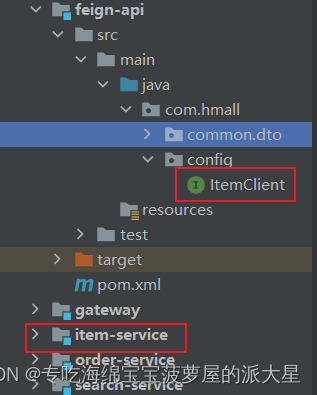
2.接口中的代码为要调用的方法,也就是分页方法
package com.hmall.config;

import com.hmall.common.dto.Item;
import com.hmall.common.dto.PageDTO;
import org.springframework.cloud.openfeign.FeignClient;
import org.springframework.web.bind.annotation.GetMapping;
import org.springframework.web.bind.annotation.RequestParam;

/**
 * 商品模块的远程调用
 *
 * @author ning
 * @since 2022/12/9 18:39
 */
//表示对应的是itemservice服务器
@FeignClient("itemservice")
public interface ItemClient {

    //分页查询
    //Item为数据库的实体类,需要复制一份到Feign模块,
    //注意,复制过来的实体类,只需要属性和构造方法,其他的不需要,否则会报错
    @GetMapping("/item/list")
    public PageDTO<Item> list(@RequestParam("page") Integer page, @RequestParam("size") Integer size);
}
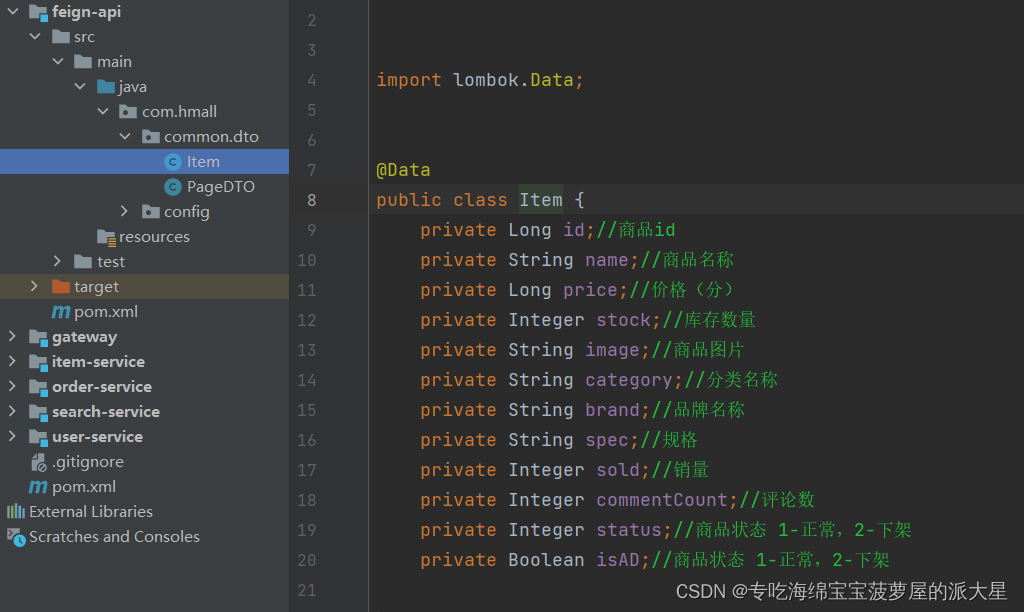
实体类:
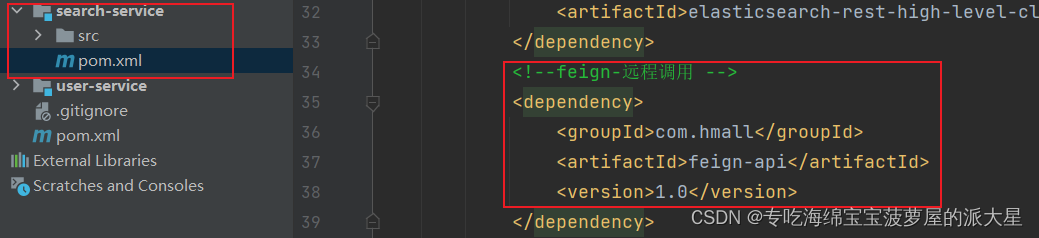
4、在es对应的模块加入ItemClient依赖
例如:
5、创建启动类
package com.hmall.search;

import org.springframework.boot.SpringApplication;
import org.springframework.boot.autoconfigure.SpringBootApplication;
import org.springframework.cloud.openfeign.EnableFeignClients;

/**
 * @author ning
 * @since 2022/12/9 20:03
 */

//开启Feign客户端
//basePackages 指定需要扫描的包
@EnableFeignClients(basePackages = "com.hmall.client")
@SpringBootApplication
public class SearchApplication {

    public static void main(String[] args) {
        SpringApplication.run(SearchApplication.class, args);
    }
}
6、创建es索引库对应的实体类itemDoc
package com.hmall.search.pojo;

import com.hmall.common.dto.Item;
import lombok.Data;
import lombok.NoArgsConstructor;
import org.springframework.beans.BeanUtils;

import java.util.ArrayList;
import java.util.List;

/**
 * es的实体类
 *
 * @author ning
 * @since 2022/12/9 20:12
 */

@NoArgsConstructor
@Data
public class ItemDoc {
    private Long id;//商品id
    private String name;//商品名称
    private Long price;//价格(分)
    private String image;//商品图片
    private String category;//分类名称
    private String brand;//品牌名称
    private Integer sold;//销量
    private Integer commentCount;//评论数
    private Boolean isAD;//商品状态 1-正常,2-下架
    private List<String> suggestion = new ArrayList<>(2);

    //把从数据查出来的参数复制到这个es的实体类
    public ItemDoc(Item item) {
        //复制属性
        BeanUtils.copyProperties(item,this);
        //自动补全字段
        //品牌
        suggestion.add(item.getBrand());
        //分类
        suggestion.add(item.getCategory());
    }
}
7、修改配置类(也可以不设置)
ribbon超时设置 (防止数据库读取时间长时,feign远程调用失败)
默认是3秒,查询如果超过3秒,就失败了
这是改成了5秒
ribbon:
  ConnectTimeout: 5000
  ReadTimeout: 5000
8、编写数据导入的测试方法
import com.alibaba.fastjson.JSON;
import com.hmall.client.ItemClient;
import com.hmall.common.dto.Item;
import com.hmall.common.dto.PageDTO;
import com.hmall.search.pojo.ItemDoc;
import lombok.extern.slf4j.Slf4j;
import org.elasticsearch.action.bulk.BulkRequest;
import org.elasticsearch.action.index.IndexRequest;
import org.elasticsearch.client.RequestOptions;
import org.elasticsearch.client.RestHighLevelClient;
import org.elasticsearch.common.xcontent.XContentType;
import org.junit.jupiter.api.Test;
import org.springframework.beans.factory.annotation.Autowired;
import org.springframework.boot.test.context.SpringBootTest;

import java.io.IOException;
import java.util.List;

/**
 * 使用分页把数据从mysql导入es
 *
 * @author ning
 * @since 2022/12/9 20:32
 */

@Slf4j
@SpringBootTest
public class FeignTest {

    //注入远程调用分页方法的接口
    @Autowired
    private ItemClient itemClient;

    //注入es的组件操作索引库的增删改查
    @Autowired
    private RestHighLevelClient client;


    /**
     * 测试:分页接口是否正常
     * 建议:在正式运行下边的数据导入的代码之前,先运行以下代码,确保远程调用分页接口正常
     */
    @Test
    void testItemClient() {
        PageDTO<Item> pageDTO = itemClient.list(1, 5);
        List<Item> itemList = pageDTO.getList();
        Long total = pageDTO.getTotal();
        log.info("total:::" + total);
        for (Item item : itemList) {
            System.out.println(item);
        }
    }


    /**
     * 数据导入(从mysql导入es)
     */
    @Test
    void testDataSync() {
        //使用分页查询数据库
        //(当前页和每页显示几条数据可以随便写,目的是获取总记录数)
        PageDTO<Item> pageDTO = itemClient.list(1, 1);
        //获取总记录数
        Long total = pageDTO.getTotal();
        System.out.println("total:" + total);
        //设置每页有1000条数据
        int size = 1000;
        //计算页数
        //总记录数和1000做模运算,如果为0,总页数就是total / size的值,否则就是total / size + 1
        Long page = total % size == 0 ? total / size : total / size + 1;
        //根据页数循环,把每一页的数据复制到es
        for (int i = 1; i <= page; i++) {
            //使用分页方法获取每页的数据
            pageDTO = itemClient.list(i, size);
            //创建一个批量请求
            BulkRequest bulkRequest = new BulkRequest();
            for (Item item : pageDTO.getList()) {
                //判断商品的状态,只有是可售卖的状态才可以复制到es
                if (item.getStatus() == 1) {
                    //创建es的实体类对象,并赋值数据库查出当页数据赋值
                    ItemDoc itemDoc = new ItemDoc(item);
                    //把封装之后的es的实体类对象转成json格式
                    String jsonString = JSON.toJSONString(itemDoc);
                    //System.out.println(itemDoc.getId());
                    //生成添加文档的请求
                    bulkRequest.add(                    //并把添加文档的请求存入批量请求中
                            new IndexRequest("item")    //创建一个添加文档的请求对象,item为添加到哪个索引库
                                    .id(itemDoc.getId().toString())//新添加数据的id
                                    .source(jsonString, XContentType.JSON)//添加的数据,声明数据格式是json
                    );
                }
            }
            try {
                //发送请求
                //第一个参数:创建的请求,第二个参数:是否还有其他执行的选项,一般选DEFAULT
                client.bulk(bulkRequest, RequestOptions.DEFAULT);
                System.out.printf("第%d页,本页总条数:%d,导入完毕\r\n", i, pageDTO.getList().size());
            } catch (IOException e) {
                e.printStackTrace();
            }
        }
    }
}
我出现的问题:
以上步骤执行完毕之后,我的代码报了一个错:
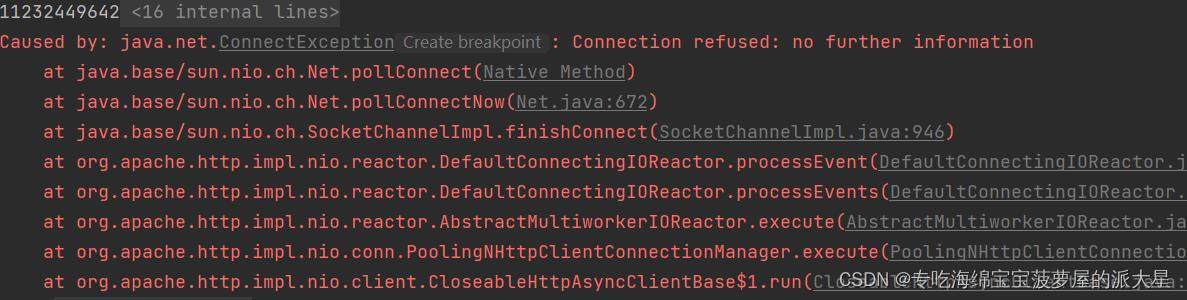

意思是,拒绝连接:没有进一步的信息
我的解决方案是:在yml文件中配置以下信息,问题就可以解决
spring:
  data:
    elasticsearch:
      repositories:
        enabled: true
    # 异常处理
  elasticsearch:
    rest:
      uris: 192.168.177.132:9200
但是,我水品有限,没有明白什么原因,还有这个配置文件中的内容也不是很清楚,如果有路过的大佬,原因耽误宝贵的时间,给小弟解释一下,小弟不胜感激!!!!





 扫一扫
扫一扫


 2839
2839

 被折叠的 条评论
为什么被折叠?
被折叠的 条评论
为什么被折叠?
 到【灌水乐园】发言





