



 本文介绍了一个SpringBoot应用中控制器层的实现,包括如何使用@GetMapping注解处理HTTP请求并返回JSON数据,以及如何通过Thymeleaf模板引擎将数据传递给HTML界面进行渲染。
先看下目录结构如下:
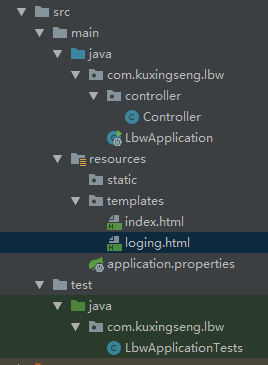
1,Controller层 如下:
package com.kuxingseng.lbw.controller;

import org.springframework.stereotype.Component;
import org.springframework.ui.Model;
import org.springframework.web.bind.annotation.GetMapping;
import org.springframework.web.bind.annotation.RequestMapping;
import org.springframework.web.bind.annotation.ResponseBody;

import java.util.ArrayList;
import java.util.HashMap;
import java.util.List;
import java.util.Map;

@Component   //与 Controller 和 Service  注解一样,都是为了加载到Spring容器中
@RequestMapping("/")  //通用的请求处理
public class Controller {


    @GetMapping("getMap")  //http请求处理  SpringBoot中4.3 引入的新的新的注解
    @ResponseBody   //用来返回JSON数据或者是XML数据。
    public List<Map> getMap() {
        List list = new ArrayList(1);
        Map m = new HashMap();
        m.put("code", "0");
        list.add(m);
        return list;
    }

    @GetMapping("logging")
    public String logging(Model model) {
        model.addAttribute("message", "渲染 测试");  //返回数据
        return "loging";//返回视图名称.html
    }
}
2,看下loging.html 界面
<!DOCTYPE html>
<html lang="en" xmlns:th="http://www.thymeleaf.org">
<head>
    <meta charset="UTF-8"/>
    <title>Title</title>
</head>
<body>
Logging
<!--/*@thymesVar id="message" type=""*/-->
<p th:text="${message}">渲染test</p>
</body>
</html>
解释2
【<html lang="en" xmlns:th="http://www.thymeleaf.org">】 需要引入thymeleaf
【th:text="${message}"】 根据后台返回的key 获取value ,会自动把【渲染test】 覆盖。
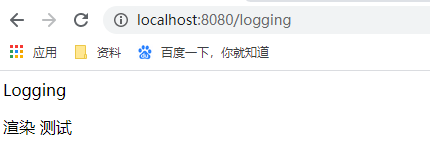
3,看下渲染效果:





 扫一扫
扫一扫


 3734
3734

 被折叠的 条评论
为什么被折叠?
被折叠的 条评论
为什么被折叠?
 到【灌水乐园】发言





