关于window.open=console.log用法

本文介绍如何在网页点击事件中调试,防止实际跳转,而是将后端接口返回的URL输出到控制台,便于查看数据。

点击 ===》跳转至新的页面
点击请求后端接口,跳转至后端返回的数据url
调试此页面,点击触发后,不想让其跳转,只想输出其跳转的url数据
可以在控制台使用:

window.open=console.log
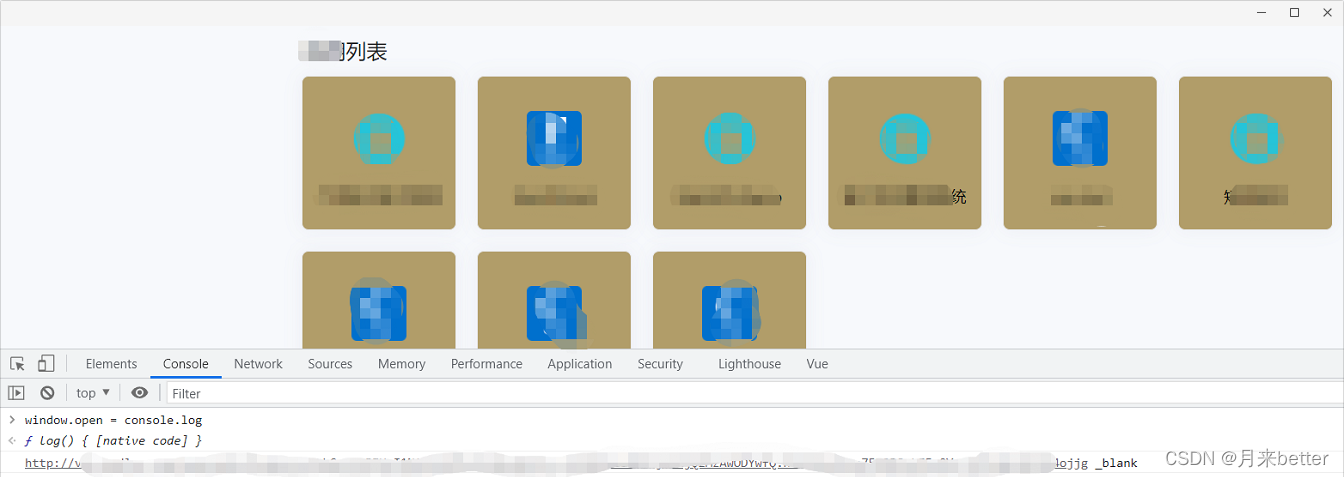
在这里插入图片描述

const open = async e => { console.log('🚀 ~ open ~ e:', e) if (visible.value) { close() return } let rect = null if (props.parentInstance) { rect = await getTriggerRectT() } else { rect = await getTriggerRect() } console.log('🚀 ~ open ~ rect:', rect) if (!rect) return doOpen(rect) } const doOpen = rect => { console.log('🚀 ~ rect:', rect) const res = uni.getSystemInfoSync() const windowHeight = Number(res.windowHeight) console.log('🚀 ~ windowHeight 视口高度:', windowHeight) const windowWidth = Number(res.windowWidth) console.log('🚀 ~ windowWidth 视口宽度:', windowWidth) let maxHeight = null if (props.maxHeight < (props.data.length + 1) * 46) { maxHeight = props.maxHeight } else { maxHeight = (props.data.length + 1) * 46 } console.log('🚀 ~ maxHeight 弹窗最大高度:', maxHeight) const menuWidth = 215 const rightGap = 12 const spaceBelow = windowHeight - rect.bottom console.log('🚀 ~ spaceBelow: 安全距离', spaceBelow) const spaceAbove = rect.top console.log('🚀 ~ spaceAbove: 安全距离', spaceAbove) const isBothDirectionsInsufficient = spaceAbove < maxHeight && spaceBelow < maxHeight console.log('🚀 ~ isBothDirectionsInsufficient:', isBothDirectionsInsufficient) let finalTop, finalLeft, finalTransform if (isBothDirectionsInsufficient) { // 上下空间都不够 → 居中显示 finalTop = windowHeight / 2 finalTransform = 'translate(0, -50%)' finalLeft = windowWidth - menuWidth - rightGap if (finalLeft < 0) finalLeft = 0 } else { // 正常方向展开 const needUpward = spaceBelow < maxHeight console.log('🚀 ~ needUpward:', needUpward) // 调整 finalTop 的计算逻辑,确保紧贴触发展开元素 finalTop = needUpward ? rect.top - maxHeight : rect.bottom; finalTransform = needUpward ? '' : ''; finalLeft = windowWidth - menuWidth - rightGap; if (finalLeft < 0) finalLeft = 0; } // 移除不必要的偏移 top.value = finalTop; console.log('🚀 ~ top.value:', top.value) left.value = finalLeft console.log('🚀 ~ left.value:', left.value) position.value = finalTransform console.log('🚀 ~ position.value:', position.value) visible.value = true emit('open', props.modelValue, props.trigger) nextTick(() => { bindOutsideClickListener() bindScrollListener() }) } 当前代码,如果触发元素距离视口上边越组件距离触发元素就会越近,如果触发元素距离视口下边越近距离就会越远,并没有紧贴住触发元素,并且如果是需要再触发元素上边紧贴的时候,弹窗会覆盖住触发元素
最新发布
11-11
评论
添加红包

请填写红包祝福语或标题

红包个数最小为10个

红包金额最低5元

当前余额3.43前往充值 >
需支付:10.00
成就一亿技术人!
领取后你会自动成为博主和红包主的粉丝 规则
hope_wisdom
发出的红包
实付
使用余额支付
点击重新获取
扫码支付
钱包余额 0

抵扣说明:

1.余额是钱包充值的虚拟货币,按照1:1的比例进行支付金额的抵扣。
2.余额无法直接购买下载,可以购买VIP、付费专栏及课程。

余额充值



