


 本文介绍Vue框架中this.$nextTick()方法的应用场景。该方法确保DOM更新后执行某些操作,适用于数据变化导致DOM更新的情况。通过实例展示了如何使用此方法正确获取更新后的DOM元素。
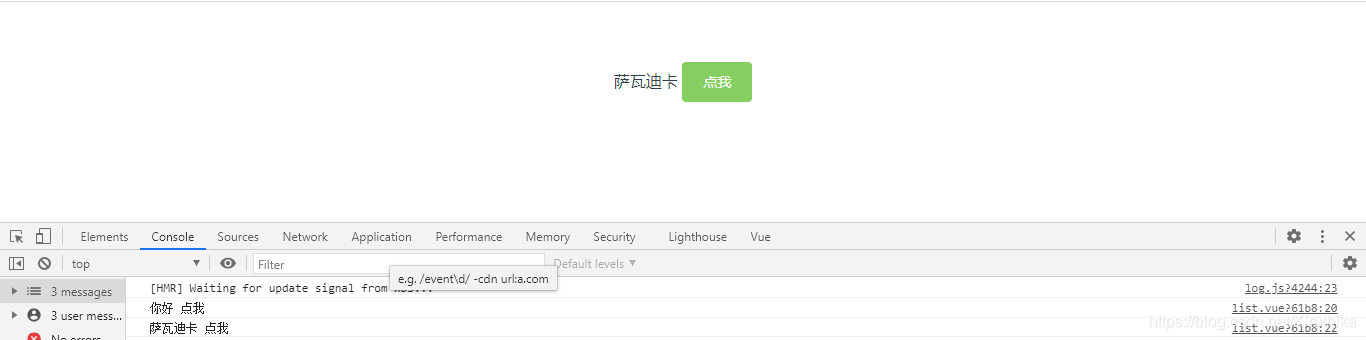
this.$ nextTick()方法主要是用在数据改变,dom改变应用场景中。vue中数据和dom渲染由于是异步的,所以,要让dom结构随数据改变这样的操作都应该放进this.$nextTick()的回调函数中
<template>
  <div class="list">
    <div ref="hello">
      {{helloVal}}
      <el-button type="success" @click="toClick">点我</el-button>
    </div>
  </div>
</template>

<script>
export default {
  data(){
    return {
      helloVal:'你好'
    }
  },
  methods:{
    toClick(){
      this.helloVal = "萨瓦迪卡";
      console.log(this.$refs['hello'].innerText);
      this.$nextTick(()=>{
        console.log(this.$refs['hello'].innerText)
      })

    }
  }
}
</script>





 扫一扫
扫一扫


 694
694

 被折叠的 条评论
为什么被折叠?
被折叠的 条评论
为什么被折叠?
 到【灌水乐园】发言





