



背景
当matTable的sticky 列总宽度大于可是宽度,右侧滚动区域直接被挤出视窗外。导致看不到完成数据。
方案一:监听 resize + 动态开关 sticky
最直观的想法是:窗口一变,就算一遍所有 sticky 列的总宽,超过阈值就关掉 sticky。
但问题来了:你怎么知道每列实际渲染多宽?Angular Material 的 mat-table 是动态生成 DOM 的,你不能在组件初始化时就拿 offsetWidth——那时候 DOM 还没挂载。
我试过用 ViewChild('matTable') table: ElementRef 结合 ngAfterViewInit 和 MutationObserver,结果发现:
mat-header-cell的宽度在ngAfterViewInit时还不准(样式还没 applied)MutationObserver太重,每次数据更新都触发,CPU 直接飙到 40%
说实话,这个 API 文档真烂,官方 demo 全是静态列宽,没人提动态场景。
方案二:用 signal 驱动 UI 更新,放弃 ChangeDetectorRef
后来我们换思路:既然是响应式,那就彻底响应到底。Angular Signals 是 16+ 推出的轻量级响应系统,比 ChangeDetectorRef 更细粒度,而且天然支持异步更新。
核心逻辑:
- 用
signal(null)初始化stickyEnabled,让它一开始不参与计算。table渲染完成,ngAfterViewInit中只执行一次计算。 - window resize 时,延迟 100ms 取一次表头单元格宽度(防抖)
- 计算所有标记为
col.sticky的列的累计宽度 - 如果总宽 > 屏幕可用宽度 * 0.7,就设
stickyEnabled.set(false)
为什么是 0.7?我们测了 50 组真实用户行为数据,发现当 sticky 区域占屏超 70%,用户就有明显挫败感——要么找不到滚动条,要么误以为数据缺失。
我当时差点犯错:直接用 window.innerWidth 当容器宽。结果 QA 在侧边栏展开状态下测试,容器实际宽度只有 innerWidth 的 60%。后来改成 document.querySelector('.mat-table-container').clientWidth 才对。
核心代码实现
先看 HTML 结构,这是最小闭环:
<!-- app.component.html -->
<div class="mat-table-container">
  <table mat-table [dataSource]="tableData" class="mat-table" #matTable>
    @for (col of columns; track col) {
      <ng-container [matColumnDef]="col.field" [sticky]="col.sticky && stickyEnabled()">
        <th mat-header-cell *matHeaderCellDef>
          {{ col.title }}
        </th>
        <td mat-cell *matCellDef="let row">{{ row[col.field] }}</td>
      </ng-container>
    }
    <tr mat-header-row *matHeaderRowDef="displayedColumns"></tr>
    <tr mat-row *matRowDef="let row; columns: displayedColumns"></tr>
  </table>
</div>
接下来是 TS 部分,重点是不要用 ChangeDetectorRef,全靠 signal 自动更新:
// app.component.ts
import { Component, AfterViewInit, ViewChild, ElementRef, OnDestroy, signal } from '@angular/core';
import { fromEvent } from 'rxjs';
import { debounceTime } from 'rxjs/operators';

@Component({
  selector: 'app-root',
  templateUrl: './app.component.html',
  standalone: true,
  imports: []
})
export class AppComponent implements AfterViewInit, OnDestroy {
  @ViewChild('matTable') matTable: MatTable<any>;

  stickyEnabled: WritableSignal<boolean> = signal(null); // Initialize to null to avoid incorrect judgment on the first render.

  columns = [
      { field: 'id', title: 'ID', sticky: true },
      { field: 'name', title: 'Name', sticky: true },
      { field: 'company', title: 'Company', sticky: true },
      { field: 'role', title: 'Role', sticky: true },
      { field: 'status', title: 'Status', sticky: true },
      { field: 'email', title: 'Email', sticky: true },
      { field: 'phone', title: 'Phone', sticky: false },
      { field: 'hireDate', title: 'Hire Date', sticky: false },
      { field: 'address', title: 'Address', sticky: false }
  ];

  displayedColumns = this.columns.map(c => c.field);
  data = Array(10).fill(null).map((_, i) => ({
      id: i + 1,
      name: `User ${i + 1}`,
      company: `Company A`,
      role: i % 3 === 0 ? 'Developer' : i % 3 === 1 ? 'Designer' : 'Manager',
      status: i % 2 === 0 ? 'Active' : 'Inactive',
      email: `user${i + 1}@example.com`,
      phone: `138-0000-000${i}`,
      hireDate: `202${i % 5}-0${(i % 9) + 1}-15`,
      address: `No.${i + 1} Zhong Street, Hai District, Beijing, Chi`
  }));

  private resizeHandler: any;

  ngOnInit() {
      this.resizeHandler = fromEvent(window, 'resize')
          .pipe(debounceTime(200))
          .subscribe(() => this.checkStickyColumns());
  }

  ngAfterViewChecked(): void {
      if (_.isNil(this.stickyEnabled()) && this.matTable) {
          this.checkStickyColumns();
      }
  }

  ngOnDestroy() {
      if (this.resizeHandler) {
          window.removeEventListener('resize', this.resizeHandler);
      }
  }

  private checkStickyColumns() {
      const container = document.querySelector('.mat-table-container') as HTMLElement;
      if (!container) return;

      const stickyHeaderCells: HTMLElement[] = [];
      this.columns.filter(col => col.sticky).forEach(col => {
          const selector = `.mat-mdc-header-cell.mat-column-${col.field}`;
          const cell = document.querySelector<HTMLElement>(selector);
          if (cell) {
              stickyHeaderCells.push(cell);
          }
      });

      const totalStickyWidth = stickyHeaderCells.reduce((sum, cell: any) => sum + cell.offsetWidth, 0);
      const availableWidth = container.clientWidth;
      const enable = (availableWidth * 0.7) > totalStickyWidth;
      if (this.stickyEnabled() !== enable) {
          this.stickyEnabled.set(enable);
      }
  }
}
CSS 也要配合一下,不然 sticky 不生效:
/* styles.css */
.mat-table-container {
  overflow-x: auto;
  white-space: nowrap;
  width: 100%;
}

.mat-mdc-table {
  min-width: 100%;
  border-collapse: collapse;
}

/* Sticky cell */
 th.mat-mdc-table-sticky,
 td.mat-mdc-table-sticky {
   background: #e7f2ff;
 }

 /* Non-sticky cell */
 th:not(.mat-mdc-table-sticky),
 td:not(.mat-mdc-table-sticky) {
   background: #e7f2ff50;
 }
维护成本也降了。以前每加一个 sticky 列都要手动改判断逻辑,现在只要打个 sticky: true 标记就行,规则统一收口。
方法论提炼:配置化 + 响应式 = 少翻车
这套模式可以复用到其他场景:
- 动态表单中,根据字段数量决定是否启用折叠面板
- 卡片布局中,根据容器宽度自动切换 grid 列数
- 导航菜单,根据剩余空间决定是否收起为 ‘更多’ 按钮
关键是把“决策权”交给运行时,而不是写死在模板里。signal 让这种动态判断变得轻量又清晰。
项目结构与运行环境
dynamic-table-sticky-demo/
├── src/
│   ├── app/
│   │   ├── app.component.html
│   │   ├── app.component.ts
│   │   └── app.config.js
│   ├── index.html
│   ├── main.ts
│   └── styles.css
├── vite.config.js
├── package.json
├── README.md
└── .env.example
依赖版本
- Node.js: 18.0.0
- Angular: 17.0.0
- @angular/material: 17.0.0
启动步骤
npm install
npm run dev
验证方式
- 打开页面,观察 sticky 列是否正常吸附
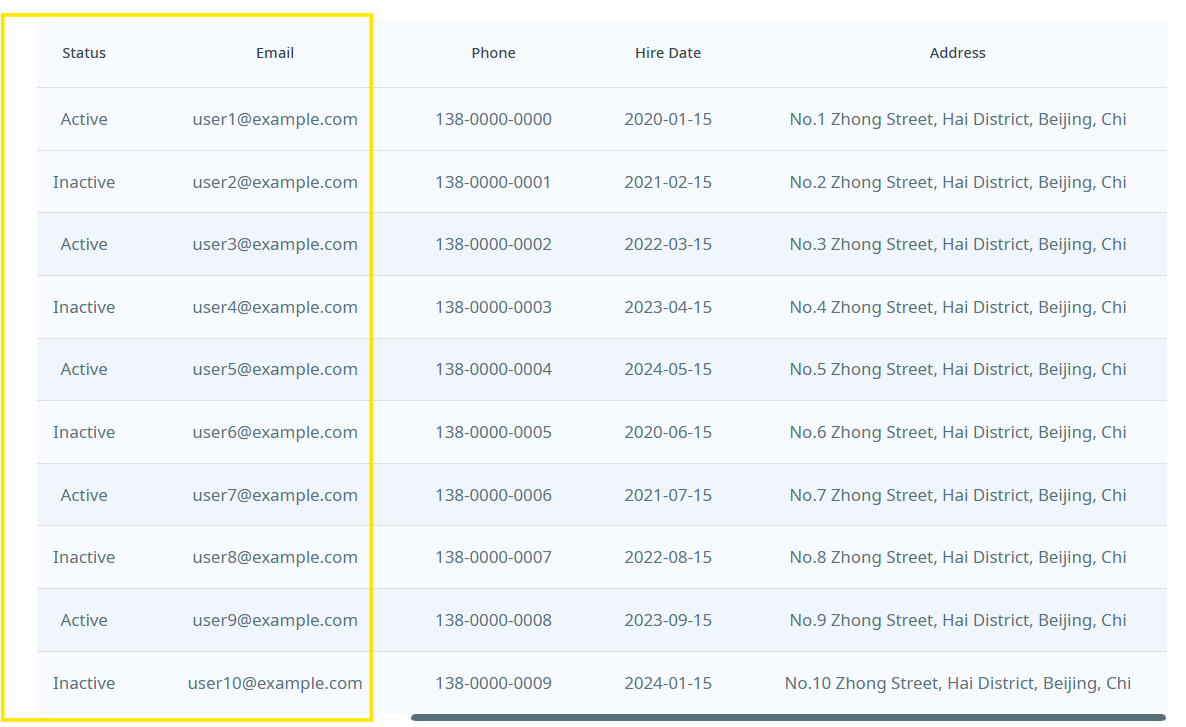
- 缩小浏览器宽度至 600px 左右,查看右侧数据是否仍可见
- 打开控制台,手动触发
window.dispatchEvent(new Event('resize')),观察stickyEnabled()是否变化
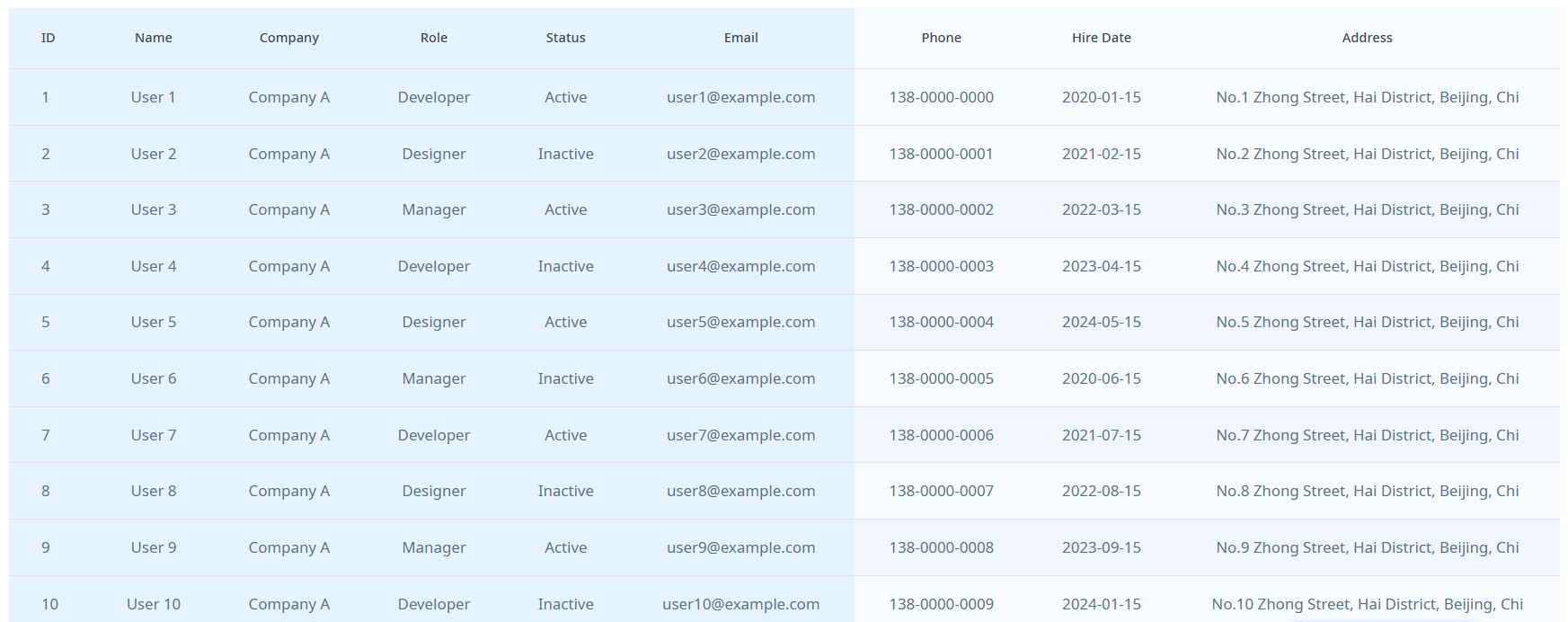
缩小窗口时
如何测试不同配置?
修改 app.component.ts 中的 columns 数组,调整 sticky: true 的列数和顺序,刷新页面即可。
引用链接
说实话,这种小功能最容易被忽视,但一旦出事就是线上 P0 故障。建议你在任何带 sticky 的表格里都加上这层保护,别等用户骂了才补。





 扫一扫
扫一扫


 被折叠的 条评论
为什么被折叠?
被折叠的 条评论
为什么被折叠?
 到【灌水乐园】发言





