





 该博客介绍了如何使用OpenCV和face_recognition库进行人脸识别。首先讲解了OpenCV的基础知识,包括矩形绘制和文本标注。接着详细阐述了face_recognition库的关键函数,如face_locations用于检测人脸位置,face_encodings获取人脸编码,compare_faces和face_distance用于比对和计算人脸相似度。在实际应用中,通过读取图片库对图片进行编码,然后利用摄像头实时捕捉人脸,进行识别与匹配,显示匹配结果。
文章目录
1.前置知识点
(1)Opencv中矩形,绘制文本
https://mydreamambitious.blog.youkuaiyun.com/article/details/125392536
(2)Opencv中基础的知识点
https://mydreamambitious.blog.youkuaiyun.com/article/details/125351256
(3)face_recognition.face_locations(img1ToRGB)
face_locations(img, number_of_times_to_upsample=1, model="hog")。
img: 是一个 numpy.array 指定要查找人脸位置的图像矩阵;
number_of_times_to_upsample: 指定要查找的次数;默认值为1;
model :指定查找的模式 'hog' 不精确但是在CPU上运算速度快 'CNN' 是一种深度学习的精确查找,但是速度慢。需要GPU/CUDA加速;
返回 值为人脸的位置 list  (top, right, bottom, left);
(4)face_recognition.face_encodings(img1ToRGB,img1Face)
face_encodings(face_image, known_face_locations=None, num_jitters=1, model="small")。
face_image :指定数据类型为numpy.array编码的人脸矩阵数据类型;
known_face_locations: 指定人脸位置 如果值为None 则默认按照 'Hog'模式 调用 _raw_face_locations 查找人脸位置;
num_jitters: 重新采样编码次数 默认为1 ;
model: 预测人脸关键点个数 large 为68个点 small 为 5个关键点,使用small更快;
返回 128维特征向量 list。
(5)face_recognition.compare_faces(encodeings,face_encoding)
compare_faces(known_face_encodings, face_encoding_to_check, tolerance=0.6)。
known_face_encodings:  已经编码的人脸 list
face_encoding_to_check :要检测的单个人脸
tolerance: 默认人脸对比距离长度对比方式np.linalg.norm(face_encodings - face_to_compare, axis=1)
返回值为 对比结果 list(如果匹配则为True,否则为false)
(6)face_recognition.face_distance(encodeings,face_encoding)
face_distance(face_encodings, face_to_compare)。
face_encodings:要比较的面部编码列表;
face_to_compare:要进行比较的面部编码列表。
返回值:要进行比较的面部和列表中的面部编码的距离。
2.正文
(1)首选读取“库”中的图片
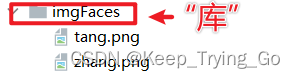
这里的“库”可以是指一个文件夹,文件夹下面包含了要进行编码的图片。
import os
import cv2
import cvzone
import numpy as np
import face_recognition
from datetime import datetime

img_path='imgFaces'
images=[]
#保存文件名,也就是图像中人物的名称
classNames=[]
#列出文件夹下的所有图片
myList=os.listdir(img_path)
# print(myList)
for pic in myList:
    img=cv2.imread(f'{img_path}/{pic}')
    images.append(img)
    classNames.append(os.path.splitext(pic)[0])
(2)对读取的所有图片进行编码
# print(classNames)
def findEncodeings(images):
    encodeList=[]
    for img in images:
        img=cv2.cvtColor(src=img,code=cv2.COLOR_BGR2RGB)
        encode=face_recognition.face_encodings(img)[0]
        encodeList.append(encode)
    return encodeList
encodeListKnown=findEncodeings(images)
(3)打开摄像头进行人脸识别
cap=cv2.VideoCapture(0)
while cap.isOpened():
    ret,frame=cap.read()
    frame=cv2.resize(src=frame,dsize=(750,600))
    frameRGB=cv2.cvtColor(src=frame,code=cv2.COLOR_BGR2RGB)
    #对摄像头读取的检测人脸
    facesLocate=face_recognition.face_locations(frameRGB)
    #进行特征编码
    faceEncoded=face_recognition.face_encodings(frameRGB,facesLocate)
	#遍历检测的人脸和库中读取的图片进行对比,计算其相似度
    for (top,right, bottom,left),face_encoding in zip(facesLocate,faceEncoded):
        #进行匹配
        matchs=face_recognition.compare_faces(encodeListKnown,face_encoding)
        #计算相似度
        distance=face_recognition.face_distance(encodeListKnown,face_encoding)
        min_distanceIndex=np.argmin(distance)
        #判断是否匹配
        name='Unknow'
        if matchs[min_distanceIndex]:
            name=classNames[min_distanceIndex]

        cv2.rectangle(img=frame,pt1=(left,top),pt2=(right,bottom),
                      color=(0,255,0),thickness=3)
        cvzone.putTextRect(img=frame,text=name,pos=(left+3,top-10),scale=1,thickness=2,colorR=(0,255,0))

    cv2.imshow('frame',frame)
    key=cv2.waitKey(1)
    if key==27:
        break
cap.release()
cv2.destroyAllWindows()
注意这里是人脸识别,不是人脸检测。






 扫一扫
扫一扫


 1640
1640


 到【灌水乐园】发言



