





 本文详细介绍了在Qt中实现多线程操作的方法,包括QThread的使用、线程的创建与启动,以及如何通过线程锁QMutex来解决多线程环境下对同一资源操作的问题,确保数据的安全性和一致性。
2020-8-24 多线程操作
1.多线程简述:
a.时间片轮流 每个进程轮流使用CPU
b.按照进程优先级使用CPU,如:车载,军工软件…
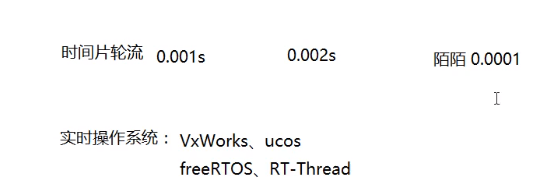
2.QThread介绍

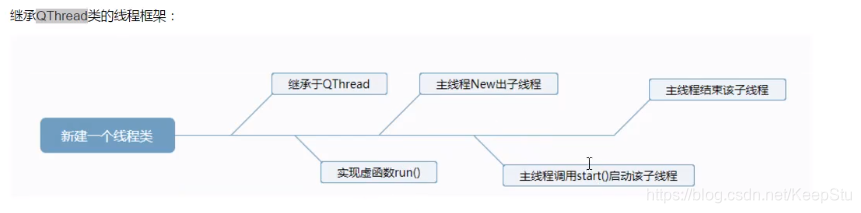
3.流程
添加新文件-新建类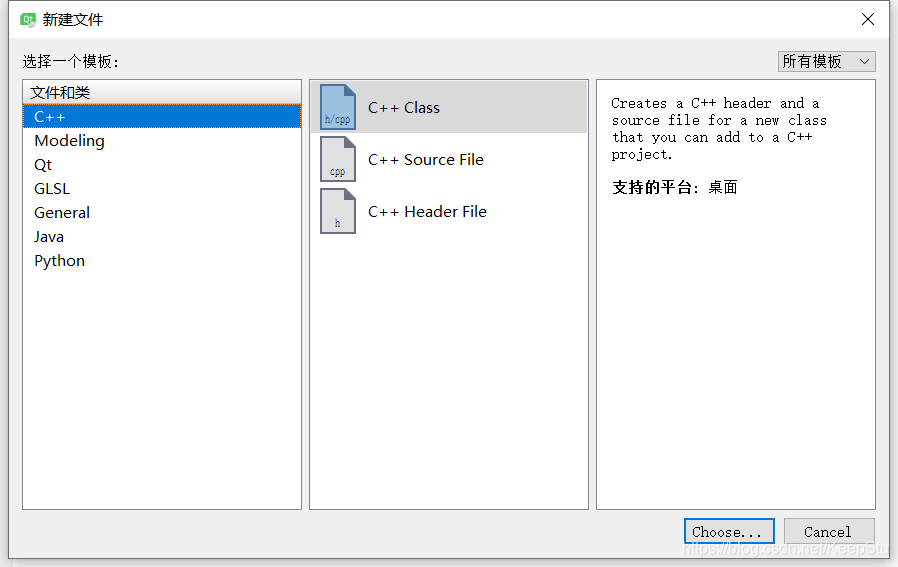
类定义
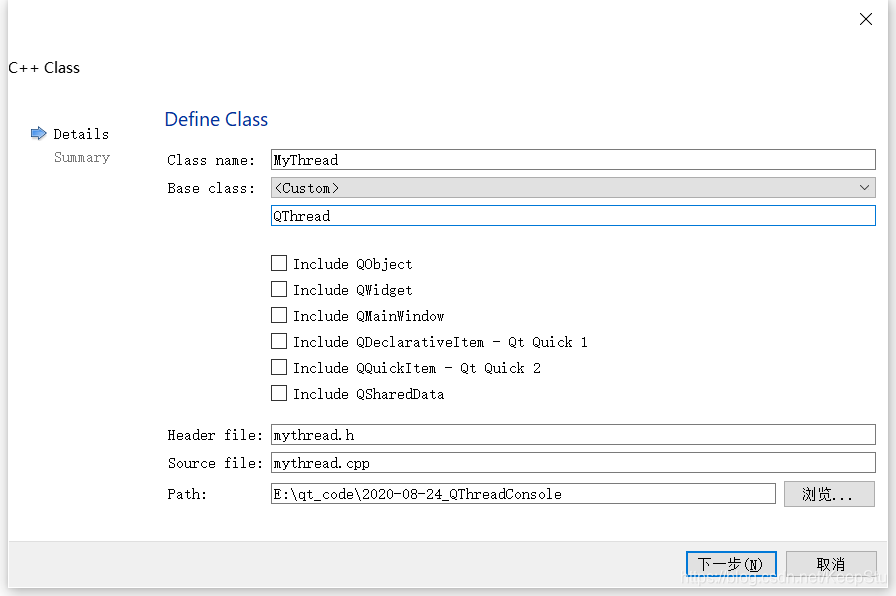
添加头文件#include <QThread>
在头文件中声明宏Q_OBJECT,这样才支持信号与槽
#ifndef MYTHREAD_H
#define MYTHREAD_H

#include <QThread>


class MyThread : public QThread
{
    Q_OBJECT
public:
    MyThread();
};

#endif // MYTHREAD_H
4.实现run()函数
声明:
protected:
    virtual void run();
5.代码
mythread.h
#ifndef MYTHREAD_H
#define MYTHREAD_H

#include <QThread>
#include <QString>
#include <QDebug>

class MyThread : public QThread
{
    Q_OBJECT
public:
    MyThread();
    void setThreadName(QString name);
protected:
    virtual void run();
private:
    QString threadName;
};

#endif // MYTHREAD_H
main.cpp
#include <QCoreApplication>
#include "mythread.h"//加入自拟的线程类
int main(int argc, char *argv[])
{
    QCoreApplication a(argc, argv);

    qDebug()<<QThread::currentThreadId();//打印主线程ID

    MyThread thread1;//定义一个线程对象
    thread1.setThreadName("thread1");
    thread1.start();//运行线程1
    MyThread thread2;
    thread2.setThreadName("thread2");
    thread2.start();//运行线程2

    //每个线程有线程的ID

    return a.exec();
}
mythread.cpp
#include "mythread.h"

MyThread::MyThread()//构造函数
{
    //打印当前线程的ID
    qDebug()<<"MyThread()"<<threadName<<QThread::currentThreadId();
}

void MyThread::setThreadName(QString name)
{
    threadName=name;
    qDebug()<<"setThreadName()"<<threadName<<QThread::currentThreadId();
}

void MyThread::run()//run函数内的都会独立开辟线程
{
    qDebug()<<"run()"<<threadName<<QThread::currentThreadId();
    //exec();//只让线程执行一次
    while(true) //一般IO操作会使用while,如果满足条件即进入while轮询,如果不满足条件就阻塞,只运行外部线程
    {
        qDebug()<<"run()while"<<threadName<<QThread::currentThreadId();
        qDebug()<<"thread:"<<threadName;
        sleep(1);//睡眠1ms,让出权限
    }

}
6.分析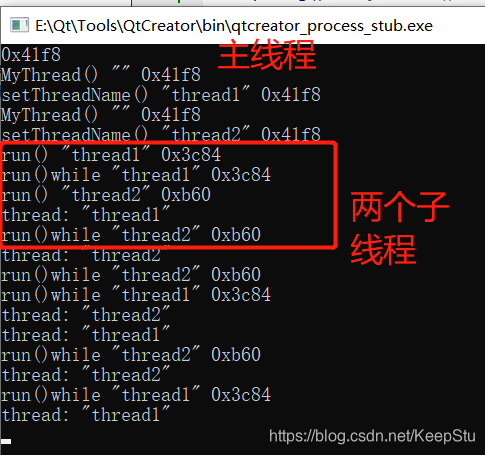
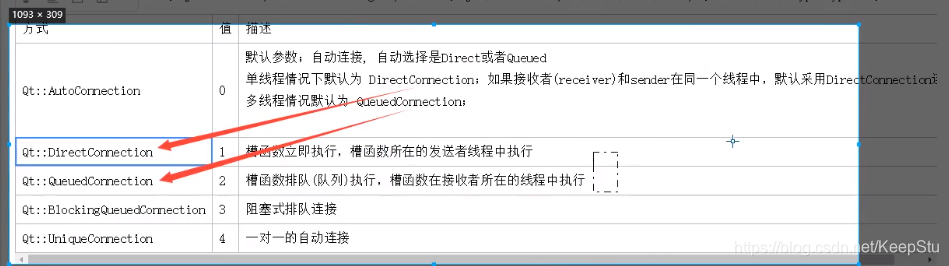
7.线程中的connect信号与槽的连接
8.对同一资源操作的线程锁
QMutex(一种线程安全方式)
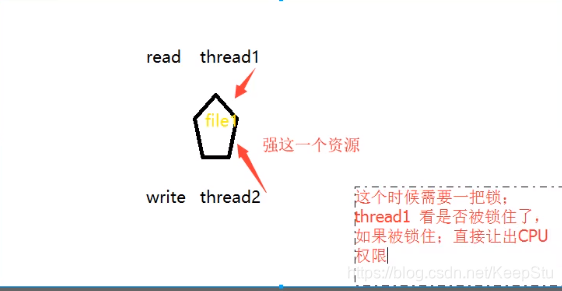
注意:线程锁QMutex必须为全局变量,不要写入类成员变量中
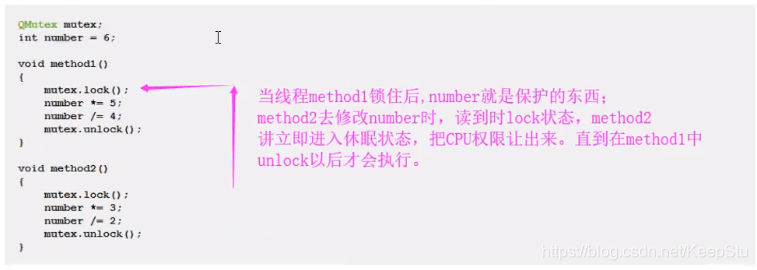
未加锁的运行结果:
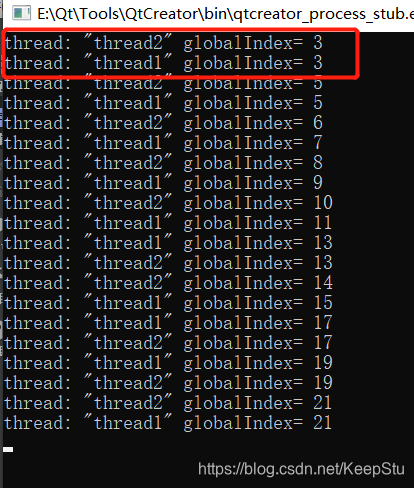
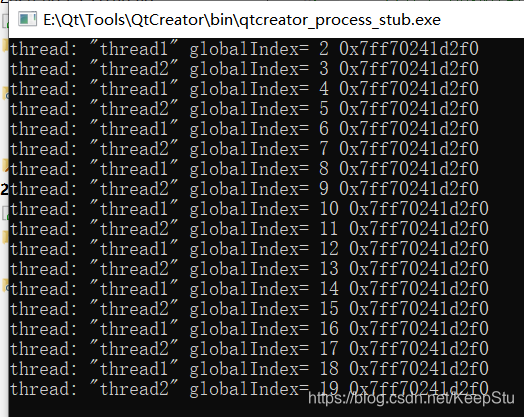
加入全局锁之后:
代码:
mythread.h
#ifndef MYTHREAD_H
#define MYTHREAD_H

#include <QThread>
#include <QString>
#include <QDebug>
#include <QMutex>

class MyThread : public QThread
{
    Q_OBJECT
public:
    MyThread();
    void setThreadName(QString name);
protected:
    virtual void run();
private:
    QString threadName;
};

#endif // MYTHREAD_H
main.cpp
#include <QCoreApplication>
#include "mythread.h"//加入自拟的线程类
#include <QMutex>
QMutex globalMutex;//定义一个全局锁
int globalIndex=1;//定义一个全局变量
int main(int argc, char *argv[])
{
    QCoreApplication a(argc, argv);


    MyThread thread1;//定义一个线程对象
    thread1.setThreadName("thread1");
    thread1.start();//运行线程1
    MyThread thread2;
    thread2.setThreadName("thread2");
    thread2.start();//运行线程2

    //每个线程有线程的ID

    return a.exec();
}
mythread.cpp
#include "mythread.h"
extern int globalIndex;//使用全局变量
extern QMutex globalMutex;//使用全局锁
MyThread::MyThread()//构造函数
{

}

void MyThread::setThreadName(QString name)
{
    threadName=name;

}


void MyThread::run()//run函数内的都会独立开辟线程
{

    //exec();//只让线程执行一次
    while(true) //一般IO操作会使用while,如果满足条件即进入while轮询,如果不满足条件就阻塞,只运行外部线程
    {
        globalMutex.lock();//先锁住
        globalIndex++;
        //qDebug()<<"run()while"<<threadName<<QThread::currentThreadId();
        qDebug()<<"thread:"<<threadName<<"globalIndex="<<globalIndex<<&globalMutex;//&globalMutex表示da'yin打印锁对象的地址,看看是不是同一把锁
        globalMutex.unlock();//解锁对资源的操作
        sleep(1);//睡眠1ms,让出权限
    }

}





 扫一扫
扫一扫


 被折叠的 条评论
为什么被折叠?
被折叠的 条评论
为什么被折叠?
 到【灌水乐园】发言





