


本文以 kali-linux-2023.3-vmware-amd64 为例。
1:nslookup
nslookup(name server lookup)常用于域名解析和网络故障排除。
nslookup 有两种操作模式,两种模式功能一致:
-
交互式模式
适用于在一个会话中执行多个查询或操作。 -
命令行模式(非交互模式)
适用于执行一次性的简单查询或将其嵌入到脚本中。
2:选项介绍
选项总览:man nslookup 命令中的解释。
NSLOOKUP(1)                         BIND 9                        NSLOOKUP(1)

NAME
       nslookup - query Internet name servers interactively

SYNOPSIS
       nslookup [-option] [name | -] [server]

DESCRIPTION
       nslookup is a program to query Internet domain name servers.  nslookup
       has  two  modes: interactive and non-interactive. Interactive mode al‐
       lows the user to query name  servers  for  information  about  various
       hosts and domains or to print a list of hosts in a domain.  Non-inter‐
       active  mode prints just the name and requested information for a host
       or domain.

ARGUMENTS
       Interactive mode is entered in the following cases:

       a. when no arguments are given (the default name server is used);

       b. when the first argument is a hyphen (-) and the second argument  is
          the host name or Internet address of a name server.

       Non-interactive  mode is used when the name or Internet address of the
       host to be looked up is given as the first argument. The optional sec‐
       ond argument specifies the host name or address of a name server.

       Options can also be specified on the command line if they precede  the
       arguments  and  are prefixed with a hyphen. For example, to change the
       default query type to host information, with an initial timeout of  10
       seconds, type:

          nslookup -query=hinfo  -timeout=10

       The  -version  option  causes nslookup to print the version number and
       immediately exit.

INTERACTIVE COMMANDS
       host [server]
              This command looks up information for host  using  the  current
              default server or using server, if specified. If host is an In‐
              ternet  address and the query type is A or PTR, the name of the
              host is returned. If host is a name and does not have a  trail‐
              ing period (.), the search list is used to qualify the name.

              To look up a host not in the current domain, append a period to
              the name.

       server domain | lserver domain
              These  commands  change  the  default server to domain; lserver
              uses the initial server to look up  information  about  domain,
              while  server uses the current default server. If an authorita‐
              tive answer cannot be found, the names of  servers  that  might
              have the answer are returned.

       root   This command is not implemented.

       finger This command is not implemented.

       ls     This command is not implemented.

       view   This command is not implemented.

       help   This command is not implemented.

       ?      This command is not implemented.

       exit   This command exits the program.

       set keyword[=value]
              This  command  is used to change state information that affects
              the lookups. Valid keywords are:

              all    This keyword prints the current values of the frequently
                     used options to set. Information about the  current  de‐
                     fault server and host is also printed.

              class=value
                     This keyword changes the query class to one of:

                     IN     the Internet class

                     CH     the Chaos class

                     HS     the Hesiod class

                     ANY    wildcard

                     The  class  specifies the protocol group of the informa‐
                     tion. The default is IN; the abbreviation for this  key‐
                     word is cl.

              nodebug
                     This keyword turns on or off the display of the full re‐
                     sponse  packet,  and  any intermediate response packets,
                     when searching. The default for this keyword is nodebug;
                     the abbreviation for this keyword is [no]deb.

              nod2   This keyword turns debugging mode on or off.  This  dis‐
                     plays  more about what nslookup is doing. The default is
                     nod2.

              domain=name
                     This keyword sets the search list to name.

              nosearch
                     If the lookup request contains at least one period,  but
                     does  not  end  with a trailing period, this keyword ap‐
                     pends the domain names in the domain search list to  the
                     request  until  an  answer  is  received. The default is
                     search.

              port=value
                     This keyword changes the  default  TCP/UDP  name  server
                     port  to  value from its default, port 53. The abbrevia‐
                     tion for this keyword is po.

              querytype=value | type=value
                     This keyword changes the type of the  information  query
                     to value. The defaults are A and then AAAA; the abbrevi‐
                     ations for these keywords are q and ty.

                     Please  note  that  it  is  only possible to specify one
                     query type. Only the default behavior looks up both when
                     an alternative is not specified.

              norecurse
                     This keyword  tells  the  name  server  to  query  other
                     servers if it does not have the information. The default
                     is   recurse;  the  abbreviation  for  this  keyword  is
                     [no]rec.

              ndots=number
                     This keyword sets the number of dots (label  separators)
                     in  a domain that disables searching. Absolute names al‐
                     ways stop searching.

              retry=number
                     This keyword sets the number of retries to number.

              timeout=number
                     This keyword changes the  initial  timeout  interval  to
                     wait for a reply to number, in seconds.

              novc   This keyword indicates that a virtual circuit should al‐
                     ways  be used when sending requests to the server.  novc
                     is the default.

              nofail This keyword tries the next nameserver if  a  nameserver
                     responds with SERVFAIL or a referral (nofail), or termi‐
                     nates  the  query (fail) on such a response. The default
                     is nofail.

RETURN VALUES
       nslookup returns with an exit status of 1 if any query failed,  and  0
       otherwise.

IDN SUPPORT
       If  nslookup  has  been built with IDN (internationalized domain name)
       support, it can accept and display non-ASCII  domain  names.  nslookup
       appropriately  converts  character  encoding  of  a domain name before
       sending a request to a DNS server  or  displaying  a  reply  from  the
       server.   To  turn off IDN support, define the IDN_DISABLE environment
       variable. IDN support is disabled if the variable is set when nslookup
       runs, or when the standard output is not a tty.

FILES
       /etc/resolv.conf

SEE ALSO
       dig(1), host(1), named(8).

AUTHOR
       Internet Systems Consortium

COPYRIGHT
       2023, Internet Systems Consortium

9.19.17-2~kali1-Kali              2023-09-08                      NSLOOKUP(1)
3:示例 - 命令行模式
3.1:查询类型设置
基本语法:nslookup [-ty=<type>] <target>
示例 3.1-1:在不指定参数的情况下,默认查询类型为 A。
nslookup [-ty=a] baidu.com
结果:
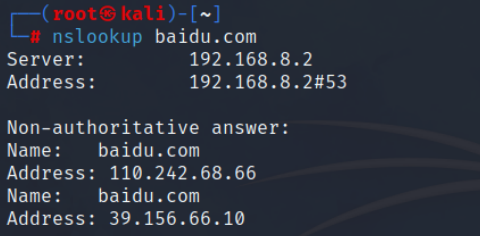
解释:
-
Server、Address:
本次查询的 DNS 服务器。可以自己指定。默认情况下 DNS 服务器的端口为 53。 -
Non-authoritative answer(非权威应答):
说明回答来自其他服务器的缓存,而不是权威 DNS 服务器。
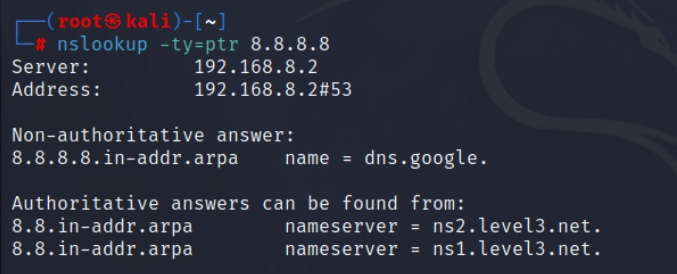
示例 3.1-2:PTR 反向 DNS 解析。
nslookup -ty=ptr 8.8.8.8
结果:
3.2:指定 DNS 服务器
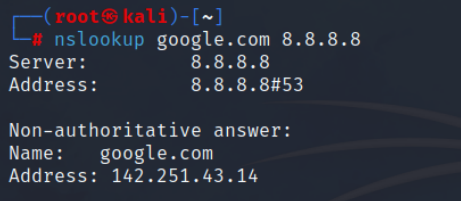
基本语法:nslookup <target> <DNS server>
示例 3.2-1:指定服务器为 8.8.8.8。
nslookup google.com 8.8.8.8
结果:
4:示例 - 交互模式
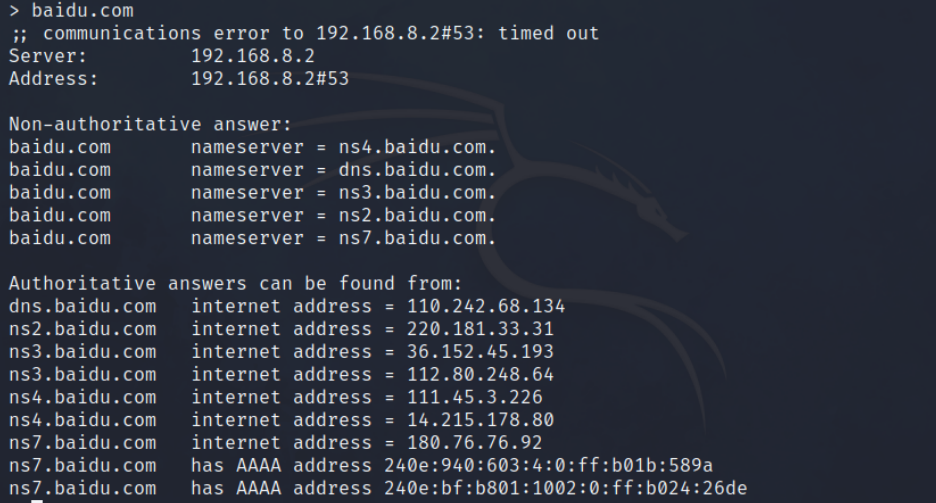
示例 4-1:查找权威服务器。
# 1、
nslookup

# 2、
set ty=NS

# 3、查看当前配置
set all

# 4、查找 baidu.com 对应的权威服务器
baidu.com
结果:
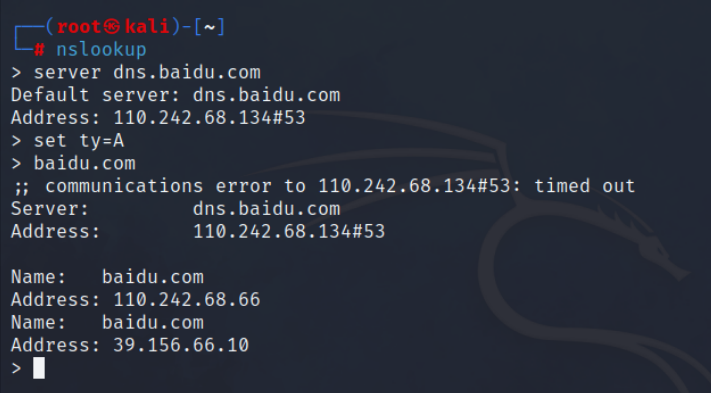
示例 4-2:指定 dns.baidu.com 作为 DNS 服务器对 baidu.com 执行 type=A 的查询。
# 1、
nslookup

# 2、
server dns.baidu.com

# 3、
set ty=A

# 4、
baidu.com
结果:
5:其他
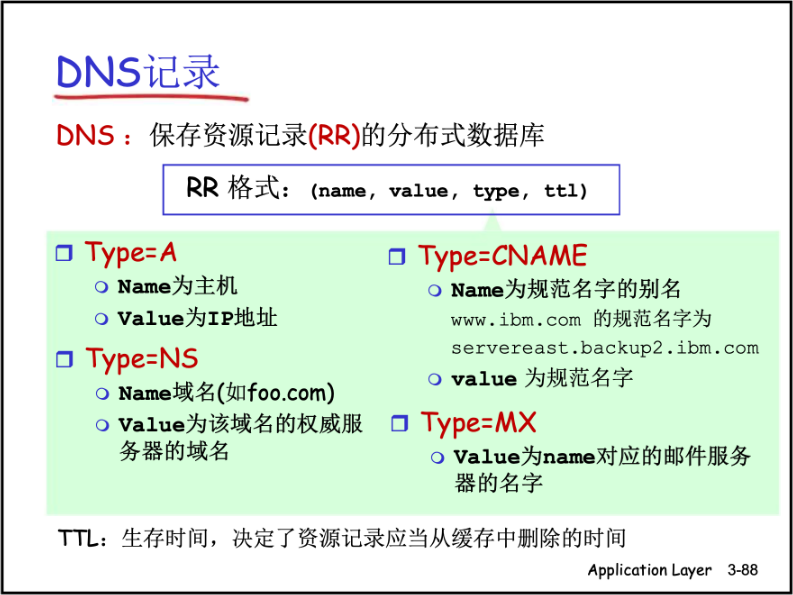
DNS 记录:
《10 most used Nslookup commands》:
https://www.cloudns.net/blog/10-most-used-nslookup-commands/
《nslookup命令详解》:
https://blog.youkuaiyun.com/xg_ren/article/details/80782338
兰生幽谷,不为莫服而不芳。舟在江海,不为莫乘而不浮。君子行义,不为莫知而止休。
——《淮南子》(西汉)刘安

 1710


 扫一扫


 被折叠的 条评论
为什么被折叠?
 到【灌水乐园】发言


