



vue生命周期的那张图,就不帖了。搜一下就有。之前学习生命周期,还是没有很深入,这次再做一些深入的学习测试。
创建阶段(到mounted)
<template>
  <div class="all">
    <div>{{name}}</div>
    <div id="when">hahaha</div>
  </div>
</template>
<script>

export default {
  name: 'All',
  data() {
    return {
      name: 'test'
    }
  },
  beforeCreate() {
    console.log('beforeCreate');
    console.log(this.name); //undefined
    console.log(this.$el); //undefined
    console.log(document.getElementById('app')); //<div id="app">...</div>
    console.log(document.getElementById('when')); //null
    console.log('-----------------------');
  },
  created() {
    console.log('created');
    console.log(this.name); //test
    console.log(this.$el); //undefined
    console.log(document.getElementById('app')); //<div id="app">...</div>
    console.log(document.getElementById('when')); //null
    console.log('-----------------------');
  },
  beforeMount() {
    console.log('beforeMount');
    console.log(this.name); //test
    console.log(this.$el); //undefined
    console.log(document.getElementById('app')); //<div id="app">...</div>
    console.log(document.getElementById('when')); //null
    console.log('-----------------------');
  },
  mounted() {
    console.log('mounted');
    console.log(this.name); //test
    console.log(this.$el); //见下图红框
    console.log(document.getElementById('app')); //<div id="app">...</div>
    console.log(document.getElementById('when')); //见下图
    console.log('-----------------------');
  }
}
</script>
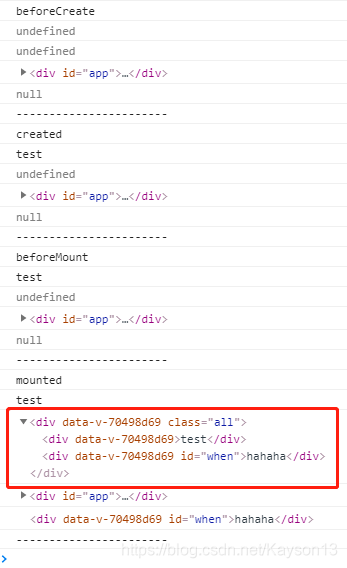
在写这篇之前,我参考了几篇文章。
其中看了这一篇: vue生命周期.
参考了其中的内容和评论内容。
但是在我测试的时候发现,测试结果和他的结果不同。
不同的点出在 beforeMount 的 this.$el 的结果上面。
我的结果是:
this.$el-------undefined
那篇文章的结果是:
this.$el-------<section id="app-8">{{data}}</section>
就是说,他的测试,在beforMount这个阶段,el是渲染出来的,但是data中的变量值没有附上,只是用一个占位符。
而我的测试,在beforeMount这个阶段,根本就没有渲染出来。
是在mounted这个阶段连同赋值一起渲染出来的。
并不能确定原因是什么。只能猜测,
有可能我直接用脚手架工具vue-cli创建。实际上我的测试是写在子组件中的。
而,在创建的过程中,父子组件生命周期的执行顺序是:
从外到内再由内到外。即:
父beforeCreate -> 父created -> 父beforeMount ->
子beforeCreate -> 子created -> 子beforeMount ->
子mounted -> 父mounted
另外关于create时期的生命周期,还有一篇更详细的文章:
【Vue】详解Vue生命周期.
这篇文章的内容,我并没有验证。
对我来说很有用的地方是
el选项的有无对生命周期过程的影响
首先系统会判断对象中有没有el选项
- 有el选项,则继续编译过程
- 没有el选项,则停止编译,也意味着暂时停止了生命周期,直到vm.$mount(el)
其中还有测试的配图。
总结一下:
- 如果有el选项,正常编译
- 没有el,那么到created会暂停编译,再遇到vm.$mount(el)会继续beforeMount往下编译。
还有一个点:template参数选项的有无对生命周期的影响
template参数选项的有无对生命周期的影响
1.如果Vue实例对象中有template参数选项,则将其作为模板编译成render函数
2.如果没有template参数选项,则将外部的HTML作为模板编译(template),也就是说,template参数选项的优先级要比外部的HTML高
3.如果1,2条件都不具备,则报错
总结:render > template > 外部html
另外:其实Vue的编译过程就是把模板转换成render函数
有关render函数,我刚开始也完全不了解。
后来由于某个需求去了解了一下。(会react应该会比较熟。)
在我的这篇文章: vue + vant根据后台传递数据动态渲染组件.有涉及一些皮毛。虽然最终并没有采用render函数这个方案。
- 再回到生命周期上
第一篇链接的文章下面有个评论,我觉得也很有道理。因此也帖出来。
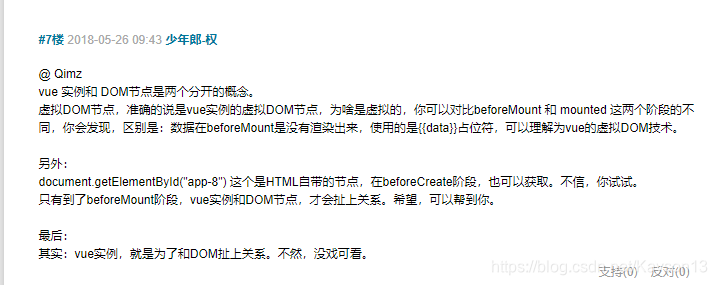
我也在测试的时候加上了这个评论所说的document.getElement(‘app-8’)的测试。结果是一致的。
总结
- beforeCreate:$el、data的值为undefined
- created:可以取到data中的值,$el 仍然为undefined
- beforeMount:$el可以取到,但是data中的值并没有附上。data中的变量,采用的是占位符方式。(子组件内部没有取到el)
- mounted:创建vm.$el并其替换"el"(我的理解:此时虚拟dom节点应该已经创建好了。而且,可能由于render函数和template优先级比外部html高,因此进行替换?)
- 这个过程中会判断是否有el。有的话,继续往下正常编译。如果没有el,那么到created会暂停编译,再遇到vm.$mount(el)会继续beforeMount往下编译。
- 还会判断是否有template,若有,将其作为模板编译成render函数。若没有,将外部html作为template模板,编译成render函数。
- document.getElementById(‘app’)是html自带的节点。在beforeCreate阶段也可以获取到。只有到了beforeMount阶段,vue实例和DOM节点才会扯上关系。(vue实例就是为了和DOM扯上关系)
更新阶段(到updated)
直接上代码。由于我刚开始在子组件里测试。发现加了watch之后可能有些问题,怕会有影响,因此这次在根节点测试。
<div id="app">
  {{name}}
 </div>
new Vue({
      el: '#app',
      data: {
        name: 'test'
      },
      watch: {
        name() {
          console.log('watch @@@@@@@@@@@@@@@@@@@@@@')
          this.name = 'watchChanged'
        }
      },
      methods: {
        updateData() {
          console.log('Function updateData>>>>>>>>>>>>')
          this.name = 'changed'
        }
      },
      beforeCreate() {
        console.log('beforeCreate');
        console.log(this.name);
        console.log(this.$el);
        console.log('-----------------------');
      },
      created() {
        console.log('created');
        console.log(this.name);
        console.log(this.$el);
        console.log('-----------------------');
        this.updateData();
      },
      beforeMount() {
        console.log('beforeMount');
        console.log(this.name);
        console.log(this.$el);
        console.log('-----------------------');
      },
      mounted() {
        console.log('mounted');
        console.log(this.name);
        console.log(this.$el);
        console.log('-----------------------');
      },
      beforeUpdate() {
        console.log('beforeUpdate');
        console.log(this.name);
        console.log(this.$el);
        console.log('-----------------------');
      },
      updated() {
        console.log('updated');
        console.log(this.name);
        console.log(this.$el);
        console.log('-----------------------');
      },
    })
直接放上测试结果了
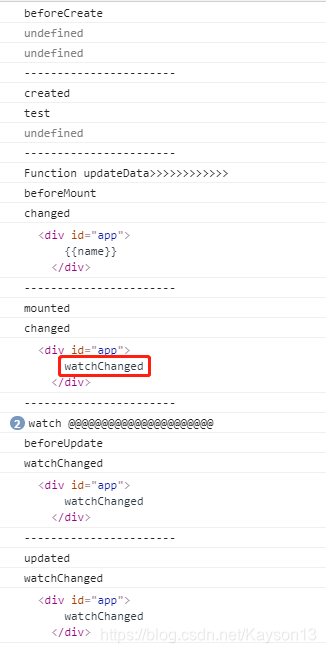
疑问
可以看到,其他的都很正常。只是watch。。。
在mounted阶段,打印出来的name依然是在created里面调用的函数所修改的变量。但是el的值却变成了watch看中检测到而改变的值。
在子组件中也是同样的结果。
依然不是很明白,如果有人能告知,不胜感谢。
总结
- 在created中调用方法改变data中的变量,之后依然会继续走beforeMount到mounted,之后执行watch中的函数。然后才会走beforeUpdate到updated并且只走了一次。
- 也就是说,在el还没有创建完之前修改data中的值,是不会出发beforeUpdate和updated函数的。
【另一篇文章的说法是(可能更专业):只有Vue实例中的数据被“写入”到我们的模板中,它的改变才可以被Vue追踪,重渲染从而调用 beforeUpdate钩子函数和updated钩子函数】
销毁阶段(到destroyed)
总结
直接引用:
【Vue】详解Vue生命周期.
beforeDestroy 钩子函数在实例被销毁之前调用。在这一步,实例仍然完全可用。
destroyed 钩子函数在Vue实例销毁后调用。调用后,Vue实例的所有东西都会解绑,所有事件监听会被移除,所有的子组件也会被销毁。
【注意】就如同调用在Vue实例上调用 $mounted会使暂停的生命周期继续一样,调用 $destroy()会直接销毁实例
$refs
仅仅作为提醒,官网中的这句话很重要:
$refs 只会在组件渲染完成之后生效,并且它们不是响应式的。这仅作为一个用于直接操作子组件的“逃生舱”——你应该避免在模板或计算属性中访问 $refs。
我在开发的时候用到了$refs去取元素的高度。出现了bug。
$refs的计算高度并不正确。
结合Vue的生命周期和官网中的这句话,找到原因。
$refs并不是响应式的。
nextTick
仅提供一种解决方案。
test() {
	this.nextTick(() => {
		console.log(this.$refs.justForTest.offsetHeight)
	})
}
利用nextTick()函数:在下次 DOM 更新循环结束之后执行延迟回调。在修改数据之后立即使用这个方法,获取更新后的 DOM。
至于nextTick回调原理,参考这篇文章
链接: vue.nextTick()方法的使用详解(简单明了).
文章中若有错误,请指出。谢谢。
本文参考:
vue生命周期.
【Vue】详解Vue生命周期.





 扫一扫
扫一扫


 被折叠的 条评论
为什么被折叠?
被折叠的 条评论
为什么被折叠?
 到【灌水乐园】发言





