



 本文介绍了如何解决因文件过大导致的413 RequestEntityTooLarge、110 Connection timed out等错误,包括调整Nginx配置及后台应用设置。
问题1:413 Request Entity Too Large
原因:前端页面通过Nginx反向代理访问后台应用,Nginx默认最大上传文件为1M,所以当上传文件大于1M时,会报出此错误
解决方法:
修改Nginx配置文件,重启Nginx。
在nginx.conf中添加
client_max_body_size 30m;
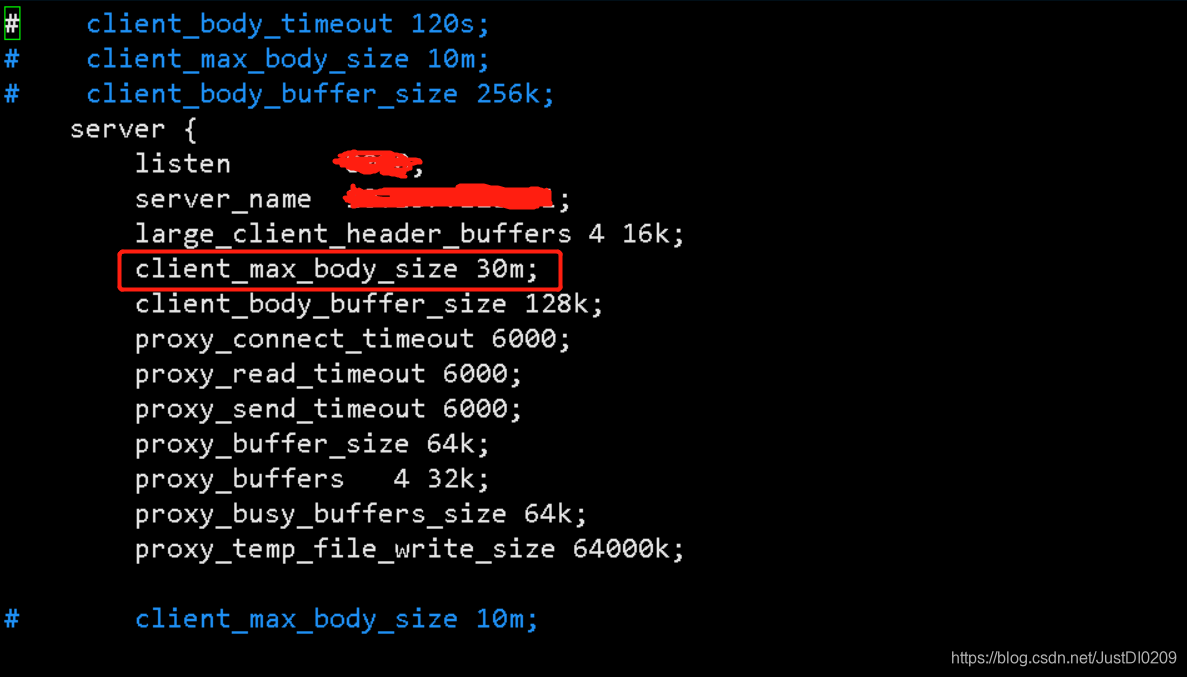
client_max_body_size 30m;
可以添加在http/server/location,三者的任意模块中,只是作用域不同
问题2:110-Connection timed out
原因:文件过大,上传超时
解决方法:
修改Nginx配置文件,重启Nginx
在server块中添加参数
        large_client_header_buffers 4 16k;
        client_body_buffer_size 128k;
        proxy_connect_timeout 6000;
        proxy_read_timeout 6000;
        proxy_send_timeout 6000;
        proxy_buffer_size 64k;
        proxy_buffers   4 32k;
        proxy_busy_buffers_size 64k;
        proxy_temp_file_write_size 64000k;
问题3:
error:"Internal Server Error"
exception:"org.springframework.web.multipart.MultipartException"
message:"Could not parse multipart servlet request; nested exception is java.lang.IllegalStateException: org.apache.tomcat.util.http.fileupload.FileUploadBase$FileSizeLimitExceededException: The field file exceeds its maximum permitted size of 1048576 bytes."
原因:后台应用未设置文件大小
解决方法:
文件需要经过的应用都需要加参数
1)前端需要添加multipart/form-data

2)后台应用加参数
spring:
  http:
    multipart:
      maxFileSize: 10MB
      maxRequestSize: 10MB






 扫一扫
扫一扫


 4446
4446

 被折叠的 条评论
为什么被折叠?
被折叠的 条评论
为什么被折叠?
 到【灌水乐园】发言





