



 本文详细介绍了在MacOS 10.14环境下,使用Python 2.7.10进行文件复制的基本习题及优化实践。通过具体代码示例,探讨了如何简化文件复制过程,并解释了output.close()的重要性,以及其对硬盘读写效率的影响。
系统:mac os 10.14
Python: 2.7.10
版本:《笨办法学Python》(第四版)
基本习题
1. 完成基本习题
(1) 根据题目,编辑以下内容:
from sys import argv
from os.path import exists

script, from_file, to_file = argv

print "Copying from %s to %s" %(from_file, to_file)

# we could do these two on one line too, how?
input = open(from_file)
indata = input.read()

print "The input file is %d bytes long" % len(indata)

print "Does the output file exists? %r" % exists(to_file)
print "Ready, hit RETURN to continue, CTRL-C to abort."
raw_input()

output = open(to_file, 'w')
output.write(indata)

print "Alright, all done."

output.close()
input.close()
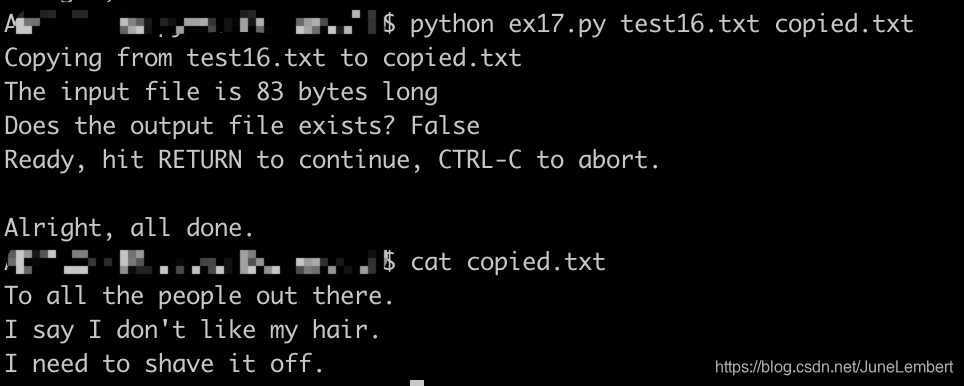
加分习题
1. 再多读读和import相关的材料,将python运行起来,试试这一条命令。
试着看 看自己能不能摸出点门道,当然了,即使弄不明白也没关系。
2. 这个脚本 实在是 有点烦人。没必要在拷贝之前问一遍把,没必要在屏幕上输出那么 多东西。试着删掉脚本的一些功能,让它使用起来更加友好。
from sys import argv
from os.path import exists

script, from_file, to_file = argv

# we could do these two on one line too, how?
input = open(from_file)
indata = input.read()
output = open(to_file, 'w')
output.write(indata)

output.close()
input.close()
3. 看看你能把这个脚本改多短,我可以把它写成一行。
open(to_file, 'w').write(open(from_file).read())
4. cat命令
我使用了一个叫 cat 的东西,这个古老的命令的用处是将两个文件“连接(con * cat * enate)”到一起,不过实际上它最大的用途是打印文件内容到屏幕上。你可以通过 man cat 命令了解到更多信息。
5. 使用 Windows 的同学,你们可以给自己找一个 cat 的替代品
关于 man 的东西就别想太多了,Windows 下没这个命令
6. 找出为什么你需要在代码中写 output.close()
原因在于如果不写,则新复制的文件中是不会保存任何内容的。也就是没有保存
out_put = open(to_file, ‘w’) 执行时会创建 to_file 文件,但是没内容
out_put.write(indata) 执行时,内容会写入到 to_file 的内存数据中,但仍未写入硬盘。
只有在执行 close 时 python 才指定文本的各种操作已经结束了,不会再有任何变化,这个时候在写入硬盘可以尽可能地减少硬盘读写操作,提高效率(特别在特大文件的时候)
参考文章:https://blog.youkuaiyun.com/aaazz47/article/details/79570531





 扫一扫
扫一扫


 440
440

 被折叠的 条评论
为什么被折叠?
被折叠的 条评论
为什么被折叠?
 到【灌水乐园】发言





