


Redux
Redux 是JavaScript状态容器,提供可预测化的状态管理。全局数据管理的工具。
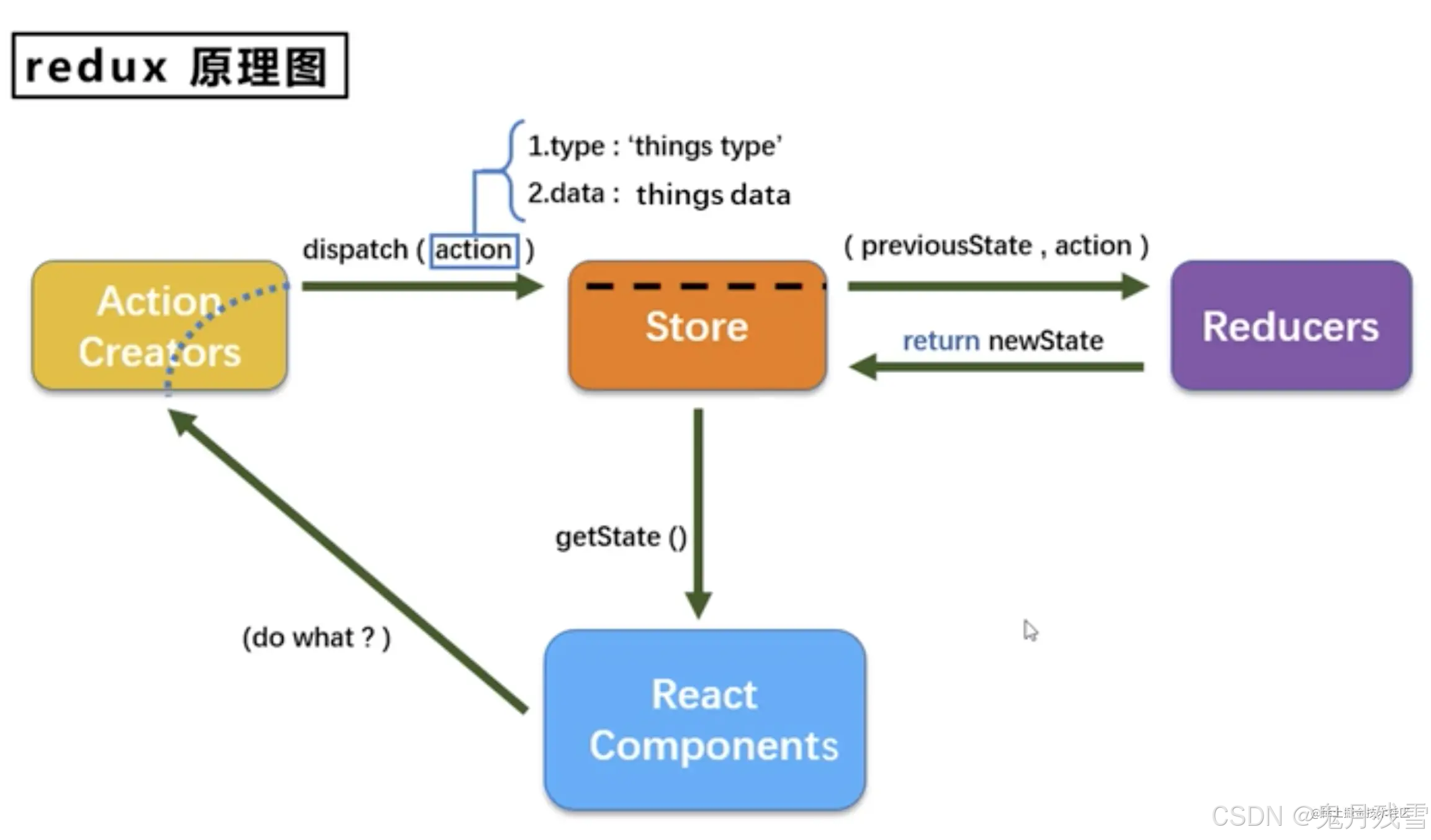
Redux 可以用这三个基本原则
- 单一数据源
整个应用的 state 被储存在一棵 object tree 中,并且这个object tree只存在于唯一一个store 中。 - State 是只读的
唯一改变 state 的方法就是触发 action,action 是一个用于描述已发生事件的普通对象。 - 使用纯函数来执行修改
描述 action 如何改变 state tree ,你需要编写reducers。Reducer 只是一些纯函数,它接收先前的 state 和 action,并返回新的state。
import React, { Component } from 'react'
import store from './redux/store'
import {increment,decrement,incrementAsync} from './redux/action'
let unsubscribe = null
export default class App extends Component {
componentDidMount(){
//订阅
unsubscribe  =  store.subscribe(()=>{
    this.setState({})
  })
}

 componentWillUnmount(){
//取消订阅
   unsubscribe()
    }
  render() {
    return (
      <div>
        {store.getState()}
        <button onClick={()=>{store.dispatch(increment(1))}}>+1</button>
        <button onClick={()=>{store.dispatch(decrement(1))}}>-1</button>
        <button onClick={()=>{store.dispatch(incrementAsync(1,1000))}}>异步+1</button>
       </div>
    )
  }
}
Store
redux中最为核心的store对象, redux-thunk、applyMiddleware用于支持异步action
combineReducers合并,接收的参数是一个对象,多个reducer函数按照合并生成一个reducer函数。对象的key值与getState()得到的对象的key一致
applyMiddleware 应用插件 扩展redux功能
redux-thunk 支持异步动作
bindActionCreators 执行actionCreator即可触发store更新了
import {legacy_createStore as createStore,applyMiddleware,combineReducers } from 'redux'
import thunk from 'redux-thunk'
import {countReducer} from './reducer'
//多个reducer合并
//import count from "./conut";
//import persons from "./persons";
//const testReducer combineReducers({
//  count,
 // persons,
//});
//const store=createStore(testReducer ,applyMiddleware(thunk))

const store=createStore(countReducer,applyMiddleware(thunk))
export default store
维持应用的 state;
提供 getState() 方法获取 state;
提供 dispatch(action) 方法更新 state;
通过 subscribe(listener) 注册监听器;
Action
同步action,action的返回值为普通object,这个对象一般{type:xxx,data:data}
异步action,action返回值为函数,异步action一般会调用同步action,异步action不是必须要用的
需要安装redux-thunk插件
const increment =(payload)=>({type:'INCREMENT',payload})
const decrement =(payload)=>({type:'DECREMENT',payload})
const incrementAsync =(payload,time)=>((dispatch)=>{
   setTimeout(()=>{
    dispatch(increment(payload))
  },time)
})
export {increment,decrement,incrementAsync}
reducer
reducer是个纯函数,接收state数据,返回加工的state数据,接受两个参数,state初始默认值,action对象,从action对象中获取type,data,根据type来更新store数据
const countReducer=({ count: 0 },action)=>{
switch (action.type) {
    case 'INCREMENT':
        return { ...state, count: state.count + action.payload }
    case 'DECREMENT':
        return { ...state, count: state.count - action.payload }
    default:
       return state
  }
}
export {countReducer}
react-redux
通过容器组件包裹UI组件,通过props传值调用dispatch来更新数据
容器组件是真正跟redux打交道的,可以随意使用redux的api
UI组件不能出现任何redux的api
容器组件会传给UI组件(1)redux中的状态(2)操作状态的方法
容器组件
connect()(UI组件)
connect() 接收四种不同的、皆可选的参数
1.mapStateToProps?: Function
mapStateToProps 的返回值必须是一个普通对象,如果你不想订阅 store 更新,请传递 null或undefined 代替 mapStateToProps。
2.mapDispatchToProps?: Function | Object
参数可以是对象、函数或不提供
3.mergeProps?: Function
4.options?: Object
import CountUI from '../App'  //UI组件
import { connect } from 'react-redux'
import {increment,decrement,incrementAsync} from '../redux/action'

 export default connect(
    (state)=>({count:state}),
    //函数形式
    (dispatch)=>({
        jia:number=>dispatch(increment(number)),
        jian:number=>dispatch(decrement(number)),
        asyncJian:(number,time)=>dispatch(incrementAsync(number,time)),
    })
    //对象形式
    {
      jia:increment,
      jian:decrement,
      asyncJian:incrementAsync,
    }
 )(CountUI)
提供provider传递store
import React from 'react'
import ReactDOM from 'react-dom/client'
import {Provider } from 'react-redux'
import store from './redux/store'
import App from './contain'

ReactDOM.createRoot(document.getElementById('root')).render(
  <React.StrictMode>
    <Provider store={store}>
        <App />
    </Provider >
  </React.StrictMode>,
)
组件中使用和更新的方法都是通过props
import React, { Component } from 'react'
export default class App extends Component {
  render() {
    return (
      <div>
        {this.props.count}
        <button onClick={()=>{this.props.jia(1)}}>+1</button>
        <button onClick={()=>{this.props.jian(1)}}>-1</button>
        <button onClick={()=>{this.props.asyncJian(1,1000)}}>异步+1</button>
      </div>
    )
  }
}
Hook写法
import { useDispatch, useSelector } from "react-redux";

 // 从 useDispatch 中获取 dispatch
  const dispatch = useDispatch();
 const {jia,jian,asyncJian} = {
        jia:number=>dispatch(increment(number)),
        jian:number=>dispatch(decrement(number)),
        asyncJian:(number,time)=>dispatch(incrementAsync(number,time)),
    }

  // 通过 useSelector 获取需要用到 state 值
  const { count} = useSelector((state) => ({count:state.count}));
react-redux哪里做了改进?
在组件中使用redux创建store和使用:
redux中通过sunscribe来监听store改变来更新,react-redux通过provider传入的store自动监听
redux获取数据是store.getState(),react-redux通过mapStateToProps函数拿到最新数据,props传递
redux更新数据直接通过dispatch,react-redux通过mapDispathToProps函数调用dispatch进行触发
useReducer+useContext也可以实现redux状态管理





 扫一扫
扫一扫


 574
574

 被折叠的 条评论
为什么被折叠?
被折叠的 条评论
为什么被折叠?
 到【灌水乐园】发言





