Android 网络编程 - OkHttp源码解析

Android开发-使用Okhttp发送请求并解析服务器返回的数据 使用okhttp向服务器发送请求 首先添加依赖 目前最新版本3.14.1,github地址 implementation 'com.squareup.okhttp3:okhttp:3.14.1' 向服务器发送GET请求并获取服务器返回的数据 OkHttpClient client = new OkHttpClient.Builder() //创建okhttp实例 ... 阅读详情

OkHttp是一个精巧的网络请求库,有以下优点:

  • 支持http2,对一台机器的所有请求共享同一个socket
  • 内置连接池,支持连接复用,减少延迟
  • 支持透明的gzip压缩响应体
  • 通过缓存避免重复的请求
  • 请求失败时自动重试主机的其他ip,自动重定向

而在设计方面也有很多值得学习的地方,如拦截器等。下面通过分析源码,理解OkHttp的设计原理。

从OkHttp发起一个请求开始:

// 同步
OkHttpClient.newCall(request).execute()
// 异步
OkHttpClient.newCall(request).enqueue(Callback responseCallback)

其实OkHttpClient.newCall(request)返回一个RealCall对象:

// OkHttpClient
@Override 
public Call newCall(Request request) {
	return RealCall.newRealCall(this, request, false /* for web socket */);
}

所以execute和enqueue是RealCall的方法,我们看看这两个方法:

// RealCall类
// 同步方法
@Override 
public Response execute() throws IOException {
	synchronized (this) {
	  if (executed) throw new IllegalStateException("Already Executed");
	  // 设置标志
	  executed = true;
	}
	captureCallStackTrace();
	try {
		// 添加到队列runningSyncCalls队列
		client.dispatcher().executed(this);
		// 执行Http请求,并获取结果
		Response result = getResponseWithInterceptorChain();
		if (result == null) throw new IOException("Canceled");
		return result;
	} finally {
		// 移出runningSyncCalls队列
		client.dispatcher().finished(this);
	}
}
// 异步方法
@Override public void enqueue(Callback responseCallback) {
  synchronized (this) {
      if (executed) throw new IllegalStateException("Already Executed");
      // 设置标志
      executed = true;
  }
  captureCallStackTrace();
  // 2中情况:
  // 如果当前并发数达到maxRequests(64),加入到readyAsyncCalls队列,等待执行
  // 否则,加入runningSyncCalls队列,在线程池中执行
  client.dispatcher().enqueue(new AsyncCall(responseCallback));
}

client.dispatcher()返回Dispatcher对象,Dispatcher实质是请求的管理器,起任务调度的作用。控制最大请求并发数和单个主机的最大并发数,并持有一个线程池负责执行异步请求。

// Dispatcher类
/** 最大并发请求数 */
private int maxRequests = 64;
/** 每个主机最大请求数 */
private int maxRequestsPerHost = 5;
/** 消费者线程池 */
private ExecutorService executorService;
/** 将要运行的异步请求队列 */
private final Deque<AsyncCall> readyAsyncCalls = new ArrayDeque<>();
/** 正在运行的异步请求队列 */
private final Deque<AsyncCall> runningAsyncCalls = new ArrayDeque<>();
/** 正在运行的同步请求队列 */
private final Deque<RealCall> runningSyncCalls = new ArrayDeque<>();

线程池初始化:

// Dispatcher类
public synchronized ExecutorService executorService() {
    if (executorService == null) {
      executorService = new ThreadPoolExecutor(0, Integer.MAX_VALUE, 60, TimeUnit.SECONDS, new SynchronousQueue<Runnable>(), Util.threadFactory("OkHttp Dispatcher", false));
    }
    return executorService;
}

我们看看管理同步请求的代码:

// Dispatcher类
synchronized void executed(RealCall call) {
    runningSyncCalls.add(call);
}

只是加入到队列中,没做任何处理,我们重点看一下管理异步请求:

// Dispatcher类
synchronized void enqueue(AsyncCall call) {
	if (runningAsyncCalls.size() < maxRequests && runningCallsForHost(call) < maxRequestsPerHost) {
		// 当前并发数小于最大并发请求数,而且当前单机请求数小于每个主机最大请求数
	    runningAsyncCalls.add(call);
	    // 直接执行
	    executorService().execute(call);
	} else {
		// 等待执行
	    readyAsyncCalls.add(call);
	}
}

那么等待的请求什么时候会执行呢,因为等待的请求都是异步请求,所以我们需要了解一下AsyncCall类。它是RealCall的内部类,继承了NamedRunnable:

// NamedRunnable
public abstract class NamedRunnable implements Runnable {
  protected final String name;
  public NamedRunnable(String format, Object... args) {
    this.name = Util.format(format, args);
  }
  @Override public final void run() {
    String oldName = Thread.currentThread().getName();
    Thread.currentThread().setName(name);
    try {
      execute();
    } finally {
      Thread.currentThread().setName(oldName);
    }
  }
  protected abstract void execute();
}

run方法执行了子类重写的execute方法,所以异步请求执行时,AsyncCall的execute方法机会执行:

// RealCall类,因为AsyncCall是RealCall的内部类
class AsyncCall extends NamedRunnable {
	...
	@Override 
	protected void execute() {
        boolean signalledCallback = false;
        try {
	        // 执行Http请求,并获取结果
            Response response = getResponseWithInterceptorChain();
            ...
        } finally {
	        // 关键 : finished方法
            client.dispatcher().finished(this);
        }
    }
	...
}

我们现在可以看看这个finished方法做了什么呢:

void finished(AsyncCall call) {
  finished(runningAsyncCalls, call, true);
}
private <T> void finished(Deque<T> calls, T call, boolean promoteCalls) {
    int runningCallsCount;
    Runnable idleCallback;
    synchronized (this) {
        if (!calls.remove(call)) throw new AssertionError("Call wasn't in-flight!");
        if (promoteCalls) promoteCalls();
        runningCallsCount = runningCallsCount();
        idleCallback = this.idleCallback;
    }
    if (runningCallsCount == 0 && idleCallback != null) {
        idleCallback.run();
    }
}

调用了promoteCalls方法:

private void promoteCalls() {
    if (runningAsyncCalls.size() >= maxRequests) return; // Already running max capacity.
    if (readyAsyncCalls.isEmpty()) return; // No ready calls to promote.

    for (Iterator<AsyncCall> i = readyAsyncCalls.iterator(); i.hasNext(); ) {
        AsyncCall call = i.next();

        if (runningCallsForHost(call) < maxRequestsPerHost) {
	        // 移出readyAsyncCalls
            i.remove();
            // 加入到runningAsyncCalls
            runningAsyncCalls.add(call);
            // 执行请求
            executorService().execute(call);
        }

        if (runningAsyncCalls.size() >= maxRequests) return; // Reached max capacity.
    }
}

这样就达到任务调度。接下来,是OkHttp的核心,拦截器。同步请求还是异步请求,都是调用了RealCall的getResponseWithInterceptorChain方法进行请求,并获取结果,我们来看看这个方法:

// RealCall类
Response getResponseWithInterceptorChain() throws IOException {
    // Build a full stack of interceptors.
    // 一堆拦截器
    List<Interceptor> interceptors = new ArrayList<>();
    interceptors.addAll(client.interceptors());
    interceptors.add(retryAndFollowUpInterceptor);
    interceptors.add(new BridgeInterceptor(client.cookieJar()));
    interceptors.add(new CacheInterceptor(client.internalCache()));
    interceptors.add(new ConnectInterceptor(client));
    if (!forWebSocket) {
      interceptors.addAll(client.networkInterceptors());
    }
    interceptors.add(new CallServerInterceptor(forWebSocket));
    // 生成拦截器链
    Interceptor.Chain chain = new RealInterceptorChain(interceptors, null, null, null, 0,
        originalRequest, this, eventListener, client.connectTimeoutMillis(),
        client.readTimeoutMillis(), client.writeTimeoutMillis());
	// 执行
    return chain.proceed(originalRequest);
}

这里调用了RealInterceptorChain的proceed方法:

// RealInterceptorChain类
public Response proceed(Request request, StreamAllocation streamAllocation, HttpCodec httpCodec,
      RealConnection connection) throws IOException {
    if (index >= interceptors.size()) throw new AssertionError();
    calls++;
    // If we already have a stream, confirm that the incoming request will use it.
    if (this.httpCodec != null && !this.connection.supportsUrl(request.url())) {
        throw new IllegalStateException("network interceptor " + interceptors.get(index - 1)
          + " must retain the same host and port");
    }

    // If we already have a stream, confirm that this is the only call to chain.proceed().
    if (this.httpCodec != null && calls > 1) {
        throw new IllegalStateException("network interceptor " + interceptors.get(index - 1)
          + " must call proceed() exactly once");
    }

    // Call the next interceptor in the chain.
    RealInterceptorChain next = new RealInterceptorChain(interceptors, streamAllocation, httpCodec,
        connection, index + 1, request, call, eventListener, connectTimeout, readTimeout,
        writeTimeout);
    // 调用了Interceptor的intercept方法
    Interceptor interceptor = interceptors.get(index);
    Response response = interceptor.intercept(next);

    // Confirm that the next interceptor made its required call to chain.proceed().
    if (httpCodec != null && index + 1 < interceptors.size() && next.calls != 1) {
        throw new IllegalStateException("network interceptor " + interceptor
          + " must call proceed() exactly once");
    }

    // Confirm that the intercepted response isn't null.
    if (response == null) {
        throw new NullPointerException("interceptor " + interceptor + " returned null");
    }

    if (response.body() == null) {
        throw new IllegalStateException(
          "interceptor " + interceptor + " returned a response with no body");
    }

    return response;
}

这里主要调用了Interceptor的intercept方法,我们挑一个Interceptor来看,intercept方法是这么执行的,(以CacheInterceptor为例):

// CacheInterceptor类
public final class CacheInterceptor implements Interceptor {
	@Override 
	public Response intercept(Chain chain) throws IOException {
		...
		// 如果有缓存,直接返回
	    if (networkRequest == null && cacheResponse == null) {
	      return new Response.Builder()
	          .request(chain.request())
	          .protocol(Protocol.HTTP_1_1)
	          .code(504)
	          .message("Unsatisfiable Request (only-if-cached)")
	          .body(Util.EMPTY_RESPONSE)
	          .sentRequestAtMillis(-1L)
	          .receivedResponseAtMillis(System.currentTimeMillis())
	          .build();
	    }
	    // 如果没有缓存,或者强制从网络获取,
	    Response networkResponse = null;
	    try {
		    // 继续调用链的下一个拦截器,又回到RealInterceptorChain的proceed方法
	        networkResponse = chain.proceed(networkRequest);
	    } finally {
	        // If we're crashing on I/O or otherwise, don't leak the cache body.
	        if (networkResponse == null && cacheCandidate != null) {
	            closeQuietly(cacheCandidate.body());
	        }
	    }
	    ...
        return response;
    }
}

从代码可以看出,Chain与Interceptor会互相递归调用,这是典型的职责链模式,这样清楚地切开了不同的逻辑,每个拦截器完成自己的职责,从而完成用户的网络请求。

大概流程是:

  1. 先经过用户拦截器
  2. RetryAndFollowUpInterceptor负责自动重试和进行必要的重定向
  3. BridgeIntercetor负责将用户Request转换成一个实际的网络请求的Request,再调用下层的拦截器获取Response,最后再将网络Response转换成用户的Reponse
  4. CacheInterceptor负责控制缓存
  5. ConnectInterceptor负责进行连接主机
  6. 网络拦截器进行拦截
  7. CallServerInterceptor是真正和服务器通信,完成http请求

(图片来自带你学开源项目:OkHttp-- 自己动手实现 okhttp)
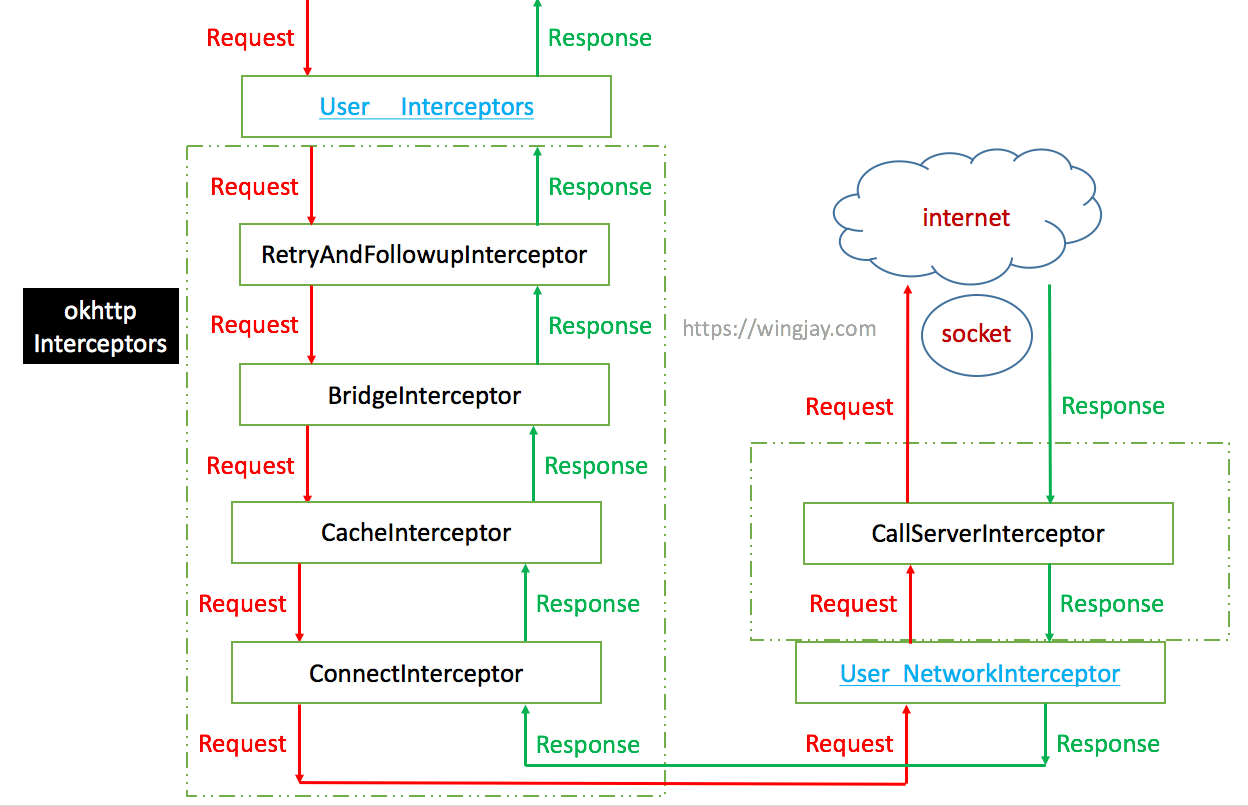
这里涉及到两个用户定义的拦截器:

  1. Interceptors:这里的拦截器是拦截用户最原始的 request。
  2. NetworkInterceptor:这是最底层的 request 拦截器。

如何区分这两个呢?举个例子,我创建两个 LoggingInterceptor,分别放在interceptors 层和 NetworkInterceptor 层,然后访问一个会重定向的 URL_1,当访问完URL_1 后会再去访问重定向后的新地址 URL_2。对于这个过程,interceptors 层的拦截器只会拦截到 URL_1 的 request,而在 NetworkInterceptor 层的拦截器则会同时拦截到 URL_1 和URL_2两个 request。

我们最后来看看拦截器的最后一节,CallServerInterceptor,主要作用访问服务器,提交Http请求,并获取结果。进入CallServerInterceptor的intercept方法看看:

// CallServerInterceptor类
@Override 
public Response intercept(Chain chain) throws IOException {
    RealInterceptorChain realChain = (RealInterceptorChain) chain;
    HttpCodec httpCodec = realChain.httpStream();
    StreamAllocation streamAllocation = realChain.streamAllocation();
    RealConnection connection = (RealConnection) realChain.connection();
    Request request = realChain.request();
	...
	// HttpCodec处理request
    ...
    Response response = responseBuilder
        .request(request)
        .handshake(streamAllocation.connection().handshake())
        .sentRequestAtMillis(sentRequestMillis)
        .receivedResponseAtMillis(System.currentTimeMillis())
        .build();
	...
    return response;
}

因为OkHttp访问服务器用的是Socket,如果每次访问(connect)都要3次握手4次挥手的话,显然大量的连接会有点浪费时间,所以OkHttp对Socket进行池化。OkHttp使用类似于引用计数法方式跟踪Socket,这里的计数对象是StreamAllocation,它被反复执行aquire与release操作,改变计数对象。详细请看OkHttp3源码分析[复用连接池]。

由于篇幅问题,关于Okhttp网络接连于通信这块,打算另开一篇记录。

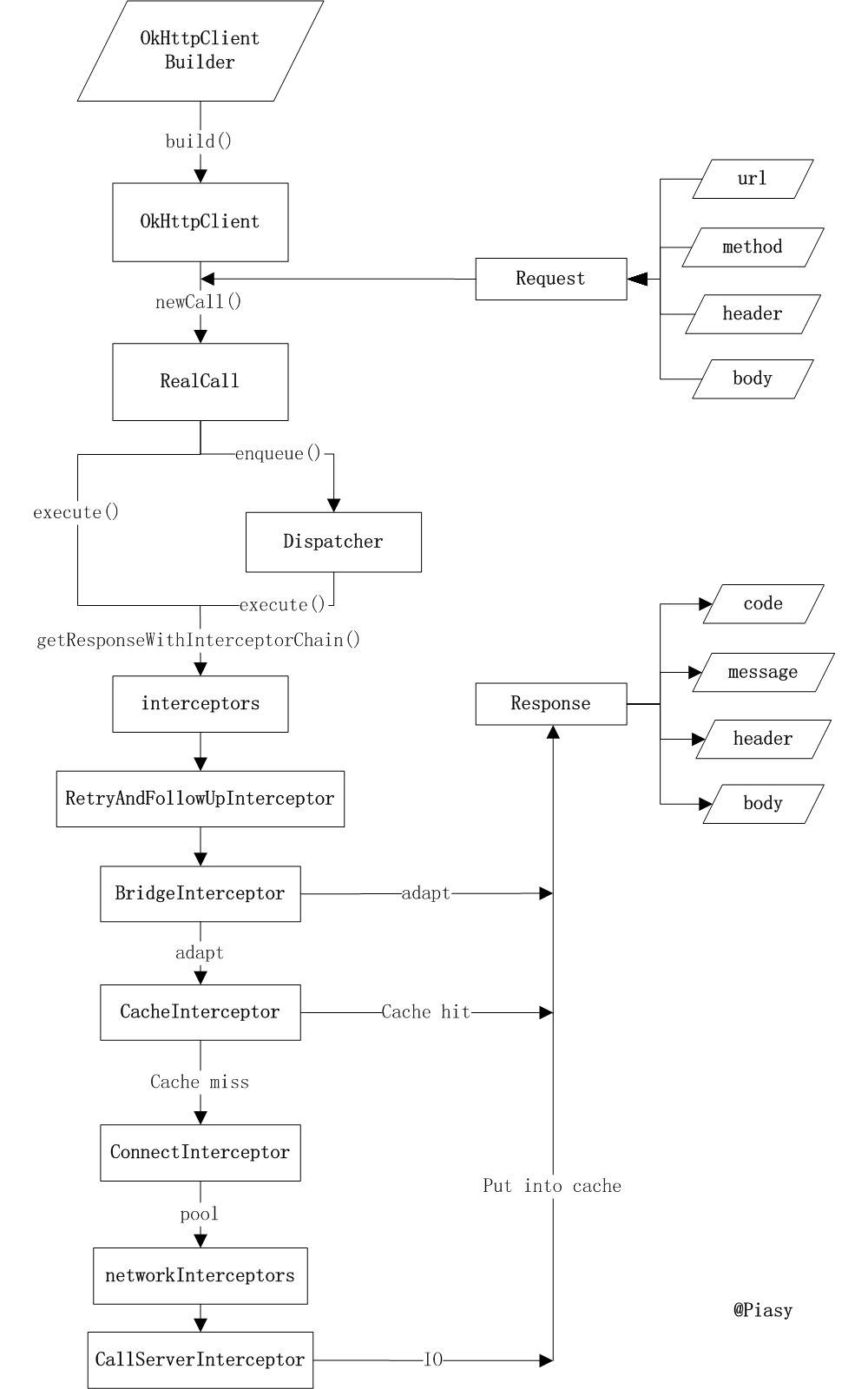
最后,提供OkHttp整体的流程图:
参考资料

OkHttp3源码详解(二整体流程)
深入解析OkHttp3
OkHttp3源码分析[复用连接池]
带你学开源项目:OkHttp-- 自己动手实现 okhttp

Android网络编程(八)源码解析OkHttp后篇[复用连接池] 上一篇我们根据OkHttp的源码讲解了OkHttp的请求网络流程,这一讲我们接着根据源码了解OkHttp的复用连接池。 阅读详情

相关推荐

Android网络编程(七)源码解析OkHttp前篇[请求网络]

学会了OkHttp3的用法后,我们当然有必要来了解下OkHttp3的源码,当然现在网上的文章很多,我仍旧希望我这一系列文章篇是最简洁易懂的。

Android进阶三部曲 - 刘望舒 8705

android http 线程池,Okhttp的线程池

2021年第一篇文章~~线程池策略当一个任务通过execute(Runnable)方法添加到线程池时:线程数量小于corePoolSize,新建线程数来处理被添加的任务。线程数量大于等于corePoolSize,存在空闲线程,使用空闲线程执行新任务。线程数量大于等于corePoolSize,不存在空闲线程,新任务被添加到等待队列,添加成功则等待空闲线程;添加失败:线程数量小于最大线程数,新建线程执...

weixin_34378978的博客 987

Android-OkhttpDownloader一个okhttp的多线程下载器

OkhttpDownloader 一个okhttp的多线程下载器

Okhttp的线程池和高并发

用户在调用client .newCall(request).enqueue(callback)的时候,调度器dispatcher首先检查运行队列是否满,若满则将其调度到等待队列,每一个执行的线程(call)在execute的结束时都会调用promotcalls,从而使得等待进程进入运行队列。整体流程如下图所示自我介绍一下,小编13年上海交大毕业,曾经在小公司待过,也去过华为、OPPO等大厂,18年进入阿里一直到现在。

2401_84132423的博客 1557

okhttp中连接池实现

代码中包含okhhtp中连接池的设计,包含连接对象的添加,连接对象何时被移除。

通用定时器脉冲计数实验(STM32CubeMx配置)

通用定时器脉冲计数实验

a1169511636的博客 5509

Okhttp的线程池和高并发,你不懂还不学

Thread类是在java.lang包中定义的。一个类只要继承了Thread类同时覆写了本类中的run()方法就可以实现多线程操作了,但是一个类只能继承一个父类在实际开发中一个多线程的操作很少使用Thread类,而是通过Runnable接口完成。但是在使用Runnable定义的子类中没有start()方法,只有Thread类中才有。

m0_60707708的博客 1846

关于动态存储器dram中rank,bank,device之间的关系

DEVICE_WIDTH表示设备的带宽(单位bit),每个列(column)包含DEVICE_WIDTH 位(bit),每一行(row)包含NUM_COLS个column。   而每一个bank包含NUM_ROWS个行(row)。所以一个设备(device)的存储容量为PER_DEVICE_STORAGE =NUM_ROWS*NUM_COLS*DEVICE_WIDTH*NUM_BANKS (i

wyj7260的专栏 4732

Android面试---OkHttp原理

okHttp原理主要是通过5个拦截器和3个双端队列(2个异步队列,1个同步队列)工作。内部实现通过一个责任链模式完成,将网络请求的各个阶段封装到各个链条中,从而实现各层的解耦。OkHttp底层是通过Socket发送Http请求与接收响应,但是OkHttp实现了连接池的概念,即对于同一主机的多个请求,可以公用一个Socket连接,而不是每次发送完Http请求就关闭底层的Socket。而OkHttp对Socket的读写操作使用的OkIo库进行了一层封装。

weixin_42487687的博客 1158

大数据审计常用的算法模型

数据预处理:用聚类算法(K-Means)对数据分组,缩小分析范围;异常初筛:用孤立森林/DBSCAN快速标记疑似异常样本;风险分级:用随机森林/XGBoost对疑似异常打分,确定核查优先级;关联深挖:用FP-Growth挖掘异常样本背后的人员/流程关联;文本佐证:用BERT分析相关合同/审批文本,获取舞弊证据。例如,某审计项目通过“K-Means分组→孤立森林标异常→FP-Growth找关联→BERT审合同”的流程,仅用1周就完成了过去3个月需10人团队的工作量,且挖出2起隐藏的串标舞弊案。

Yulay专栏 1068

WiFi信道状态信息 基于Intel 5300的CSI Tool 安装及使用(一)

经过半个月的坎坷安装过程,连Windows系统都没装过的本人终于颤颤巍巍把CSI TOOL装好了,下面记录一下适于我所使用设备的安装过程。设备:一台THINKPAD X201,一台师兄借的华硕主板的台式机首先,如果你和我一样对linux其实一窍不通的话,建议先反复看教程里的安装代码,照猫画虎很难一步实现的,中途一定会有这或那的问题需要解决,所以该了解的基础linux指令还是要了解,起码安装过程中的那些指令可以去查一查。.........

Silver_777的博客 2万+

Android 网络编程之OkHttp源码解析

前言:OkHttp框架是Android的网络请求框架,无数的项目都在使用着这个框架,重要性不言而喻; 本文会将OKHTTP的源码进行拆解,每个部分来单独学习,由简入深,循序渐进,篇幅较长,建议收藏,慢慢观看,如果觉得内容不错的话,点赞关注来一波,感谢! 源码基于okhttp3 java版本:3.14.9 OkHttp3的简单使用: public void request() { String url = "http://wwww.baidu.com"; OkH.

十年磨一剑 706

CANoe信号传输故障排查指南

本文提供了全面的CANoe信号传输故障排查指南,涵盖从硬件连接、通道配置到软件脚本与数据库加载的全链路诊断。针对常见的通道指示灯不亮、信号无法发送及ECU握手失败等问题,给出了基于CANoe工具和CAPL脚本的详细排查步骤与解决方案,帮助工程师系统化定位并解决实车测试中的通信故障。

ice55的博客 258

Android---网络编程之Okhttp3源码解析

相关 Android—网络编程之Http协议 Android—网络编程之OkHttp3整体结构了解以及使用 Android—网络编程之Okhttp3源码解析 Android—网络编程之Retrofit2整体结构了解以及+Okhttp3+rxjava2使用 Android—网络编程之Retrofit2源码分析 Android—网络编程之Socket编程(实例) ...

zcpHappy的博客 672

华为昇腾910B3显卡实战:手把手教你部署DeepSeek 32B模型(含Bge-zh向量库配置)

本文详细介绍了在配备8张华为昇腾910B3显卡的服务器上,从零部署DeepSeek 32B大模型推理服务的完整实战方案。内容涵盖环境准备、模型配置、多卡负载分配,并集成了BGE中文向量模型与ChromaDB向量数据库,最终通过Open WebUI构建了可投入生产的企业级AI应用栈,为私有化大模型部署提供了具体参考。

weixin_29038345的博客 1709

C# Winform使用Monaco打造代码编辑器

本文介绍了如何在Winform项目中集成Monaco代码编辑器。通过NuGet安装WebView2控件,创建monaco-editor.html文件加载编辑器,并实现与C#代码的交互。关键步骤包括:初始化WebView2环境、配置Monaco编辑器参数、设置代码变更监听事件以及处理C#与JavaScript之间的通信。注意事项提示了依赖库安装问题的解决方法。该方案实现了功能完整的代码编辑器,支持代码自动保存和实时显示功能。

遇见--专栏 346

android 7代码解析,Android网络编程7之源码解析OkHttp前篇[请求网络]

前言学会了OkHttp3的用法后,我们当然有必要来了解下OkHttp3的源码,当然现在网上的文章很多,我仍旧希望我这一系列文章篇是最简洁易懂的。1.从请求处理开始分析首先OKHttp3如何使用这里就不在赘述了,不明白的同学可以查看Android网络编程(五)OkHttp2.x用法全解析、Android网络编程(六)OkHttp3用法全解析这两篇文章。当我们要请求网络的时候我们需要用OkHttpCl...

weixin_36250220的博客 151

dify安装ollama插件及OLLAMA模型添加失败问题完整解决方法

plugin_daemon-1 | 2025/05/10 17:37:36 stdio.go:160: [INFO]plugin langgenius/ollama:0.0.6: Installed model: ollama 提示ollama安装成功,再添加模型就不会有问题了。安装dify1.2.0和1.3.1均出现OLLAMA插件安装失败或插件安装后添加模型失败的问题,具体表现为一是添加ollama插件时没反应,需要二次添加才成功;二是添加模型时点保存报500错误或点保存后没反应,无法成功添加。

symstandsun的博客 9078

Android网络编程7之源码解析OkHttp前篇[请求网络]

前言 学会了OkHttp3的用法后,我们当然有必要来了解下OkHttp3的源码,当然现在网上的文章很多,我仍旧希望我这一系列文章篇是最简洁易懂的。 1.从请求处理开始分析 首先OKHttp3如何使用这里就不在赘述了,不明白的同学可以查看Android网络编程(五)OkHttp2.x用法全解析、Android网络编程(六)OkHttp3用法...

weixin_33826268的博客 85

IEM模型,地表粗糙度模拟

利用微波反演土壤水分时候,利用IEM模型可以实现对随机地表的模拟

计算机控制技术及应用

《计算机控制技术及应用》通过总结作者的科研成果和吸收国内外的先进理论、方法和技术,以计算机控制系统的网络化、开放化、智能化和集成化发展趋势为主线索,主要介绍计算机控制系统的基本概念和计算机控制系统的典型形式,计算机控制系统的数学描述与基本分析方法,以及数字PID控制器、最少拍控制系统、达林算法、状态变量设计法等设计方法及其各种改进算法。重点突出计算机控制系统输入输出通道接口的设计方法和典型控制系统的设计案例与实现方法等。

Android网络编程8之源码解析OkHttp中篇[复用连接池]

1.引子 在了解OkHttp的复用连接池之前,我们首先要了解几个概念。 TCP三次握手 通常我们进行HTTP连接网络的时候我们会进行TCP的三次握手,然后传输数据,然后再释放连接。 TCP三次握手的过程为: 第一次握手:建立连接。客户端发送连接请求报文段,将SYN位置为1,Sequence Number为x;然后,客户端进入SYN_S...

weixin_33708432的博客 91

深度学习工具包 DeepLearningToolbox

深度学习工具包Deprecation notice.-----This toolbox is outdated and no longer maintained.There are much better tools available for deep learning than this toolbox, e.g. [Theano](http://deeplearning.net/software/theano/), [torch](http://torch.ch/) or [tensorflow](http://www.tensorflow.org/)I would suggest you use one of the tools mentioned above rather than use this toolbox.Best, Rasmus.DeepLearnToolbox================A Matlab toolbox for Deep Learning.Deep Learning is a new subfield of machine learning that focuses on learning deep hierarchical models of data.It is inspired by the human brain&#39;s apparent deep (layered, hierarchical) architecture.A good overview of the theory of Deep Learning theory is[Learning Deep Architectures for AI](http://www.iro.umontreal.ca/~bengioy/papers/ftml_book.pdf)For a more informal introduction, see the following videos by Geoffrey Hinton and Andrew Ng.* [The Next Generation of Neural Networks](http://www.youtube.com/watch?v=AyzOUbkUf3M) (Hinton, 2007)* [Recent Developments in Deep Learning](http://www.youtube.com/watch?v=VdIURAu1-aU) (Hinton, 2010)* [Unsupervised Feature Learning and Deep Learning](http://www.youtube.com/watch?v=ZmNOAtZIgIk) (Ng, 2011)If you use this toolbox in your research please cite [Prediction as a candidate for learning deep hierarchical models of data](http://www2.imm.dtu.dk/pubdb/views/publication_details.php?id=6284)```@MASTERSTHESIS\{IMM2012-06284, author = "R. B. Palm", title = "Prediction as a candidate for learning deep hierarchical models of data", year = "2012",}```Contact: rasmusbergpalm at gmail dot comDirectories included in the toolbox-----------------------------------`NN/` - A library for Feedforward Backpropagation Neural Networks`CNN/` - A library for Convolutional Neural Networks`DBN/` - A library for Deep Belief Networks`SAE/` - A library for Stacked Auto-Encoders`CAE/` - A library for Convolutional Auto-Encoders`util/` - Utility functions used by the libraries`data/` - Data used by the examples`tests/` - unit tests to verify toolbox is workingFor references on each library check REFS.mdSetup-----1. Download.2. addpath(genpath(&#39;DeepLearnToolbox&#39;));Example: Deep Belief Network---------------------```matlabfunction test_example_DBNload mnist_uint8;train_x = double(train_x) / 255;test_x = double(test_x) / 255;train_y = double(train_y);test_y = double(test_y);%% ex1 train a 100 hidden unit RBM and visualize its weightsrand(&#39;state&#39;,0)dbn.sizes = [100];opts.numepochs = 1;opts.batchsize = 100;opts.momentum = 0;opts.alpha = 1;dbn = dbnsetup(dbn, train_x, opts);dbn = dbntrain(dbn, train_x, opts);figure; visualize(dbn.rbm{1}.W&#39;); % Visualize the RBM weights%% ex2 train a 100-100 hidden unit DBN and use its weights to initialize a NNrand(&#39;state&#39;,0)%train dbndbn.sizes = [100 100];opts.numepochs = 1;opts.batchsize = 100;opts.momentum = 0;opts.alpha = 1;dbn = dbnsetup(dbn, train_x, opts);dbn = dbntrain(dbn, train_x, opts);%unfold dbn to nnnn = dbnunfoldtonn(dbn, 10);nn.activation_function = &#39;sigm&#39;;%train nnopts.numepochs = 1;opts.batchsize = 100;nn = nntrain(nn, train_x, train_y, opts);[er, bad] = nntest(nn, test_x, test_y);assert(er < 0.10, &#39;Too big error&#39;);```Example: Stacked Auto-Encoders---------------------```matlabfunction test_example_SAEload mnist_uint8;train_x = double(train_x)/255;test_x = double(test_x)/255;train_y = double(train_y);test_y = double(test_y);%% ex1 train a 100 hidden unit SDAE and use it to initialize a FFNN% Setup and train a stacked denoising autoencoder (SDAE)rand(&#39;state&#39;,0)sae = saesetup([784 100]);sae.ae{1}.activation_function = &#39;sigm&#39;;sae.ae{1}.learningRate = 1;sae.ae{1}.inputZeroMaskedFraction = 0.5;opts.numepochs = 1;opts.batchsize = 100;sae = saetrain(sae, train_x, opts);visualize(sae.ae{1}.W{1}(:,2:end)&#39;)% Use the SDAE to initialize a FFNNnn = nnsetup([784 100 10]);nn.activation_function = &#39;sigm&#39;;nn.learningRate = 1;nn.W{1} = sae.ae{1}.W{1};% Train the FFNNopts.numepochs = 1;opts.batchsize = 100;nn = nntrain(nn, train_x, train_y, opts);[er, bad] = nntest(nn, test_x, test_y);assert(er < 0.16, &#39;Too big error&#39;);```Example: Convolutional Neural Nets---------------------```matlabfunction test_example_CNNload mnist_uint8;train_x = double(reshape(train_x&#39;,28,28,60000))/255;test_x = double(reshape(test_x&#39;,28,28,10000))/255;train_y = double(train_y&#39;);test_y = double(test_y&#39;);%% ex1 Train a 6c-2s-12c-2s Convolutional neural network %will run 1 epoch in about 200 second and get around 11% error. %With 100 epochs you&#39;ll get around 1.2% errorrand(&#39;state&#39;,0)cnn.layers = { struct(&#39;type&#39;, &#39;i&#39;) %input layer struct(&#39;type&#39;, &#39;c&#39;, &#39;outputmaps&#39;, 6, &#39;kernelsize&#39;, 5) %convolution layer struct(&#39;type&#39;, &#39;s&#39;, &#39;scale&#39;, 2) %sub sampling layer struct(&#39;type&#39;, &#39;c&#39;, &#39;outputmaps&#39;, 12, &#39;kernelsize&#39;, 5) %convolution layer struct(&#39;type&#39;, &#39;s&#39;, &#39;scale&#39;, 2) %subsampling layer};cnn = cnnsetup(cnn, train_x, train_y);opts.alpha = 1;opts.batchsize = 50;opts.numepochs = 1;cnn = cnntrain(cnn, train_x, train_y, opts);[er, bad] = cnntest(cnn, test_x, test_y);%plot mean squared errorfigure; plot(cnn.rL);assert(er<0.12, &#39;Too big error&#39;);```Example: Neural Networks---------------------```matlabfunction test_example_NNload mnist_uint8;train_x = double(train_x) / 255;test_x = double(test_x) / 255;train_y = double(train_y);test_y = double(test_y);% normalize[train_x, mu, sigma] = zscore(train_x);test_x = normalize(test_x, mu, sigma);%% ex1 vanilla neural netrand(&#39;state&#39;,0)nn = nnsetup([784 100 10]);opts.numepochs = 1; % Number of full sweeps through dataopts.batchsize = 100; % Take a mean gradient step over this many samples[nn, L] = nntrain(nn, train_x, train_y, opts);[er, bad] = nntest(nn, test_x, test_y);assert(er < 0.08, &#39;Too big error&#39;);%% ex2 neural net with L2 weight decayrand(&#39;state&#39;,0)nn = nnsetup([784 100 10]);nn.weightPenaltyL2 = 1e-4; % L2 weight decayopts.numepochs = 1; % Number of full sweeps through dataopts.batchsize = 100; % Take a mean gradient step over this many samplesnn = nntrain(nn, train_x, train_y, opts);[er, bad] = nntest(nn, test_x, test_y);assert(er < 0.1, &#39;Too big error&#39;);%% ex3 neural net with dropoutrand(&#39;state&#39;,0)nn = nnsetup([784 100 10]);nn.dropoutFraction = 0.5; % Dropout fraction opts.numepochs = 1; % Number of full sweeps through dataopts.batchsize = 100; % Take a mean gradient step over this many samplesnn = nntrain(nn, train_x, train_y, opts);[er, bad] = nntest(nn, test_x, test_y);assert(er < 0.1, &#39;Too big error&#39;);%% ex4 neural net with sigmoid activation functionrand(&#39;state&#39;,0)nn = nnsetup([784 100 10]);nn.activation_function = &#39;sigm&#39;; % Sigmoid activation functionnn.learningRate = 1; % Sigm require a lower learning rateopts.numepochs = 1; % Number of full sweeps through dataopts.batchsize = 100; % Take a mean gradient step over this many samplesnn = nntrain(nn, train_x, train_y, opts);[er, bad] = nntest(nn, test_x, test_y);assert(er < 0.1, &#39;Too big error&#39;);%% ex5 plotting functionalityrand(&#39;state&#39;,0)nn = nnsetup([784 20 10]);opts.numepochs = 5; % Number of full sweeps through datann.output = &#39;softmax&#39;; % use softmax outputopts.batchsize = 1000; % Take a mean gradient step over this many samplesopts.plot = 1; % enable plottingnn = nntrain(nn, train_x, train_y, opts);[er, bad] = nntest(nn, test_x, test_y);assert(er < 0.1, &#39;Too big error&#39;);%% ex6 neural net with sigmoid activation and plotting of validation and training error% split training data into training and validation datavx = train_x(1:10000,:);tx = train_x(10001:end,:);vy = train_y(1:10000,:);ty = train_y(10001:end,:);rand(&#39;state&#39;,0)nn = nnsetup([784 20 10]); nn.output = &#39;softmax&#39;; % use softmax outputopts.numepochs = 5; % Number of full sweeps through dataopts.batchsize = 1000; % Take a mean gradient step over this many samplesopts.plot = 1; % enable plottingnn = nntrain(nn, tx, ty, opts, vx, vy); % nntrain takes validation set as last two arguments (optionally)[er, bad] = nntest(nn, test_x, test_y);assert(er < 0.1, &#39;Too big error&#39;);```[![Bitdeli Badge](https://d2weczhvl823v0.cloudfront.net/rasmusbergpalm/deeplearntoolbox/trend.png)](https://bitdeli.com/free "Bitdeli Badge")

Android网络编程(五)源码解析OkHttp后篇[复用连接池]

1.引子在了解OkHttp的复用连接池之前,我们首先要了解几个概念。TCP三次握手通常我们进行HTTP连接网络的时候我们会进行TCP的三次握手,然后传输数据,然后再释放连接。TCP三次握手的过程为:第一次握手:建立连接。客户端发送连接请求报文段,将SYN位置为1,Sequence Number为x;然后,客户端进入SYN_SEND状态,等待服务器的确认;第二次握手:服务器收到客户端的SYN报文段,

z_x_Qiang的博客 722

VC中sqlite的使用

在VC中对sqlite的使用,实现数据库大批数据的快速插入,读取数据库中的数据在ListCtrl中显示

Android网络编程(四)源码解析OkHttp前篇[请求网络]

1.从请求处理开始分析首先我们要请求网络的时候我们需要用OkHttpClient.newCall(request)进行execute或者enqueue操作,当我们调用newCall时:@Override public Call newCall(Request request) { return new RealCall(this, request);}实际返回的是一个RealCall类,我们调用

z_x_Qiang的博客 391

Android网络编程实战:联网引擎与数据解析

Android网络编程实战:联网引擎与数据解析 本文深入探讨了Android网络编程的核心技术,包括Volley网络框架的源码解析与优化策略,OkHttp3的核心原理与高级用法,JSON/XML数据解析技术的对比分析,以及RESTful API设计与接口兼容性实践。通过对这些关键技术点的详细解析,为开发者提供了全面的网络编程实战指南。 Volley网络框架源码解析与优化 Volley作为Googl...

gitblog_00291的博客 461

android之http协议编程(源码&ppt),Android网络编程(八)源码解析OkHttp中篇[复用连接池]...

1.引子在了解OkHttp的复用连接池之前,我们首先要了解几个概念。TCP三次握手通常我们进行HTTP连接网络的时候我们会进行TCP的三次握手,然后传输数据,然后再释放连接。TCP三次握手的过程为:第一次握手:建立连接。客户端发送连接请求报文段,将SYN位置为1,Sequence Number为x;然后,客户端进入SYN_SEND状态,等待服务器的确认;第二次握手:服务器收到客户端的SYN报文段,...

weixin_39607836的博客 245
上一篇: Android 网络编程 - HTTP协议
下一篇: Android View - 上拉刷新下拉加载ListView
JohanMan
博客等级 码龄10年 72粉丝 131原创
评论 1
成就一亿技术人!
拼手气红包6.0元
还能输入1000个字符
 
 条评论被折叠 查看
添加红包

请填写红包祝福语或标题

个

红包个数最小为10个

元

红包金额最低5元

当前余额3.43元 前往充值 >
需支付:10.00元
成就一亿技术人!
领取后你会自动成为博主和红包主的粉丝 规则
hope_wisdom
发出的红包
实付元
使用余额支付
点击重新获取
扫码支付
钱包余额 0

抵扣说明:

1.余额是钱包充值的虚拟货币,按照1:1的比例进行支付金额的抵扣。
2.余额无法直接购买下载,可以购买VIP、付费专栏及课程。

余额充值

