



1.film服务
(1).引入依赖
<?xml version="1.0" encoding="UTF-8"?>
<project xmlns="http://maven.apache.org/POM/4.0.0" xmlns:xsi="http://www.w3.org/2001/XMLSchema-instance"
         xsi:schemaLocation="http://maven.apache.org/POM/4.0.0 https://maven.apache.org/xsd/maven-4.0.0.xsd">
    <modelVersion>4.0.0</modelVersion>
    <parent>
        <groupId>com.steven.movies</groupId>
        <artifactId>movies_parent</artifactId>
        <version>0.0.1-SNAPSHOT</version>
        <relativePath>../pom.xml</relativePath>
    </parent>
    <groupId>com.steven.movies</groupId>
    <artifactId>movies_film</artifactId>
    <version>0.0.1-SNAPSHOT</version>
    <name>movies_film</name>
    <description>影片模块</description>
    <properties>
        <java.version>8</java.version>
    </properties>
    <dependencies>
        <dependency>
            <groupId>com.steven.movies</groupId>
            <artifactId>movies_common</artifactId>
        </dependency>

		<!-- eureka-client -->
        <dependency>
            <groupId>org.springframework.cloud</groupId>
            <artifactId>spring-cloud-starter-netflix-eureka-client</artifactId>
        </dependency>
    </dependencies>

    <build>
        <plugins>
            <plugin>
                <groupId>org.springframework.boot</groupId>
                <artifactId>spring-boot-maven-plugin</artifactId>
            </plugin>
        </plugins>
    </build>
</project>
(2).添加日志
在logback.xml文件中添加如下配置信息。
<configuration>
    <appender name="STDOUT" class="ch.qos.logback.core.ConsoleAppender">
        <encoder>
            <pattern>%highlight(%-5level) (%file:%line\)- %m%n</pattern>
            <charset>UTF-8</charset>
        </encoder>
    </appender>

    <root level="info">
        <appender-ref ref="STDOUT"/>
    </root>
</configuration>
(3).添加配置
在application.yml文件中添加如下配置信息。
server:
  port: 8301

eureka:
  client:
    service-url:
      defaultZone: http://localhost:8761/eureka/
  instance:
    prefer-ip-address: true

spring:
  datasource:
    url: jdbc:mysql://127.0.0.1:3306/study?autoReconnect=true&useUnicode=true&characterEncoding=utf8&zeroDateTimeBehavior=CONVERT_TO_NULL&useSSL=false&serverTimezone=UTC
    username: root
    password: admin123
    filters: log4j,wall,mergeStat
  application:
    name: film.service

mybatis-plus:
  mapper-locations: classpath*:com/steven/movies/**/xml/*Mapper.xml
  global-config:
    id-type: 0
    db-column-underline: false
    refresh-mapper: true

logging:
  config: classpath:logback.xml
(4).dao层开发
首先在项目目录“/src/main/java/com/steven/movies/film”下新建“/dao/entity”目录,并在entity目录下新建Film实体类,具体代码如下。
@Data
@NoArgsConstructor
@AllArgsConstructor
@ToString
public class Film extends Model<Film> {

    private static final long serialVersionUID = 1L;

    private Integer id;

    private Integer hallId;

    private String filmName;

    private BigDecimal price;

    private Date showTime;

    private Date createTime;

    private Date updateTime;
}
然后在dao目录下新建mapper目录,并在mapper目录下新建FilmMapper接口,具体代码如下。
public interface FilmMapper extends BaseMapper<Film> {
    List<Film> findFilmListByHallId(Integer hallId);
}
最后在mapper目录下新建“xml”目录,并在xml目录下新建FilmMapper.xml文件,具体代码如下。
<?xml version="1.0" encoding="UTF-8"?>
<!DOCTYPE mapper PUBLIC "-//mybatis.org//DTD Mapper 3.0//EN" "http://mybatis.org/dtd/mybatis-3-mapper.dtd">
<mapper namespace="com.steven.movies.film.dao.mapper.FilmMapper">

    <!-- 通用查询映射结果 -->
    <resultMap id="BaseResultMap" type="com.steven.movies.film.dao.entity.Film">
        <id column="id" property="id"/>
        <result column="hall_id" property="hallId"/>
        <result column="film_name" property="filmName"/>
        <result column="price" property="price"/>
        <result column="show_time" property="showTime"/>
        <result column="create_time" property="createTime"/>
        <result column="update_time" property="updateTime"/>
    </resultMap>

    <select id="findFilmListByHallId" parameterType="java.lang.Integer" resultMap="BaseResultMap">
        select *
        from film
        where hall_id = #{hallId}
    </select>
</mapper>
(5).service层开发
在项目目录“/src/main/java/com/steven/movies/film”下新建service目录,并在service目录下新建IFilmService接口,具体代码如下。
public interface IFilmService {
    //获取电影列表
    IPage<Film> findFilmList(int currentPage, int pageSize) throws CommonServiceException;

    //根据主键获取电影信息
    Film findFilmById(Integer filmId) throws CommonServiceException;

	//根据影厅id获取电影信息
    List<Film> findFilmListByHallId(Integer hallId) throws CommonServiceException;
}
然后在service目录下新建impl目录,并在impl目录下新建FilmServiceImpl实现类,具体代码如下。
@Service
public class FilmServiceImpl implements IFilmService {
    @Resource
    private FilmMapper filmMapper;

    @Override
    public IPage<Film> findFilmList(int currentPage, int pageSize) throws CommonServiceException {
        return filmMapper.selectPage(new Page<>(currentPage, pageSize), null);
    }

    @Override
    public Film findFilmById(Integer filmId) throws CommonServiceException {
        return filmMapper.selectById(filmId);
    }

	@Override
    public List<Film> findFilmListByHallId(Integer hallId) {
        return filmMapper.findFilmListByHallId(hallId);
    }
}
(6).controller层开发
在项目目录“/src/main/java/com/steven/movies/film”下新建controller目录,并在controller目录下新建FilmController类,具体代码如下。
@RestController
@RequestMapping("/films")
public class FilmController {
    @Autowired
    private IFilmService filmService;

    //获取电影列表
    @RequestMapping(value = "/findFilmList", method = RequestMethod.POST)
    public ServerResponse findFilmList(@RequestBody BasePageVO basePageVO) throws CommonServiceException {
        //检查入参
        basePageVO.checkParam();

        //调用逻辑层,获取返回参数
        IPage<Film> results = filmService.findFilmList(basePageVO.getCurrentPage(), basePageVO.getPageSize());

        return ServerResponse.createBySuccess(PageUtil.getPageResult(results));
    }

    //根据电影主键获取电影信息
    @RequestMapping(value = "/findFilmById/{filmId}", method = RequestMethod.GET)
    public ServerResponse findFilmById(@PathVariable("filmId") Integer filmId) throws CommonServiceException {
        Film film = filmService.findFilmById(filmId);
        if (film == null) {
            return ServerResponse.createBySuccess();
        } else {
            return ServerResponse.createBySuccess(film);
        }
    }

	//根据影厅id获取电影信息
    @RequestMapping(value = "/findFilmListByHallId/{hallId}", method = RequestMethod.GET)
    public ServerResponse findFilmListByHallId(@PathVariable("hallId") Integer hallId) throws CommonServiceException {
        List<Film> filmList = filmService.findFilmListByHallId(hallId);
        if (CollectionUtils.isEmpty(filmList)) {
            return ServerResponse.createBySuccess();
        } else {
            return ServerResponse.createBySuccess(filmList);
        }
    }
}
(7).启动项目
在启动类MoviesFilmApplication上添加注解@MapperScan(basePackages = “com.steven.movies.film.dao”)和@EnableDiscoveryClient,然后启动项目。
@MapperScan(basePackages = {"com.steven.movies.film.dao"})
@EnableDiscoveryClient
@SpringBootApplication
public class MoviesFilmApplication {

    public static void main(String[] args) {
        SpringApplication.run(MoviesFilmApplication.class, args);
    }

	@Bean
    public PaginationInterceptor paginationInterceptor() {
        PaginationInterceptor paginationInterceptor = new PaginationInterceptor();
        //设置最大单页限制数量,默认500条,-1表示不受限制
        paginationInterceptor.setLimit(1000);
        paginationInterceptor.setCountSqlParser(new JsqlParserCountOptimize(true));
        return paginationInterceptor;
    }

}
(8).Eureka
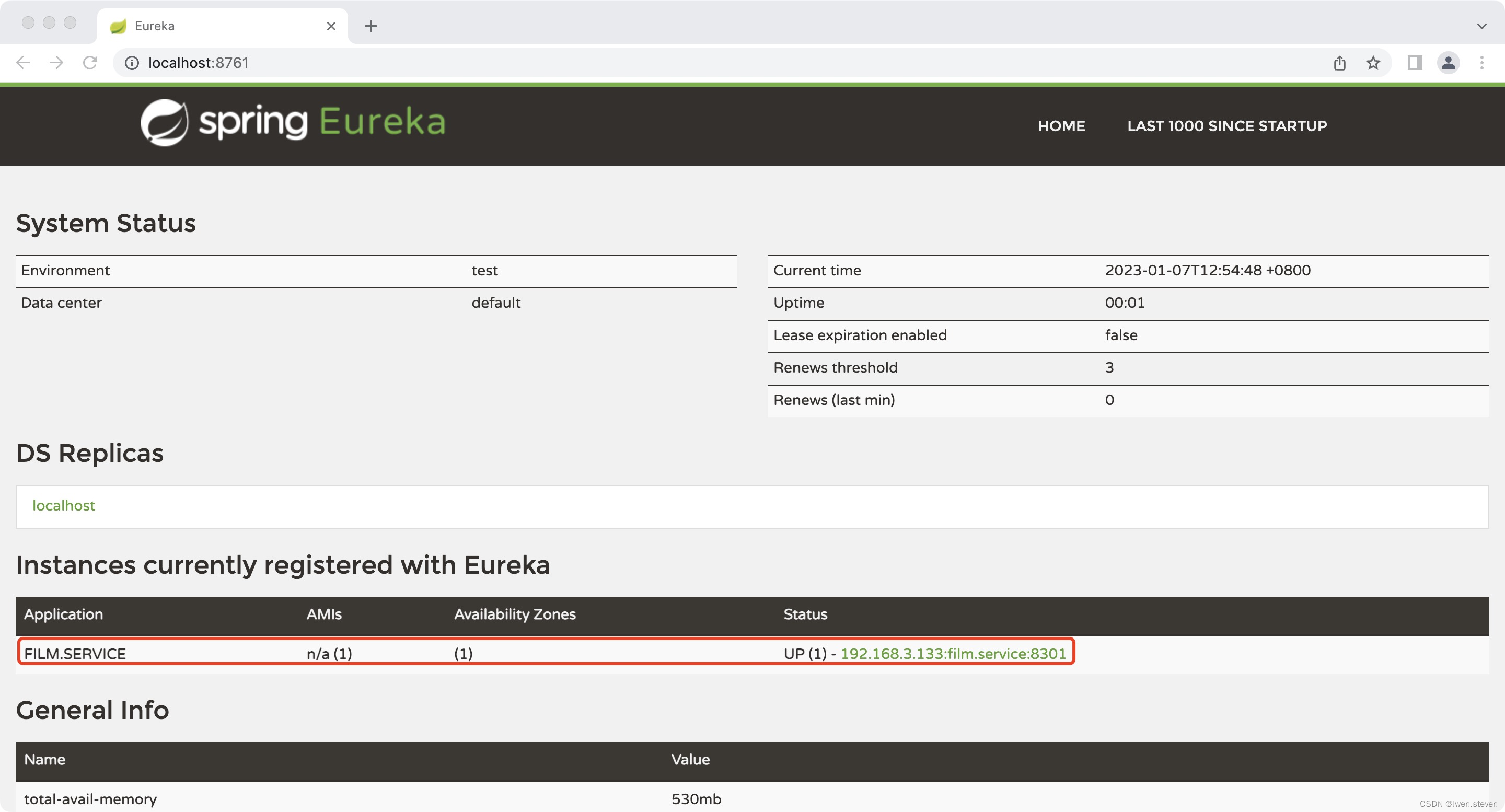
由图可知,电影微服务已经被注册到Eureka Server上了。
(9).测试
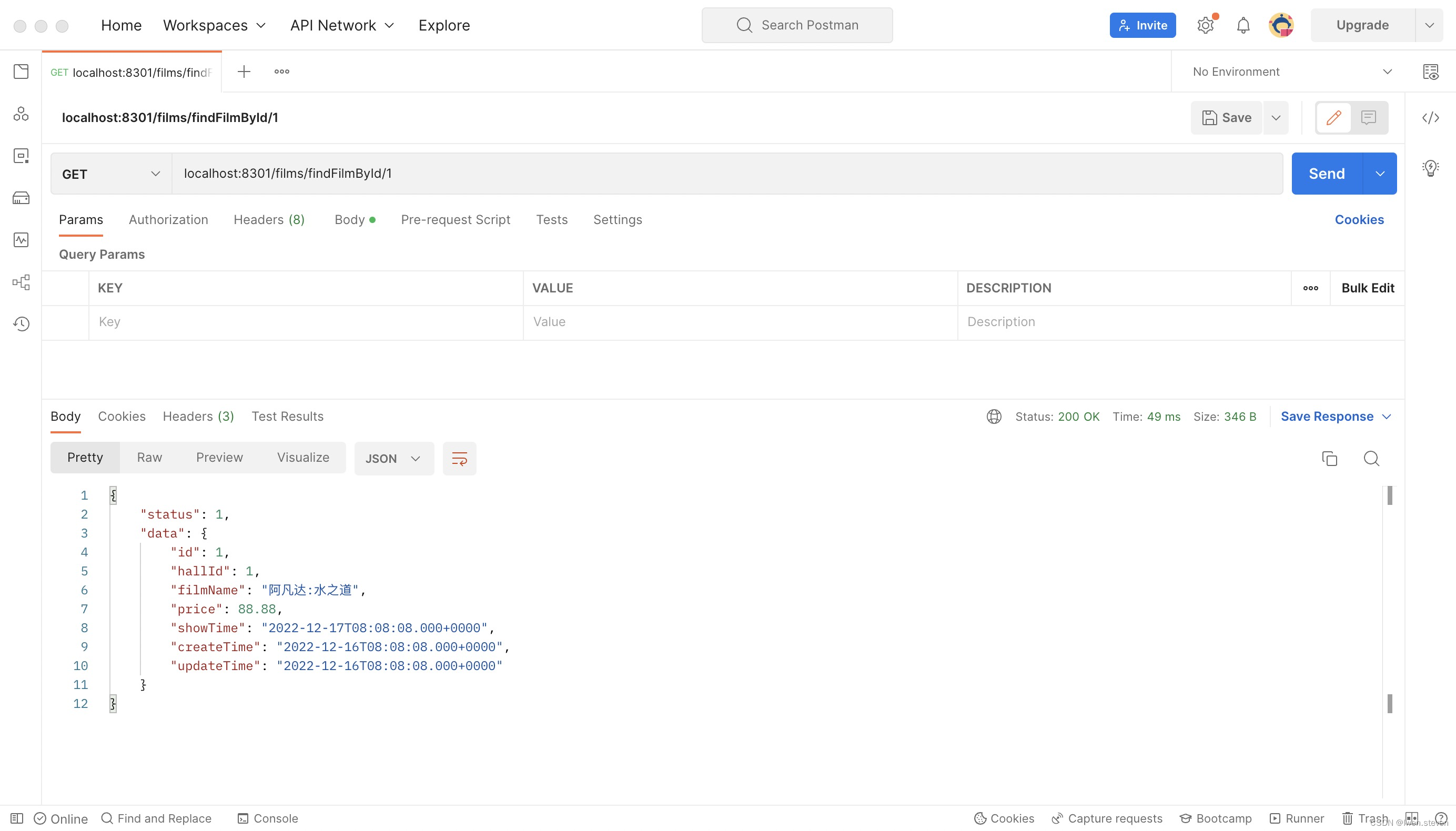
启动项目,然后在postman中请求“localhost:8301/films/findFilmById/1”,可以查询到相应的信息,测试结果如下图所示。
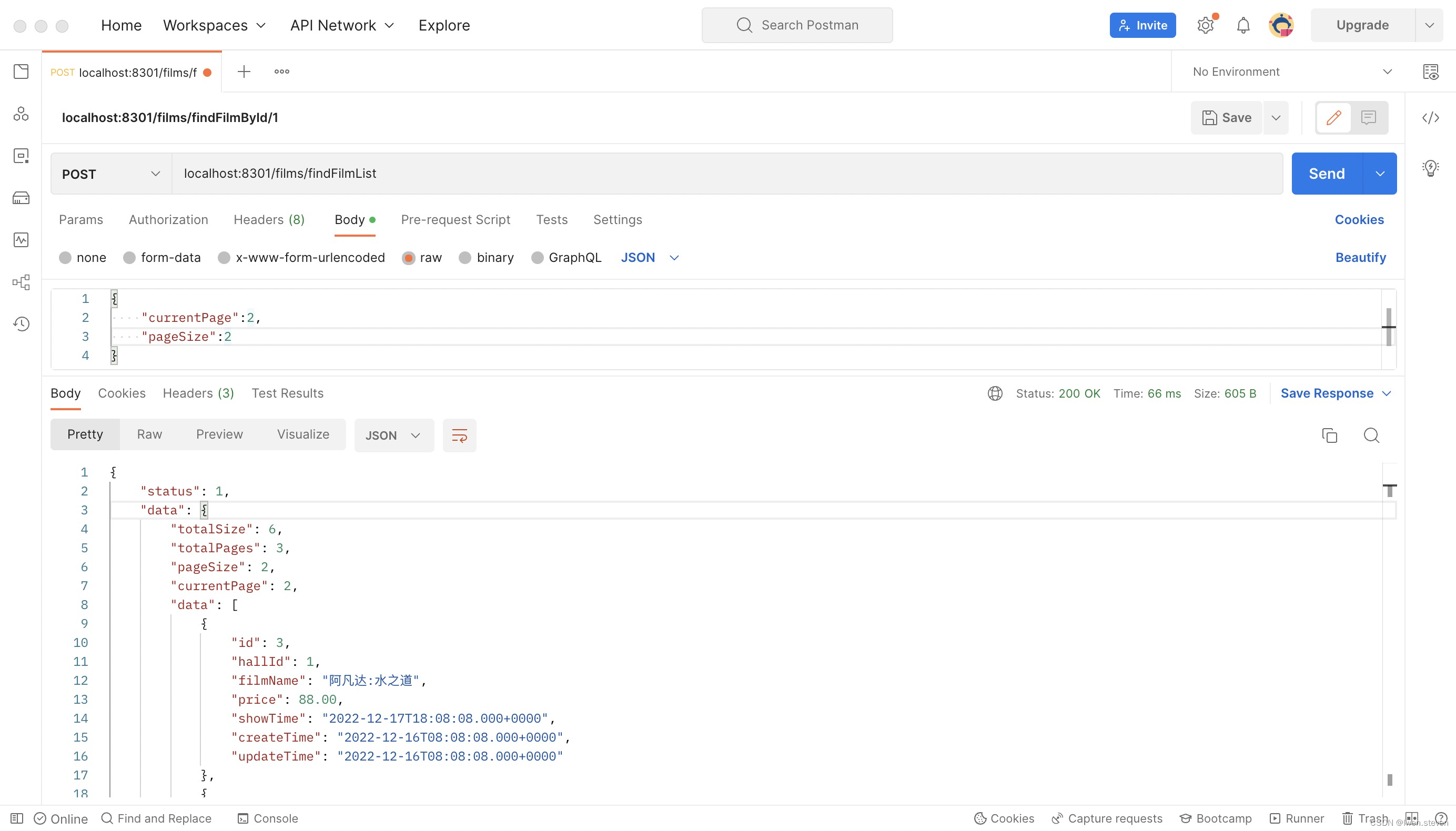
在postman中请求“localhost:8301/films/findFilmList”测试分页功能,可以查询到相应的信息,测试结果如下图所示。
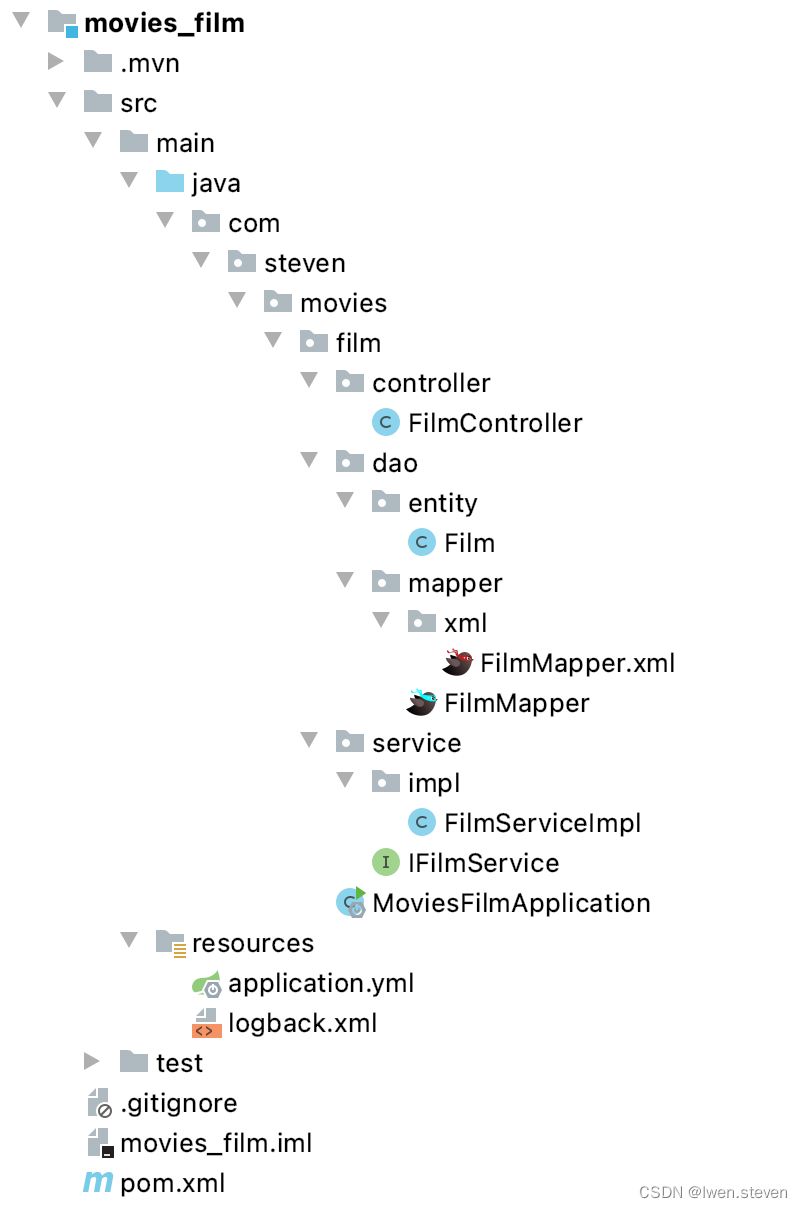
(10).film服务工程目录结构
2.hall服务
(1).引入依赖
<?xml version="1.0" encoding="UTF-8"?>
<project xmlns="http://maven.apache.org/POM/4.0.0" xmlns:xsi="http://www.w3.org/2001/XMLSchema-instance"
         xsi:schemaLocation="http://maven.apache.org/POM/4.0.0 https://maven.apache.org/xsd/maven-4.0.0.xsd">
    <modelVersion>4.0.0</modelVersion>
    <parent>
        <groupId>com.steven.movies</groupId>
        <artifactId>movies_parent</artifactId>
        <version>0.0.1-SNAPSHOT</version>
        <relativePath>../pom.xml</relativePath>
    </parent>
    <groupId>com.steven.movies</groupId>
    <artifactId>movies_hall</artifactId>
    <version>0.0.1-SNAPSHOT</version>
    <name>movies_hall</name>
    <description>影厅模块</description>
    <properties>
        <java.version>8</java.version>
    </properties>
    <dependencies>
        <dependency>
            <groupId>com.steven.movies</groupId>
            <artifactId>movies_common</artifactId>
        </dependency>

        <!-- eureka-client -->
        <dependency>
            <groupId>org.springframework.cloud</groupId>
            <artifactId>spring-cloud-starter-netflix-eureka-client</artifactId>
        </dependency>
    </dependencies>

    <build>
        <plugins>
            <plugin>
                <groupId>org.springframework.boot</groupId>
                <artifactId>spring-boot-maven-plugin</artifactId>
            </plugin>
        </plugins>
    </build>
</project>
(2).添加日志
在logback.xml文件中添加如下配置信息。
<configuration>
    <appender name="STDOUT" class="ch.qos.logback.core.ConsoleAppender">
        <encoder>
            <pattern>%highlight(%-5level) (%file:%line\)- %m%n</pattern>
            <charset>UTF-8</charset>
        </encoder>
    </appender>

    <root level="info">
        <appender-ref ref="STDOUT"/>
    </root>
</configuration>
(3).添加配置
在application.yml文件中添加如下配置信息。
server:
  port: 8401

eureka:
  client:
    service-url:
      defaultZone: http://localhost:8761/eureka/

spring:
  datasource:
    url: jdbc:mysql://127.0.0.1:3306/study?autoReconnect=true&useUnicode=true&characterEncoding=utf8&zeroDateTimeBehavior=CONVERT_TO_NULL&useSSL=false&serverTimezone=UTC
    username: root
    password: admin123
    filters: log4j,wall,mergeStat
  application:
    name: hall.service

mybatis-plus:
  mapper-locations: classpath*:com/steven/movies/**/xml/*Mapper.xml
  global-config:
    id-type: 0
    db-column-underline: false
    refresh-mapper: true

logging:
  config: classpath:logback.xml
(4).dao层开发
首先在项目目录“/src/main/java/com/steven/movies/hall”下新建“/dao/entity”目录,并在entity目录下新建Hall实体类,具体代码如下。
@Data
public class Hall extends Model<Hall> {

    private static final long serialVersionUID = 1L;

    private Integer id;

    private Integer cinemaId;

    private String hallName;

    private Date createTime;

    private Date updateTime;
}
然后在dao目录下新建mapper目录,并在mapper目录下新建HallMapper接口,具体代码如下。
public interface HallMapper extends BaseMapper<Hall> {

}
最后在mapper目录下新建“xml”目录,并在xml目录下新建HallMapper.xml文件,具体代码如下。
<?xml version="1.0" encoding="UTF-8"?>
<!DOCTYPE mapper PUBLIC "-//mybatis.org//DTD Mapper 3.0//EN" "http://mybatis.org/dtd/mybatis-3-mapper.dtd">
<mapper namespace="com.steven.movies.hall.dao.mapper.HallMapper">

    <!-- 通用查询映射结果 -->
    <resultMap id="BaseResultMap" type="com.steven.movies.hall.dao.entity.Hall">
        <id column="id" property="id" />
        <result column="cinema_id" property="cinemaId" />
        <result column="hall_name" property="hallName" />
        <result column="create_time" property="createTime" />
        <result column="update_time" property="updateTime" />
    </resultMap>
</mapper>
(5).service层开发
在项目目录“/src/main/java/com/steven/movies/hall”下新建service目录,并在service目录下新建IHallService接口,具体代码如下。
public interface IHallService extends IService<Hall> {
    //根据主键获取影厅信息
    Hall findHallById(Integer hallId) throws CommonServiceException;
}
然后在service目录下新建impl目录,并在impl目录下新建HallServiceImpl实现类,具体代码如下。
@Service
public class HallServiceImpl extends ServiceImpl<HallMapper, Hall> implements IHallService {
    @Resource
    private HallMapper hallMapper;

    @Override
    public Hall findHallById(Integer hallId) throws CommonServiceException {
        return hallMapper.selectById(hallId);
    }
}
(6).controller层开发
在项目目录“/src/main/java/com/steven/movies/hall”下新建controller目录,并在controller目录下新建HallController类,具体代码如下。
@Controller
@RequestMapping("/halls")
public class HallController {
    @Autowired
    private IHallService hallService;

    //根据影厅主键获取影厅信息
    @RequestMapping(value = "/findHallById/{hallId}", method = RequestMethod.GET)
    public ServerResponse findHallById(@PathVariable("hallId") Integer hallId) throws CommonServiceException {
        Hall hall = hallService.findHallById(hallId);
        if (hall == null) {
            return ServerResponse.createBySuccess();
        } else {
            return ServerResponse.createBySuccess(hall);
        }
    }
}
(7).启动项目
在启动类MoviesHallApplication上添加注解@MapperScan(basePackages = “com.steven.movies.hall.dao”)和@EnableDiscoveryClient,然后启动项目。
@MapperScan(basePackages = {"com.steven.movies.hall.dao"})
@EnableDiscoveryClient
@SpringBootApplication
public class MoviesHallApplication {

    public static void main(String[] args) {
        SpringApplication.run(MoviesHallApplication.class, args);
    }

}
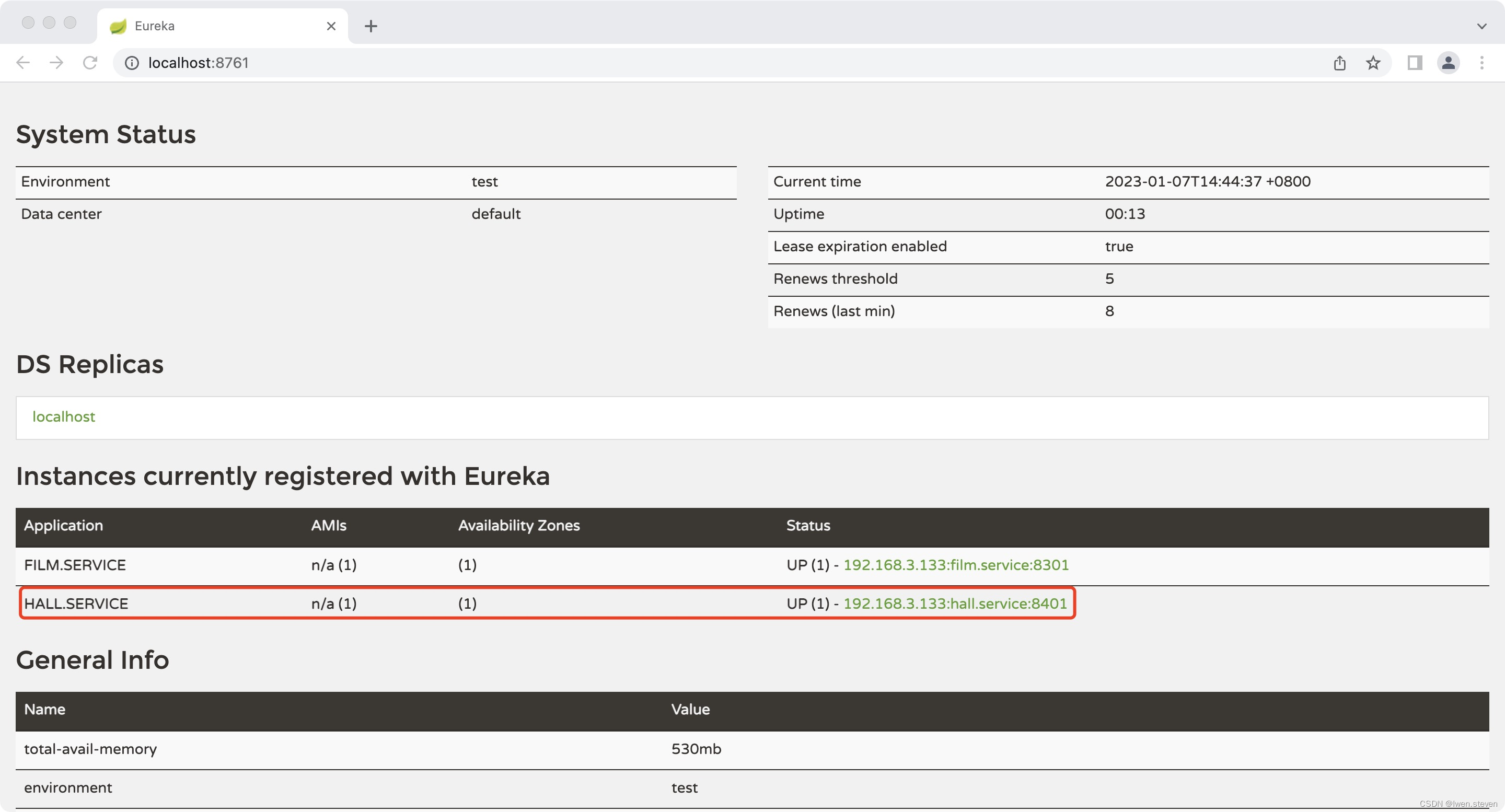
(8).Eureka
由图可知,影厅微服务已经被注册到Eureka Server上了。
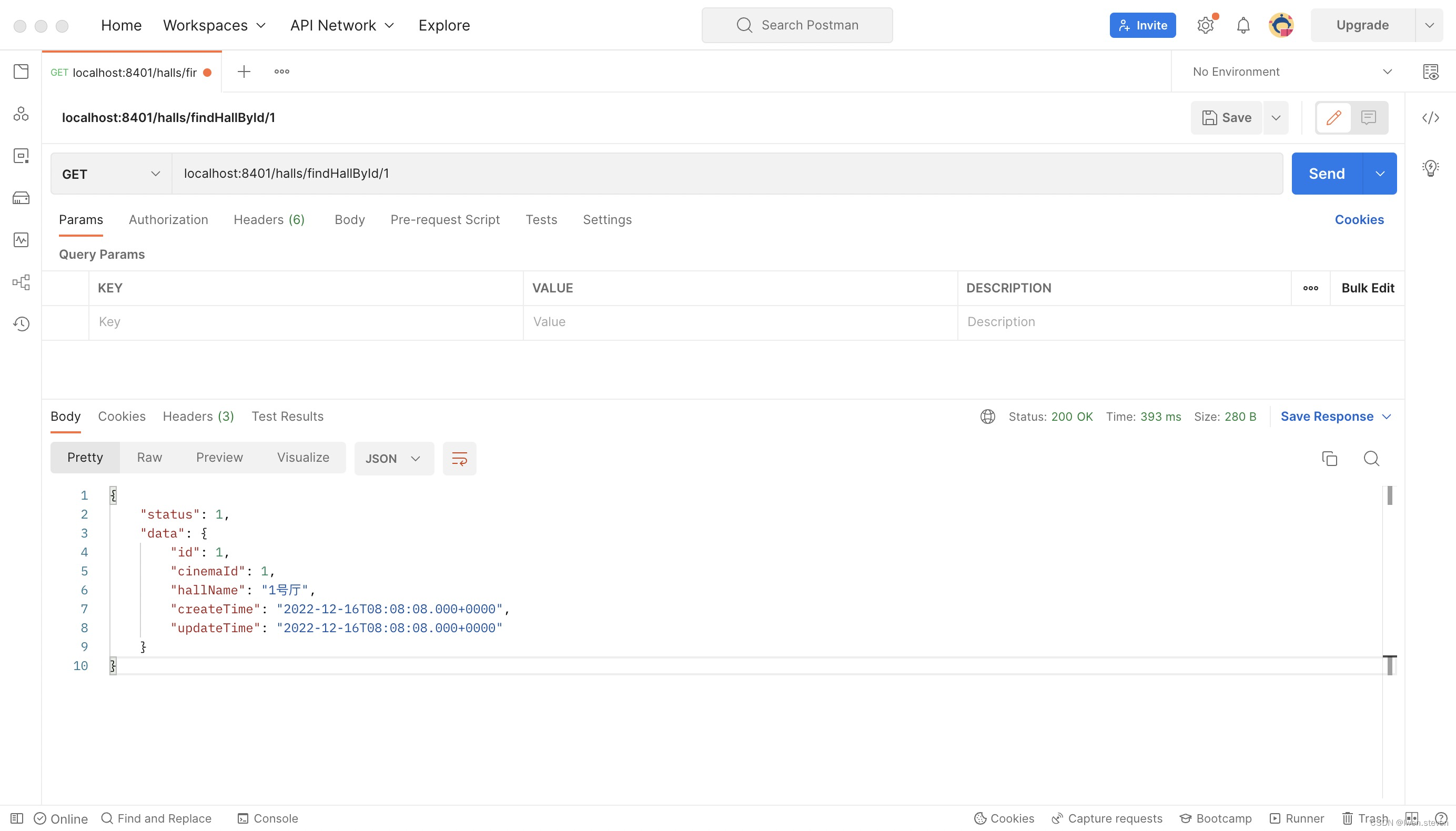
(9).测试
启动项目,然后在postman中请求“localhost:8401/halls/findHallById/1”,可以查询到相应的信息,测试结果如下图所示。
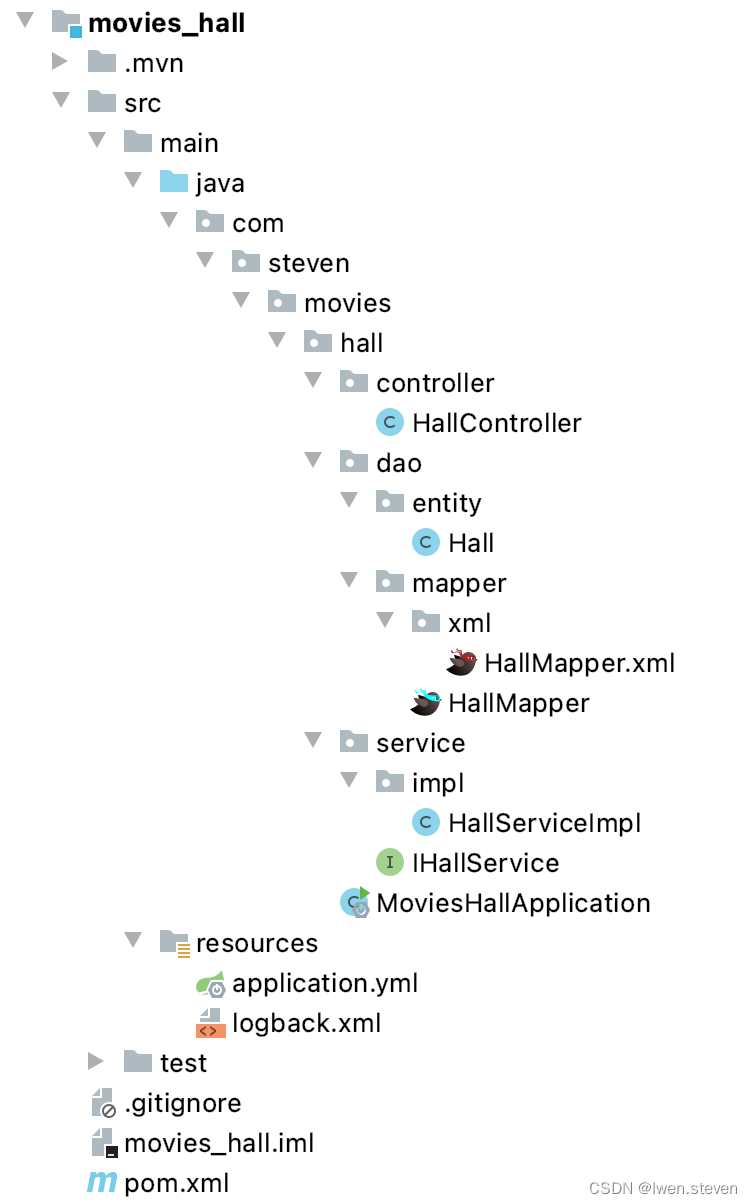
(10).hall服务工程目录结构
3.服务发现慢的原因
- Eureka Client默认延迟40秒,向Eureka Server发起心跳注册。
- Eureka Server每30秒更新一次服务列表缓存,即使是刚注册的实例,也可能不会立即出现在服务注册列表中。
- Eureka Client每30秒会从Eureka Server拉去服务列表信息,更新一下服务列表缓存。
4.自我保护模式
众所周知,Eureka在CAP理论当中是属于AP , 也就说当产生网络分区时,Eureka保证系统的可用性,但不保证系统里面数据的一致性。
当发生网络分区的时候,Eureka Server和Client端的通信被终止,Server端收不到大部分的Client的续约,这个时候,如果直接将没有收到心跳的Client端自动剔除,那么会将可用的Client端剔除,这不符合AP理论,所以Eureka宁可保留也许已经宕机了的Client端 , 也不愿意将可以用的client端一起剔除。 从这一点上,也就保证了Eureka程序的健壮性,符合AP理论。





 扫一扫
扫一扫


 被折叠的 条评论
为什么被折叠?
被折叠的 条评论
为什么被折叠?
 到【灌水乐园】发言





