


 本文详细解析了在使用Python爬取GitHub仓库信息时遇到的UnicodeEncodeError错误,并提供了有效的解决方案。通过调整代码中对描述字段的处理方式,成功避免了因特殊字符导致的编码问题,确保程序稳定运行。
书中第349页运行python_repos.py报如下错误:
AttributeError: 'NoneType' object has no attribute 'decode'
对仓库们进行id和description打印,查看一下哪里出了问题:
import requests

url = 'https://api.github.com/search/repositories?q=language:python&sort=stars'
r = requests.get(url)
print("Status code:", r.status_code)

response_dict = r.json()
print("Total repositories:", response_dict['total_count'])

repositories = response_dict['items']
for i in repositories:
    print('id:',i['id'],'\nDescription:',i['description'])
程序运行后对仓库的id和description依次进行打印:
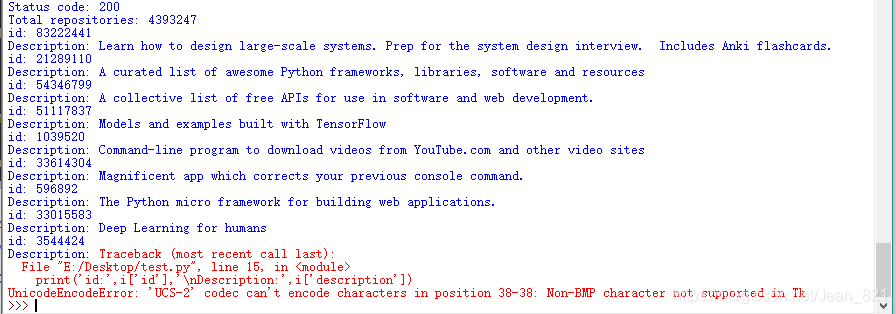
可以看到id为3544424的Description有问题,显示报错UnicodeEncodeError.
去API调用(https://api.github.com/search/repositories?q=language:python&sort=stars)看一下这个仓库的描述是这个样子的:

这个httpie的描述有一个🥧就是不能转码的原因。
之前看到别人说的如果Description是空值(None)也会报错,我现在看的这个排名里的仓库恰好没有空值。
解决:
在plot_dict这个字典里,description用str()转换成字符串:
plot_dict = {
			'value':i['stargazers_count'],
            'label':str(i['description']),
            }
然后就可以顺利出图啦!鼠标放到条形时显示的项目描述还是会正常显示🥧的!
小小扩展:
刚刚那个检查的代码遇到第一个不能打印的描述时就停止了,可以用try-except来看看所有不能正常打印的描述:
import requests

url = 'https://api.github.com/search/repositories?q=language:python&sort=stars'
r = requests.get(url)
print("Status code:", r.status_code)

response_dict = r.json()
print("Total repositories:", response_dict['total_count'])

repositories = response_dict['items']
for i in repositories:
    try:
        print('id:',i['id'],'\nDescription:',i['description'])
    except UnicodeEncodeError:
        print('CANNOT PRINT DESCRIPTION')
凡是有不能转码的描述都会打印CANNOT PRINT DESCRIPTION





 扫一扫
扫一扫


 被折叠的 条评论
为什么被折叠?
被折叠的 条评论
为什么被折叠?
 到【灌水乐园】发言





