



记录开发
13. 翻硬币小游戏
5. 核心关卡设计
首先创建金币类 MyCoin,仍是继承于 QPushButton 类,因为与之前 MyPushButton 功能不同,故重新构造;
//MyCoin.h
#ifndef MYCOIN_H
#define MYCOIN_H

#include <QPushButton>

class MyCoin : public QPushButton
{
    Q_OBJECT
public:
//    explicit MyCoin(QWidget *parent = nullptr);

    MyCoin(QString btnImg);

signals:

};

#endif // MYCOIN_H
//MyCoin.cpp
MyCoin::MyCoin(QString btnImg)
{
    QPixmap pixmap;
    bool ret = pixmap.load(btnImg);
    if(!ret)
    {
        QString str = QString("加载图片 %1 失败!").arg(btnImg);
        qDebug() << str ;
    }

    this->setFixedSize(pixmap.width(), pixmap.height() );
    this->setStyleSheet("QPushButton{border:0px;}");    //边框 0 像素;
    this->setIcon(pixmap);
    this->setIconSize(QSize(pixmap.width(),pixmap.height()));
}
添加两个数据配置文件 dataconfig.h 以及 dataconfig.cpp;
//dataconfig.h
#ifndef PLAYSCENE_H
#define PLAYSCENE_H

#include <QMainWindow>

class PlayScene : public QMainWindow
{
    Q_OBJECT
public:
    //explicit PlayScene(QWidget *parent = nullptr);
    PlayScene(int levelNum);

    int levelIndex;     //记录所选关卡;
    void paintEvent(QPaintEvent *);

    int gameArray[4][4];    //维护每一个关卡的二维数组;
signals:
    void playSceneBack();
};

#endif // PLAYSCENE_H
//dataconfig.cpp
#include "dataconfig.h"
#include <QDebug>
dataConfig::dataConfig(QObject *parent) : QObject(parent)
{

     //枚举金币的初始位置,一共 20 个二维数组;
     int array1[4][4] = {{1, 1, 1, 1},
                        {1, 1, 0, 1},
                        {1, 0, 0, 0},
                        {1, 1, 0, 1} } ;

     QVector< QVector<int>> v;
     for(int i = 0 ; i < 4;i++)
     {
         QVector<int>v1;
         for(int j = 0 ; j < 4;j++)
         {

            v1.push_back(array1[i][j]);
         }
         v.push_back(v1);
     }

     mData.insert(1,v);


     int array2[4][4] = { {1, 0, 1, 1},
                          {0, 0, 1, 1},
                          {1, 1, 0, 0},
                          {1, 1, 0, 1}} ;

     v.clear();
     for(int i = 0 ; i < 4;i++)
     {
          QVector<int>v1;
          for(int j = 0 ; j < 4;j++)
          {
             v1.push_back(array2[i][j]);
          }
          v.push_back(v1);
     }

     mData.insert(2,v);


     int array3[4][4] = {  {0, 0, 0, 0},
                           {0, 1, 1, 0},
                           {0, 1, 1, 0},
                           {0, 0, 0, 0}} ;
     v.clear();
     for(int i = 0 ; i < 4;i++)
     {
          QVector<int>v1;
          for(int j = 0 ; j < 4;j++)
          {
             v1.push_back(array3[i][j]);
          }
          v.push_back(v1);
     }

     mData.insert(3,v);


     int array4[4][4] = {   {0, 1, 1, 1},
                            {1, 0, 0, 1},
                            {1, 0, 1, 1},
                            {1, 1, 1, 1}} ;
     v.clear();
     for(int i = 0 ; i < 4;i++)
     {
          QVector<int>v1;
          for(int j = 0 ; j < 4;j++)
          {
             v1.push_back(array4[i][j]);
          }
          v.push_back(v1);
     }

     mData.insert(4,v);


     int array5[4][4] = {  {1, 0, 0, 1},
                           {0, 0, 0, 0},
                           {0, 0, 0, 0},
                           {1, 0, 0, 1}} ;
     v.clear();
     for(int i = 0 ; i < 4;i++)
     {
          QVector<int>v1;
          for(int j = 0 ; j < 4;j++)
          {
             v1.push_back(array5[i][j]);
          }
          v.push_back(v1);
     }

     mData.insert(5,v);


     int array6[4][4] = {   {1, 0, 0, 1},
                            {0, 1, 1, 0},
                            {0, 1, 1, 0},
                            {1, 0, 0, 1}} ;
     v.clear();
     for(int i = 0 ; i < 4;i++)
     {
          QVector<int>v1;
          for(int j = 0 ; j < 4;j++)
          {
             v1.push_back(array6[i][j]);
          }
          v.push_back(v1);
     }

     mData.insert(6,v);


     int array7[4][4] = {   {0, 1, 1, 1},
                            {1, 0, 1, 1},
                            {1, 1, 0, 1},
                            {1, 1, 1, 0}} ;
     v.clear();
     for(int i = 0 ; i < 4;i++)
     {
          QVector<int>v1;
          for(int j = 0 ; j < 4;j++)
          {
             v1.push_back(array7[i][j]);
          }
          v.push_back(v1);
     }

     mData.insert(7,v);

     int array8[4][4] = {  {0, 1, 0, 1},
                           {1, 0, 0, 0},
                           {0, 0, 0, 1},
                           {1, 0, 1, 0}} ;
     v.clear();
     for(int i = 0 ; i < 4;i++)
     {
          QVector<int>v1;
          for(int j = 0 ; j < 4;j++)
          {
             v1.push_back(array8[i][j]);
          }
          v.push_back(v1);
     }

     mData.insert(8,v);

     int array9[4][4] = {   {1, 0, 1, 0},
                            {1, 0, 1, 0},
                            {0, 0, 1, 0},
                            {1, 0, 0, 1}} ;
     v.clear();
     for(int i = 0 ; i < 4;i++)
     {
          QVector<int>v1;
          for(int j = 0 ; j < 4;j++)
          {
             v1.push_back(array9[i][j]);
          }
          v.push_back(v1);
     }

     mData.insert(9,v);


     int array10[4][4] = {  {1, 0, 1, 1},
                            {1, 1, 0, 0},
                            {0, 0, 1, 1},
                            {1, 1, 0, 1}} ;
     v.clear();
     for(int i = 0 ; i < 4;i++)
     {
          QVector<int>v1;
          for(int j = 0 ; j < 4;j++)
          {
             v1.push_back(array10[i][j]);
          }
          v.push_back(v1);
     }

     mData.insert(10,v);


     int array11[4][4] = {  {0, 1, 1, 0},
                            {1, 0, 0, 1},
                            {1, 0, 0, 1},
                            {0, 1, 1, 0}} ;
     v.clear();
     for(int i = 0 ; i < 4;i++)
     {
          QVector<int>v1;
          for(int j = 0 ; j < 4;j++)
          {
             v1.push_back(array11[i][j]);
          }
          v.push_back(v1);
     }

     mData.insert(11,v);

     int array12[4][4] = {  {0, 1, 1, 0},
                            {0, 0, 0, 0},
                            {1, 1, 1, 1},
                            {0, 0, 0, 0}} ;
     v.clear();
     for(int i = 0 ; i < 4;i++)
     {
          QVector<int>v1;
          for(int j = 0 ; j < 4;j++)
          {
             v1.push_back(array12[i][j]);
          }
          v.push_back(v1);
     }

     mData.insert(12,v);


     int array13[4][4] = {    {0, 1, 1, 0},
                              {0, 0, 0, 0},
                              {0, 0, 0, 0},
                              {0, 1, 1, 0}} ;
     v.clear();
     for(int i = 0 ; i < 4;i++)
     {
          QVector<int>v1;
          for(int j = 0 ; j < 4;j++)
          {
             v1.push_back(array13[i][j]);
          }
          v.push_back(v1);
     }

     mData.insert(13,v);

     int array14[4][4] = {    {1, 0, 1, 1},
                              {0, 1, 0, 1},
                              {1, 0, 1, 0},
                              {1, 1, 0, 1}} ;
     v.clear();
     for(int i = 0 ; i < 4;i++)
     {
          QVector<int>v1;
          for(int j = 0 ; j < 4;j++)
          {
             v1.push_back(array14[i][j]);
          }
          v.push_back(v1);
     }

     mData.insert(14,v);


     int array15[4][4] = {   {0, 1, 0, 1},
                             {1, 0, 0, 0},
                             {1, 0, 0, 0},
                             {0, 1, 0, 1}} ;
     v.clear();
     for(int i = 0 ; i < 4;i++)
     {
          QVector<int>v1;
          for(int j = 0 ; j < 4;j++)
          {
             v1.push_back(array15[i][j]);
          }
          v.push_back(v1);
     }

     mData.insert(15,v);


     int array16[4][4] = {   {0, 1, 1, 0},
                             {1, 1, 1, 1},
                             {1, 1, 1, 1},
                             {0, 1, 1, 0}} ;
     v.clear();
     for(int i = 0 ; i < 4;i++)
     {
          QVector<int>v1;
          for(int j = 0 ; j < 4;j++)
          {
             v1.push_back(array16[i][j]);
          }
          v.push_back(v1);
     }

     mData.insert(16,v);

     int array17[4][4] = {  {0, 1, 1, 1},
                            {0, 1, 0, 0},
                            {0, 0, 1, 0},
                            {1, 1, 1, 0}} ;
     v.clear();
     for(int i = 0 ; i < 4;i++)
     {
          QVector<int>v1;
          for(int j = 0 ; j < 4;j++)
          {
             v1.push_back(array17[i][j]);
          }
          v.push_back(v1);
     }

     mData.insert(17,v);


     int array18[4][4] = { {0, 0, 0, 1},
                           {0, 0, 1, 0},
                           {0, 1, 0, 0},
                           {1, 0, 0, 0}} ;
     v.clear();
     for(int i = 0 ; i < 4;i++)
     {
          QVector<int>v1;
          for(int j = 0 ; j < 4;j++)
          {
             v1.push_back(array18[i][j]);
          }
          v.push_back(v1);
     }

     mData.insert(18,v);

     int array19[4][4] = {   {0, 1, 0, 0},
                             {0, 1, 1, 0},
                             {0, 0, 1, 1},
                             {0, 0, 0, 0}} ;
     v.clear();
     for(int i = 0 ; i < 4;i++)
     {
          QVector<int>v1;
          for(int j = 0 ; j < 4;j++)
          {
             v1.push_back(array19[i][j]);
          }
          v.push_back(v1);
     }

     mData.insert(19,v);

     int array20[4][4] = {  {0, 0, 0, 0},
                            {0, 0, 0, 0},
                            {0, 0, 0, 0},
                            {0, 0, 0, 0}} ;
     v.clear();
     for(int i = 0 ; i < 4;i++)
     {
          QVector<int>v1;
          for(int j = 0 ; j < 4;j++)
          {
             v1.push_back(array20[i][j]);
          }
          v.push_back(v1);
     }

     mData.insert(20,v);


     //测试数据
//    for( QMap<int, QVector< QVector<int> > >::iterator it = mData.begin();it != mData.end();it++ )
//    {
//         for(QVector< QVector<int> >::iterator it2 = (*it).begin(); it2!= (*it).end();it2++)
//         {
//            for(QVector<int>::iterator it3 = (*it2).begin(); it3 != (*it2).end(); it3++ )
//            {
//                qDebug() << *it3 ;
//            }
//         }
//         qDebug() << endl;
//    }


}
接下来根据数组中的值来创建金币,在 playScene 中加入一个二维数组成员来维护
int gameArray[4][4]; //维护每一个关卡的二维数组;
	//playScene.cpp
    //维护初始数组;
    for(int i = 0; i < 4; i++)
    {
        for(int j = 0; j < 4; j++)
        {
            this->gameArray[i][j] = data.mData[this->levelIndex][i][j];
        }
    }
然后根据值来判断金币的初始样式;
//根据数组值来创建金币;
QString str;
if(this->gameArray[i][j] == 1) {
    str = ":/res/Coin0001.png";
}
else {
    str = ":/res/Coin0008.png";
}

MyCoin *coin = new MyCoin(str);
coin->setParent(this);
coin->move(59 + i*50, 204 + j*50);
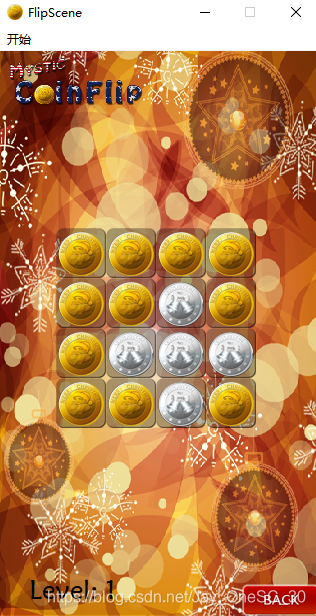
找到一个小 Bug,在 playScene 的构造函数中,没有给成员 levelIndex 赋值,所以在用到这个成员时报错了,因为是随机值;所以要在开头补上语句
this->levelIndex = levelNum;,即可得到下图的关卡样式;
6. 实现金币翻转
拓展金币类的属性,添加 X,Y,和正反位置;
int posX;
int posY;
bool flag;  //正反;

coin->posX = i;
coin->posY = j;
coin->flag = this->gameArray[i][j];
添加特效函数 changeFlag(),即翻转效果,这样就可用信号和槽函数去连接;鼠标点击所连接的槽函数就可让该位置周围的金币皆翻转;
void changeFlag(void);
QTimer *timer1;
QTimer *timer2;
int min = 1;
int max = 8;

void MyCoin::changeFlag()
{
    if(this->flag) {
        timer1->start(30);
        this->flag = false;
    }
    else {
        timer2->start(30);
        this->flag = true;
    }
}
在 MyCoin 的构造函数中实现 timer 的创建及连接;
    //在构造函数中构建 timer;
    timer1 = new QTimer;
    timer2 = new QTimer;

    //实现动画效果,用定时器来实现图片的播放;
    //注意这是定时器的信号连接,也就是说定时器触发后就要有这个反应,所以可以写在构造函数里;
    //而定时器的触发是标志改变;
    //而标志改变的触发是鼠标点击,这个逻辑要搞清楚;鼠标点击的监听应该是在 playScene 中;
    connect(timer1, &QTimer::timeout, [=](){
        QPixmap pix;
        QString str = QString(":/res/Coin000%1.png").arg(this->min++);	//这样用 QString 很好用;
        pix.load(str);
        this->setIcon(pix);
        this->setIconSize(QSize(pixmap.width(),pixmap.height()));

		//翻转结束后要重置;
        if(this->min > this->max) {
            this->min = 1;
            timer1->stop();
        }
    });

    connect(timer2, &QTimer::timeout, [=](){
        QPixmap pix;
        QString str = QString(":/res/Coin000%1.png").arg(this->max--);
        pix.load(str);
        this->setIcon(pix);
        this->setIconSize(QSize(pixmap.width(),pixmap.height()));

        if(this->min > this->max) {
            this->max = 8;
            timer2->stop();
        }
    });
在 playScene 中实现鼠标的连接以及周围金币的翻转;
由于在创建 coin 时我们创建的对象并没有存储,故在翻转时无法识别周围的金币,因此我们可以在 playScene 中维护住一个 coin 对象组,用来定位每一个 coin;
MyCoin *allCoin[4][4];  //维护所有的金币;

//更新 allCoin;
allCoin[i][j] = coin;

//鼠标点击的信号连接,要在该 coin 对象创建时连接;
connect(coin, &MyCoin::clicked, [=](){
    emit coin->changeFlag();
    this->gameArray[i][j] = coin->flag; //维护;

    //延时周围翻转;
    QTimer::singleShot(300, this,[=](){
        if(coin->posX + 1 <= 3) {
            allCoin[coin->posX + 1][coin->posY]->changeFlag();
            //维护数组值;
            this->gameArray[coin->posX + 1][coin->posY] = allCoin[coin->posX + 1][coin->posY]->flag;
        }
        if(coin->posX - 1 >= 0) {
            allCoin[coin->posX - 1][coin->posY]->changeFlag();
            this->gameArray[coin->posX - 1][coin->posY] = allCoin[coin->posX - 1][coin->posY]->flag;
        }
        if(coin->posY + 1 <= 3) {
            allCoin[coin->posX][coin->posY + 1]->changeFlag();
            //维护数组值;
            this->gameArray[coin->posX][coin->posY + 1] = allCoin[coin->posX][coin->posY + 1]->flag;
        }
        if(coin->posY - 1 >= 0) {
            allCoin[coin->posX][coin->posY - 1]->changeFlag();
            this->gameArray[coin->posX][coin->posY - 1] = allCoin[coin->posX][coin->posY - 1]->flag;
        }

    });
});
7. 游戏通关的判断
在每次翻转之后都要进行一次判断,如果皆为正面,则表示游戏通关;我们在 playScene 中维护一个标志位
bool isWin; //通关的标志;,当其为 true 时表示游戏成功;然后每次翻转后用一个二阶循环来判断;
//判断是否胜利;
this->isWin = true;
for(int i = 0; i < 4; i++) {
    for(int j = 0; j < 4; j++) {
        if(this->gameArray[i][j] == 0) {
            this->isWin = false;
            break;
        }
    }
}

if(this->isWin == true) {
    qDebug() << "Win";
}
胜利之后金币的点击操作应该无响应,也就是说要拦截鼠标的点击,故我们也在 MyCoin 类中加个胜利标志位
bool isWin; //通关的标志;,然后当其值为 true 时拦截;
//通关后拦截鼠标点击;
void MyCoin::mousePressEvent(QMouseEvent *e)
{
    if(this->isWin) {
        return;
    }
    else {
        QPushButton::mousePressEvent(e);
    }
}
显示胜利图片,提前将图片放在 Y 轴的高位,成功后弹下即可;
QLabel* winLabel = new QLabel;
QPixmap tmpPix;
tmpPix.load(":/res/LevelCompletedDialogBg.png");
winLabel->setGeometry(0,0,tmpPix.width(),tmpPix.height());
winLabel->setPixmap(tmpPix);
winLabel->setParent(this);
winLabel->move((this->width() - tmpPix.width())*0.5, -tmpPix.height());

if(this->isWin) {
    qDebug() << "Win";
    for(int i = 0; i < 4; i++) {
        for(int j = 0; j < 4; j++) {
            allCoin[i][j]->isWin = true;
        }
    }

    //弹下图片;
    QPropertyAnimation *animation1 =  new QPropertyAnimation(winLabel, "geometry");

    animation1->setDuration(1000);

    animation1->setStartValue(QRect(winLabel->x(),winLabel->y(),winLabel->width(),winLabel->height()));

    animation1->setEndValue(QRect(winLabel->x(),winLabel->y()+114,winLabel->width(),winLabel->height()));

    animation1->setEasingCurve(QEasingCurve::OutBounce);
    animation1->start();
}
8. 添加音效
用 QSound 类来添加游戏音效;比如开始按钮,通关音效
首先要添加模块QT += core gui multimedia,音效是多媒体模块下的内容;然后添加音效文件QSound *startSound = new QSound(":/res/TapButtonSound.wav",this);,其他音效的添加方法都一样;
9. 修复小BUG
用 setGeometry 来实现
chooseScene->setGeometry(this->geometry());,this->setGeometry(chooseScene->geometry());
10. Qt程序打包
先用 release 版本将代码编译出来,再将 .exe 文件挪出到新的文件夹,然后用 cmd 定位到该文件夹,输入指令 windeployqt CoinGame.exe,也就是 windeployqt + 空格 + 程序名,即可将所需文件和库都调入新建的文件夹;
下一步的打包可以用第三方的软件 HM NIS Edit;





 扫一扫
扫一扫


 515
515

 被折叠的 条评论
为什么被折叠?
被折叠的 条评论
为什么被折叠?
 到【灌水乐园】发言





