


太极图
周四课余时间比较多,正好前几天为了给小学弟解决问题,回顾了一些Android的知识,(上学还是不能把以前上班学到的东西丢掉)于是写一篇关于自定义view的文章。
文章目录
- 太极图
- 最后完成的样子(可旋转)
- 一、先画一个太极
- 二、让太极旋转
- 三、自定义属性(颜色,动画速度)
- 四、源码
- 总结
最后完成的样子(可旋转)

这篇文章主要内容为使用Canvas画简单图案,自定义属性,以及属性动画ObjectAnimator中的旋转动画
提示:以下是本篇文章正文内容
一、先画一个太极
先介绍一下定义的东西:
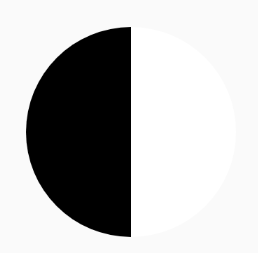
1.第一步,画一个半边黑半边白的圆
效果:
2.第二步,画黑白两个小圆
效果:

3.第三步,画黑白两个更小的圆
效果

二、让太极旋转
先简单介绍一下定义的东西
1.旋转的开始方法
//旋转动画开始的方法
public void createAnimation() {
if (objectAnimator==null){
objectAnimator = ObjectAnimator.ofFloat(this, "rotation", 0f, 360f);//添加旋转动画,旋转中心默认为控件中点
objectAnimator.setDuration(animaltime);//设置动画时间
objectAnimator.setInterpolator(new LinearInterpolator());//动画时间线性渐变
objectAnimator.setRepeatCount(ObjectAnimator.INFINITE);
objectAnimator.setRepeatMode(ObjectAnimator.RESTART);
objectAnimator.start();//动画开始
}else{
objectAnimator.resume();//动画继续开始
}
}- 1.
- 2.
- 3.
- 4.
- 5.
- 6.
- 7.
- 8.
- 9.
- 10.
- 11.
- 12.
- 13.
- 14.
- 15.
2.旋转的暂停方法(可继续旋转)
3.旋转的停止方法(不可继续旋转)
三、自定义属性(颜色,动画速度)
1.新建attrs文件

2.定义属性
3.布局中使用
4.java文件中获取在布局中定义的值
/**
获取自定义属性
*/
private void initCustomAttrs(Context context, AttributeSet attrs) {
//获取自定义属性。
TypedArray ta = context.obtainStyledAttributes(attrs, R.styleable.TaiJiView);
//获取太极颜色
leftcolor = ta.getColor(R.styleable.TaiJiView_leftcolor, Color.BLACK);
rightcolor=ta.getColor(R.styleable.TaiJiView_rightcolor, Color.WHITE);
//时间
animaltime=ta.getInt(R.styleable.TaiJiView_animaltime,1000);
//回收
ta.recycle();
}- 1.
- 2.
- 3.
- 4.
- 5.
- 6.
- 7.
- 8.
- 9.
- 10.
- 11.
- 12.
- 13.
- 14.
- 15.
- 16.
最后运行一下看一下效果

四、源码
1.TaiJiView.java
public class TaiJiView extends View{
private Paint mPaint;
private int mWidth;
private int mHeight;
private int useWidth;
private int leftcolor;
private int rightcolor;
private ObjectAnimator objectAnimator;
private int animaltime;
@RequiresApi(api = Build.VERSION_CODES.LOLLIPOP)
public TaiJiView(Context context) {
this(context,null);
}
@RequiresApi(api = Build.VERSION_CODES.LOLLIPOP)
public TaiJiView(Context context, @Nullable AttributeSet attrs) {
this(context, attrs,0);
}
@RequiresApi(api = Build.VERSION_CODES.LOLLIPOP)
public TaiJiView(Context context, @Nullable AttributeSet attrs, int defStyleAttr) {
this(context, attrs, defStyleAttr,0);
initCustomAttrs(context,attrs);
}
@RequiresApi(api = Build.VERSION_CODES.LOLLIPOP)
public TaiJiView(Context context, @Nullable AttributeSet attrs, int defStyleAttr, int defStyleRes) {
super(context, attrs, defStyleAttr, defStyleRes);
init();
}
private void init() {
initPaint();
}
/**
获取自定义属性
*/
private void initCustomAttrs(Context context, AttributeSet attrs) {
//获取自定义属性。
TypedArray ta = context.obtainStyledAttributes(attrs, R.styleable.TaiJiView);
//获取太极颜色
leftcolor = ta.getColor(R.styleable.TaiJiView_leftcolor, Color.BLACK);
rightcolor=ta.getColor(R.styleable.TaiJiView_rightcolor, Color.WHITE);
animaltime=ta.getInt(R.styleable.TaiJiView_animaltime,1000);
//回收
ta.recycle();
}
/**
* 初始化画笔
*/
private void initPaint() {
mPaint = new Paint(); //创建画笔对象
mPaint.setColor(Color.BLACK); //设置画笔颜色
mPaint.setStyle(Paint.Style.FILL); //设置画笔模式为填充
mPaint.setStrokeWidth(10f); //设置画笔宽度为10px
mPaint.setAntiAlias(true); //设置抗锯齿
mPaint.setAlpha(255); //设置画笔透明度
}
@Override
protected void onSizeChanged(int w, int h, int oldw, int oldh) {
super.onSizeChanged(w, h, oldw, oldh);
mWidth = w;
mHeight = h;
useWidth=mWidth;
if (mWidth>mHeight){
useWidth=mHeight;
}
}
@RequiresApi(api = Build.VERSION_CODES.KITKAT)
@Override
protected void onDraw(Canvas canvas) {
super.onDraw(canvas);
mPaint.setColor(leftcolor);
        canvas.drawArc(new RectF(0, 0, useWidth, useWidth), 270, -180, true, mPaint);

        mPaint.setColor(rightcolor);
        canvas.drawArc(new RectF(0, 0, useWidth, useWidth), 270, 180, true, mPaint);
mPaint.setColor(leftcolor);
        canvas.drawArc(new RectF(useWidth / 4, 0, useWidth / 2 +useWidth / 4, useWidth / 2),
                270, 360, true, mPaint);

        mPaint.setColor(rightcolor);
        canvas.drawArc(new RectF(useWidth / 4, useWidth / 2, useWidth / 2 + useWidth / 4,useWidth),
                270, 360, true, mPaint);
mPaint.setColor(leftcolor);
        canvas.drawCircle(useWidth/ 2, useWidth * 3 / 4, useWidth/16, mPaint);

        mPaint.setColor(rightcolor);
        canvas.drawCircle(useWidth / 2, useWidth / 4, useWidth/16, mPaint);
}
@RequiresApi(api = Build.VERSION_CODES.KITKAT)
public void createAnimation() {
if (objectAnimator==null){
objectAnimator = ObjectAnimator.ofFloat(this, "rotation", 0f, 360f);//添加旋转动画,旋转中心默认为控件中点
objectAnimator.setDuration(animaltime);//设置动画时间
objectAnimator.setInterpolator(new LinearInterpolator());//动画时间线性渐变
objectAnimator.setRepeatCount(ObjectAnimator.INFINITE);
objectAnimator.setRepeatMode(ObjectAnimator.RESTART);
objectAnimator.start();//动画开始
}else{
objectAnimator.resume();//动画继续开始
}
}
@RequiresApi(api = Build.VERSION_CODES.KITKAT)
public  void stopAnimation(){
        if (objectAnimator!=null){
            objectAnimator.pause();//动画暂停  .end()结束动画
        }
    }
public  void cleanAnimation(){
        if (objectAnimator!=null){
            objectAnimator.end(); //结束动画
        }
    }
}- 1.
- 2.
- 3.
- 4.
- 5.
- 6.
- 7.
- 8.
- 9.
- 10.
- 11.
- 12.
- 13.
- 14.
- 15.
- 16.
- 17.
- 18.
- 19.
- 20.
- 21.
- 22.
- 23.
- 24.
- 25.
- 26.
- 27.
- 28.
- 29.
- 30.
- 31.
- 32.
- 33.
- 34.
- 35.
- 36.
- 37.
- 38.
- 39.
- 40.
- 41.
- 42.
- 43.
- 44.
- 45.
- 46.
- 47.
- 48.
- 49.
- 50.
- 51.
- 52.
- 53.
- 54.
- 55.
- 56.
- 57.
- 58.
- 59.
- 60.
- 61.
- 62.
- 63.
- 64.
- 65.
- 66.
- 67.
- 68.
- 69.
- 70.
- 71.
- 72.
- 73.
- 74.
- 75.
- 76.
- 77.
- 78.
- 79.
- 80.
- 81.
- 82.
- 83.
- 84.
- 85.
- 86.
- 87.
- 88.
- 89.
- 90.
- 91.
- 92.
- 93.
- 94.
- 95.
- 96.
- 97.
- 98.
- 99.
- 100.
- 101.
- 102.
- 103.
- 104.
- 105.
- 106.
- 107.
- 108.
- 109.
- 110.
- 111.
- 112.
- 113.
- 114.
- 115.
- 116.
- 117.
- 118.
- 119.
- 120.
- 121.
- 122.
- 123.
- 124.
- 125.
- 126.
- 127.
2.attrs文件
总结
希望能够对您有所帮助。如有疑问可留言。欢迎各位前辈点评





 扫一扫
扫一扫


 5958
5958

 被折叠的 条评论
为什么被折叠?
被折叠的 条评论
为什么被折叠?
 到【灌水乐园】发言





