使用hutool工具进行导入导出excel表格

基于Hutool工具的Excel导出实现 阅读详情
AI摘要

本文介绍了如何使用Hutool和Apache POI库在后台为网站添加用户数据的导入导出功能,包括导出用户列表为Excel文件并提供前端调用,以及解析上传的Excel文件进行数据导入并批量保存。适合快速上手Excel操作的开发者。

如何在后台添加导入导出表格的功能呢,本期的文章将会带领小伙伴们一起实现此功能


1.先引入hutool的相关依赖

 <!--hutool-->
        <dependency>
            <groupId>cn.hutool</groupId>
            <artifactId>hutool-all</artifactId>
            <version>5.7.20</version>
        </dependency>
        <dependency>
            <groupId>org.apache.poi</groupId>
            <artifactId>poi-ooxml</artifactId>
            <version>4.1.2</version>
        </dependency>

2.导出 

创建一个Controller进行测试 

  //表格导出接口
    @GetMapping("/export")
    public void export(HttpServletResponse response) throws IOException {
        //查询所有用户
        List<User> list= userService.list();
        //在内存操作,写到浏览器
        ExcelWriter writer= ExcelUtil.getWriter(true);

        //自定义标题别名
        writer.addHeaderAlias("username","用户名");
        writer.addHeaderAlias("password","密码");
        writer.addHeaderAlias("nickname","昵称");
        writer.addHeaderAlias("email","邮箱");
        writer.addHeaderAlias("phone","电话");
        writer.addHeaderAlias("address","地址");
        writer.addHeaderAlias("createTime","创建时间");

        //默认配置
        writer.write(list,true);
        //设置content—type
        response.setContentType("application/vnd.openxmlformats-officedocument.spreadsheetml.sheet;charset:utf-8");

        //设置标题
        String fileName= URLEncoder.encode("用户信息","UTF-8");
        //Content-disposition是MIME协议的扩展,MIME协议指示MIME用户代理如何显示附加的文件。
        response.setHeader("Content-Disposition","attachment;filename="+fileName+".xlsx");
        ServletOutputStream outputStream= response.getOutputStream();

        //将Writer刷新到OutPut
        writer.flush(outputStream,true);
        outputStream.close();
        writer.close();
    }

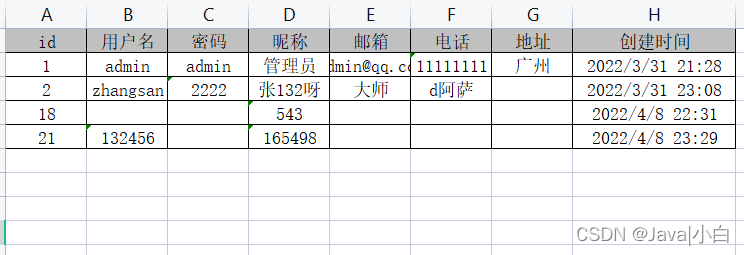
测试结果如下

Vue前端使用这个代码进行访问即可

  //点击函数exp, 导出表格
            exp(){
                window.open("http://localhost:9090/user/export")
            }

3.导入

创建一个Controller进行测试 

因为我前面导出设置了别名,所以这里我选择用第二种方式,

接下来可以去postman验证是否能实现功能

/**
     * 导入excel
     * @param file
     */
    @PostMapping("/import")
    public void importExcel(MultipartFile file) throws IOException {
        //1.第一种 头必须和实体(英文)一样
        //文件处理成io流
        InputStream in = file.getInputStream();
//        //io流给ExcelReader
        ExcelReader excelReader=ExcelUtil.getReader(in);
//        //读取数据且转化为list
//        List<User> list = excelReader.readAll(User.class);

        //2.第二种导入方式
        //忽略第一行头(第一行是中文的情况),直接读取表的内容
        List<List<Object>> list = excelReader.read(1);
        List<User> listUser = CollUtil.newArrayList();
        for (List<Object> row: list) {
            User user=new User();
            user.setUsername(row.get(0).toString());
            user.setPassword(row.get(1).toString());
            user.setNickname(row.get(2).toString());
            user.setNickname(row.get(3).toString());
            user.setPhone(row.get(4).toString());
            user.setAddress(row.get(5).toString());
            listUser.add(user);
//            ****类似一一对应****
        }
        //批量注册进数据库
        userService.saveBatch(listUser);
    }

前端的话我是用的elemen-ui

      <el-upload action="http://localhost:9090/user/import"  
                    :show-file-list="false" accept="xlsx" 
                    :on-success="handleImportSuccess" 
                    style="display: inline-block;margin-right: 5px">
           <el-button type="primary">导入 <i class="el-icon-bottom"></i></el-button>
      </el-upload>

on-success是一个钩子函数,弹了一个插入成功的信息跟刷新页面的操作

//导入,钩子函数进行页面的提示跟成功后页面的刷新
            handleImportSuccess(){
                this.$message.success("导入成功")
                this.load();
            }

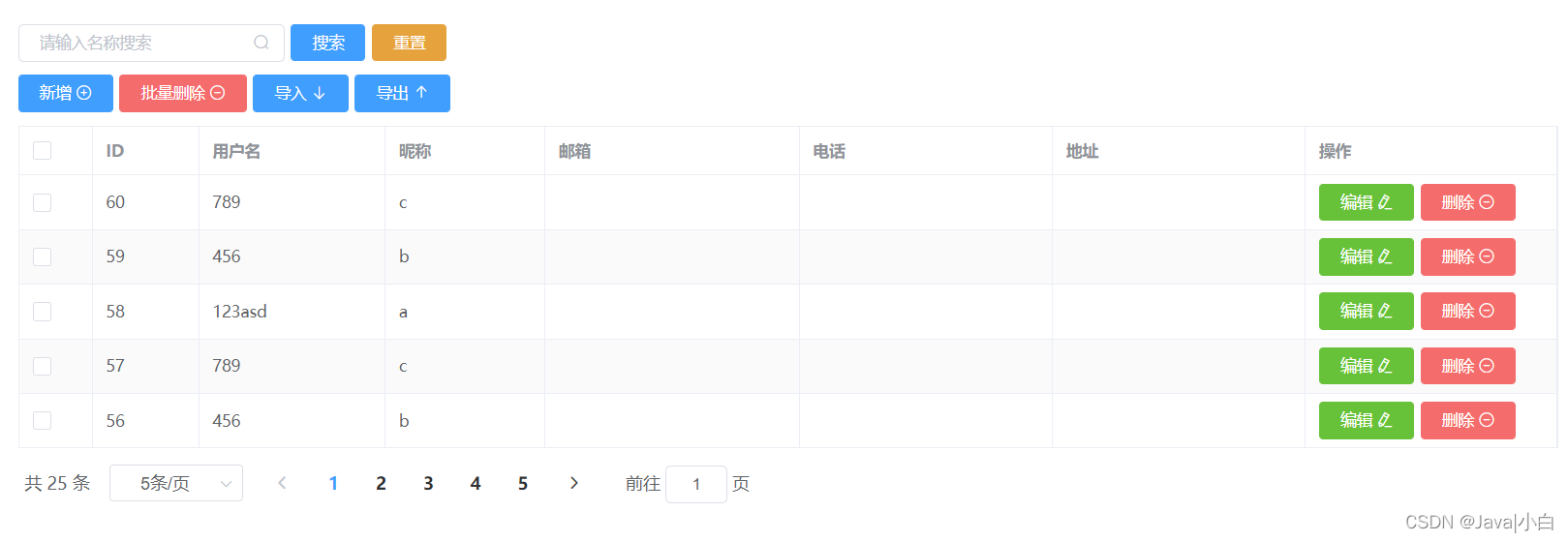
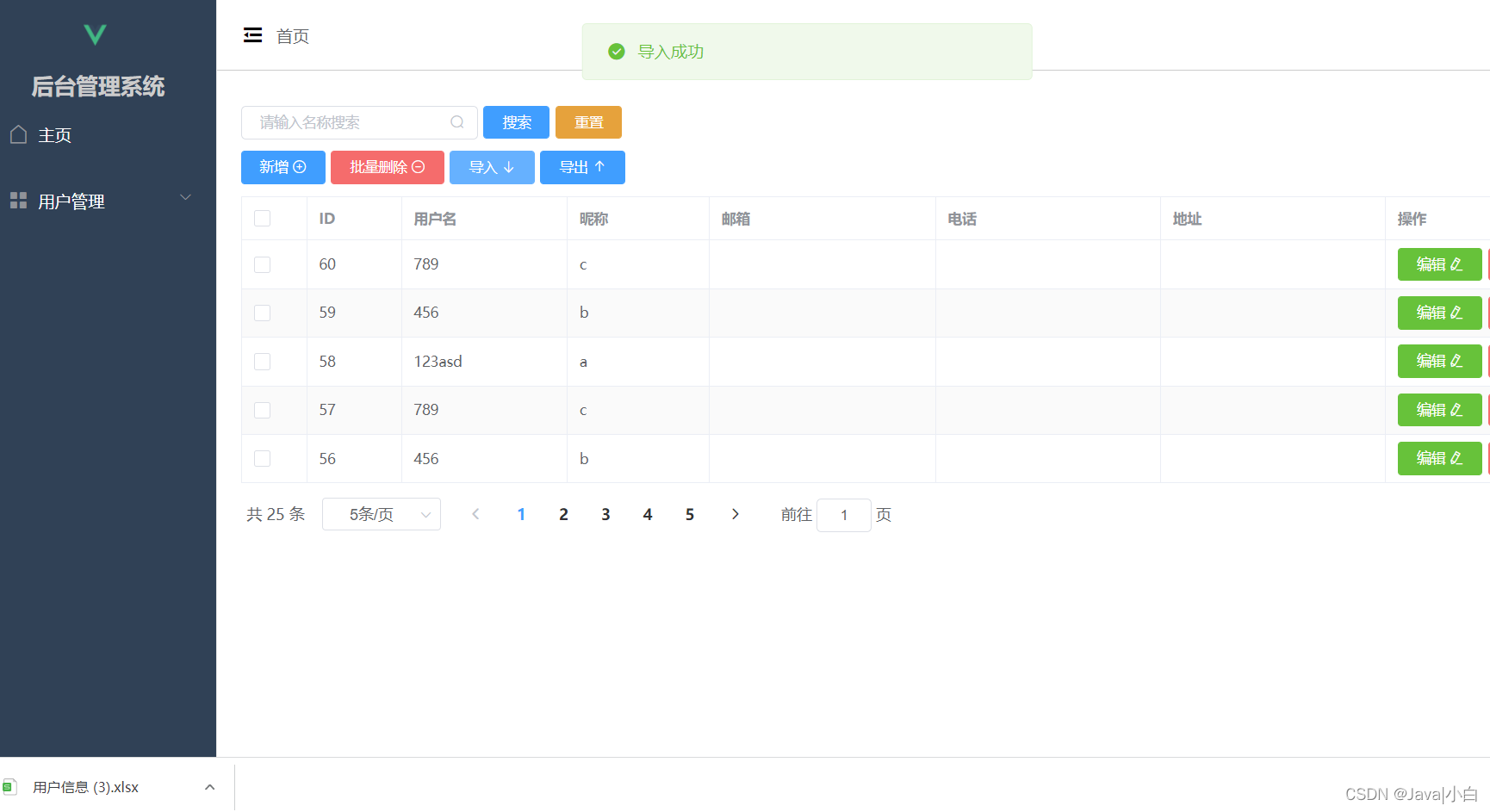
4.效果图为

5.本期的表格导入导出就分享到这啦,如果有其他需要的小伙伴可以评论区留言,代码代码敲不停


使用Hutool生成Excel工作日报文件 通过使用Hutool生成Excel工作日报,包括了单元格样式设置、字体加粗、背景色填充、单元格合并等等。 阅读详情

相关推荐

hutool工具编写导出Excel的使用

最近写了一个要导出excel的,要是比较简单一些就使用原始的方式了,遍历循环rows,并且遍历循环单元格填充值,就OK了,但是我的表头不是固定的,还需要一个行里填充4个单元格,有点像合并单元格之类的,填充数据呢,也是稍微复杂点,如果用原生的一是时间长,二是也比较困难,通过一些方式找到了hutool工具的ExcelWriter方式。 这个导出的好处就是你就关注数据本身,专注于数据本身能够怎么存储到List集合里,再把集合传给writer方法里就好了,就直接可以是一个想要的excel,咱们先来说一下使用示例

dfBeautifulLive的博客 5920

Hutool工具类excel导出详细教程

【代码】Hutool工具类excel导出详细教程。

txwy12的博客 6306

Excel 导入导出(前端处理:xslx)(后端处理:hutool+poi || Easy Excel )

判断前端是否有传过来ids,有就将其转成数组并queryWrapper查询出,没有就根据其他条件查询出数据列表。: Hutool-poi 模块中的一个工具类,用于处理 Excel 文件的读写。导出全部的可向后端传入ids.join(',')//把数组转成字符串。只需要在实体类的属性上面加一个注解 @Alias("中文")查询出来的list里是一条条user对象,所以有键值对。对象,比如获取工作表、将工作表转换为 JSON 等。方法会将文件读取为二进制数据缓冲区,即。对象的两种不同读取文件的方式。

qq_51985869的博客 3022

使用hutool库,对excel进行一些导出、导入操作

使用hutool库进行excel的导入、导出

qq_48162563的博客 4269

springboot使用hutool实现EXCEL导入导出

手把手教你 springboot导入导出。

这里是Mae。 4411

ICC2 高效上手 | create_lib 命令全攻略:数字后端工程师的必备秘籍

如果技术文件中的足够满足你的需求,你可以设置,然后运行create_lib命令;如果技术文件的精度不够,那就需要显式地使用来定义缩放因子。在使用create_lib必须显式指定库名(如my_libA推荐优先通过或来关联技术数据,确保你的设计库有正确的工艺基础。显式地通过-ref_libs定义参考库,这样可以避免工具自动推导时可能出现的冲突。慎重使用,只有在对数据精度有特殊需求时才显式指定,并且要确保它与参考库的缩放因子一致。

weixin_50820814的博客 1596

使用Hutool 工具库导出Excel表格

Hutool是Hu + tool的自造词,前者致敬我的“前任公司”,后者为工具之意,谐音“糊涂”,寓意追求“万事都作糊涂观,无所谓失,无所谓得”的境界。 Hutool是一个Java工具包,也只是一个工具包,它帮助我们简化每一行代码,减少每一个方法,让Java语言也可以“甜甜的”。Hutool最初是我项目中“util”包的一个整理,后来慢慢积累并加入更多非业务相关功能,并广泛学习其它开源项目精髓,...

记忆碎片 1万+

从网口变压器到TVS管:手把手设计通过4KV浪涌的以太网电路

本文详细解析工业级以太网接口4KV浪涌防护设计,从网口变压器选型到TVS管布局,提供通过IEC61000-4-5标准测试的完整方案。重点介绍Bob Smith电路优化和PCB设计技巧,帮助工程师有效应对雷电感应和设备开关瞬态干扰,确保工业设备稳定运行。

study的专栏 292

Java使用hutool工具类导出Excel表格

使用Hutool 工具库导出Excel表格的方法 首先我们需要导入下面的三个依赖: cn.hutool hutool-all 5.2.3; org.apache.poi poi-ooxml 4.1.1 org.apache.poi poi-ooxml-schemas 3.17 测试代码: @RestController public class Controller { @GetMapping("/downloadExcel") @ResponseBo

weixin_40263829的博客 904

Geant4学习——入门(基本概念、Geant4工具包的结构、强制类、可选类)

Geant4是由欧洲核子研究组织基于C++面向对象技术开发的蒙特卡罗应用软件包,用于模拟粒子在物质中输运的物理过程。由于具有良好的通用性和扩展能力,Geant4在涉及微观粒子与物质相互作用的诸多领域获得了广泛应用。 第一部分 Geant4的基本概念 HEP中的模拟是“虚拟现实”。仿真既可用于在研发阶段帮助设计探测器,又可用于物理研究中了解探测器的响应。为了创建这样的虚拟现实,我们需要对粒子间的相互作用,几何形状和材料进行建模,以便将基本粒子传播到检测器中。我们还需要描述检测器生成原始数据的灵敏度。 Gea

M_M-铭的博客 2万+

RTKLIB PPP与RTK_POST精密定位实战:从实时到事后处理的完整流程解析

本文详细解析了如何使用RTKLIB进行精密单点定位(PPP)的完整流程,涵盖从实时处理到事后处理(RTK_POST)的关键步骤。文章深入探讨了数据准备、软件配置、核心参数设置(如电离层、对流层、潮汐改正)以及常见问题排查,旨在帮助用户掌握高精度GNSS定位技术,实现从入门到精通的实战应用。

weixin_29047919的博客 285

利用hutool工具类导出Excel表格

1.引入hutool和相关依赖 <dependency> <groupId>cn.hutool</groupId> <artifactId>hutool-all</artifactId> <version>5.0.7</version> </dependency> <!--必需引入下面的poi-ooxml依赖而且版本要》=3.17才行

iot_qizu的博客 2714

ThinkpadCPU锁频0.4G问题

这篇帖子总结的很好,有这种问题可以试一试:但是切记,不要病急乱投医,冷静下来,慢慢分析和排除故障,有时候,并不需要我们知道所有的原理,只要问题解决了就是OK的。ThinkpadCPU锁频0.4G,具体是过程是今天我需要去楼下打印东西,要带着笔记本电脑,拔掉电源我就去楼下。一般这种问题很有可能是电源导致的,先不要病急乱投医,刷BIOS,装系统什么的,没用。但是确实解决了我的问题,记录下来。带着电脑回到工位,插上电源。突然我突发奇想,拔掉电源,神奇的事情发生了,CPU频率复活了,再插上电源,CPU完全恢复了。

小幽余生不加糖 1万+

使用hutool工具类,快速导出Excel表格

使用hutoo工具类 导出数据到excel表

q192101462的博客 3650

手把手教你用Siemens EDA破解工具搞定PADs VX2.7安装与卡死问题

本文详细介绍了如何使用Siemens EDA工具解决PADs VX2.7的安装与卡死问题。从License配置到性能调优,提供全面的解决方案,帮助工程师高效完成电子设计自动化任务。特别针对常见的卡顿现象,给出了输入法兼容性调整、图形性能优化等实用技巧。

k8l9m0n的博客 556

java使用hutool实现Excel导入导出

使用hutool实现Excel导入导出 引入pom文件 cn.hutool hutool-all 4.6.10 org.apache.poi poi-ooxml 3.17-beta1 xerces xercesImpl 2.12.0 导入 Excel 将excel 中的内容添加到list集合当中list泛型为object inputStream ->流 //conroller 接收参数 @RequestParam(value = “file”, required = false) Mul

weixin_48351502的博客 4678

C-08-实战:搭建一个AI客服机器人(接入微信企微)

客服是一人公司最大的时间杀手。本文教你搭建一个AI客服机器人,能自动回答80%的常见问题,只把复杂问题转给人工。含微信公众号和企业微信接入完整代码。

Johnny2004的专栏 90

Hutool工具类实现Excel的导入和导出

在工作中Excel的导入和导出应该算是简单的业务吧,之前有用原生的写过,使用Hutool工具类实现此功能还是第一次。官网地址:https://hutool.cn/docs/第一次接触的小伙伴们可以自行进行阅读,此博客只介绍在项目中的应用及自己踩到的坑,高手可以忽略,不喜勿喷! 导出Excel ​public void getComExcelService(HttpServletResponse response) { ​ List<ZbComVo> mqSendTaskDTO =.

曰业而安的博客 1万+

复分析 阿尔福斯(Ahlfors) 第三版答案 英文

答案分为十章,有部分习题没有答案,全英文复分析阿尔福斯(Ahlfors) 第三版答案

文档:亲测可用解决vnc灰屏,黑屏,鼠标大黑叉情况

主要解决vnc-viewer灰屏,黑屏,鼠标大黑叉等现象,详细见文档。

hutool Excel导入导出

需求:考试系统中需要做一个试题的导入导出功能 使用hutool 试题模板下载(使用流方式下载) @ApiOperation(value = "试题模板下载") @PostMapping("import/template") public void quImportTemplate(HttpServletResponse response) throws IOException { QuExportDTO redioQuExport = new QuExport

weixin_49456013的博客 2416

深度学习工具包 DeepLearningToolbox

深度学习工具包Deprecation notice.-----This toolbox is outdated and no longer maintained.There are much better tools available for deep learning than this toolbox, e.g. [Theano](http://deeplearning.net/software/theano/), [torch](http://torch.ch/) or [tensorflow](http://www.tensorflow.org/)I would suggest you use one of the tools mentioned above rather than use this toolbox.Best, Rasmus.DeepLearnToolbox================A Matlab toolbox for Deep Learning.Deep Learning is a new subfield of machine learning that focuses on learning deep hierarchical models of data.It is inspired by the human brain's apparent deep (layered, hierarchical) architecture.A good overview of the theory of Deep Learning theory is[Learning Deep Architectures for AI](http://www.iro.umontreal.ca/~bengioy/papers/ftml_book.pdf)For a more informal introduction, see the following videos by Geoffrey Hinton and Andrew Ng.* [The Next Generation of Neural Networks](http://www.youtube.com/watch?v=AyzOUbkUf3M) (Hinton, 2007)* [Recent Developments in Deep Learning](http://www.youtube.com/watch?v=VdIURAu1-aU) (Hinton, 2010)* [Unsupervised Feature Learning and Deep Learning](http://www.youtube.com/watch?v=ZmNOAtZIgIk) (Ng, 2011)If you use this toolbox in your research please cite [Prediction as a candidate for learning deep hierarchical models of data](http://www2.imm.dtu.dk/pubdb/views/publication_details.php?id=6284)```@MASTERSTHESIS\{IMM2012-06284, author = "R. B. Palm", title = "Prediction as a candidate for learning deep hierarchical models of data", year = "2012",}```Contact: rasmusbergpalm at gmail dot comDirectories included in the toolbox-----------------------------------`NN/` - A library for Feedforward Backpropagation Neural Networks`CNN/` - A library for Convolutional Neural Networks`DBN/` - A library for Deep Belief Networks`SAE/` - A library for Stacked Auto-Encoders`CAE/` - A library for Convolutional Auto-Encoders`util/` - Utility functions used by the libraries`data/` - Data used by the examples`tests/` - unit tests to verify toolbox is workingFor references on each library check REFS.mdSetup-----1. Download.2. addpath(genpath('DeepLearnToolbox'));Example: Deep Belief Network---------------------```matlabfunction test_example_DBNload mnist_uint8;train_x = double(train_x) / 255;test_x = double(test_x) / 255;train_y = double(train_y);test_y = double(test_y);%% ex1 train a 100 hidden unit RBM and visualize its weightsrand('state',0)dbn.sizes = [100];opts.numepochs = 1;opts.batchsize = 100;opts.momentum = 0;opts.alpha = 1;dbn = dbnsetup(dbn, train_x, opts);dbn = dbntrain(dbn, train_x, opts);figure; visualize(dbn.rbm{1}.W'); % Visualize the RBM weights%% ex2 train a 100-100 hidden unit DBN and use its weights to initialize a NNrand('state',0)%train dbndbn.sizes = [100 100];opts.numepochs = 1;opts.batchsize = 100;opts.momentum = 0;opts.alpha = 1;dbn = dbnsetup(dbn, train_x, opts);dbn = dbntrain(dbn, train_x, opts);%unfold dbn to nnnn = dbnunfoldtonn(dbn, 10);nn.activation_function = 'sigm';%train nnopts.numepochs = 1;opts.batchsize = 100;nn = nntrain(nn, train_x, train_y, opts);[er, bad] = nntest(nn, test_x, test_y);assert(er < 0.10, 'Too big error');```Example: Stacked Auto-Encoders---------------------```matlabfunction test_example_SAEload mnist_uint8;train_x = double(train_x)/255;test_x = double(test_x)/255;train_y = double(train_y);test_y = double(test_y);%% ex1 train a 100 hidden unit SDAE and use it to initialize a FFNN% Setup and train a stacked denoising autoencoder (SDAE)rand('state',0)sae = saesetup([784 100]);sae.ae{1}.activation_function = 'sigm';sae.ae{1}.learningRate = 1;sae.ae{1}.inputZeroMaskedFraction = 0.5;opts.numepochs = 1;opts.batchsize = 100;sae = saetrain(sae, train_x, opts);visualize(sae.ae{1}.W{1}(:,2:end)')% Use the SDAE to initialize a FFNNnn = nnsetup([784 100 10]);nn.activation_function = 'sigm';nn.learningRate = 1;nn.W{1} = sae.ae{1}.W{1};% Train the FFNNopts.numepochs = 1;opts.batchsize = 100;nn = nntrain(nn, train_x, train_y, opts);[er, bad] = nntest(nn, test_x, test_y);assert(er < 0.16, 'Too big error');```Example: Convolutional Neural Nets---------------------```matlabfunction test_example_CNNload mnist_uint8;train_x = double(reshape(train_x',28,28,60000))/255;test_x = double(reshape(test_x',28,28,10000))/255;train_y = double(train_y');test_y = double(test_y');%% ex1 Train a 6c-2s-12c-2s Convolutional neural network %will run 1 epoch in about 200 second and get around 11% error. %With 100 epochs you'll get around 1.2% errorrand('state',0)cnn.layers = { struct('type', 'i') %input layer struct('type', 'c', 'outputmaps', 6, 'kernelsize', 5) %convolution layer struct('type', 's', 'scale', 2) %sub sampling layer struct('type', 'c', 'outputmaps', 12, 'kernelsize', 5) %convolution layer struct('type', 's', 'scale', 2) %subsampling layer};cnn = cnnsetup(cnn, train_x, train_y);opts.alpha = 1;opts.batchsize = 50;opts.numepochs = 1;cnn = cnntrain(cnn, train_x, train_y, opts);[er, bad] = cnntest(cnn, test_x, test_y);%plot mean squared errorfigure; plot(cnn.rL);assert(er<0.12, 'Too big error');```Example: Neural Networks---------------------```matlabfunction test_example_NNload mnist_uint8;train_x = double(train_x) / 255;test_x = double(test_x) / 255;train_y = double(train_y);test_y = double(test_y);% normalize[train_x, mu, sigma] = zscore(train_x);test_x = normalize(test_x, mu, sigma);%% ex1 vanilla neural netrand('state',0)nn = nnsetup([784 100 10]);opts.numepochs = 1; % Number of full sweeps through dataopts.batchsize = 100; % Take a mean gradient step over this many samples[nn, L] = nntrain(nn, train_x, train_y, opts);[er, bad] = nntest(nn, test_x, test_y);assert(er < 0.08, 'Too big error');%% ex2 neural net with L2 weight decayrand('state',0)nn = nnsetup([784 100 10]);nn.weightPenaltyL2 = 1e-4; % L2 weight decayopts.numepochs = 1; % Number of full sweeps through dataopts.batchsize = 100; % Take a mean gradient step over this many samplesnn = nntrain(nn, train_x, train_y, opts);[er, bad] = nntest(nn, test_x, test_y);assert(er < 0.1, 'Too big error');%% ex3 neural net with dropoutrand('state',0)nn = nnsetup([784 100 10]);nn.dropoutFraction = 0.5; % Dropout fraction opts.numepochs = 1; % Number of full sweeps through dataopts.batchsize = 100; % Take a mean gradient step over this many samplesnn = nntrain(nn, train_x, train_y, opts);[er, bad] = nntest(nn, test_x, test_y);assert(er < 0.1, 'Too big error');%% ex4 neural net with sigmoid activation functionrand('state',0)nn = nnsetup([784 100 10]);nn.activation_function = 'sigm'; % Sigmoid activation functionnn.learningRate = 1; % Sigm require a lower learning rateopts.numepochs = 1; % Number of full sweeps through dataopts.batchsize = 100; % Take a mean gradient step over this many samplesnn = nntrain(nn, train_x, train_y, opts);[er, bad] = nntest(nn, test_x, test_y);assert(er < 0.1, 'Too big error');%% ex5 plotting functionalityrand('state',0)nn = nnsetup([784 20 10]);opts.numepochs = 5; % Number of full sweeps through datann.output = 'softmax'; % use softmax outputopts.batchsize = 1000; % Take a mean gradient step over this many samplesopts.plot = 1; % enable plottingnn = nntrain(nn, train_x, train_y, opts);[er, bad] = nntest(nn, test_x, test_y);assert(er < 0.1, 'Too big error');%% ex6 neural net with sigmoid activation and plotting of validation and training error% split training data into training and validation datavx = train_x(1:10000,:);tx = train_x(10001:end,:);vy = train_y(1:10000,:);ty = train_y(10001:end,:);rand('state',0)nn = nnsetup([784 20 10]); nn.output = 'softmax'; % use softmax outputopts.numepochs = 5; % Number of full sweeps through dataopts.batchsize = 1000; % Take a mean gradient step over this many samplesopts.plot = 1; % enable plottingnn = nntrain(nn, tx, ty, opts, vx, vy); % nntrain takes validation set as last two arguments (optionally)[er, bad] = nntest(nn, test_x, test_y);assert(er < 0.1, 'Too big error');```[![Bitdeli Badge](https://d2weczhvl823v0.cloudfront.net/rasmusbergpalm/deeplearntoolbox/trend.png)](https://bitdeli.com/free "Bitdeli Badge")

使用hutool导入导出excel,效率高起来,拒绝cell填充

一.导入excel 注意:敲代码之前需要加载hutool的依赖和poi的依赖,当时做这个依赖挺扯得,因为你不知道的是3.17的poi-ooxml依赖的却是3.11的poi,当时我看到的时候都震惊了,不废话了,具体依赖在下面 <dependency> <groupId>cn.hutool</groupId> <artifactId&g...

weixin_43563882的博客 6946

NTscan扫描工具

ntscan是一个扫描器,可以扫描没有密码和弱密码的共享,先到配置文件中填写猜测的用户名和密码,扫描过程中右侧出现的是扫描日志。

【EXCEL】-模板导入导出-easy poi(小白也能轻松搞定)

前言:开发中会经常碰到涉及EXCEL的导入导出,对java程序员而言,EXCEL的相关操作绝大多数的人会采用Apache开源的POI进行开发,POI封装的属于比较底层的操作,功能强大,可扩张性极好,同时难度不大,但因为较为底层,封装的不够,对开发人员来说,即便是最简单的导入导出涉及的代码也比较繁琐,而且在开发中会有很多重复代码,这些重复代码你可以自己封装工具类,也可以网上找一些现成的工具类,从而避...

老汉健身的博客 1万+

利用Easy excel读取导入复杂表格(多张sheet表,hutool工具类的一些使用)

如图所示,这个excel表格共有4张sheet表,我们可以将四张表一起读取到,然后对单个sheet分别解析,之后演示以第一张sheet表为例。

m0_69688176的博客 1992

hutool工具类导出Excel表格

-必需引入下面的poi-ooxml依赖而且版本要》=3.17才行,因为Hutool工具ExcelUtil依赖这个 https://mvnrepository.com/artifact/org.apache.poi/poi-ooxml-->templates下创建一个export.html在body里通过一个超链接“导出Excel”去访问后端的export接口导出Excel表格(直接在浏览器输入接口地址也能导出Excel表)// 通过工具类创建writer,默认创建xls格式。2.创建User实体。

weixin_43580824的博客 1375
上一篇: mybatis plus 代码生成器的使用
下一篇: SpringBoot:一篇文章带你入门任意文件的上传与下载
Java|小白
博客等级 码龄5年 8粉丝 8原创
评论 12
成就一亿技术人!
拼手气红包6.0元
还能输入1000个字符
 
 条评论被折叠 查看
添加红包

请填写红包祝福语或标题

个

红包个数最小为10个

元

红包金额最低5元

当前余额3.43元 前往充值 >
需支付:10.00元
成就一亿技术人!
领取后你会自动成为博主和红包主的粉丝 规则
hope_wisdom
发出的红包
实付元
使用余额支付
点击重新获取
扫码支付
钱包余额 0

抵扣说明:

1.余额是钱包充值的虚拟货币,按照1:1的比例进行支付金额的抵扣。
2.余额无法直接购买下载,可以购买VIP、付费专栏及课程。

余额充值