


App Icons on iPad and iPhone
在iPad和iPhone应用程序图标
https://developer.apple.com/library/ios/qa/qa1686/_index.html
Q: How are the icon files in my application bundle used on iPad and iPhone?
A: Below are guidelines for handling icon files for iPhone-only apps, iPad-only apps, and universal apps.
If you don't provide artwork for one of the listed optional icons, the system will automatically scale one of your existing icon images to an appropriate size. It is strongly recommended that your application include artwork for all the icons listed, at the specific sizes needed.
Prior to iOS 3.2, icon images were required to follow a strict naming convention. These legacy names are still listed in the tables below along with example names for the more recent icons. Except for iTunesArtwork, icon images included in your app can have arbitrary names.
Note: iOS ignores the PPI (Pixels Per Inch) of icon images. You may author your icon images at any PPI but their width and height, as measured in pixels, must match the values in the tables below.
Important: iTunesArtwork icon images should be in png format, but name them without the .png extension.
Icons for iPhone-only Apps
iPhone-only applications use the following icons. Items marked with "Required" must be included.
Note: You should include images for the iPad-specific icons even if your app is not a universal app. If available, they will be used when the app is installed on an iPad.
| Image Size (px) | File Name | Used For | App Store | Ad Hoc |
|---|---|---|---|---|
| 512x512 | iTunesArtwork | iTunes 上Logo | Do not include 不包括 | Optional but recommended 可选 |
| 1024x1024 | iTunesArtwork@2x | iTunes 上Logo 两倍尺寸 | Do not include 不包括 | Optional but recommended 可选 |
| 120x120 | Icon-60@2x.png | iPhone/iPod Touch 桌面Logo 两倍尺寸 (iPhone 6/5s/5/4s)都是两倍缩放视网膜屏 | Required 必须的 | Required 必须的 |
| 180x180 | Icon-60@3x.png | iPhone 6 Plus 桌面Logo 三倍缩放视网膜屏 | Optional but recommended | Optional but recommended |
| 76x76 | Icon-76.png | iPad 非视网膜屏 一倍尺寸 | Optional but recommended | Optional but recommended |
| 152x152 | Icon-76@2x.png | iPad 视网膜屏 两倍尺寸 | Optional but recommended | Optional but recommended |
| 40x40 | Icon-Small-40.png | Spotlight (IOS 9特有的桌面APP搜索功能) 非视网膜屏 一倍尺寸 | Optional but recommended | Optional but recommended |
| 80x80 | Icon-Small-40@2x.png | Spotlight (IOS 9特有的桌面APP搜索功能) 视网膜屏 两倍尺寸 | Optional but recommended | Optional but recommended |
| 120x120 | Icon-Small-40@3x.png | Spotlight iPhone 6 Plus 三倍尺寸 | Optional but recommended | Optional but recommended |
| 29x29 | Icon-Small.png | Settings (iPhone 通用设置里面的图标) 一倍 | Recommended if you have a Settings bundle, optional otherwise 建议如果你有一个设置包,可选择其他 | Recommended if you have a Settings bundle, optional otherwise 建议如果你有一个设置包,可选择其他 |
| 58x58 | Icon-Small@2x.png | Settings (iPhone 通用设置里面的图标) 两倍 | Recommended if you have a Settings bundle, optional otherwise | Recommended if you have a Settings bundle, optional otherwise |
| 87x87 | Icon-Small@3x.png | Settings (iPhone 通用设置里面的图标) iPhone 6 Plus 三倍尺寸 | Recommended if you have a Settings bundle, optional otherwise | Recommended if you have a Settings bundle, optional otherwise |
In addition to the above icons, iPhone-only applications with a deployment target of iOS 6.1 or earlier use the following icons. Items marked with "Required" must be included if the application's deployment target is iOS 6.1 or earlier.
| Image Size (px) | File Name | Used For | App Store | Ad Hoc |
|---|---|---|---|---|
| 57x57 | Icon.png | Home screen on iPhone/iPod touch (iOS 6.1 and earlier) | Required | Required |
| 114x114 | Icon@2x.png | Home screen on iPhone/iPod Touch with retina display (iOS 6.1 and earlier) | Optional but recommended | Optional but recommended |
| 72x72 | Icon-72.png | Home screen on iPad (iOS 6.1 and earlier) | Optional but recommended | Optional but recommended |
| 144x144 | Icon-72@2x.png | Home screen on iPad with retina display (iOS 6.1 and earlier) | Optional but recommended | Optional but recommended |
| 29x29 | Icon-Small.png | Spotlight on iPhone/iPod Touch (iOS 6.1 and earlier) and Settings | Recommended if you have a Settings bundle, otherwise optional but recommended | Recommended if you have a Settings bundle, otherwise optional but recommended |
| 58x58 | Icon-Small@2x.png | Spotlight on iPhone/iPod Touch with retina display (iOS 6.1 and earlier) and Settings on devices with retina display | Recommended if you have a Settings bundle, otherwise optional but recommended | Recommended if you have a Settings bundle, otherwise optional but recommended |
| 50x50 | Icon-Small-50.png | Spotlight on iPad (iOS 6.1 and earlier) | Optional but recommended | Optional but recommended |
| 100x100 | Icon-Small-50@2x.png | Spotlight on iPad with retina display (iOS 6.1 and earlier) | Optional but recommended | Optional but recommended |
You can include distinct images for the iPhone and iPad icons in categories where the required sizes are equivalent, for example, Settings.
Icons for iPad-only Apps
iPad-only applications use the following icons. Items marked with "Required" must be included.
iPad的应用程序只使用图标下面, "Required" 是必要的
| Image Size (px) | File Name | Used For | App Store | Ad Hoc |
|---|---|---|---|---|
| 512x512 | iTunesArtwork | Ad Hoc iTunes | Do not include | Optional but recommended |
| 1024x1024 | iTunesArtwork@2x | Ad Hoc iTunes on devices with retina display | Do not include | Optional but recommended |
| 76x76 | Icon-76.png | Home screen on iPad | Required | Required |
| 152x152 | Icon-76@2x.png | Home screen on iPad with retina display | Optional but recommended | Optional but recommended |
| 40x40 | Icon-Small-40.png | Spotlight on iPad | Optional but recommended | Optional but recommended |
| 80x80 | Icon-Small-40@2x.png | Spotlight on iPad with retina display | Optional but recommended | Optional but recommended |
| 29x29 | Icon-Small.png | Settings on iPad | Recommended if you have a Settings bundle, otherwise optional but recommended | Recommended if you have a Settings bundle, otherwise optional but recommended |
| 58x58 | Icon-Small@2x.png | Settings on iPad with retina display | Recommended if you have a Settings bundle, otherwise optional but recommended | Recommended if you have a Settings bundle, otherwise optional but recommended |
In addition to the above icons, iPad-only applications with a deployment target of iOS 6.1 or earlier use the following icons. Items marked with "Required" must be included if the application's deployment target is iOS 6.1 or earlier.
| Image Size (px) | File Name | Used For | App Store | Ad Hoc |
|---|---|---|---|---|
| 72x72 | Icon-72.png | Home screen on iPad (iOS 6.1 and earlier) | Required | Required |
| 144x144 | Icon-72@2x.png | Home screen on iPad with retina display (iOS 6.1 and earlier) | Optional but recommended | Optional but recommended |
| 50x50 | Icon-Small-50.png | Spotlight on iPad (iOS 6.1 and earlier) | Optional but recommended | Optional but recommended |
| 100x100 | Icon-Small-50@2x.png | Spotlight on iPad with retina display (iOS 6.1 and earlier) | Optional but recommended | Optional but recommended |
Icons for Universal Apps
Universal applications use the following icons. Items marked with "Required" must be included.
| Image Size (px) | File Name | Used For | App Store | Ad Hoc |
|---|---|---|---|---|
| 512x512 | iTunesArtwork | App list in iTunes | Do not include | Optional but recommended |
| 1024x1024 | iTunesArtwork@2x | App list in iTunes for devices with retina display | Do not include | Optional but recommended |
| 120x120 | Icon-60@2x.png | Home screen on iPhone/iPod Touch with retina display | Required | Required |
| 180x180 | Icon-60@3x.png | Home screen on iPhone 6 Plus | Optional but recommended | Optional but recommended |
| 76x76 | Icon-76.png | Home screen on iPad | Required | Required |
| 152x152 | Icon-76@2x.png | Home screen on iPad with retina display | Optional but recommended | Optional but recommended |
| 40x40 | Icon-Small-40.png | Spotlight | Optional but recommended | Optional but recommended |
| 80x80 | Icon-Small-40@2x.png | Spotlight on devices with retina display | Optional but recommended | Optional but recommended |
| 120x120 | Icon-Small-40@3x.png | Spotlight on iPhone 6 Plus | Optional but recommended | Optional but recommended |
| 29x29 | Icon-Small.png | Settings | Recommended if you have a Settings bundle, optional otherwise | Recommended if you have a Settings bundle, optional otherwise |
| 58x58 | Icon-Small@2x.png | Settings on devices with retina display | Recommended if you have a Settings bundle, optional otherwise | Recommended if you have a Settings bundle, optional otherwise |
| 87x87 | Icon-Small@2x.png | Settings on iPhone 6 Plus | Recommended if you have a Settings bundle, optional otherwise | Recommended if you have a Settings bundle, optional otherwise |
In addition to the above icons, universal applications with a deployment target of iOS 6.1 or earlier use the following icons. Items marked with "Required" must be included if the application's deployment target is iOS 6.1 or earlier.
| Image Size (px) | File Name | Used For | App Store | Ad Hoc |
|---|---|---|---|---|
| 57x57 | Icon.png | Home screen on iPhone/iPod touch (iOS 6.1 and earlier) | Required | Required |
| 114x114 | Icon@2x.png | Home screen on iPhone/iPod Touch with retina display (iOS 6.1 and earlier) | Optional but recommended | Optional but recommended |
| 72x72 | Icon-72.png | Home screen on iPad (iOS 6.1 and earlier) | Required | Required |
| 144x144 | Icon-72@2x.png | Home screen on iPad with retina display (iOS 6.1 and earlier) | Optional but recommended | Optional but recommended |
| 29x29 | Icon-Small.png | Spotlight on iPhone/iPod Touch (iOS 6.1 and earlier) and Settings | Recommended if you have a Settings bundle, otherwise optional but recommended | Recommended if you have a Settings bundle, otherwise optional but recommended |
| 58x58 | Icon-Small@2x.png | Spotlight on iPhone/iPod Touch with retina display (iOS 6.1 and earlier) and Settings on devices with retina display | Recommended if you have a Settings bundle, otherwise optional but recommended | Recommended if you have a Settings bundle, otherwise optional but recommended |
| 50x50 | Icon-Small-50.png | Spotlight on iPad (iOS 6.1 and earlier) | Optional but recommended | Optional but recommended |
| 100x100 | Icon-Small-50@2x.png | Spotlight on iPad with retina display (iOS 6.1 and earlier) | Optional but recommended | Optional but recommended |

附网上整理的资料
Icon
iphone6/6+ 更新:
Icon-Small@3x.png 87*87
Icon-40@3x.png 120*120
Icon-60@3x.png 180*180
Icon.png 57*57
Icon@2x.png 114*114
Icon-Small.png 29*29
Icon-Small@2x.png 58*58
Icon-Small-50.png 50*50
Icon-Small-50@2x.png 100*100
Icon-72.png 72*72
Icon-72@2x.png 144*144
Icon-40.png 40*40
Icon-40@2x.png 80*80
Icon-60.png 60*60
Icon-60@2x.png 120*120
Icon-76.png 76*76
Icon-76@2x.png 152*152
4.0 inch screen:
Default-568h@2x.png (old 640x1136 ~ for iPhone 5)
4.0 inch screen:
LaunchImage-700-568h@2x.png (new 640x1136 ~ for iPhone 5)
4.7 inch screen:
LaunchImage-800-667h@2x.png (750x1334 ~ for iPhone 6)
5.5 inch screen:
LaunchImage-800-Portrait-736h@3x.png (1242x2208 ~ for iPhone 6 Plus Portrait)
5.5 inch screen:
LaunchImage-800-Landscape-736h@3x.png (2208x1242 ~ for iPhone 6 Plus Landscape)
Retina iPad:
Default-Portrait@2x.png (1536x2048 ~ for Retina iPad Portrait)
Retina iPad:
Default-Landscape@2x.png (2048x1536 ~ for Retina iPad Landscape)
iPad Mini/iPad:
Default-Portrait.png (768x1024 ~ for iPad Portrait)
iPad Mini/iPad:
Default-Landscape.png (1024x768 ~ for iPad Landscape)
iPhone Portrait iOS8 Retina HD 5.5 LaunchImage-800-Portrait-736h@3x.png 1242 × 2208 pixels
iPhone Portrait iOS8 Retina HD 4.7 LaunchImage-800-667h@2x.png 750 × 1334 pixels
iPhone Landscape iOS8 Retina HD 5.5 LaunchImage-800-Landscape-736h@3x.png 2208 × 1242 pixels
iPhone Portrait iOS 7,8 2x Default@2x.png 640 × 960 pixels
iPhone Portrait iOS 7,8 Retina 4 LaunchImage-700-568h@2x.png 640 × 1136 pixels
iPad Portrait iOS 7,8 1x Default-Portrait.png 768 × 1024 pixels
iPad Portrait iOS 7,8 2x Default-Portrait@2x.png 1536 × 2048 pixels
iPad Landscape iOS 7,8 1x Default-Portrait.png 1024 × 768 pixels
iPad Landscape iOS 7,8 2x Default-Portrait@2x.png 1536 × 2048 pixels
iPhone Portrait iOS 5,6 1x Default.png 320 × 480 pixels
iPhone Portrait iOS 5,6 2x Default@2x.png 640 × 960 pixels
iPhone Portrait iOS 5,6 Retina 4 Default-568h@2x.png 640 × 1136 pixels
LaunchImage 最新整理网上资料 http://www.jianshu.com/p/2e2fe5b96772
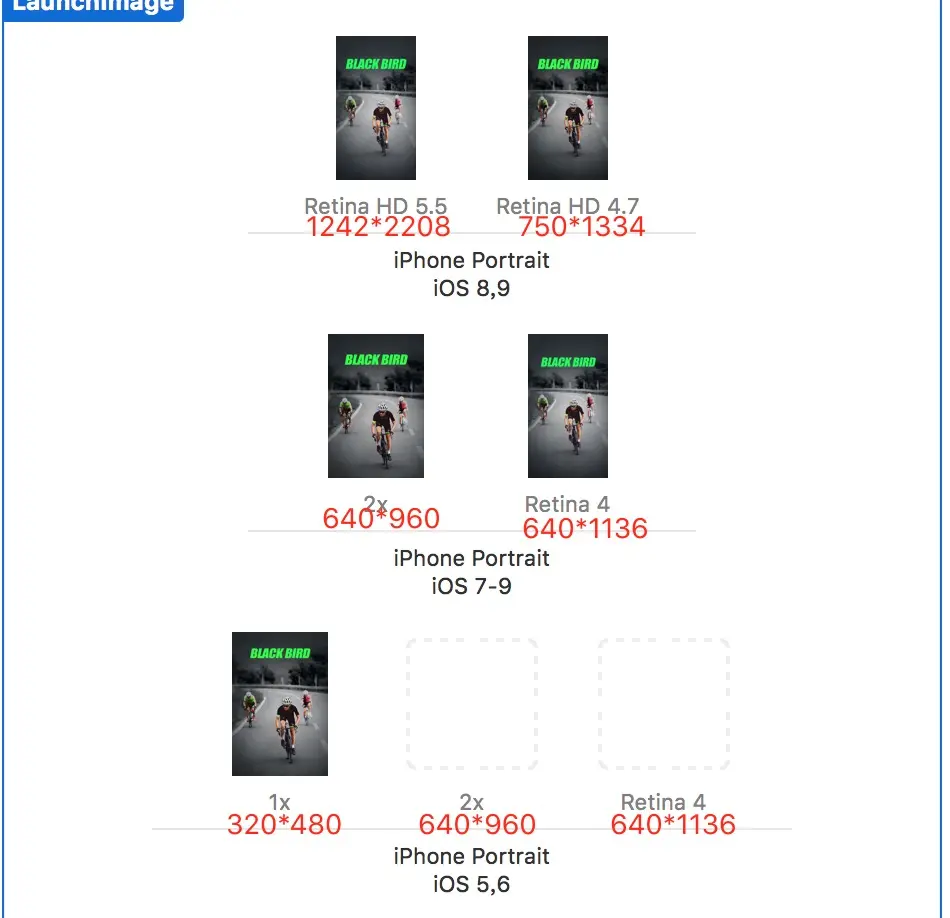
APP启动页,即LaunchImages,需要五张不同尺寸大小的图,切记一定要选择png格式,否则打包时报错,导致APP适配失败。
五张图的大小即:320×480、640×960、640×1136、750×1334、1242×2208
分别对应的iphone屏幕尺寸:iphone 3GS、iphone4(s)、iphone5(c、s)、iphone6(s)、iphone 6(s) plus
具体步骤:
Step1:
1.点击工程目录中的Images.xcassets,点击左侧边栏的LaunchImages(如果没有,在空白处右击创建一个)
2.然后在xcode最右侧的边栏处选择你的APP是否要对ipad、横竖屏、以及低版本的iOS系统做支持。
LaunchImages选择框中不同图片的选择
iPhone Portrait iOS 8-Retina HD 5.5 (1242×2208) @3x
iPhone Portrait iOS 8-Retina HD 4.7 (750×1334) @2x
iPhone Portrait iOS 7,8-2x (640×960) @2x
iPhone Portrait iOS 7,8-Retina 4 (640×1136) @2x
iPhone Portrait iOS 5,6-1x (320×480) @1x
iPhone Portrait iOS 5,6-2x (640×960) @2x
iPhone Portrait iOS 5,6-Retina4 (640×1136) @2x
step3:
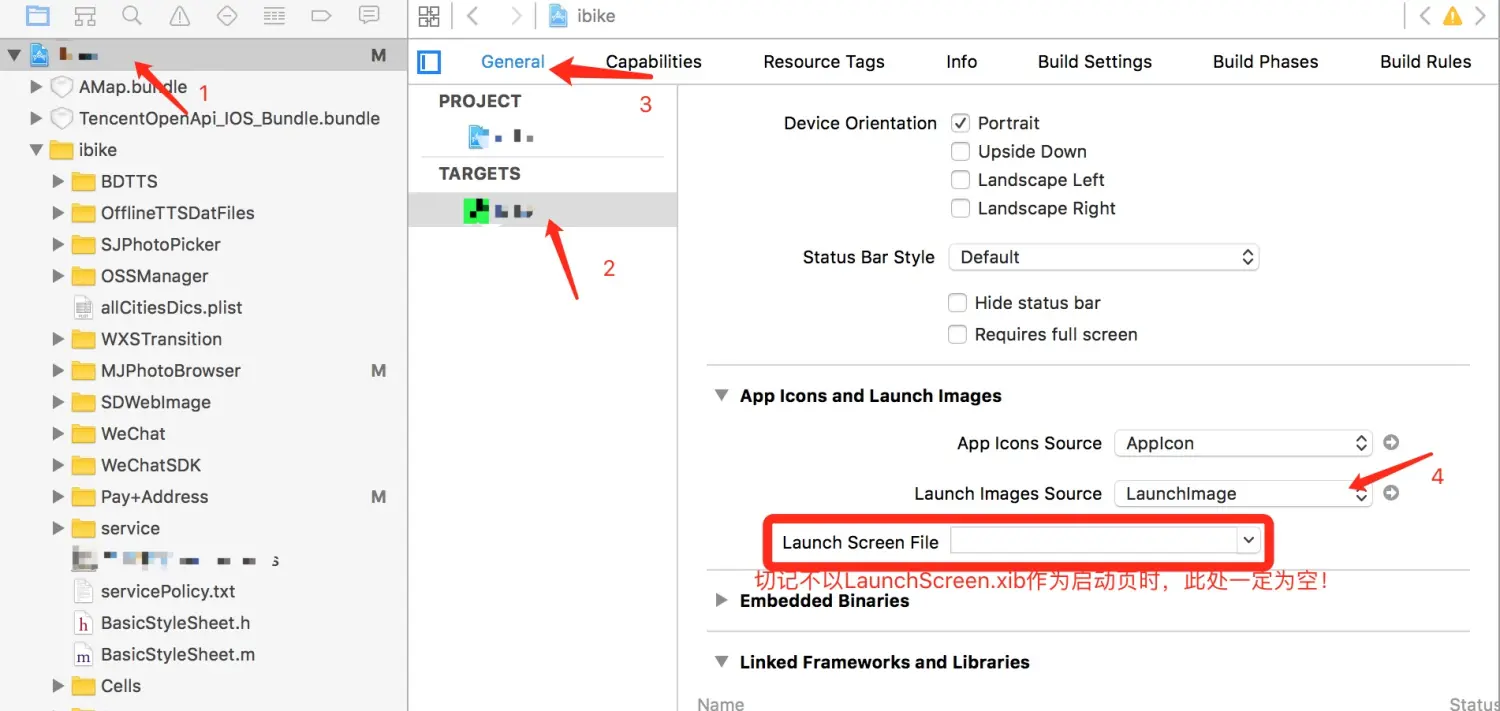
将填好的图片配置到工程中的启动页选项中
点击项目目录的工程 -> target -> General -> App Icons And Launch Images
将Launch Images Source的选项设置为LaunchImages,切记当APP不是用LaunchScreen.xib来配置启动页时,LaunchScreen File的选择状态一定为空!!!!
作者:wenny_Liu
链接:http://www.jianshu.com/p/2e2fe5b96772
來源:简书
著作权归作者所有。商业转载请联系作者获得授权,非商业转载请注明出处。

 1420


 扫一扫


 被折叠的 条评论
为什么被折叠?
 到【灌水乐园】发言


