


 本文介绍了在Vue应用中如何实现返回上一页时保持页面滚动位置。通过使用`keep-alive`组件的`include`属性或者在路由配置中设置,结合监听滚动事件和Vuex存储滚动高度,实现了页面切换后滚动位置的保存与恢复。
1、keep-alive
方法1:绑定include属性
APP.vue
<template>
  <div id="app">
     <keep-alive :include="includeStr">
        <router-view></router-view>
     </keep-alive>
  </div>
</template>
<script>
export default{
	data(){
		return{
			//多个页面keep-alive
			includes: [
	        "publishrecruit", //必须为组件文件的name
	        "Home",
	        "PositionDetail"
	      ]
		}
	},
	computed: {
	    includeStr() {
			return this.includes.join(",");
	    }
	}
}
</script>

方法2:在router文件设置
APP.vue
<template>
  <div id="app">
    <!--<router-view/>-->
    <!--页面返回不刷新-->
    <keep-alive>
      <router-view v-if="$route.meta.keepAlive"></router-view>
    </keep-alive>
    <router-view v-if="!$route.meta.keepAlive"></router-view>
  </div>
</template>
index.js
export default new Router({
	routes: [{
    	path: '/home',
	    name: 'Home',
	    component: () => import('../views/common/Home.vue'),
        meta: {
        	keepAlive: true
    	}
    }]
})
2、给监听滚动的容器固定高度
Home.vue
<template>
	//这个就是最外层容器,给它设置固定高度以及overflow: scroll
	//给外层容器添加ref属性,用于获取scrollTop
	<div class="contains" ref="cpmt">
    	<van-pull-refresh
	        v-model="isLoading"
	        @refresh="onRefresh"
	        success-text="刷新成功"
	        :disabled="option.length < 5">
        	<van-list
	            v-model="loading"
	            :finished="finished"
	            offset="-10"
	            :finished-text="option.length ? '没有更多了' : ''"
	            @load="onLoad">
	            <CastList
	              ref="cast"
	              :isFinish="finished"
	              @castClick="castClick"
	              :positionList="option">
	            </CastList>
          </van-list>
      </van-pull-refresh>
    </div>
</template>
<style scoped>
	.contains {
	  width: 100%;
	  height: 100%;
	  overflow: scroll;
	}
</style>
以下代码仅作展示,与文章主旨无关 不用加进代码中!!!
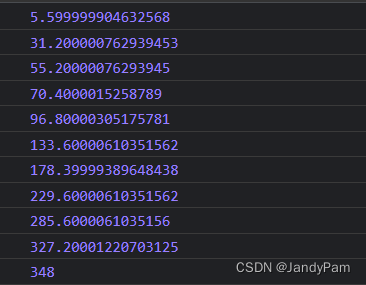
这时为 .contains 添加 @scroll 事件即可看见滚动了多少,这边是展示通过this.$refs.cmpt.scrollTop即可获取滚动高度
<div class="contains" ref="cpmt" @scroll="listscroll">
//中间代码省略...
</div>
listscroll(){
    console.log(this.$refs.cpmt.scrollTop);
},
3、离开页面时将容器滚动高度存储进vuex
Home.vue
//beforeRouteLeave生命周期
beforeRouteLeave(to, from, next) {
    this.$store.commit('setHomeListScrollTop', this.$refs.cpmt.scrollTop);
}
store.js
const store = new Vuex.Store({
    state:{
        listScrollTop: 0 //为滚动高度设置初始值:0
    },
    getters:{
        getHomeListScrollTop(state){
            return state.listScrollTop;
        }
    },
    mutations:{
        setHomeListScrollTop(state,scrollTop){
            state.listScrollTop = scrollTop;
        }
    }
})
3、返回列表页面后重新设置滚动高度
Home.vue
<script>
export default{
	data(){
		return{}
	},
	//从store.js中获取存储进去的滚动高度
	computed: {
	    homeListScrollTop(){
	      return this.$store.getters.getHomeListScrollTop;
	    }
	},
	//在actived生命周期中重新设置容器的滚动高度
	activated(){
	    this.$refs.cpmt.scrollTo(0, this.homeListScrollTop);
	}
}
</script>





 扫一扫
扫一扫


 8577
8577

 被折叠的 条评论
为什么被折叠?
被折叠的 条评论
为什么被折叠?
 到【灌水乐园】发言





