
lvgl平铺布局lv_tileview

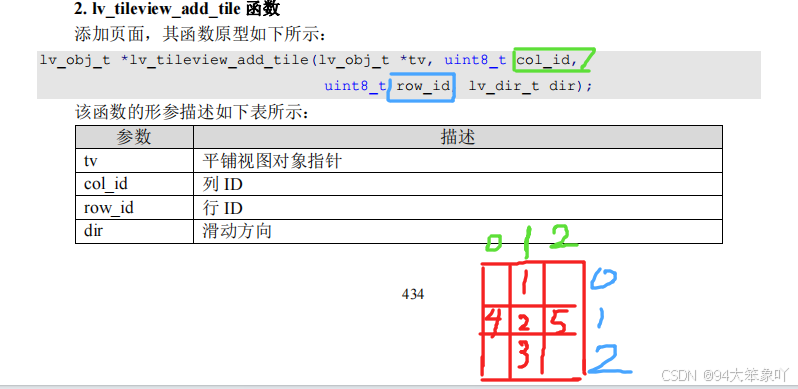
页面添加

    tile_1 = lv_tileview_add_tile( tileview, 1, 0, LV_DIR_BOTTOM );                /* 添加页面1 */
    tile_2 = lv_tileview_add_tile( tileview, 1, 1, LV_DIR_LEFT|LV_DIR_RIGHT|LV_DIR_BOTTOM|LV_DIR_TOP );    /* 添加页面2 */
    tile_3 = lv_tileview_add_tile( tileview, 1, 2, LV_DIR_TOP );                 /* 添加页面3 */
	
	
	tile_4 = lv_tileview_add_tile( tileview, 0, 1, LV_DIR_RIGHT );    /* 添加页面4 */
	tile_5 = lv_tileview_add_tile( tileview, 2, 1, LV_DIR_LEFT );    /* 添加页面5 */

LV_DIR_BOTTOM 向下滑动

LV_DIR_TOP向上滑动

LV_DIR_LEFT向左滑动

LV_DIR_RIGHT向右滑动

因为创建的十字的布局,(0,0)页是空的 初始化时给他指定一页内容页

	//跳转第一页//因为有个空页,所以要指定到有内容的
	lv_obj_set_tile(tileview,tile_1,LV_ANIM_ON);

//源码 进入主循环前调用lv_mainstart ()就行

#ifndef _LV_XY_H
#define _LV_XY_H


#define LV_FLEX 1

#if LV_FLEX
    #include "lvgl.h"
    #include "lv_conf.h"
    #include "lv_port_disp_template.h"
    #include "lv_port_indev_template.h"

	#include "./BSP/LED/led.h"

    void lv_mainstart ( void );
    void loop ( void );


#endif
#endif


#include "user_lv_flex.h"

#if LV_FLEX


//活动宽度
/*================== * WIDGET USAGE *================*/ /*Documentation of the widgets: https://docs.lvgl.io/latest/en/html/widgets/index.html*/ #define LV_USE_ARC 1 #define LV_USE_BAR 1 #define LV_USE_BTN 1 #define LV_USE_BTNMATRIX 1 #define LV_USE_CANVAS 1 #define LV_USE_CHECKBOX 1 #define LV_USE_DROPDOWN 1 /*Requires: lv_label*/ #define LV_USE_IMG 1 /*Requires: lv_label*/ #define LV_USE_LABEL 1 #if LV_USE_LABEL #define LV_LABEL_TEXT_SELECTION 1 /*Enable selecting text of the label*/ #define LV_LABEL_LONG_TXT_HINT 1 /*Store some extra info in labels to speed up drawing of very long texts*/ #endif #define LV_USE_LINE 1 #define LV_USE_ROLLER 1 /*Requires: lv_label*/ #if LV_USE_ROLLER #define LV_ROLLER_INF_PAGES 7 /*Number of extra "pages" when the roller is infinite*/ #endif #define LV_USE_SLIDER 1 /*Requires: lv_bar*/ #define LV_USE_SWITCH 1 #define LV_USE_TEXTAREA 1 /*Requires: lv_label*/ #if LV_USE_TEXTAREA != 0 #define LV_TEXTAREA_DEF_PWD_SHOW_TIME 1500 /*ms*/ #endif #define LV_USE_TABLE 1 /*================== * EXTRA COMPONENTS *==================*/ /*----------- * Widgets *----------*/ #define LV_USE_ANIMIMG 1 #define LV_USE_CALENDAR 1 #if LV_USE_CALENDAR #define LV_CALENDAR_WEEK_STARTS_MONDAY 0 #if LV_CALENDAR_WEEK_STARTS_MONDAY #define LV_CALENDAR_DEFAULT_DAY_NAMES {"Mo", "Tu", "We", "Th", "Fr", "Sa", "Su"} #else #define LV_CALENDAR_DEFAULT_DAY_NAMES {"Su", "Mo", "Tu", "We", "Th", "Fr", "Sa"} #endif #define LV_CALENDAR_DEFAULT_MONTH_NAMES {"January", "February", "March", "April", "May", "June", "July", "August", "September", "October", "November", "December"} #define LV_USE_CALENDAR_HEADER_ARROW 1 #define LV_USE_CALENDAR_HEADER_DROPDOWN 1 #endif /*LV_USE_CALENDAR*/ #define LV_USE_CHART 1 #define LV_USE_COLORWHEEL 1 #define LV_USE_IMGBTN 1 #define LV_USE_KEYBOARD 1 #define LV_USE_LED 1 #define LV_USE_LIST 1 #define LV_USE_MENU 1 #define LV_USE_METER 1 #define LV_USE_MSGBOX 1 #define LV_USE_SPAN 1 #if LV_USE_SPAN /*A line text can contain maximum num of span descriptor */ #define LV_SPAN_SNIPPET_STACK_SIZE 64 #endif #define LV_USE_SPINBOX 1 #define LV_USE_SPINNER 1 #define LV_USE_TABVIEW 1 #define LV_USE_TILEVIEW 1 #define LV_USE_WIN 1 翻译一下
最新发布
01-06
评论
成就一亿技术人!
拼手气红包6.0元
还能输入1000个字符
 
红包 添加红包
表情包 插入表情
 条评论被折叠 查看
添加红包

请填写红包祝福语或标题

红包个数最小为10个

红包金额最低5元

当前余额3.43前往充值 >
需支付:10.00
成就一亿技术人!
领取后你会自动成为博主和红包主的粉丝 规则
hope_wisdom
发出的红包
实付
使用余额支付
点击重新获取
扫码支付
钱包余额 0

抵扣说明:

1.余额是钱包充值的虚拟货币,按照1:1的比例进行支付金额的抵扣。
2.余额无法直接购买下载,可以购买VIP、付费专栏及课程。

余额充值



