


问题贴图:
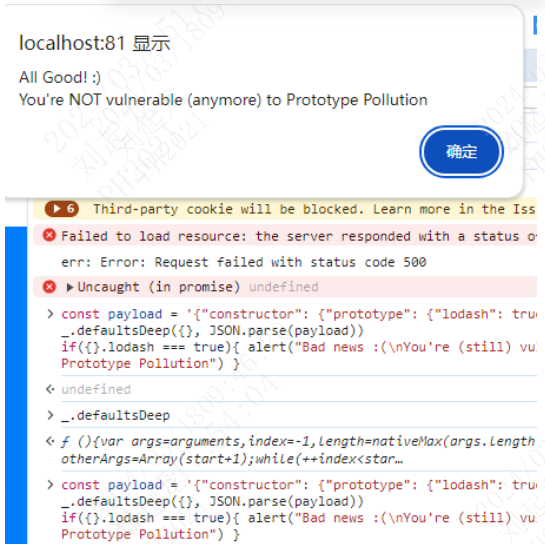
出现以下提示说明你OK了,要是没出现那老师傅您接着往下瞧
1. 漏洞复现
在本地你可以用以下代码在本地浏览器的控制台cv回车测试
const payload = '{"constructor": {"prototype": {"lodash": true}}}'
_.defaultsDeep({}, JSON.parse(payload))
if({}.lodash === true){ alert("Bad news :(\nYou're (still) vulnerable to Prototype Pollution") } else { alert("All Good! :)\nYou're NOT vulnerable (anymore) to Prototype Pollution") }
修复漏洞
第一种情况全局的lodash修复
这个好整,各位看官你直接cv以下代码升级您的lodash就好了
如果是项目中依赖的 lodash(在 node_modules 中),需要升级项目依赖:
# 使用 npm 升级到最新版本
npm install lodash@latest --save

# 使用 yarn 升级到最新版本
yarn add lodash@latest
如果有嵌套依赖(如其他包依赖旧版 lodash)你可以用npm ls lodash查看
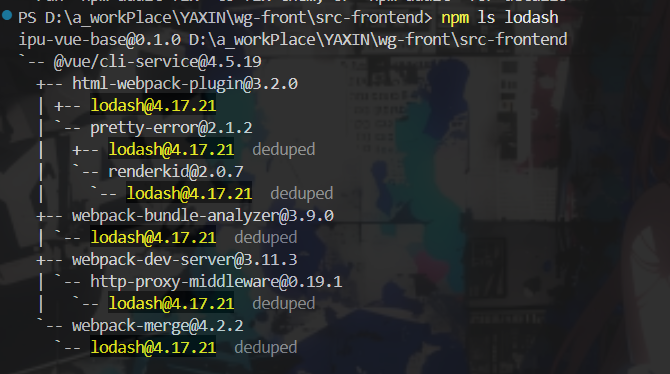
如果说你的npm版本在8及以上的话您可以去看一看这位大神的版本,咱主要讲的是8以下的版本,这位大神的讲解很详细易懂,小编就是从这里学的
前端安全——最新:lodash原型漏洞从发现到修复全过程_lodash漏洞-优快云博客
npm8以下版本修复
新增一个本地 Node 脚本 scripts/force-resolutions.js 来实现与 npm-force-resolutions 类似的功能
/*
  Minimal force-resolutions for npm@6 lockfile (lockfileVersion: 1).
  - Reads package.json "resolutions"
  - Walks package-lock.json recursively and pins matching dependency names to the specified version
  - Removes resolved/integrity to force npm to re-resolve the tarball for that version

  Note: This intentionally ignores path-scoped resolutions (pkg>lodash or pkg/lodash) and pins by package name.
*/

const fs = require('fs');
const path = require('path');

const root = process.cwd();
const pkgPath = path.join(root, 'package.json');
const lockPath = path.join(root, 'package-lock.json');

function readJson(file) {
  return JSON.parse(fs.readFileSync(file, 'utf8'));
}

function writeJson(file, data) {
  fs.writeFileSync(file, JSON.stringify(data, null, 2) + '\n', 'utf8');
}

function collectResolutionVersions(resolutions) {
  const map = new Map();
  if (!resolutions || typeof resolutions !== 'object') return map;
  for (const [key, version] of Object.entries(resolutions)) {
    // Key may be "lodash" or "pkg>lodash" or "pkg/lodash"
    const parts = key.split(/[>\/]/);
    const name = parts[parts.length - 1];
    if (!name) continue;
    map.set(name, version);
  }
  return map;
}

function applyResolutionsToDeps(depTree, resolutionsMap) {
  if (!depTree || typeof depTree !== 'object') return;
  const deps = depTree.dependencies;
  if (!deps || typeof deps !== 'object') return;

  for (const [depName, depInfo] of Object.entries(deps)) {
    if (!depInfo || typeof depInfo !== 'object') continue;

    if (resolutionsMap.has(depName)) {
      const pinned = resolutionsMap.get(depName);
      depInfo.version = pinned;
      // Remove resolved/integrity to force re-resolution
      delete depInfo.resolved;
      delete depInfo.integrity;
    }
    // Recurse
    applyResolutionsToDeps(depInfo, resolutionsMap);
  }
}

function main() {
  if (!fs.existsSync(pkgPath) || !fs.existsSync(lockPath)) {
    console.error('[force-resolutions] package.json or package-lock.json not found');
    process.exit(0); // do not fail install
  }
  const pkg = readJson(pkgPath);
  const lock = readJson(lockPath);

  const resolutionsMap = collectResolutionVersions(pkg.resolutions);
  if (resolutionsMap.size === 0) {
    process.exit(0);
  }

  applyResolutionsToDeps(lock, resolutionsMap);
  writeJson(lockPath, lock);
  console.log('[force-resolutions] Applied resolutions to package-lock.json');
}

main();
package.json配置:
// 无需再安装全局或本地的 npm-force-resolutions
"scripts": {
    "serve": "vue-cli-service serve",
    "build": "vue-cli-service build",
    "lint": "vue-cli-service lint",
    "preinstall": "node scripts/force-resolutions.js"
  },
  "resolutions": {
    "lodash": "4.17.21",
    "html-webpack-plugin/lodash": "4.17.21",
    "pretty-error/lodash": "4.17.21",
    "renderkid/lodash": "4.17.21",
    "webpack-bundle-analyzer/lodash": "4.17.21",
    "http-proxy-middleware/lodash": "4.17.21",
    "webpack-merge/lodash": "4.17.21"
  },
请重新安装依赖:
cd src-frontend

del /q package-lock.json 2> NUL & rmdir /s /q node_modules 2> NUL

npm install
del这一行可能会报错,小编是新手还没来得及看原因,有哪位大佬知道刚好指导一下小编
可以替换为powershell指令:Remove-Item -Recurse -Force node_modules, package-lock.json
主要就是为了清除以前的node_modules和package-lock.json包避免出现一些杂七杂八的问题
删除后重新npm install再执行开始说的那段浏览器的代码就可以了
以上基本就可以解决问题,但是还有一种老六行为,小编就载到这里了,话不多说上图。
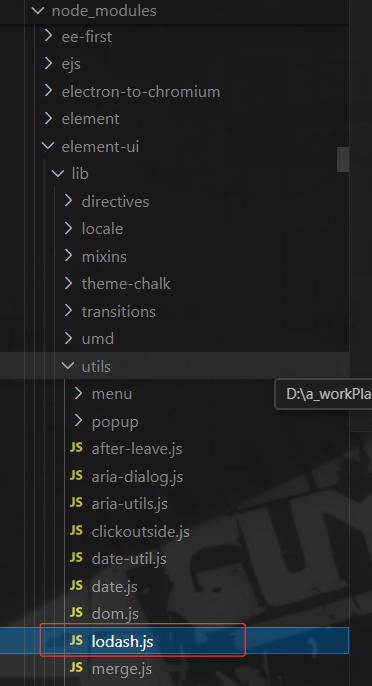
element-ui里居然还有一份lodash, 关键element-ui这里2.15.14版本还是最新的。搞了半天我之前的研究半天的方法居然不是最终问题,那么在这里2.15.8的版本是没有这个引入的,也是下面这位博主发现的可不是我哦,可不能太看得起我了嘻嘻。
前端安全——最新:lodash原型漏洞从发现到修复全过程_lodash漏洞-优快云博客





 扫一扫
扫一扫


 978
978

 被折叠的 条评论
为什么被折叠?
被折叠的 条评论
为什么被折叠?
 到【灌水乐园】发言





