


 本文介绍了一种通过JavaScript检查document.referrer来防止B页面被非A平台链接直接打开的方法,当referrer为空时,针对不同浏览器版本采取不同的策略,确保页面仅接受来自A平台的合法链接。
需求:有个A平台点击需要跳转到新的页面B,但是这个B页面只允许从A平台点击的时候通过链接打开,如果是浏览器输入或者复制都不允许打开,这种做法是为了防止外链暴露
思路:可以使用document.referrer方法,这个方法会返回一个值,如果用户直接导航到页面(不是通过链接,而是通过使用书签),则该值为空字符串。由于此属性仅返回一个字符串,因此它不会授予对引用页的文档对象模型 (DOM) 访问权限。
代码如下:
   const type = document.referrer
          console.log(type, 'type')
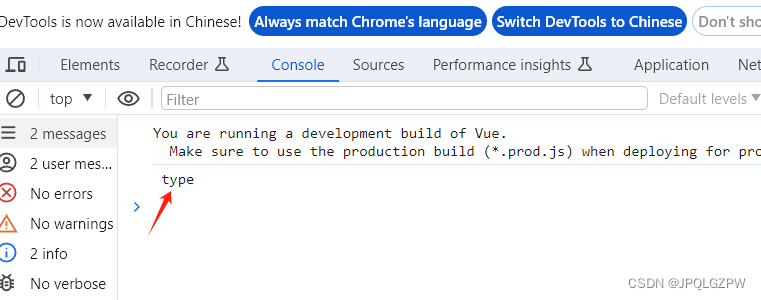
由于我是直接通过输入网址打开的所以type为空,如果是通过点击链接打开的会返回当前页面的地址,通过判断type是不是为空就可以实现关闭外链
关闭外链的代码:
       if (type == "" ){
            alert('请求地址无效')
            if (navigator.userAgent.indexOf('MSIE') > 0) {
              if (navigator.userAgent.indexOf('MSIE 6.0') > 0) {
                window.opener = null
                window.close()
              } else {
                window.open('', '_top')
                window.top.close()
              }
            } else if (navigator.userAgent.indexOf('Firefox') > 0) {
              window.location.href = 'about:blank'
            } else {
              window.opener = null
              window.open('about:blank', '_self')
              window.close()
            }
          }
全部代码如下:
    created() {
          const type = document.referrer
          if (type == "" ){
            alert('请求地址无效')
            if (navigator.userAgent.indexOf('MSIE') > 0) {
              if (navigator.userAgent.indexOf('MSIE 6.0') > 0) {
                window.opener = null
                window.close()
              } else {
                window.open('', '_top')
                window.top.close()
              }
            } else if (navigator.userAgent.indexOf('Firefox') > 0) {
              window.location.href = 'about:blank'
            } else {
              window.opener = null
              window.open('about:blank', '_self')
              window.close()
            }
          }
        },





 扫一扫
扫一扫


 1597
1597

 被折叠的 条评论
为什么被折叠?
被折叠的 条评论
为什么被折叠?
 到【灌水乐园】发言





