


一、回顾
上一个作业实现了动作分离+MVC,也就是Model+View+Controller+Action。同时,由于游戏对象自创建开始到游戏结束一直存在,游戏对象的创建、回收仍然由conroller统一管理。当游戏对象在游戏过程中提前被回收,同时又有新的游戏对象产生,对象的管理工作就不得不从controller中剥离出来,否则不但管理困难,游戏对象还难以复用。
因此,这次在前面的框架的基础上,进一步细化:建立“游戏对象工厂”,统一管理游戏过程中游戏对象的产生、回收、复用等等。
二、游戏介绍
在打飞碟游戏中,每一轮都会有新的飞碟产生,鼠标点中飞碟则被视为“打中飞碟”,会使飞碟消失,飞碟飞出屏幕区域同样会消失,一轮中飞碟全部消失则进入下一轮。从这里可以看到,游戏对象的创建与销毁是频繁的,而且新对象与旧对象之间没有实质性的差异,是可以复用的。
三、实现
代码实现部分借鉴了unity 实现简易打飞碟游戏-优快云博客,respect。
1、
首先总体框架不变,Model+View+Controller+Action,对象工厂放在controller中(或许也可以提出来)。
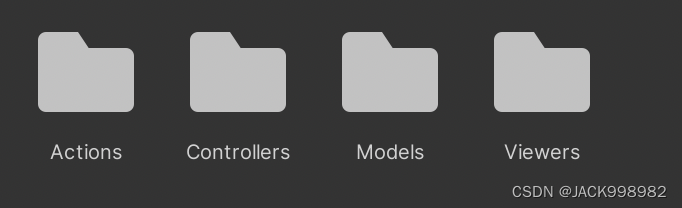
2、Actions
Actions中的SSActionManager、SSAction几乎不变。
对应的CCActionManager、CCAction逻辑如下:
using System.Collections;
using System.Collections.Generic;
using UnityEngine;

public class CCActionManager : SSActionManager, IActionCallback
{
    public RoundController sceneController;//RoundController相当于FirstController
    public CCAction action;
    public DiskFactory factory;

    // Start is called before the first frame update
    new void Start()
    {
        sceneController = Singleton<RoundController>.Instance;
        sceneController.actionManager = this;
        factory = Singleton<DiskFactory>.Instance;
    }

    //回调函数
    public void SSActionEvent(SSAction source,
        SSActionEventType events = SSActionEventType.Completed,
        int intParam = 0,
        string strParam = null,
        Object objectParam = null) {
            //
            factory.FreeDisk(source.transform.gameObject);
    }

    public void MoveDisk(GameObject disk) {
        action = CCAction.GetSSAction(disk.GetComponent<DiskAttributes>().speedX, disk.GetComponent<DiskAttributes>().speedY);
        RunAction(disk, action, this);
    }
}
using System.Collections;
using System.Collections.Generic;
using UnityEngine;
//飞碟从界面左右两侧飞入,离开界面时运动结束
public class CCAction : SSAction
{
    public float speedX;
    public float speedY;
    public static CCAction GetSSAction(float x, float y) {
        CCAction action = ScriptableObject.CreateInstance<CCAction>();
        //CCFlyAction action = SSAction.Instance;
        action.speedX = x;
        action.speedY = y;
        return action;
    }
    // Start is called before the first frame update
    public override void Start()
    {

    }

    // Update is called once per frame
    public override void Update()
    {
        //检查当前脚本所附加的游戏对象是否处于活动状态
        if (this.transform.gameObject.activeSelf == false) {//飞碟已经被"销毁"
            Debug.Log("1");
            this.destroy = true;
            this.callback.SSActionEvent(this);
            return;
        }
        Vector3 vec3 = Camera.main.WorldToScreenPoint (this.transform.position);
        if (vec3.x < -200 || vec3.x > Camera.main.pixelWidth + 200 || vec3.y < -200 || vec3.y > Camera.main.pixelHeight + 200) {
            Debug.Log("2");
            this.destroy = true;
            this.callback.SSActionEvent(this);
            return;
        }
        //更新位置
        //Time.deltaTime表示从上一帧到当前帧的时间间隔
        // += 速度*时间
        transform.position += new Vector3(speedX, speedY, 0) * Time.deltaTime * 2;


    }
}
3、Controller
RoundController负责管理轮次、调用对象工厂生成对象、检测鼠标是否点中飞碟,同时实现FirstController(场记)的功能。
using System.Collections;
using System.Collections.Generic;
using UnityEngine;
using System.Threading;

public class RoundController : MonoBehaviour, ISceneController, IUserAction
{
    int round = 0;
    int max_round = 5;
    float timer = 0.5f;
    GameObject disk;
    DiskFactory factory ;
    public CCActionManager actionManager;
    public ScoreController scoreController;
    public UserGUI userGUI;

    //before Start
    void Awake() {
        SSDirector director = SSDirector.getInstance();
        director.currentSceneController = this;
        director.currentSceneController.LoadSource();

        //Add同时赋值给RoundController的CCAcM、ScoreC
        gameObject.AddComponent<CCActionManager>();
        gameObject.AddComponent<ScoreController>();

        gameObject.AddComponent<DiskFactory>();
        factory = Singleton<DiskFactory>.Instance;
        gameObject.AddComponent<UserGUI>();
        userGUI = gameObject.GetComponent<UserGUI>();

    }
    // Start is called before the first frame update
    void Start()
    {

    }

    // Update is called once per frame
    void Update()
    {
        if (userGUI.mode == 0) return;
        GetHit();
        gameOver();
        if (round > max_round) {
            return;
        }
        timer -= Time.deltaTime;
        if (timer <= 0 && actionManager.RemainActionCount() == 0) {
            //从工厂中得到10个飞碟,为其加上动作
            for (int i = 0; i < 10; ++i) {
                disk = factory.GetDisk(round);
                actionManager.MoveDisk(disk);
            }
            round += 1;
            if (round <= max_round) {
                userGUI.round = round;
            }
            timer = 4.0f;
        }

    }

    public void LoadSource()
    {

    }

    public void gameOver()
    {
        if (round > max_round && actionManager.RemainActionCount() == 0)
            userGUI.gameMessage = "THE END";
    }

    public void GetHit() {
        if (Input.GetButtonDown("Fire1")) {

			Vector3 mp = Input.mousePosition; //get Screen Position

			//create ray, origin is camera, and direction to mousepoint
			Camera ca = Camera.main;
			Ray ray = ca.ScreenPointToRay(Input.mousePosition);

			//Return the ray's hit
			RaycastHit hit;
			if (Physics.Raycast(ray, out hit)) {
                //点中飞碟则加分
                scoreController.Record(hit.transform.gameObject);
                //设为不可见
                hit.transform.gameObject.SetActive(false);
			}
            else{
                //没点中飞碟则惩罚
                UnityEngine.Debug.Log("nope");
                scoreController.Publish();
            }
		}
    }
}
ScoreController负责记分,包括增加飞碟对应的分数、惩罚减少分数。它在RoundController中被调用。
using System.Collections;
using System.Collections.Generic;
using UnityEngine;

public class ScoreController : MonoBehaviour
{
    int score;
    public RoundController roundController;
    public UserGUI userGUI;
    // Start is called before the first frame update
    void Start()
    {
        roundController = (RoundController)SSDirector.getInstance().currentSceneController;

        //这行代码使得RoundController中的gameObject.AddComponent<ScoreController>();的同时,
        //将自身赋给了roundController.scoreController
        roundController.scoreController = this;

        userGUI = this.gameObject.GetComponent<UserGUI>();
    }
    //加分
    public void Record(GameObject disk) {
        score += disk.GetComponent<DiskAttributes>().score;
        userGUI.score = score;
    }
    //扣分
    public void Publish(){
        UnityEngine.Debug.Log("publish");
        if(score>=1)
            score-=1;
        userGUI.score = score;
    }


}
DiskFactory:
功能:生产飞碟、设置飞碟属性值、管理飞碟。通过两个队列:free、used,分别管理空闲飞碟、正在被使用的飞碟。当需要新的飞碟的时候,就从空闲飞碟队列中取出一个返回,并且放到正在被使用飞碟中管理。当一个飞碟被销毁(实际上没有销毁),就从正在被使用队列移动到空闲飞碟,实现复用。
using System.IO;
using System.Diagnostics;
using System.Security.AccessControl;
using System.Collections;
using System.Collections.Generic;
using UnityEngine;
public class MyException : System.Exception
{
    public MyException() { }
    public MyException(string message) : base(message) { }
}

public class DiskFactory : MonoBehaviour
{

    List<GameObject> disk_used;
    List<GameObject> disk_free;
    System.Random rand;
    //public int miss=0;
    // Start is called before the first frame update
    void Start()
    {

        disk_used = new List<GameObject>();
        disk_free = new List<GameObject>();
        rand = new System.Random();
        //Disk disk = GetDisk(1);
    }

    // Update is called once per frame
    void Update()
    {

    }

    void setAttributes(GameObject disk,int round){
        //根据不同round设置diskAttributes的值
        //随意的旋转角度
        disk.transform.localEulerAngles = new Vector3(-rand.Next(20,40),0,0);

        DiskAttributes attri = disk.GetComponent<DiskAttributes>();
        attri.score = rand.Next(1,4);
        //由分数来决定速度、颜色、大小
        //速度(大小)
        attri.speedX = (rand.Next(1,5) + attri.score + round) * 0.2f;
        attri.speedY = (rand.Next(1,5) + attri.score + round) * 0.2f;
        //颜色
        Color[] color={Color.blue, Color.green, Color.red};
        disk.GetComponent<Renderer>().material.color = color[attri.score-1];
        //大小
        disk.transform.localScale += new Vector3(-0.2f * (attri.score-1), 0, -0.2f * (attri.score-1));

        //飞碟可从四个方向飞入(左上、左下、右上、右下)
        int[,] dir={{1,1},{1,-1},{-1,1},{-1,-1}};
        float[,] screenPos={{Screen.width*0.1f,0},{Screen.width*0.1f,Screen.height*1.1f},{Screen.width*1f,0},{Screen.width*0.8f,Screen.height*0.8f}};
        int direction = rand.Next(0,4);

        //速度方向
        attri.speedX *= dir[direction,0];
        attri.speedY *= dir[direction,1];
        //初始位置
        disk.transform.Translate(Camera.main.ScreenToWorldPoint(new Vector3(screenPos[direction,0], screenPos[direction,1], 8)));
        UnityEngine.Debug.Log("trans",disk.transform);
    }

    public GameObject GetDisk(int round) {
        GameObject disk;
        if (disk_free.Count != 0) {
            disk = disk_free[0];
            disk_free.Remove(disk);
        }
        else {
            disk=new Disk().disk;
        }
        setAttributes(disk,round);
        //setAttributes(disk,round);
        disk_used.Add(disk);
        disk.SetActive(true);
        UnityEngine.Debug.Log("generate disk");
        return disk;
    }

    public void FreeDisk(GameObject disk) {
        disk.SetActive(false);
        //将位置和大小恢复到预制,这点很重要!
        disk.transform.position = new Vector3(0, 0,0);
        disk.transform.localScale = new Vector3(2f,0.1f,2f);
        if (!disk_used.Contains(disk)) {
            throw new MyException("Try to remove a item from a list which doesn't contain it.");
        }
        UnityEngine.Debug.Log("free disk");
        disk_used.Remove(disk);
        disk_free.Add(disk);
    }
}
Singleton:这个类并非控制器,它实现了单示例接口,保证游戏中一些实例对象的单一(比如只有一个对象工厂、记分员ScoreController、场记RoundController等等)
使用:在前面Action、Controller都有使用,比如CCActionManager中的:
        sceneController = Singleton<RoundController>.Instance;
        factory = Singleton<DiskFactory>.Instance;
using System.Collections;
using System.Collections.Generic;
using UnityEngine;
public class Singleton<T> : MonoBehaviour where T : MonoBehaviour
{
protected static T instance;
public static T Instance {
get {
if (instance == null) {
instance = (T)FindObjectOfType (typeof(T));
if (instance == null) {
Debug.LogError ("An instance of " + typeof(T) +
" is needed in the scene, but there is none.");
}
}
return instance;
}
}
}
4、Model、Views
飞碟Disk
using System.Drawing;
using System.Collections;
using System.Collections.Generic;
using UnityEngine;

public class DiskAttributes : MonoBehaviour
{
    //public GameObject gameobj;
    public int score;
    public float speedX;
    public float speedY;
}

public class Disk
{
    public GameObject disk;


    public Disk(){
        disk = GameObject.Instantiate(Resources.Load("Prefabs/disk", typeof(GameObject))) as GameObject;
        disk.AddComponent<DiskAttributes>();
    }
}
using System;
using System.Collections;
using System.Collections.Generic;
using UnityEngine;

public class UserGUI : MonoBehaviour
{
    public int mode;
    public int score;
    public int miss;
    public int round;
    public string gameMessage;
    private IUserAction action;
    public GUIStyle bigStyle, blackStyle, smallStyle;//自定义字体格式
    public Font pixelFont;
    private int menu_width = Screen.width / 5, menu_height = Screen.width / 10;//主菜单每一个按键的宽度和高度
    // Start is called before the first frame update
    void Start()
    {
        mode = 0;
        score = 0;
        miss = 0;
        round = 0;
        gameMessage = "";
        action = SSDirector.getInstance().currentSceneController as IUserAction;

        //pixelStyle
        //pixelFont = Font.Instantiate(Resources.Load("Fonts/ThaleahFat", typeof(Font))) as Font;
        //if (pixelFont == null) Debug.Log("null");
        //pixelFont.fontSize = 50;
        //pixelFont = Arial;

        //大字体初始化
        bigStyle = new GUIStyle();
        bigStyle.normal.textColor = Color.white;
        bigStyle.normal.background = null;
        bigStyle.fontSize = 50;
        bigStyle.alignment=TextAnchor.MiddleCenter;

        //black
        blackStyle = new GUIStyle();
        blackStyle.normal.textColor = Color.black;
        blackStyle.normal.background = null;
        blackStyle.fontSize = 50;
        blackStyle.alignment=TextAnchor.MiddleCenter;

        //小字体初始化
        smallStyle = new GUIStyle();
        smallStyle.normal.textColor = Color.white;
        smallStyle.normal.background = null;
        smallStyle.fontSize = 20;
        smallStyle.alignment=TextAnchor.MiddleCenter;

    }

    // Update is called once per frame
    void Update()
    {

    }

    void OnGUI() {
        //GUI.skin.button.font = pixelFont;
        GUI.skin.button.fontSize = 35;
        switch(mode) {
            case 0:
                mainMenu();
                break;
            case 1:
                GameStart();
                break;

        }
    }

    void mainMenu() {
        GUI.Label(new Rect(Screen.width / 2 - menu_width * 0.5f, Screen.height * 0.1f, menu_width, menu_height), "HIT UFO", bigStyle);
        bool button = GUI.Button(new Rect(Screen.width / 2 - menu_width * 0.5f, Screen.height * 3 / 7, menu_width, menu_height), "START");
        if (button) {
            mode = 1;
        }

    }
    void GameStart() {
        UnityEngine.Debug.Log(Camera.main.pixelWidth);
        UnityEngine.Debug.Log(Screen.width*1f);
        GUI.Label(new Rect(Screen.width / 2 - menu_width * 0.5f, Screen.height * 0.1f, menu_width, menu_height), gameMessage,bigStyle);//, bigStyle300, 60, 50, 200
        GUI.Label(new Rect(Screen.width*0.8f, Screen.height * 0.8f-30, menu_width, menu_height), "Score: " + score, smallStyle);//0,0,100,50
        GUI.Label(new Rect(Screen.width*0.8f, Screen.height * 0.8f, menu_width, menu_height), "Round: " + round, smallStyle);
    }
}





 扫一扫
扫一扫


 2万+
2万+

 被折叠的 条评论
为什么被折叠?
被折叠的 条评论
为什么被折叠?
 到【灌水乐园】发言





