


 本文详细介绍了字节数组流ByteArrayOutputStream与ByteArrayInputStream的基本用法及与其他流类结合使用的案例,包括DataOutputStream、DataInputStream、ObjectInputStream和ObjectOutputStream等。通过实际代码演示了如何进行数据转换与操作。
【1】字节数组流
ByteArrayOutputStream: 可以捕获内存缓冲区的数据,转换成字节数组(toByteArray()方法)。
ByteArrayInputStream: 可以将字节数组转换为输入流。
字节数组输出流在内存中创建一个字节数组缓冲区,所有发送到输出流的数据保存在该字节数组缓冲区中。
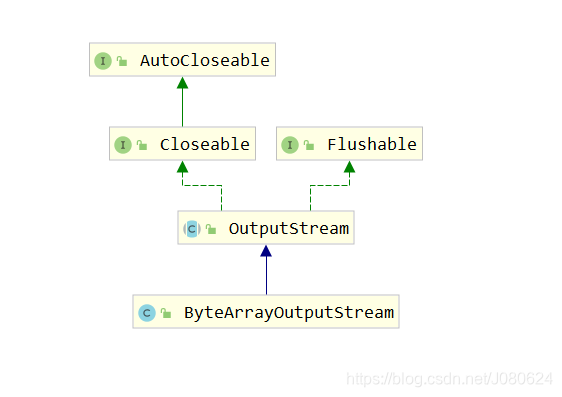
类继承示意图如下:
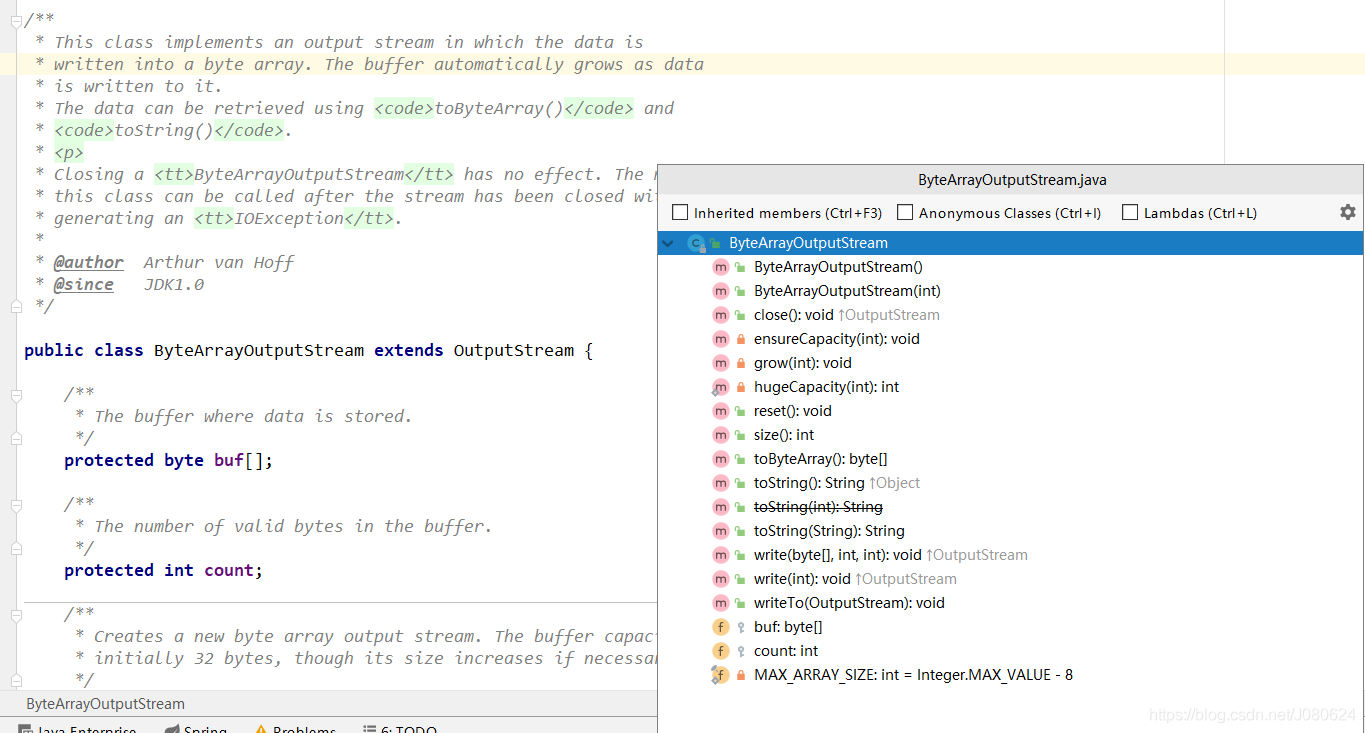
主要属性和方法如下:
测试示例如下:
	@Test
	public void byteArray() throws IOException{

		ByteArrayOutputStream bout=new ByteArrayOutputStream();
		//只能输入字节,不能输入中文字符
		bout.write(1);
		bout.write(2);
		bout.write(3);
		////核心方法--获取内存缓冲中的数据--字节数组
		byte[] buf=bout.toByteArray();
		System.out.println(buf.length+","+buf.getClass());

		for(int i=0;i<buf.length;i++)
		{
		  System.out.println(buf[i]);
		}
		bout.close();
		System.out.println("输出流结束。。。输入流开始。。。");
		//ByteArrayInputStream: 可以将字节数组转化为输入流
		ByteArrayInputStream bin=new ByteArrayInputStream(buf);
		int data=0;
		while( (data=bin.read())!=-1)
		{
		  System.out.println(data);
		}
		bin.close();
	}
result as follows :
3,class [B // 表示Byte数组
1
2
3
输出流结束。。。输入流开始。。。
1
2
3
如果输入英文字符,将会输出其ASCII值:
如a 的ascii为97,i 为105
bout.write('i');
bout.write(2);
bout.write(3);
result as follows :
3,class [B
105
2
3
输出流结束。。。输入流开始。。。
105
2
3
【2】与DataOutputStream&DataInputStream联合使用
实例代码如下:
	@Test
	public void testBAOPStream() throws IOException{

		//与DataOutputStream&DataInputStream联合使用:

		ByteArrayOutputStream bout=new ByteArrayOutputStream();
		DataOutputStream dos=new DataOutputStream(bout);
		String name="suntao";
		int age=19;
		dos.writeUTF(name);
		dos.writeInt(age);
		//获取内存缓冲区中的数据
		byte[] buf=bout.toByteArray();
		for(int i=0;i<buf.length;i++)
		{
//		  System.out.println((char)buf[i]);
		  System.out.println(buf[i]);
		}
		System.out.println(new String(buf));
		System.out.println(new String(buf).trim());
		dos.close();
		bout.close();

		ByteArrayInputStream bin=new ByteArrayInputStream(buf);
		DataInputStream dis=new DataInputStream(bin);
		name=dis.readUTF();//从字节数组中读取,自动进行编码转换
		age=dis.readInt();
		System.out.println("name :"+name+","+"age :"+age);
		dis.close();
		bin.close();
	}
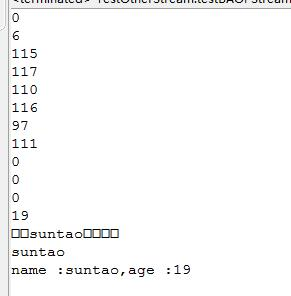
result as follows :
115-s , ,97 - a
【3】与System.in,System.out配合使用
测试示例如下:
import java.io.*;
public class ByteStreamTest {
   public static void main(String args[])throws IOException {
      ByteArrayOutputStream bOutput = new ByteArrayOutputStream(12);
      while( bOutput.size()!= 10 ) {
         // 获取用户输入
         bOutput.write(System.in.read());
      }
      byte b [] = bOutput.toByteArray();
      System.out.println("Print the content");
      for(int x= 0 ; x < b.length; x++) {
         // 打印字符
         System.out.print((char)b[x]  + "   ");
      }
      System.out.println("   ");
      int c;
      ByteArrayOutputStream bInput = new ByteArrayOutputStream(b);
      System.out.println("Converting characters to Upper case " );
      for(int y = 0 ; y < 1; y++ ) {
         while(( c= bInput.read())!= -1) {
            System.out.println(Character.toUpperCase((char)c));
         }
         bInput.reset();
      }
   }
}
result as follows :
adfsdfsfdas
Print the content
a   d   f   s   d   f   s   f   d   a
Converting characters to Upper case
A
D
F
S
D
F
S
F
D
A
【4】与ObjectInputStream&ObjectOutputStream联合使用
这里模拟使用Redis的Jedis进行对象的存取。
测试代码示例如下:
public static void setexObj(String key, int seconds, Object obj) throws Exception {
		Jedis jedis = RedisCachedFactory.getJedis();
		jedis.setex(key.getBytes(), seconds, serialize(obj));
		RedisCachedFactory.close(jedis);

	}
public static Object getObj(String key) throws Exception {
	Object obj = null;
	Jedis jedis = RedisCachedFactory.getJedis();
	obj = unserialize(jedis.get(key.getBytes()));
	RedisCachedFactory.close(jedis);
	return obj;
}
//将对象序列化为字节数组
public static byte[] serialize(Object object) throws Exception {
		ObjectOutputStream oos = null;
		ByteArrayOutputStream baos = null;
		try {
			// 序列化
			baos = new ByteArrayOutputStream();
			oos = new ObjectOutputStream(baos);
			oos.writeObject(object);
			//拿到字节数组
			byte[] bytes = baos.toByteArray();
			return bytes;
		} catch (Exception e) {
			throw new Exception(e);
		}
	}
//将字节数组反序列化为对象
public static Object unserialize(byte[] bytes) throws Exception {
	ByteArrayInputStream bais = null;
	try {
		// 反序列化
		bais = new ByteArrayInputStream(bytes);
		ObjectInputStream ois = new ObjectInputStream(bais);
		return ois.readObject();
	} catch (Exception e) {
		throw new Exception(e);
	}
}





 扫一扫
扫一扫


 1112
1112

 被折叠的 条评论
为什么被折叠?
被折叠的 条评论
为什么被折叠?
 到【灌水乐园】发言





