



【1】Redis启动过程中的三个警告
23494:M 19 May 10:32:14.171 # WARNING: The TCP backlog setting of 511 cannot be enforced because /proc/sys/net/core/somaxconn is set to the lower value of 128.
23494:M 19 May 10:32:14.171 # Server started, Redis version 3.2.6
23494:M 19 May 10:32:14.171 # WARNING overcommit_memory is set to 0! Background save may fail under low memory condition. To fix this issue add 'vm.overcommit_memory = 1' to /etc/sysctl.conf and then reboot or run the command 'sysctl vm.overcommit_memory=1' for this to take effect.
23494:M 19 May 10:32:14.172 # WARNING you have Transparent Huge Pages (THP) support enabled in your kernel. This will create latency and memory usage issues with Redis. To fix this issue run the command 'echo never > /sys/kernel/mm/transparent_hugepage/enabled' as root, and add it to your /etc/rc.local in order to retain the setting after a reboot. Redis must be restarted after THP is disabled.

【2】 Can’t save in background: fork: Resource temporarily unavailable
或者异常提示如下:
redis.clients.jedis.exceptions.JedisDataException: MISCONF Redis is configured to save RDB snapshots, but it is currently not able to persist on disk. Commands that may modify the data set are disabled, because this instance is configured to report errors during writes if RDB snapshotting fails (stop-writes-on-bgsave-error option). Please check the Redis logs for details about the RDB error.
这个原因通常是由于内存问题引起的,或者说是内存分配机制问题引起的。
可能你会看到如下的解决方式(也就是修改redis.conf):
config set stop-writes-on-bgsave-error no
不过这只是让你看不到那个错误而已,实际redis去set数据的时候同样失败。
解决方案(可以看第【1】部分的警告)
在/etc/sysctl.conf配置文件中
vm.overcommit_memory = 1
然后重启(或者运行命令sysctl vm.overcommit_memory=1 )使其生效。
【3】Redis启动的几种方式
① 前台方式启动
#bin目录下
./redis-server [redis.conf配置文件路径]
这种方式Ctrl c的时候会退出。
② nohup &方式启动
#bin目录下
nohup ./redis-server [redis.conf配置文件路径] &
这种方式Ctrl c的时候不会退出。
nohup命令可以将程序以忽略挂起信号的方式运行起来,被运行的程序的输出信息将不会显示到终端。
无论是否将 nohup 命令的输出重定向到终端,输出都将附加到当前目录的 nohup.out 文件中。如果当前目录的 nohup.out 文件不可写,输出重定向到$HOME/nohup.out文件中。如果没有文件能创建或打开以用于追加,那么 command 参数指定的命令不可调用。如果标准错误是一个终端,那么把指定的命令写给标准错误的所有输出作为标准输出重定向到相同的文件描述符。
③ 使用service/systemctl命令
#如下所示
service redis start
这种方式需要配置了redis服务,可以参考博文CentOS7 下源码安装Redis并配置服务开机启动
④ 停止redis
除了使用service脚本、kill命令外可以使用redis-cli客户端:
redis-cli -h 127.0.0.1 -p 6379 shutdown
【4】SpringBoot整合Redis Cluster时遇到的问题
版本:SpringBoot2.3.4.RELEASE, Redis连接池采用lettuce,5.3.4.RELEASE。
错误如下:io.lettuce.core.RedisCommandExecutionException: WRONGPASS invalid username-password pair or user is disabled.
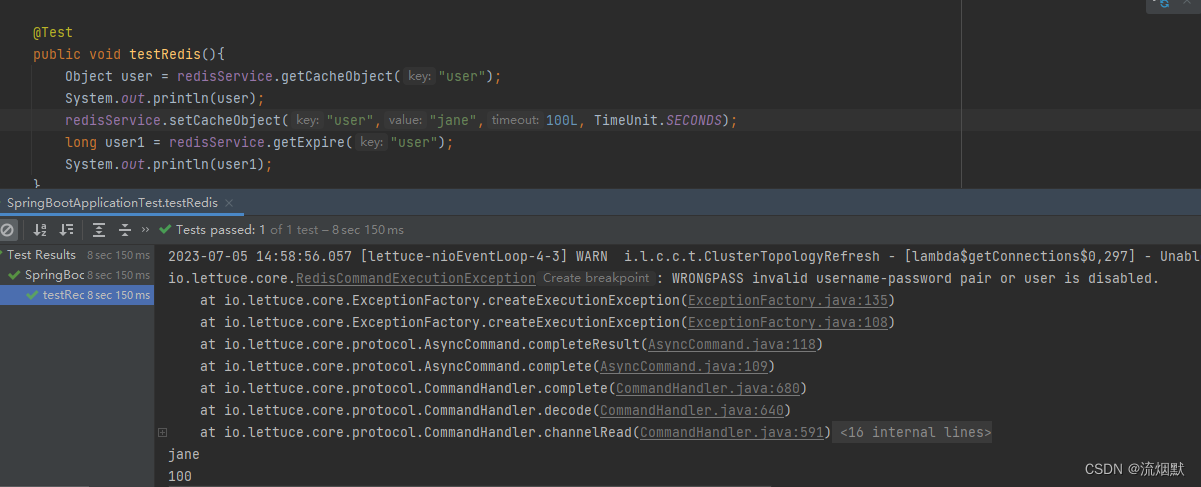
推测应该只是一个警告,实际是拿到了连接信息并成功进行了get、set操作。图片末尾打印的jane,100即是说明。
目前为止还没有找到该异常的合理解释与解决方案。





 扫一扫
扫一扫


 3154
3154

 被折叠的 条评论
为什么被折叠?
被折叠的 条评论
为什么被折叠?
 到【灌水乐园】发言





