


 本文详细介绍了如何在Centos7系统中解决磁盘容量不足的问题,通过在VMware中增加磁盘空间并进行格式化,使用fdisk命令创建新分区,调整分区类型为Linux LVM,并通过partprobe命令通知系统更新分区表。随后,通过pvcreate、vgextend和lvextend命令将新增空间分配给特定逻辑卷,最后使用xfs_growfs同步文件系统。
Centos7系统磁盘容量不足(10g),在vmware中增加到15g,仍需在centos中格式化磁盘。
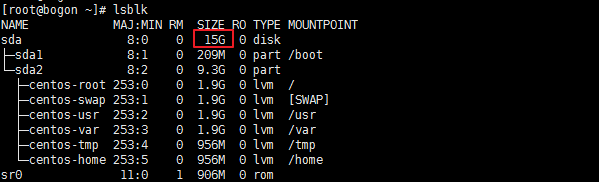
可以看到整个sda为15g,而sda1和sda2加起来为10g。
fdisk /dev/sda增加主分区。
[root@bogon ~]# fdisk /dev/sda
Welcome to fdisk (util-linux 2.23.2).

Changes will remain in memory only, until you decide to write them.
Be careful before using the write command.


Command (m for help): m
Command action
   a   toggle a bootable flag
   b   edit bsd disklabel
   c   toggle the dos compatibility flag
   d   delete a partition
   g   create a new empty GPT partition table
   G   create an IRIX (SGI) partition table
   l   list known partition types
   m   print this menu
   n   add a new partition
   o   create a new empty DOS partition table
   p   print the partition table
   q   quit without saving changes
   s   create a new empty Sun disklabel
   t   change a partition's system id
   u   change display/entry units
   v   verify the partition table
   w   write table to disk and exit
   x   extra functionality (experts only)

Command (m for help): n
Partition type:
   p   primary (2 primary, 0 extended, 2 free)
   e   extended
Select (default p): p
Partition number (3,4, default 3): 3
First sector (19984384-31457279, default 19984384):
Using default value 19984384
Last sector, +sectors or +size{K,M,G} (19984384-31457279, default 31457279): 30000000
Partition 3 of type Linux and of size 4.8 GiB is set

Command (m for help): m
Command action
   a   toggle a bootable flag
   b   edit bsd disklabel
   c   toggle the dos compatibility flag
   d   delete a partition
   g   create a new empty GPT partition table
   G   create an IRIX (SGI) partition table
   l   list known partition types
   m   print this menu
   n   add a new partition
   o   create a new empty DOS partition table
   p   print the partition table
   q   quit without saving changes
   s   create a new empty Sun disklabel
   t   change a partition's system id
   u   change display/entry units
   v   verify the partition table
   w   write table to disk and exit
   x   extra functionality (experts only)

Command (m for help): t
Partition number (1-3, default 3): 3
Hex code (type L to list all codes): L

 0  Empty           24  NEC DOS         81  Minix / old Lin bf  Solaris
 1  FAT12           27  Hidden NTFS Win 82  Linux swap / So c1  DRDOS/sec (FAT-
 2  XENIX root      39  Plan 9          83  Linux           c4  DRDOS/sec (FAT-
 3  XENIX usr       3c  PartitionMagic  84  OS/2 hidden C:  c6  DRDOS/sec (FAT-
 4  FAT16 <32M      40  Venix 80286     85  Linux extended  c7  Syrinx
 5  Extended        41  PPC PReP Boot   86  NTFS volume set da  Non-FS data
 6  FAT16           42  SFS             87  NTFS volume set db  CP/M / CTOS / .
 7  HPFS/NTFS/exFAT 4d  QNX4.x          88  Linux plaintext de  Dell Utility
 8  AIX             4e  QNX4.x 2nd part 8e  Linux LVM       df  BootIt
 9  AIX bootable    4f  QNX4.x 3rd part 93  Amoeba          e1  DOS access
 a  OS/2 Boot Manag 50  OnTrack DM      94  Amoeba BBT      e3  DOS R/O
 b  W95 FAT32       51  OnTrack DM6 Aux 9f  BSD/OS          e4  SpeedStor
 c  W95 FAT32 (LBA) 52  CP/M            a0  IBM Thinkpad hi eb  BeOS fs
 e  W95 FAT16 (LBA) 53  OnTrack DM6 Aux a5  FreeBSD         ee  GPT
 f  W95 Ext'd (LBA) 54  OnTrackDM6      a6  OpenBSD         ef  EFI (FAT-12/16/
10  OPUS            55  EZ-Drive        a7  NeXTSTEP        f0  Linux/PA-RISC b
11  Hidden FAT12    56  Golden Bow      a8  Darwin UFS      f1  SpeedStor
12  Compaq diagnost 5c  Priam Edisk     a9  NetBSD          f4  SpeedStor
14  Hidden FAT16 <3 61  SpeedStor       ab  Darwin boot     f2  DOS secondary
16  Hidden FAT16    63  GNU HURD or Sys af  HFS / HFS+      fb  VMware VMFS
17  Hidden HPFS/NTF 64  Novell Netware  b7  BSDI fs         fc  VMware VMKCORE
18  AST SmartSleep  65  Novell Netware  b8  BSDI swap       fd  Linux raid auto
1b  Hidden W95 FAT3 70  DiskSecure Mult bb  Boot Wizard hid fe  LANstep
1c  Hidden W95 FAT3 75  PC/IX           be  Solaris boot    ff  BBT
1e  Hidden W95 FAT1 80  Old Minix
Hex code (type L to list all codes): 8e
Changed type of partition 'Linux' to 'Linux LVM'

Command (m for help): w
The partition table has been altered!

Calling ioctl() to re-read partition table.

WARNING: Re-reading the partition table failed with error 16: Device or resource busy.
The kernel still uses the old table. The new table will be used at
the next reboot or after you run partprobe(8) or kpartx(8)
Syncing disks.
按照最后的提示,需要重启系统或使用partprobe命令,partprobe来通知系统分区表发生变化。

报错。
/dev/sr0为虚拟光驱,partprobe会默认检查所有设备。
只需要检查指定设备即可。
partprobe /dev/sda
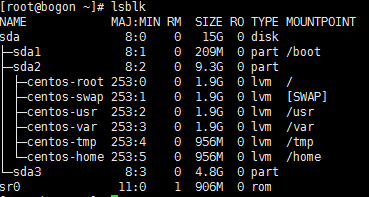
之后lsblk可以看到sda3。
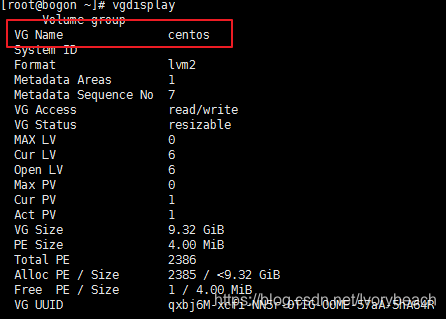
vgdisplay查看所有的volume group。
lvdisplay查看所有的logical volume。
[root@bogon ~]# lvdisplay
  --- Logical volume ---
  LV Path                /dev/centos/swap
  LV Name                swap
  VG Name                centos
  LV UUID                0TlORf-1qEr-EvLh-xHDO-tbKc-8upc-5HhSXn
  LV Write Access        read/write
  LV Creation host, time localhost, 2020-03-24 16:11:42 +0800
  LV Status              available
  # open                 2
  LV Size                1.86 GiB
  Current LE             477
  Segments               1
  Allocation             inherit
  Read ahead sectors     auto
  - currently set to     8192
  Block device           253:1

  --- Logical volume ---
  LV Path                /dev/centos/var
  LV Name                var
  VG Name                centos
  LV UUID                TvfTBz-5Zmc-Brdw-FXzl-eeK1-0MQ0-yfbIEC
  LV Write Access        read/write
  LV Creation host, time localhost, 2020-03-24 16:11:43 +0800
  LV Status              available
  # open                 1
  LV Size                <1.86 GiB
  Current LE             476
  Segments               1
  Allocation             inherit
  Read ahead sectors     auto
  - currently set to     8192
  Block device           253:3

  --- Logical volume ---
  LV Path                /dev/centos/tmp
  LV Name                tmp
  VG Name                centos
  LV UUID                ZxcFtc-U7LQ-hhl3-1FVb-c9wK-FPDb-3gJlnB
  LV Write Access        read/write
  LV Creation host, time localhost, 2020-03-24 16:11:43 +0800
  LV Status              available
  # open                 1
  LV Size                956.00 MiB
  Current LE             239
  Segments               1
  Allocation             inherit
  Read ahead sectors     auto
  - currently set to     8192
  Block device           253:4

  --- Logical volume ---
  LV Path                /dev/centos/root
  LV Name                root
  VG Name                centos
  LV UUID                158pHK-30Ac-6C1K-mgJD-aZsD-Mut5-ZhmGuX
  LV Write Access        read/write
  LV Creation host, time localhost, 2020-03-24 16:11:44 +0800
  LV Status              available
  # open                 1
  LV Size                1.86 GiB
  Current LE             477
  Segments               1
  Allocation             inherit
  Read ahead sectors     auto
  - currently set to     8192
  Block device           253:0

  --- Logical volume ---
  LV Path                /dev/centos/home
  LV Name                home
  VG Name                centos
  LV UUID                ovdyZg-KTSR-tvzg-ot3u-GxYa-AZo7-97CpIh
  LV Write Access        read/write
  LV Creation host, time localhost, 2020-03-24 16:11:44 +0800
  LV Status              available
  # open                 1
  LV Size                956.00 MiB
  Current LE             239
  Segments               1
  Allocation             inherit
  Read ahead sectors     auto
  - currently set to     8192
  Block device           253:5

  --- Logical volume ---
  LV Path                /dev/centos/usr
  LV Name                usr
  VG Name                centos
  LV UUID                b6oECZ-FE2o-ugDw-YVEJ-yBge-BoAi-n8vfK5
  LV Write Access        read/write
  LV Creation host, time localhost, 2020-03-24 16:11:44 +0800
  LV Status              available
  # open                 1
  LV Size                1.86 GiB
  Current LE             477
  Segments               1
  Allocation             inherit
  Read ahead sectors     auto
  - currently set to     8192
  Block device           253:2
需要将sda3的空间分配给/dev/centos/usr这个LV。
pvcreate /dev/sda3创建physical volume(物理卷)。

vgextend centos /dev/sda3扩容卷组centos。

lvextend -L +3G /dev/centos/usr将3g的物理卷分配给/dev/centos/usr这个虚拟卷。此时/dev/centos/usr虚拟卷的大小会改变,但是df -h中/usr的大小没有改变。

xfs_growfs /dev/centos/usr同步文件系统。
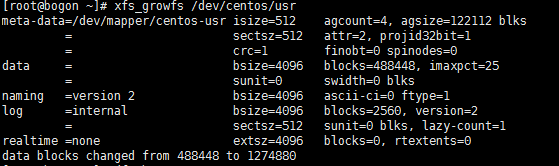
同步后df -h和lsblk可以看到空间增加。
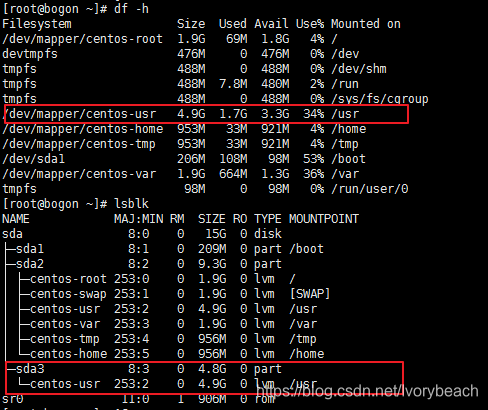
至此/usr扩容完毕。





 扫一扫
扫一扫


 1915
1915

 被折叠的 条评论
为什么被折叠?
被折叠的 条评论
为什么被折叠?
 到【灌水乐园】发言





