



最近在研究 node 的导包机制,就自己写了一个可以导入的三方库
为了方便转换源,这里附上配置换源的方式
# 国内源(为了快速下载)
npm config set registry https://registry.npmmirror.com
# 官方源(只有官方源才能发布库)
npm config set registry https://registry.npmjs.org
一、创建自己的库
这里用到了 cosmiconfig 这个库,就能让我们的库自动去搜索配置文件,就不用自己往出读取了
mkdir xxx
cd xxx
npm init -y
mkdir src
npm i typescript tslib cosmiconfig
npm install --save-dev rollup @rollup/plugin-terser @rollup/plugin-typescript @rollup/plugin-node-resolve @rollup/plugin-commonjs
src 下创建 index.ts 和 config.ts
config.ts
import { cosmiconfig } from "cosmiconfig";

export async function loadConfig() {
  const explorer = cosmiconfig("xxx");
  const result = await explorer.search();
  console.log("找到的配置:", result);
  return result ? result.config : {};
}
index.ts
import { loadConfig } from "./config.js";

export async function run() {
  const defaultConfig = {
    port: 3000,
    debug: false,
  };

  const userConfig = await loadConfig();
  const finalConfig = { ...defaultConfig, ...userConfig };

  console.log("最终配置:", finalConfig);
  return finalConfig;
}
根目录下创建 rollup.config.js:
这里的入口文件一定要是 ts 文件,js 文件不会生成 types/index.d.ts 类型声明
import { defineConfig } from "rollup";
import terser from "@rollup/plugin-terser";
import resolve from "@rollup/plugin-node-resolve";
import commonjs from "@rollup/plugin-commonjs";
import typescript from "@rollup/plugin-typescript";

export default defineConfig({
  input: "src/index.ts",
  output: [
    {
      file: "dist/index.esm.js",
      format: "esm",
    },
    {
      file: "dist/index.cjs.js",
      format: "cjs",
    },
  ],
  plugins: [
    terser(),
    resolve(),
    commonjs(),
    typescript({
      declaration: true,
      declarationDir: "dist/types",
      rootDir: "src"
    }),
  ],
  external: ["typescript"],
});
根目录下创建 tsconfig.json:
{
  "compilerOptions": {
    "target": "esnext",
    "module": "esnext",
    "declaration": true,
    "moduleResolution": "Node",
    "esModuleInterop": true,
    "forceConsistentCasingInFileNames": true,
    "strict": true,
    "skipLibCheck": true,
  },
  "include": [
    "src/**/*"
  ],
  "exclude": [
    "node_modules",
    "dist"
  ]
}
配置 package.json
{
  "name": "xxx",
  "version": "1.0.0",
  "exports": {
    ".": {
      "import": "./dist/index.esm.js",
      "require": "./dist/index.cjs.js",
      "types": "./dist/types/index.d.ts"
    }
  },
  "type": "module",
  "scripts": {
    "build": "rollup -c"
  },
  "files": [
    "dist"
  ],
  "keywords": [],
  "author": "",
  "license": "ISC",
  "description": "",
  "dependencies": {
    "cosmiconfig": "^9.0.0",
    "tslib": "^2.8.1",
    "typescript": "^5.9.2"
  },
  "devDependencies": {
    "@rollup/plugin-commonjs": "^28.0.6",
    "@rollup/plugin-node-resolve": "^16.0.1",
    "@rollup/plugin-terser": "^0.4.4",
    "@rollup/plugin-typescript": "^12.1.4",
    "rollup": "^4.52.3"
  }
}
接下来就可以发布自己的库了
- 如果没有配置账号的话,可以去这里 https://www.npmjs.com/,之后本地 npm login 登录上就可以
- 确定发布的时候一定要是切换回官方源,要不会发布不成功(换源方式在顶部)
- 如果想看下发布出来是什么效果,可以先 npm pack,会本地生成一个压缩包
# 如果本地没有登录的话
npm login
# 如果想看自己发布的库会是什么样子,就运行下面的命令
npm pack
# 进行发布
npm publish
二、导入自己的库
创建自己的项目,步骤和创建自己的库是一样的(换源方式在顶部)
mkdir test-xxx
cd test-xxx
npm init -y
mkdir src
安装自己的依赖,切换回国内的源下载的更快
npm i xxx创建 src/index.js 还有 xxx.config.js
xxx.config.js
export default {
  port: 5000,
  debug: true,
};
src/index.js
import { run } from 'xxx'
// 因为在库的 index.ts 中导出了这个 run 函数
console.log(run())
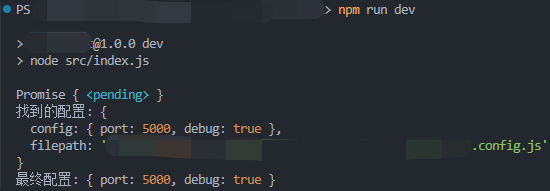
node src/index.js 即可观察控制台输入如下:





 扫一扫
扫一扫


 2873
2873

 被折叠的 条评论
为什么被折叠?
被折叠的 条评论
为什么被折叠?
 到【灌水乐园】发言





