



 本文详细介绍了一种基于HTML和CSS实现的音视频滚动歌词效果,通过WX:FOR循环遍历歌词列表,结合动画和定位技巧,使得当前播放的歌词高亮显示,增强了用户体验。
效果图
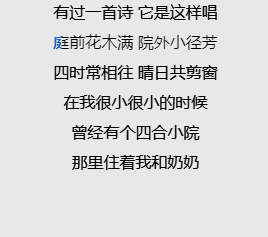
html代码
<view wx:for="{{lyric}}" wx:key="index" class="box1231">
	<view style=" position: relative;">
		<view style="height:30px;position:relative;">{{item}}</view>
		<view style="height:30px" id="hover" class="{{yinyueScrollIndex===index?'over':''}}" style="animation-duration:{{animations[index]-0.2}}s;">{{item}}</view>
							<!--副歌词-->
	</view>
</view>
css样式
.box1231 {
  display: flex;
  justify-content: center;
  align-items: center;
  flex-direction: column;
  text-align: center;
  /* border: 1px solid #ccc; */
  position: relative;
}

#hover {
  position: absolute;
  pointer-events: none;
  top: 0;
  left: 0;
  overflow: hidden;
  width: 100%;
  white-space: nowrap;
}

.over {
  animation: test;
  animation-timing-function: linear;
  /* 速度 */
  animation-delay: 0s;
  /* 延时 */

  /* 动画迭代计数 */
  animation-direction: normal;
  color: rgb(19, 103, 212);
}

@keyframes test {
  0% {
    width: 0px;
  }
  100% {
    width: 100px;
  }
}





 扫一扫
扫一扫


 7170
7170

 被折叠的 条评论
为什么被折叠?
被折叠的 条评论
为什么被折叠?
 到【灌水乐园】发言





