





前提纪要:今天接到一个需求,需要开发将数据写入到Redis 。之前的数据
大多是由团队数据同事写入的,根据数据人员提供的信息,当前的Redis 数据已经通过GZip 压缩过了,所以需要我将数据读取,反序列化的时候应该手动转换成String。之前读数据嘛,怎么给我就怎么拿
然后写了Redis 的序列化和反序列化
  @Override
    public byte[] serialize(String t) throws SerializationException {
        if (t == null) {
            return new byte[0];
        }
        final byte[] data = t.getBytes(StandardCharsets.UTF_8);
        if (data != null) {
            try {
                ByteArrayOutputStream byteArrayOutputStream = new ByteArrayOutputStream();
                try (GZIPOutputStream gzipOutputStream = new GZIPOutputStream(byteArrayOutputStream)) {
                    gzipOutputStream.write(data);
                }
                return byteArrayOutputStream.toByteArray();
            } catch (IOException e) {
                throw new SerializationException("Failed to compress serialized data", e);
            }
        }
        return new byte[0];
    }

    @Override
    public String deserialize(byte[] bytes) throws SerializationException {
        if (bytes == null || bytes.length == 0) return null;

        try {
            ByteArrayInputStream in = new ByteArrayInputStream(bytes);
            GZIPInputStream gzip = new GZIPInputStream(in);
            ByteArrayOutputStream bos = new ByteArrayOutputStream();
            byte[] buffer = new byte[1024];
            int len;

            while ((len = gzip.read(buffer)) > 0) {
                bos.write(buffer, 0, len);
            }

            in.close();
            gzip.close();
            bos.close();
            final byte[] gzipData = bos.toByteArray();
            if (gzipData == null || gzipData.length == 0)
                return null;

            return new String(gzipData, StandardCharsets.UTF_8);
        } catch (IOException e) {
            throw new SerializationException("Error deserializing", e);
        }
    }
当我拿到需求时,在写入的时候,即将操作Map 数据转成string 然后转换成byte[]
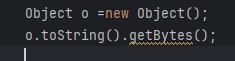
这个时候就感觉不对劲了,为什么不能直接将Map 直接转成byte[] 数组呢,一查Object 没有这个方法,发现fastjson 有
        byte[] data;
        try {
            data = objectMapper.writeValueAsBytes(t);
        } catch (JsonProcessingException e) {
            throw new RuntimeException(e);
        }
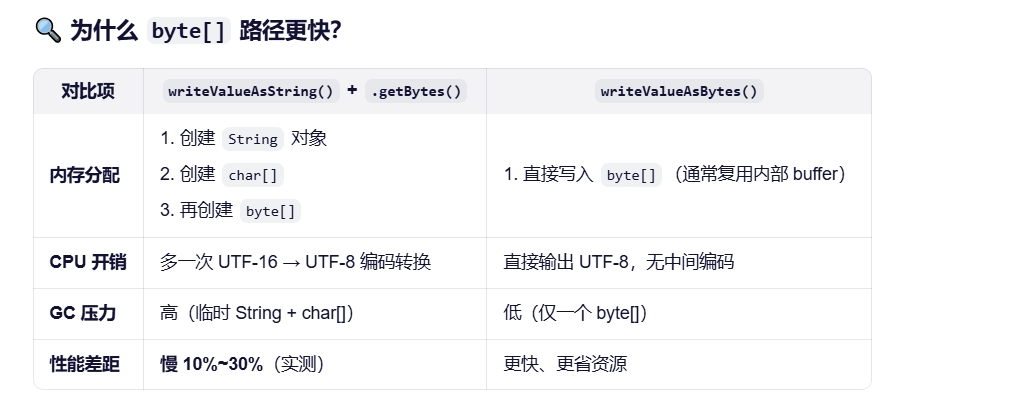
但是它的底层逻辑还是转换成 字符串 ,但是是json 字符串
    // 1. 创建一个 ByteArrayOutputStream(内部通常带缓冲)
    ByteArrayOutputStream out = new ByteArrayOutputStream(
        Math.max(1024, initialWriterBufferSize)
    );
    // 2. 将对象序列化为 JSON 文本,并直接写入 OutputStream(UTF-8 编码)
    writeValue(out, value);
    // 3. 返回内部的 byte[]
    return out.toByteArray();
这个时候我问一下AI 有没有什么好处

呦西,性能优化了,数据也变小了
序列化的问题解决了,那反序列化呢
  // 2. 直接从 byte[] 反序列化(无需构造 String!)
            return objectMapper.readValue(gzipData, clazz);
把这个序列化反序列类 写完后,发现定制化很严重,后面想着怎么优化
public class GzipxxxRedisSerializer<T> implements RedisSerializer<Object> {
    private final ObjectMapper objectMapper;

    private final Class<T> clazz;

    public GzipMenuRedisSerializer(ObjectMapper objectMapper, Class<T> clazz) {
        this.objectMapper = objectMapper;
        this.clazz = clazz;
    }

    @Override
    public byte[] serialize(Object t) throws SerializationException {
        if (t == null) {
            return new byte[0];
        }
        byte[] data;
        try {
            data = objectMapper.writeValueAsBytes(t);
        } catch (JsonProcessingException e) {
            throw new RuntimeException(e);
        }
        try {
            ByteArrayOutputStream byteArrayOutputStream = new ByteArrayOutputStream();
            try (GZIPOutputStream gzipOutputStream = new GZIPOutputStream(byteArrayOutputStream)) {
                gzipOutputStream.write(data);
            }
            return byteArrayOutputStream.toByteArray();
        } catch (IOException e) {
            throw new SerializationException("Failed to compress serialized data", e);
        }
    }

    @Override
    public T deserialize(byte[] bytes) throws SerializationException {
        if (bytes == null || bytes.length == 0) return null;

        try {
            ByteArrayInputStream in = new ByteArrayInputStream(bytes);
            GZIPInputStream gzip = new GZIPInputStream(in);
            ByteArrayOutputStream bos = new ByteArrayOutputStream();
            byte[] buffer = new byte[1024];
            int len;

            while ((len = gzip.read(buffer)) > 0) {
                bos.write(buffer, 0, len);
            }

            in.close();
            gzip.close();
            bos.close();
            final byte[] gzipData = bos.toByteArray();
            if (gzipData.length == 0)
                return null;
            // 2. 直接从 byte[] 反序列化(无需构造 String!)
            return objectMapper.readValue(gzipData, clazz);
        } catch (IOException e) {
            throw new SerializationException("Error deserializing", e);
        }
    }
}
考虑到GZip是为了压缩数据,减少redis 存储压力,那之前使用过Protobuf和Gzip 有什么差异了,其实这个数据同事真实的测过,gzip 压缩的大小更大,protobuf 压缩的没那么大,但是效果很好
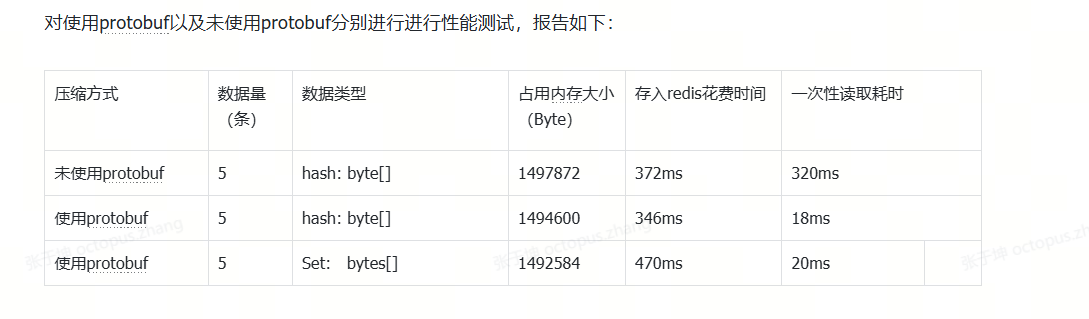
那综合考虑到压缩和性能我全都要 :综合protobuf + gzip
问了一把AI
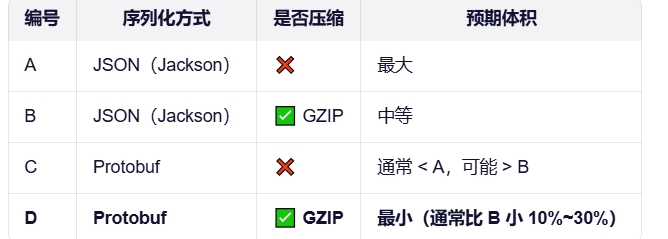
Protobuf 本身不等于“压缩”,它是一种高效的二进制序列化格式;而 GZIP 是通用压缩算法。
如果你对 Protobuf 的输出再做 GZIP,通常会比原始 JSON+GZIP 更小;但如果你只比较 “Protobuf 原生 vs JSON+GZIP”,那么在某些数据特征下,后者可能更小。
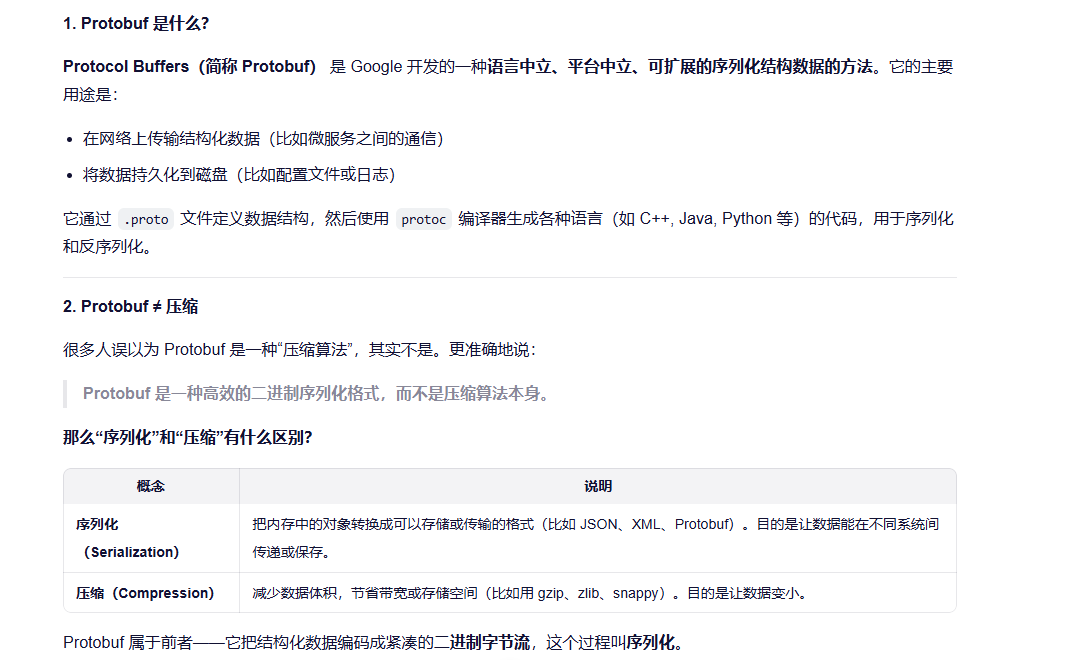
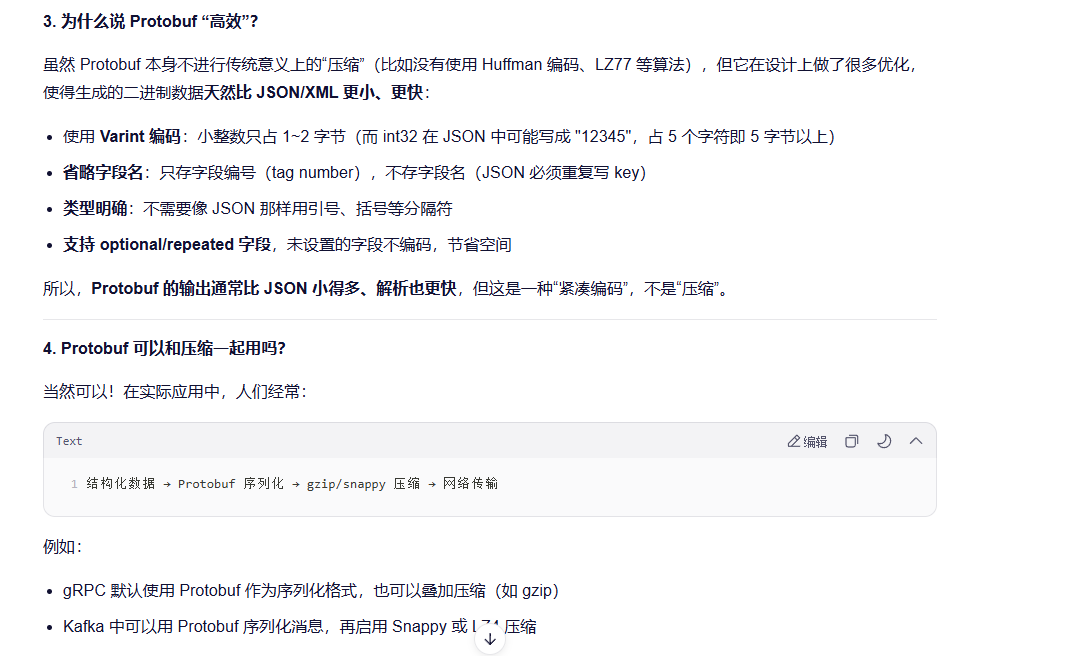
这说明:Protobuf 负责“高效表示”,压缩算法负责“进一步缩小体积”,两者是互补的。
总结
✅ Protobuf 是序列化格式,不是压缩算法。
✅ 它生成的二进制数据天然紧凑,所以常被误认为“压缩了”。
❌ 但如果你需要极致的小体积,仍可对 Protobuf 输出再做压缩。
🎯 核心优势:跨语言、高性能、体积小、向前/向后兼容。
希望这个解释帮你理清了概念!如果还有疑问,欢迎继续问 😊





 扫一扫
扫一扫


 777
777

 被折叠的 条评论
为什么被折叠?
被折叠的 条评论
为什么被折叠?
 到【灌水乐园】发言





