



阿里云短信服务
- 阿里云登录
import com.aliyuncs.CommonRequest;
import com.aliyuncs.CommonResponse;
import com.aliyuncs.DefaultAcsClient;
import com.aliyuncs.IAcsClient;
import com.aliyuncs.exceptions.ClientException;
import com.aliyuncs.exceptions.ServerException;
import com.aliyuncs.http.MethodType;
import com.aliyuncs.profile.DefaultProfile;

public class SendSms {
    public static void main(String[] args) {
        // 连接阿里云
        DefaultProfile profile = DefaultProfile.getProfile("cn-hangzhou", "<accessKeyId>", "<accessSecret>");// accessKeyId:账号 accessSecret:密码
        IAcsClient client = new DefaultAcsClient(profile);
		// 构建请求
        CommonRequest request = new CommonRequest();
        request.setSysMethod(MethodType.POST);
        // 不要动
        request.setSysDomain("dysmsapi.aliyuncs.com");
        request.setSysVersion("2017-05-25");
        request.setSysAction("SendSms");

        // 自定义参数(手机号,验证码,签名,模板)
        request.putQueryParameter("PhoneNumbers", "手机号");
        request.putQueryParameter("SignName", "签名");
        request.putQueryParameter("TemplateCode", "模板Code");
        // 构建短信验证码
        HashMap<String,Object> map = new HashMap<>();
        map.put("code","1122");
        request.putQueryParameter("TemplateParam", JSONObject.toJSONString(map));
        try {
            CommonResponse response = client.getCommonResponse(request);
            // 响应是否发送成功
            System.out.println(response.getData());
            // 如果有返回值时候
            // return response.getHttpResponse().isSuccess();
        } catch (ServerException e) {
            e.printStackTrace();
        } catch (ClientException e) {
            e.printStackTrace();
        }
        // return false;
    }
}
		<!--阿里云短信依赖-->
        <dependency>
            <groupId>com.aliyun</groupId>
            <artifactId>aliyun-java-sdk-core</artifactId>
            <version>4.5.3</version>
        </dependency>

        <!--fastJSON-->
        <dependency>
            <groupId>com.alibaba</groupId>
            <artifactId>fastjson</artifactId>
            <version>1.2.73</version>
        </dependency>

        <!--结合Redis-->
        <dependency>
            <groupId>org.springframework.boot</groupId>
            <artifactId>spring-boot-starter-data-redis</artifactId>
        </dependency>
@CrossOrigin // 控制台跨域支持
- 调用短信业务
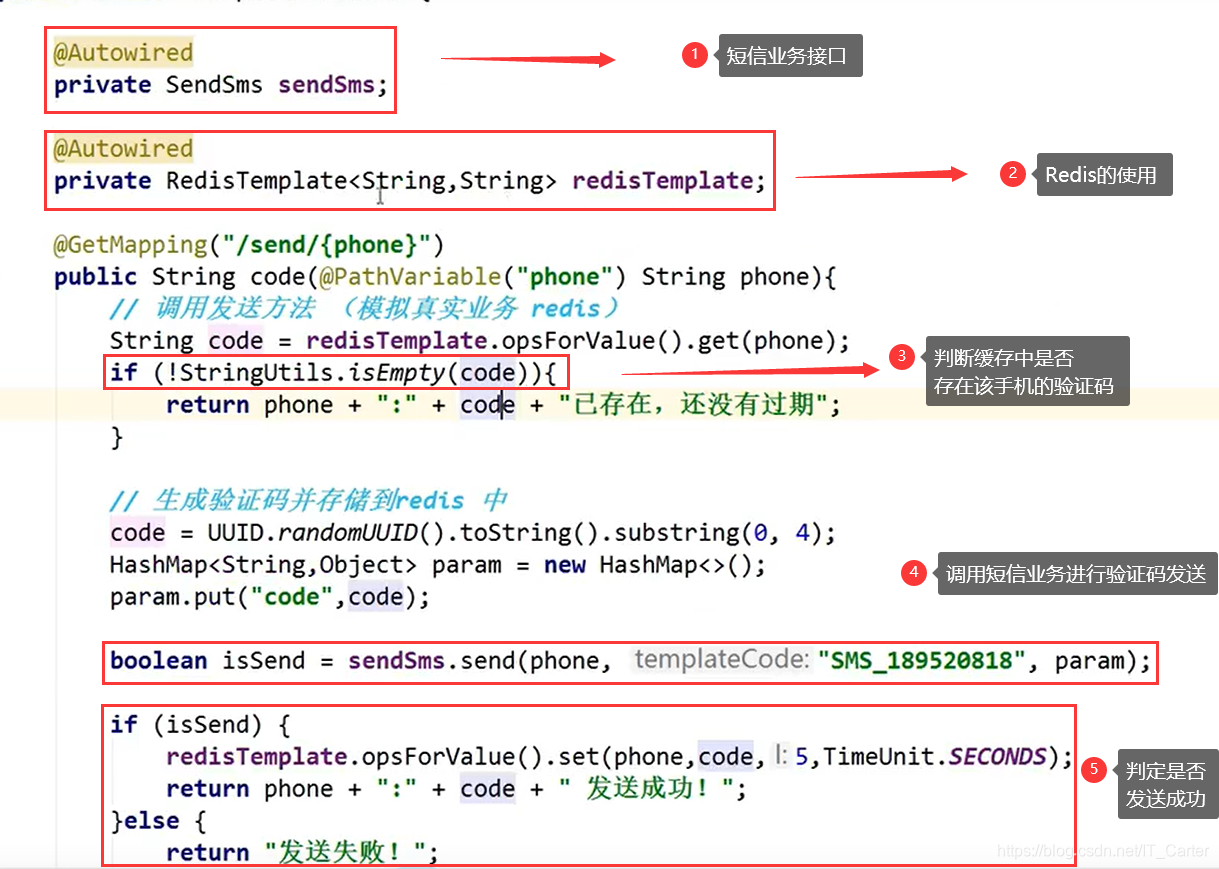
真实场景下:调用短信业务+添加redis
-
application.propertities中添加Redis配置
# Redis的配置 spring.redis.host=localhost spring.redis.port=6379 spring.redis.password= -
打开Redis缓存软件
-
进行代码书写
calhost
spring.redis.port=6379
spring.redis.password=





 扫一扫
扫一扫


 648
648

 被折叠的 条评论
为什么被折叠?
被折叠的 条评论
为什么被折叠?
 到【灌水乐园】发言





