


项目背景
最近公司某物联网项目需要使用socket长连接进行消息通讯,捣鼓了一版代码上线,结果BUG不断,本猿寝食难安,于是求助度娘,数日未眠项目终于平稳运行了,本着开源共享的精神,本猿把项目代码提炼成了一个demo项目,尽量摒弃了其中丑陋的业务部分,希望与同学们共同学习进步。
一、项目架构
本项目使用了netty、redis以及springboot2.2.0。
二、项目模块
本项目目录结构如下图:
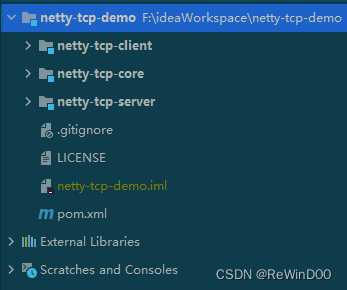
netty-tcp-core是公共模块,主要是工具类。netty-tcp-server是netty服务端,服务端仅作测试使用,实际项目中我们只使用了客户端。netty-tcp-client是客户端,也是本文的重点。
三、业务流程
我们实际项目中使用RocketMQ作为消息队列,本项目由于是demo项目于是改为了BlockingQueue。数据流为:
生产者->消息队列->消费者(客户端)->tcp通道->服务端->tcp通道->客户端。
当消费者接收到某设备发送的消息后,将判断缓存中是否存在该设备与服务端的连接,如果存在并且通道活跃则使用该通道发送消息,如果不存在则创建通道并在通道激活后立即发送消息,当客户端收到来自服务端的消息时进行响应的业务处理。
四、代码详解
1.消息队列
由于本demo项目移除了消息中间件,于是需要自己创建一个本地队列模拟真实使用场景
package org.example.client;import org.example.client.model.NettyMsgModel;import java.util.concurrent.ArrayBlockingQueue;/*** 本项目为演示使用本地队列 实际生产中应该使用消息中间件代替(rocketmq或rabbitmq)** @author ReWind00* @date 2023/2/15 11:20*/public class QueueHolder {private static final ArrayBlockingQueue<NettyMsgModel> queue = new ArrayBlockingQueue<>(100);public static ArrayBlockingQueue<NettyMsgModel> get() {return queue;}}
使用一个类保存队列的静态实例以便在任何类中都可以快速引用。接下来我们需要启动一个线程去监听队列中的消息,一但消息投递到队列中,我们就取出消息然后异步多线程处理该消息。
public class LoopThread implements Runnable {@Overridepublic void run() {for (int i = 0; i < MAIN_THREAD_POOL_SIZE; i++) {executor.execute(() -> {while (true) {//取走BlockingQueue里排在首位的对象,若BlockingQueue为空,阻断进入等待状态直到try {NettyMsgModel nettyMsgModel = QueueHolder.get().take();messageProcessor.process(nettyMsgModel);} catch (InterruptedException e) {log.error(e.getMessage(), e);}}});}}}
使用take方法会使该线程一直阻塞直到队列收到消息后进入下一次循环。
2.执行类
process方法来自于MessageProcessor类,该类为单例,但是会有多线程同时执行。
public void process(NettyMsgModel nettyMsgModel) {String imei = nettyMsgModel.getImei();try {synchronized (this) { //为避免收到同一台设备多条消息后重复创建客户端,必须加锁if (redisCache.hasKey(NETTY_QUEUE_LOCK + imei)) { //上一条消息处理中log.info("imei={}消息处理中,重新入列", imei);//放回队列重新等待消费 延迟x秒(实际项目中应该使用rocketmq或者rabbitmq实现延迟消费)new Timer().schedule(new TimerTask() {@Overridepublic void run() {QueueHolder.get().offer(nettyMsgModel);}}, 2000);log.info("imei={}消息处理中,重新入列完成", imei);return;} else {//如果没有在连接中的直接加锁redisCache.setCacheObject(NETTY_QUEUE_LOCK + imei, "1", 120, TimeUnit.SECONDS);}}//缓存中存在则发送消息if (NettyClientHolder.get().containsKey(imei)) {NettyClient nettyClient = NettyClientHolder.get().get(imei);if (null != nettyClient.getChannelFuture() && nettyClient.getChannelFuture().channel().isActive()) { //通道活跃直接发送消息if (!nettyClient.getChannelFuture().channel().isWritable()) {log.warn("警告,通道不可写,imei={},channelId={}", nettyClient.getImei(),nettyClient.getChannelFuture().channel().id());}nettyClient.send(nettyMsgModel.getMsg());} else {log.info("client imei={},通道不活跃,主动关闭", nettyClient.getImei());nettyClient.close();//重新创建客户端发送this.createClientAndSend(nettyMsgModel);}} else { //缓存中不存在则创建新的客户端this.createClientAndSend(nettyMsgModel);}} catch (Exception e) {log.error(e.getMessage(), e);} finally {//执行完后解锁redisCache.deleteObject(NETTY_QUEUE_LOCK + imei);}}
其中imei是我们设备的唯一标识,我们可以用imei作为缓存的key来确认是否已创建过连接。由于我们消息的并发量可能会很大,所以存在当某设备的连接正在创建的过程中,另一个线程收到该设备消息也开始创建连接的情况,所以我们使用synchronized 代码块以及redis分布式锁来避免此情况的发生。当一条消息获得锁后,在锁释放前,后续消息将会被重新放回消息队列并延迟消费。
获取锁的线程会根据imei判断缓存是否存在连接,如果存在直接发送消息,如果不存在则进入创建客户端的方法。
private void createClientAndSend(NettyMsgModel nettyMsgModel) {log.info("创建客户端执行中imei={}", nettyMsgModel.getImei());//此处的DemoClientHandler可以根据自己的业务定义NettyClient nettyClient = SpringUtils.getBean(NettyClient.class, nettyMsgModel.getImei(), nettyMsgModel.getBizData(),this.createDefaultWorkGroup(this.workerThread), DemoClientHandler.class);executor.execute(nettyClient); //执行客户端初始化try {//利用锁等待客户端激活synchronized (nettyClient) {long c1 = System.currentTimeMillis();nettyClient.wait(5000); //最多阻塞5秒 5秒后客户端仍然未激活则自动解锁long c2 = System.currentTimeMillis();log.info("创建客户端wait耗时={}ms", c2 - c1);}if (null != nettyClient.getChannelFuture() && nettyClient.getChannelFuture().channel().isActive()) { //连接成功//存入缓存NettyClientHolder.get().put(nettyMsgModel.getImei(), nettyClient);//客户端激活后发送消息nettyClient.send(nettyMsgModel.getMsg());} else { //连接失败log.warn("客户端创建失败,imei={}", nettyMsgModel.getImei());nettyClient.close();//可以把消息重新入列处理}} catch (Exception e) {log.error("客户端初始化发送消息异常===>{}", e.getMessage(), e);}}
当netty客户端实例创建后使用线程池执行初始化,由于是异步执行,我们此时立刻发送消息很可能客户端还没有完成连接,因此必须加锁等待。进入synchronized 代码块,使用wait方法等待客户端激活后解锁,参数5000为自动解锁的毫秒数,意思是如果客户端出现异常情况迟迟未能连接成功并激活通道、解锁,则最多5000毫秒后该锁自动解开。这参数在实际使用时可以视情况调整,在并发量很大的情况下,5秒的阻塞可能会导致线程池耗尽,或内存溢出。待客户端创建成功并激活后则立即发送消息。
3.客户端
package org.example.client;import io.netty.bootstrap.Bootstrap;import io.netty.buffer.Unpooled;import io.netty.channel.*;import io.netty.channel.socket.SocketChannel;import io.netty.channel.socket.nio.NioSocketChannel;import io.netty.handler.codec.DelimiterBasedFrameDecoder;import io.netty.handler.codec.string.StringDecoder;import io.netty.handler.codec.string.StringEncoder;import io.netty.handler.timeout.IdleStateHandler;import io.netty.util.CharsetUtil;import lombok.Getter;import lombok.NoArgsConstructor;import lombok.extern.slf4j.Slf4j;import org.example.client.handler.BaseClientHandler;import org.example.core.util.SpringUtils;import org.springframework.beans.factory.annotation.Value;import org.springframework.context.annotation.Scope;import org.springframework.stereotype.Component;import org.springframework.util.StringUtils;import java.util.Map;import java.util.concurrent.TimeUnit;import java.util.concurrent.atomic.AtomicBoolean;import java.util.concurrent.atomic.AtomicInteger;/*** @author ReWind00* @date 2023/2/15 9:59*/@Slf4j@Component@Scope("prototype")@Getter@NoArgsConstructorpublic class NettyClient implements Runnable {@Value("${netty.server.port}")private int port;@Value("${netty.server.host}")private String host;//客户端唯一标识private String imei;//自定义业务数据private Map<String, Object> bizData;private EventLoopGroup workGroup;private Class<BaseClientHandler> clientHandlerClass;private ChannelFuture channelFuture;public NettyClient(String imei, Map<String, Object> bizData, EventLoopGroup workGroup, Class<BaseClientHandler> clientHandlerClass) {this.imei = imei;this.bizData = bizData;this.workGroup = workGroup;this.clientHandlerClass = clientHandlerClass;}@Overridepublic void run() {try {this.init();log.info("客户端启动imei={}", imei);} catch (Exception e) {log.error("客户端启动失败:{}", e.getMessage(), e);}}public void close() {if (null != this.channelFuture) {this.channelFuture.channel().close();}NettyClientHolder.get().remove(this.imei);}public void send(String message) {try {if (!this.channelFuture.channel().isActive()) {log.info("通道不活跃imei={}", this.imei);return;}if (!StringUtils.isEmpty(message)) {log.info("队列消息发送===>{}", message);this.channelFuture.channel().writeAndFlush(message);}} catch (Exception e) {log.error(e.getMessage(), e);}}private void init() throws Exception {//将本实例传递到handlerBaseClientHandler clientHandler = SpringUtils.getBean(clientHandlerClass, this);Bootstrap b = new Bootstrap();//2 通过辅助类去构造server/clientb.group(workGroup).channel(NioSocketChannel.class).option(ChannelOption.CONNECT_TIMEOUT_MILLIS, 3000).option(ChannelOption.SO_RCVBUF, 1024 * 32).option(ChannelOption.SO_SNDBUF, 1024 * 32).handler(new ChannelInitializer<SocketChannel>() {@Overrideprotected void initChannel(SocketChannel ch) throws Exception {ch.pipeline().addLast(new DelimiterBasedFrameDecoder(1024 * 1024, Unpooled.copiedBuffer("\r\n".getBytes())));ch.pipeline().addLast(new StringEncoder(CharsetUtil.UTF_8));// String解码。ch.pipeline().addLast(new StringDecoder(CharsetUtil.UTF_8));// String解码。// // 心跳设置ch.pipeline().addLast(new IdleStateHandler(0, 0, 600, TimeUnit.SECONDS));ch.pipeline().addLast(clientHandler);}});this.connect(b);}private void connect(Bootstrap b) throws InterruptedException {long c1 = System.currentTimeMillis();final int maxRetries = 2; //重连2次final AtomicInteger count = new AtomicInteger();final AtomicBoolean flag = new AtomicBoolean(false);try {this.channelFuture = b.connect(host, port).addListener(new ChannelFutureListener() {public void operationComplete(ChannelFuture future) throws Exception {if (!future.isSuccess()) {if (count.incrementAndGet() > maxRetries) {log.warn("imei={}重连超过{}次", imei, maxRetries);} else {log.info("imei={}重连第{}次", imei, count);b.connect(host, port).addListener(this);}} else {log.info("imei={}连接成功,连接IP:{}连接端口:{}", imei, host, port);flag.set(true);}}}).sync(); //同步连接} catch (Exception e) {log.error(e.getMessage(), e);}log.info("设备imei={},channelId={}连接耗时={}ms", imei, channelFuture.channel().id(), System.currentTimeMillis() - c1);if (flag.get()) {channelFuture.channel().closeFuture().sync(); //连接成功后将持续阻塞该线程}}}
netty客户端为多实例,每个实例绑定一个线程,持续阻塞到客户端关闭为止,每个客户端中可以保存自己的业务数据,以便在后续与服务端交互时处理业务使用。客户端执行连接时,给了2次重试的机会,如果3次都没连接成功则放弃。后续可以选择将该消息重新入列消费。我们实际项目中,此处还应该预先给服务端发送一条登录消息,待服务端确认后才能执行后续通讯,这需要视实际情况进行调整。
另一个需要注意的点是EventLoopGroup是从构造函数传入的,而不是在客户端中创建的,因为当客户端数量非常多时,每个客户端都创建自己的线程组会极大的消耗服务器资源,因此我们在实际使用中是按业务去创建统一的线程组给该业务下的所有客户端共同使用的,线程组的大小需要根据业务需求灵活配置。
在init方法中,我们给客户端加上了一个handler来处理与服务端的交互,下面来看一下具体实现。
package org.example.client.handler;import io.netty.channel.ChannelHandlerContext;import io.netty.handler.timeout.IdleState;import io.netty.handler.timeout.IdleStateEvent;import lombok.extern.slf4j.Slf4j;import org.example.client.NettyClient;import org.springframework.context.annotation.Scope;import org.springframework.stereotype.Component;import java.util.Map;/*** @author ReWind00* @date 2023/2/15 10:09*/@Slf4j@Component@Scope("prototype")public class DemoClientHandler extends BaseClientHandler {private final String imei;private final Map<String, Object> bizData;private final NettyClient nettyClient;private int allIdleCounter = 0;private static final int MAX_IDLE_TIMES = 3;public DemoClientHandler(NettyClient nettyClient) {this.nettyClient = nettyClient;this.imei = nettyClient.getImei();this.bizData = nettyClient.getBizData();}@Overridepublic void channelActive(ChannelHandlerContext ctx) throws Exception {log.info("客户端imei={},通道激活成功", this.imei);synchronized (this.nettyClient) { //当通道激活后解锁队列线程,然后再发送消息this.nettyClient.notify();}}@Overridepublic void channelInactive(ChannelHandlerContext ctx) throws Exception {log.warn("客户端imei={},通道断开连接", this.imei);}@Overridepublic void channelRead(ChannelHandlerContext ctx, Object msg) throws Exception {log.info("客户端imei={},收到消息: {}", this.imei, msg);//处理业务...if ("shutdown".equals(msg)) {this.nettyClient.close();}}@Overridepublic void userEventTriggered(ChannelHandlerContext ctx, Object evt) throws Exception {if (evt instanceof IdleStateEvent) {IdleStateEvent e = (IdleStateEvent) evt;boolean flag = false;if (e.state() == IdleState.ALL_IDLE) {this.allIdleCounter++;log.info("客户端imei={}触发闲读或写第{}次", this.imei, this.allIdleCounter);if (this.allIdleCounter >= MAX_IDLE_TIMES) {flag = true;}}if (flag) {log.warn("读写超时达到{}次,主动断开连接", MAX_IDLE_TIMES);ctx.channel().close();}}}@Overridepublic void exceptionCaught(ChannelHandlerContext ctx, Throwable cause) throws Exception {log.error("客户端imei={},连接异常{}", imei, cause.getMessage(), cause);}}
DemoClientHandler也是多实例bean,每个实例持有自己的NettyClient引用,以便在后续处理具体业务。在channelActive方法中,我们可以看到执行了客户端实例的notify方法,此处就是在客户端创建成功并且通道激活后解除wait锁的地方。channelRead方法就是我们处理服务端发送过来的消息的方法,我们的具体业务应该在该方法执行,当然不建议长时间阻塞客户端的工作线程,可以考虑异步处理。
最后我们看一下客户端缓存类。
package org.example.client;import java.util.concurrent.ConcurrentHashMap;/*** @author ReWind00* @date 2023/2/15 11:01*/public class NettyClientHolder {private static final ConcurrentHashMap<String, NettyClient> clientMap = new ConcurrentHashMap<>();public static ConcurrentHashMap<String, NettyClient> get() {return clientMap;}}
由于netty的通道无法序列化,因此不能存入redis,只能缓存在本地内存中,其本质就是一个ConcurrentHashMap。
五、测试
package org.example.client.controller;import org.example.client.QueueHolder;import org.example.client.model.NettyMsgModel;import org.springframework.web.bind.annotation.GetMapping;import org.springframework.web.bind.annotation.RequestMapping;import org.springframework.web.bind.annotation.RequestParam;import org.springframework.web.bind.annotation.RestController;/*** @author ReWind00* @date 2023/2/15 13:48*/@RestController@RequestMapping("/demo")public class DemoController {/*** 间隔发送两条消息*/@GetMapping("testOne")public void testOne() {QueueHolder.get().offer(NettyMsgModel.create("87654321", "Hello World!"));try {Thread.sleep(5000);} catch (InterruptedException e) {e.printStackTrace();}QueueHolder.get().offer(NettyMsgModel.create("87654321", "Hello World Too!"));}/*** 任意发送消息** @param imei* @param msg*/@GetMapping("testTwo")public void testTwo(@RequestParam String imei, @RequestParam String msg) {QueueHolder.get().offer(NettyMsgModel.create(imei, msg));}/*** 连续发送两条消息 第二条由于redis锁将会重新放回队列延迟消费*/@GetMapping("testThree")public void testThree() {QueueHolder.get().offer(NettyMsgModel.create("12345678", "Hello World!"));QueueHolder.get().offer(NettyMsgModel.create("12345678", "Hello World Too!"));}}
测试接口代码如上,调用testOne,日志如下:

可以看到第一条消息触发了客户端创建流程,创建后发送了消息,而5秒后的第二条消息直接通过已有通道发送了。
测试接口代码如上,调用testTwo,日志如下:

发送shutdown可以主动断开已有连接。
测试接口代码如上,调用testThree,日志如下:

可以看到第二条消息重新入列并被延迟消费了。
六、源码
https://gitee.com/jaster/netty-tcp-demo
后记
本demo项目仅作学习交流使用,如果要应用到生产环境还有些许不足,有问题的同学可以留言交流。





 扫一扫
扫一扫


 3954
3954

 被折叠的 条评论
为什么被折叠?
被折叠的 条评论
为什么被折叠?
 到【灌水乐园】发言





