


环境
-
JProfiler 17.1.3(IDEA插件)
-
JProfiler 9.2(可执行软件)
-
IntelliJ IDEA 2017.2.5
下载
下载JProfiler(IDEA)插件
方式1:
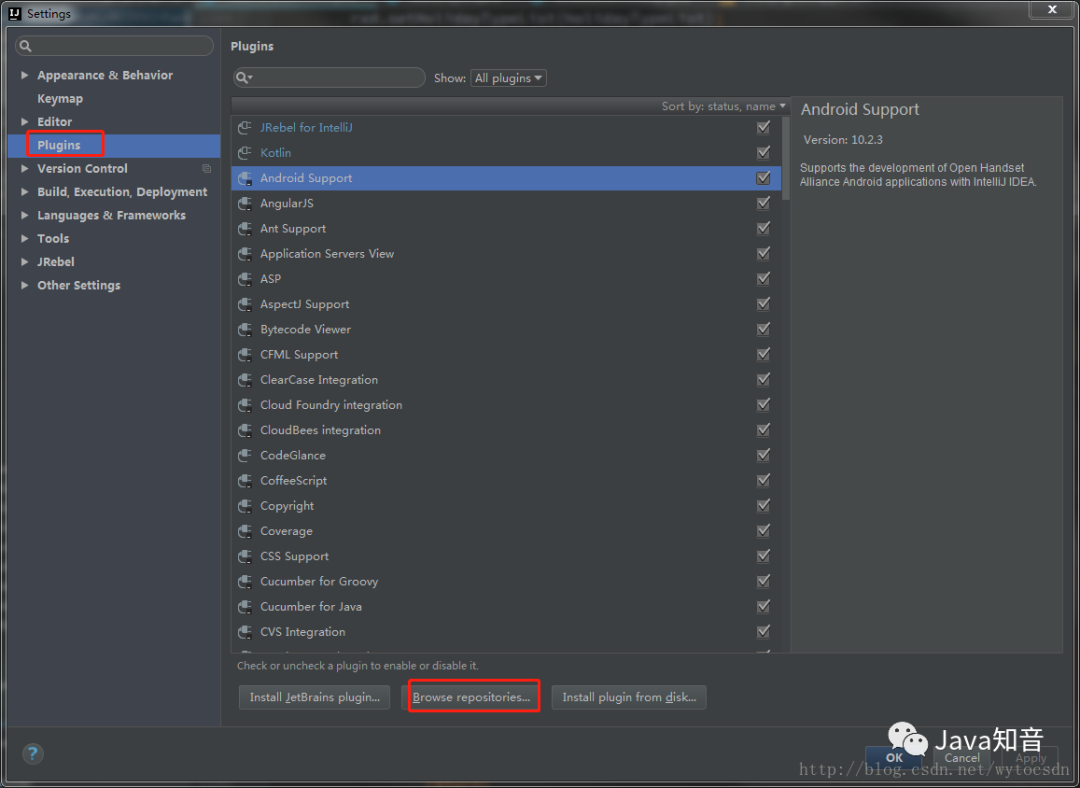
在IDEA上直接下载Settings–plugins–Browse repositories
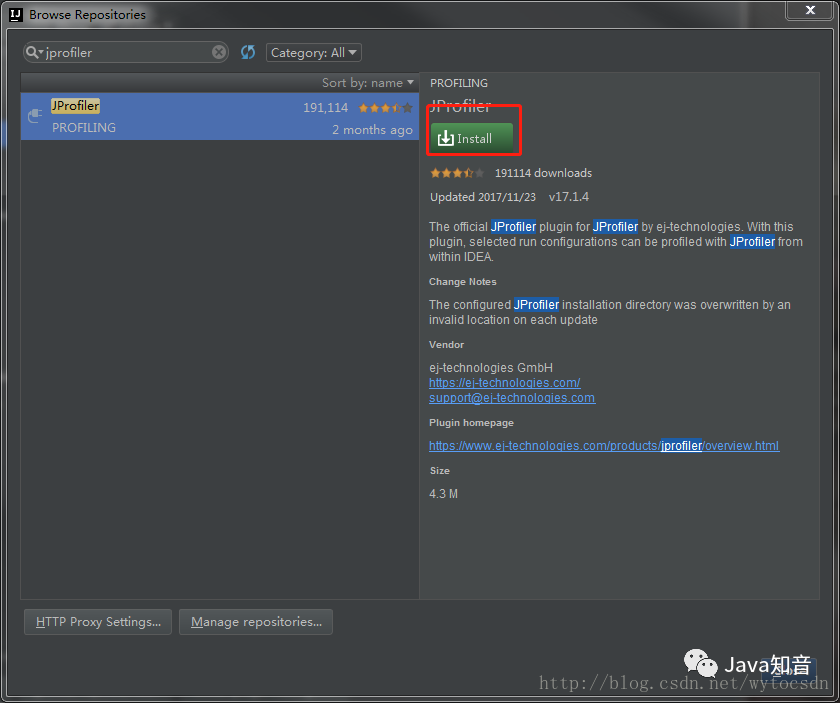
搜索JProfiler 点击 install 按钮安装,然后从启IDEA工具
看到如下图片则说明安装完成

方式2:
官网下载插件,手动安装
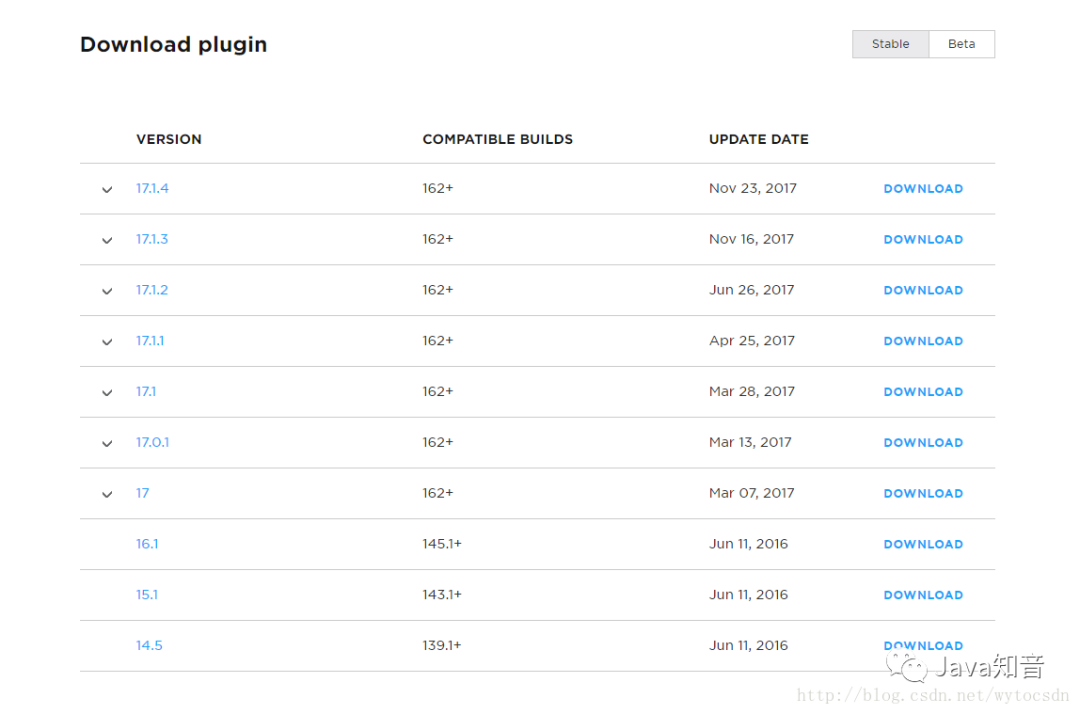
在首页向下翻,中部位置能看到JProfiler最新版本,包括历史版本下载链接,本教程中我们选择17.1.3版本。点击DOWNLOAD进行下载。
https://plugins.jetbrains.com/plugin/253-jprofiler
把从下载的压缩包解压出来的JProfiler文件夹,copy到IDEA自定义插件目录,默认路径:C:\Users\Administrator.IntelliJIdea2017.2\config\plugins
从启IDEA看到如下图标则安装成功:
安装
安装JProfiler监控软件
官方下载地址
https://www.ej-technologies.com/download/jprofiler/version_92
右上角可以选择要下载版本
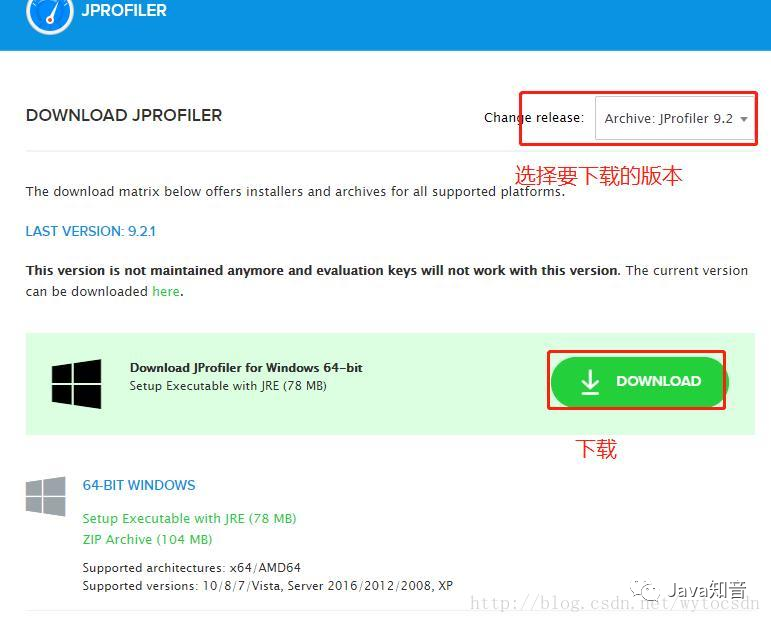
注:本教程选择的版本是9.2
下载完双击运行,选择自定义目录安装,点击Next
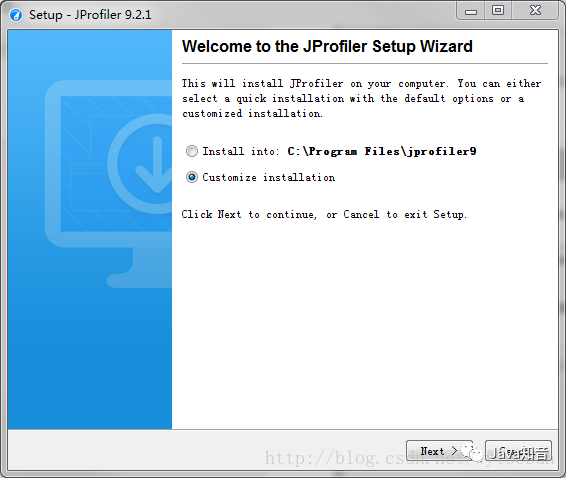
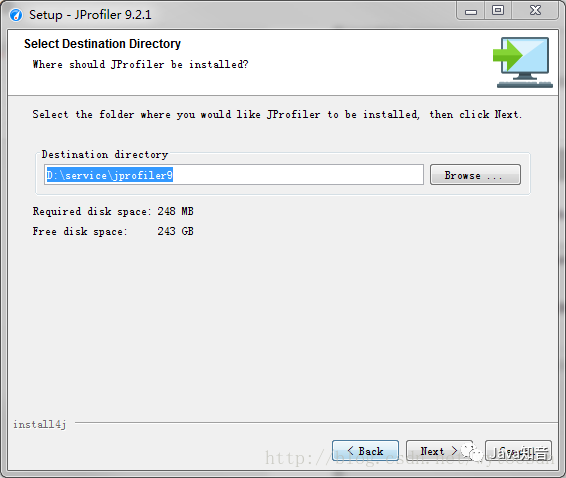
选择安装路径,建议选择一个文件名中没有中文,没有空格的路径因为如果改手动启动时,空格识别不了。然后一直点Next
配置
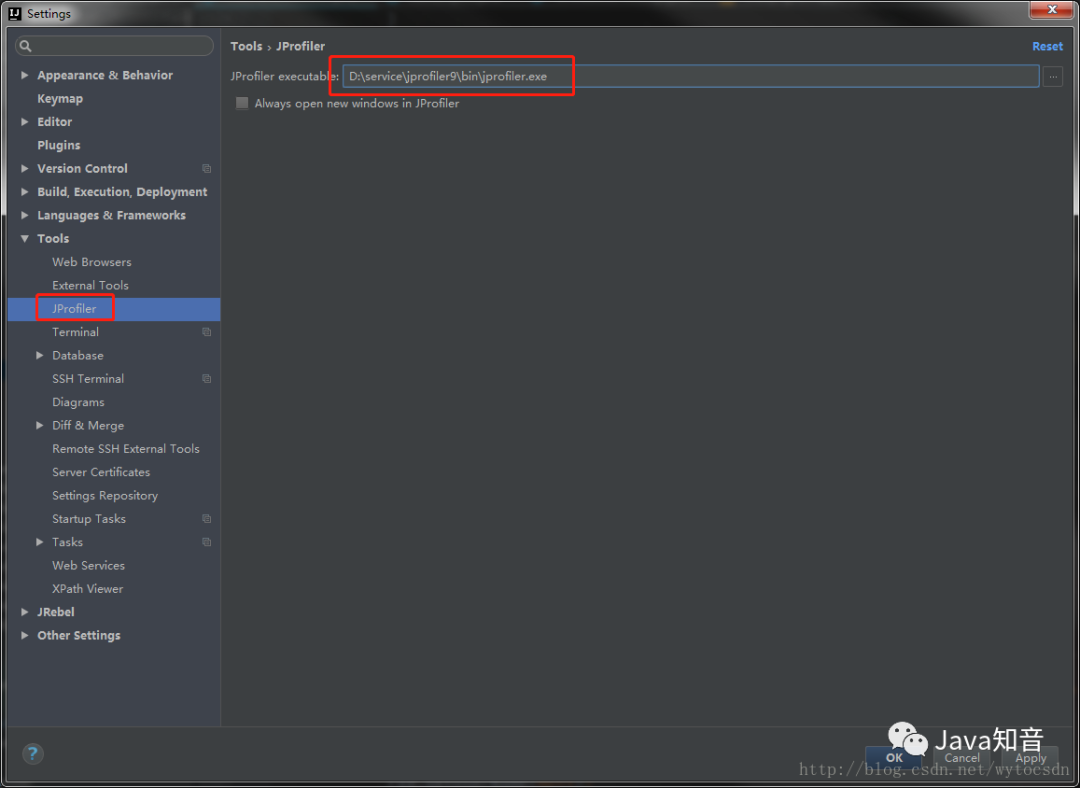
配置IDEA运行环境
Settings–Tools–JProflier–JProflier executable选择JProfile安装可执行文件。(如果系统只装了一个版本,启动IDEA时会默认选择)保存
选择你要分析的项目,点击JProfiler图标启动。

启动完成会自动弹出JProfiler窗口,在里面就可以监控自己的代码性能了。
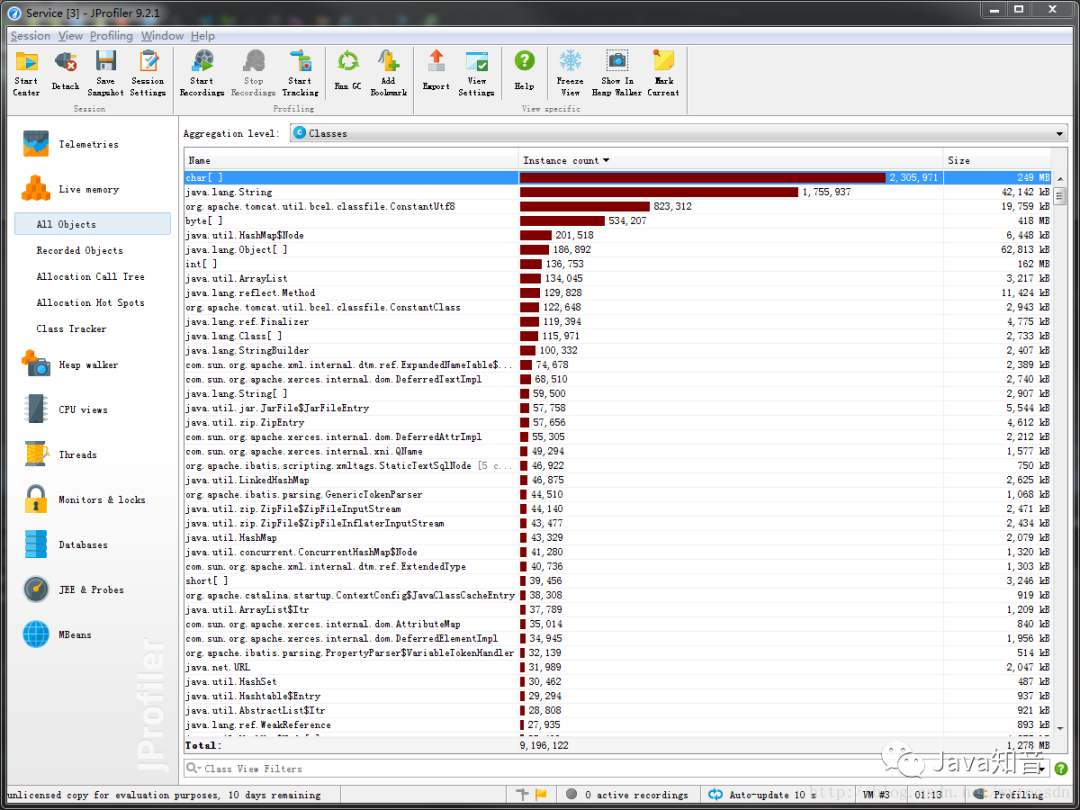
至此IDEA中配置JProfiler做性能分析就完成了!
扩展
配置JRebel和JProfiler同时运行
有些人在IDEA中配置了JRebel热部署,要想JRebel和JProfiler同时运行,就要改手动管理JProfiler session了。
方式1:
通过点击tomcat的启动脚本启动
在要分析的tomcat启动脚本catalina.bat中增加一行。
set CATALINA_OPTS=-agentpath:D:\service\jprofiler9\bin\windows-x64\jprofilerti.dll=port=8849,nowait,id=80,config=C:\Users\Administrator\.jprofiler9\config.xml %CATALINA_OPTS%
方式2:
通过Idea JRebel 启动
在IDEA Run/Debug Configurations窗口JRebel Debug中配置Environment Variables属性。
CATALINA_OPTS=-agentpath:D:\service\jprofiler9\bin\windows-x64\jprofilerti.dll\=port\=8849,nowait,id\=81,config\=C:\Users\Administrator\.jprofiler9\config.xml
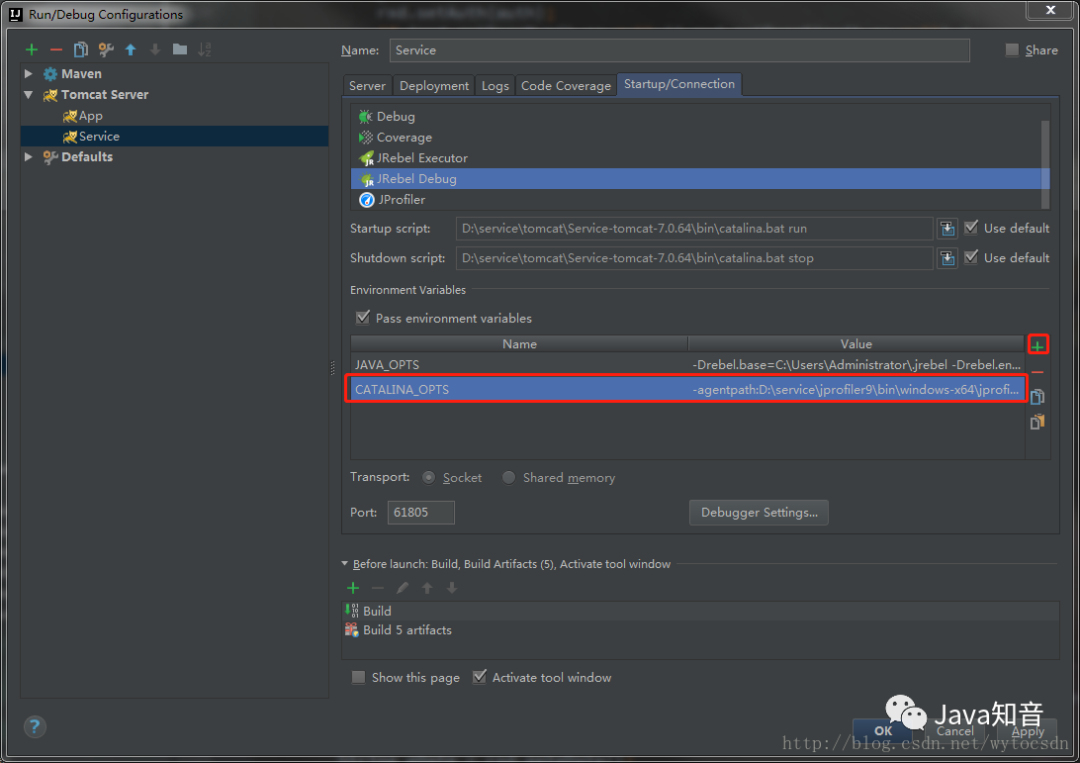
启动JRebel

看到控制台如下信息,说明JRebel和JProfiler都启动了。
JProfiler> Protocol version 55
JProfiler> Using JVMTI
JProfiler> JVMTI version 1.1 detected.
JProfiler> Don't wait for frontend to connect.
JProfiler> 64-bit library
JProfiler> Using config file C:\Users\Administrator\.jprofiler9\config.xml (id: 80)
JProfiler> Listening on port: 8849.
JProfiler> Instrumenting native methods.
JProfiler> Can retransform classes.
JProfiler> Can retransform any class.
JProfiler> Native library initialized
2018-02-05 17:55:02 JRebel:
2018-02-05 17:55:02 JRebel: A newer version '7.1.5' is available for download
2018-02-05 17:55:02 JRebel: from http://zeroturnaround.com/software/jrebel/download/
2018-02-05 17:55:02 JRebel:
Connected to the target VM, address: '127.0.0.1:61805', transport: 'socket'
JProfiler> VM initialized
2018-02-05 17:55:02 JRebel: Contacting myJRebel server ..
JProfiler> Using dynamic instrumentation
JProfiler> Time measurement: elapsed time
JProfiler> CPU profiling enabled
二月 05, 2018 5:55:04 下午 org.apache.catalina.startup.VersionLoggerListener log
信息: Server version:        Apache Tomcat/7.0.64
二月 05, 2018 5:55:04 下午 org.apache.catalina.startup.VersionLoggerListener log
信息: Server built:          Aug 19 2015 17:18:06 UTC
二月 05, 2018 5:55:04 下午 org.apache.catalina.startup.VersionLoggerListener log
信息: Server number:         7.0.64.0
二月 05, 2018 5:55:04 下午 org.apache.catalina.startup.VersionLoggerListener log
信息: OS Name:               Windows 7
二月 05, 2018 5:55:04 下午 org.apache.catalina.startup.VersionLoggerListener log
信息: OS Version:            6.1
二月 05, 2018 5:55:04 下午 org.apache.catalina.startup.VersionLoggerListener log
信息: Architecture:          amd64
二月 05, 2018 5:55:04 下午 org.apache.catalina.startup.VersionLoggerListener log
信息: Java Home:             D:\service\Java\jdk1.8.0_101\jre
二月 05, 2018 5:55:04 下午 org.apache.catalina.startup.VersionLoggerListener log
信息: JVM Version:           1.8.0_101-b13
二月 05, 2018 5:55:04 下午 org.apache.catalina.startup.VersionLoggerListener log
信息: JVM Vendor:            Oracle Corporation
二月 05, 2018 5:55:04 下午 org.apache.catalina.startup.VersionLoggerListener log
信息: CATALINA_BASE:         C:\Users\Administrator\.IntelliJIdea2017.2\system\tomcat\Unnamed_Service-ALL_7
二月 05, 2018 5:55:04 下午 org.apache.catalina.startup.VersionLoggerListener log
信息: CATALINA_HOME:         D:\service\tomcat\Service-tomcat-7.0.64
二月 05, 2018 5:55:04 下午 org.apache.catalina.startup.VersionLoggerListener log
信息: Command line argument: -Drebel.base=C:\Users\Administrator\.jrebel
二月 05, 2018 5:55:04 下午 org.apache.catalina.startup.VersionLoggerListener log
信息: Command line argument: -Drebel.env.ide.plugin.version=7.1.4
二月 05, 2018 5:55:04 下午 org.apache.catalina.startup.VersionLoggerListener log
信息: Command line argument: -Drebel.env.ide.version=2017.2.5
二月 05, 2018 5:55:04 下午 org.apache.catalina.startup.VersionLoggerListener log
信息: Command line argument: -Drebel.env.ide.product=IU
二月 05, 2018 5:55:04 下午 org.apache.catalina.startup.VersionLoggerListener log
信息: Command line argument: -Drebel.env.ide=intellij
二月 05, 2018 5:55:04 下午 org.apache.catalina.startup.VersionLoggerListener log
信息: Command line argument: -Drebel.notification.url=http://localhost:17434
二月 05, 2018 5:55:04 下午 org.apache.catalina.startup.VersionLoggerListener log
信息: Command line argument: -agentpath:C:\Users\Administrator\.IntelliJIdea2017.2\config\plugins\jr-ide-idea\lib\jrebel6\lib\jrebel64.dll
二月 05, 2018 5:55:04 下午 org.apache.catalina.startup.VersionLoggerListener log
信息: Command line argument: -agentlib:jdwp=transport=dt_socket,address=127.0.0.1:61805,suspend=y,server=n
二月 05, 2018 5:55:04 下午 org.apache.catalina.startup.VersionLoggerListener log
信息: Command line argument: -Dfile.encoding=UTF-8
二月 05, 2018 5:55:04 下午 org.apache.catalina.startup.VersionLoggerListener log
信息: Command line argument: -Dcom.sun.management.jmxremote=
二月 05, 2018 5:55:04 下午 org.apache.catalina.startup.VersionLoggerListener log
信息: Command line argument: -Dcom.sun.management.jmxremote.port=1099
二月 05, 2018 5:55:04 下午 org.apache.catalina.startup.VersionLoggerListener log
信息: Command line argument: -Dcom.sun.management.jmxremote.ssl=false
二月 05, 2018 5:55:04 下午 org.apache.catalina.startup.VersionLoggerListener log
信息: Command line argument: -Dcom.sun.management.jmxremote.authenticate=false
二月 05, 2018 5:55:04 下午 org.apache.catalina.startup.VersionLoggerListener log
信息: Command line argument: -Djava.rmi.server.hostname=127.0.0.1
二月 05, 2018 5:55:04 下午 org.apache.catalina.startup.VersionLoggerListener log
信息: Command line argument: -Djava.util.logging.config.file=C:\Users\Administrator\.IntelliJIdea2017.2\system\tomcat\Unnamed_Service-ALL_7\conf\logging.properties
二月 05, 2018 5:55:04 下午 org.apache.catalina.startup.VersionLoggerListener log
信息: Command line argument: -Djava.util.logging.manager=org.apache.juli.ClassLoaderLogManager
二月 05, 2018 5:55:04 下午 org.apache.catalina.startup.VersionLoggerListener log
信息: Command line argument: -agentpath:D:\service\jprofiler9\bin\windows-x64\jprofilerti.dll=port=8849,nowait,id=80,config=C:\Users\Administrator\.jprofiler9\config.xml
二月 05, 2018 5:55:04 下午 org.apache.catalina.startup.VersionLoggerListener log
信息: Command line argument: -Djava.endorsed.dirs=D:\service\tomcat\Service-tomcat-7.0.64\endorsed
二月 05, 2018 5:55:04 下午 org.apache.catalina.startup.VersionLoggerListener log
信息: Command line argument: -Dcatalina.base=C:\Users\Administrator\.IntelliJIdea2017.2\system\tomcat\Unnamed_Service-ALL_7
二月 05, 2018 5:55:04 下午 org.apache.catalina.startup.VersionLoggerListener log
信息: Command line argument: -Dcatalina.home=D:\service\tomcat\Service-tomcat-7.0.64
二月 05, 2018 5:55:04 下午 org.apache.catalina.startup.VersionLoggerListener log
信息: Command line argument: -Djava.io.tmpdir=D:\service\tomcat\Service-tomcat-7.0.64\temp
二月 05, 2018 5:55:04 下午 org.apache.catalina.core.AprLifecycleListener lifecycleEvent
信息: Loaded APR based Apache Tomcat Native library 1.1.33 using APR version 1.5.1.
二月 05, 2018 5:55:04 下午 org.apache.catalina.core.AprLifecycleListener lifecycleEvent
信息: APR capabilities: IPv6 [true], sendfile [true], accept filters [false], random [true].
2018-02-05 17:55:06 JRebel:  Starting logging to file: C:\Users\Administrator\.jrebel\jrebel.log
2018-02-05 17:55:06 JRebel:
2018-02-05 17:55:06 JRebel:  #############################################################
2018-02-05 17:55:06 JRebel:
2018-02-05 17:55:06 JRebel:  JRebel Agent 7.1.4 (201712200830)
2018-02-05 17:55:06 JRebel:  (c) Copyright ZeroTurnaround AS, Estonia, Tartu.
2018-02-05 17:55:06 JRebel:
2018-02-05 17:55:06 JRebel:  Over the last 16 days JRebel prevented
2018-02-05 17:55:06 JRebel:  at least 117 redeploys/restarts saving you about 0 hours.
2018-02-05 17:55:06 JRebel:
2018-02-05 17:55:06 JRebel:  Licensed to wenyuan hou (using myJRebel).
2018-02-05 17:55:06 JRebel:
2018-02-05 17:55:06 JRebel:
2018-02-05 17:55:06 JRebel:  #############################################################
2018-02-05 17:55:06 JRebel:
点击jprofiler.exe
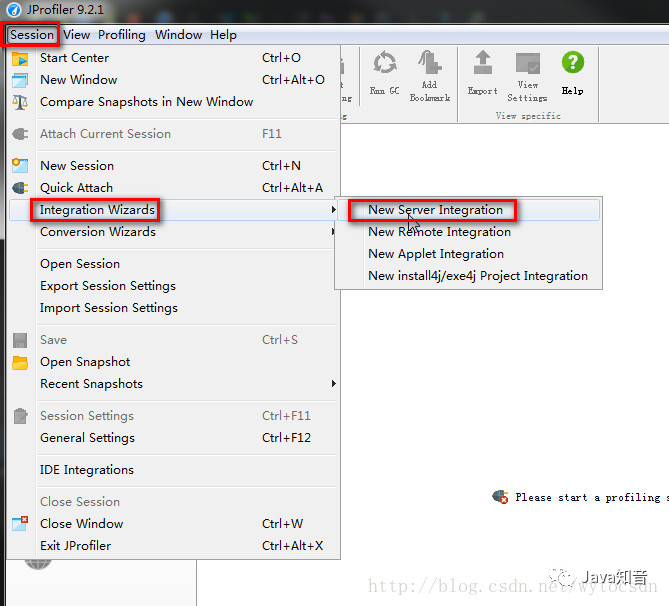
执行菜单Session–Integr ation Wizards–New Server Integration
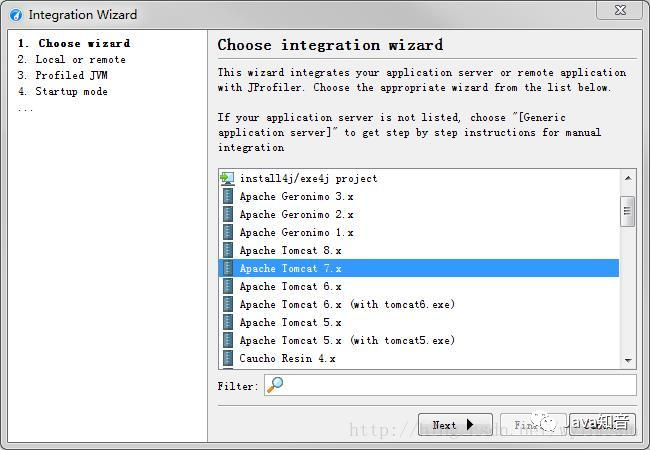
选择tomcat容器版本(7.X)
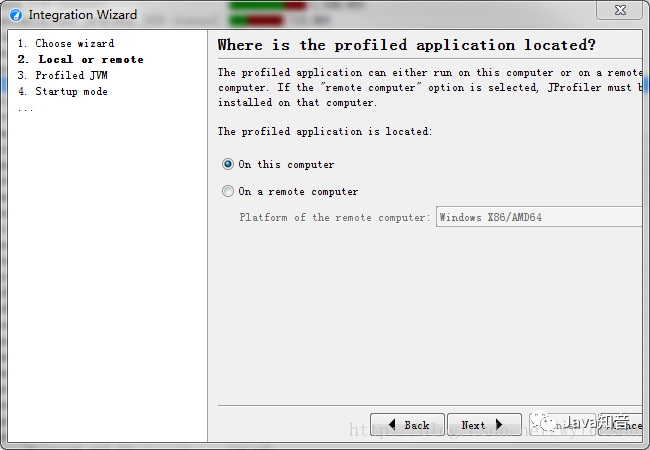
选择是本地测试还是远程测试(本处选本地)
选择虚拟机的类型
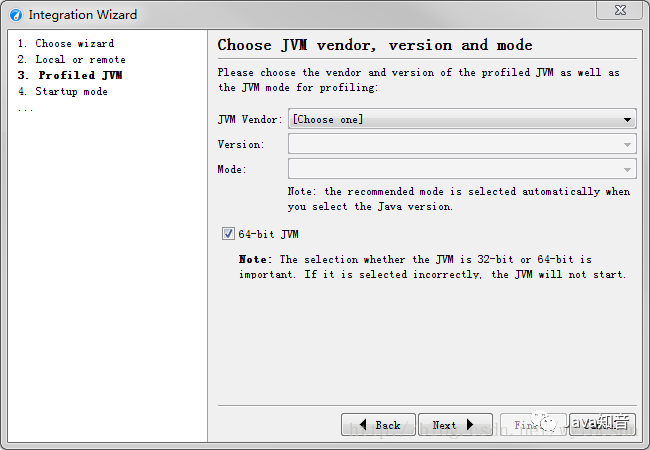
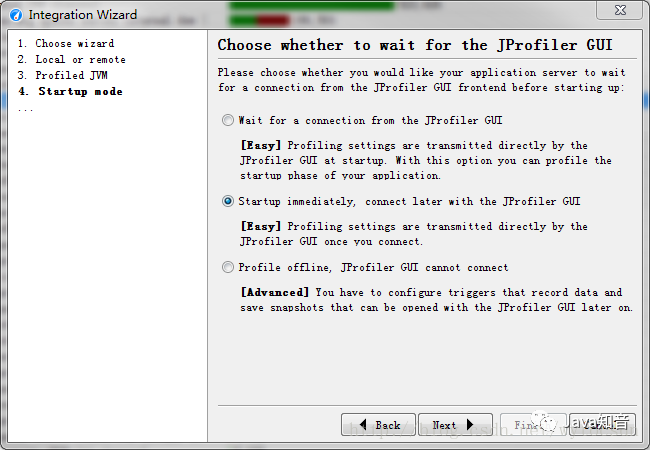
选择Web容器是否和Jprofiler一起运行(我们使用JRebel启动,所以选择第二个)
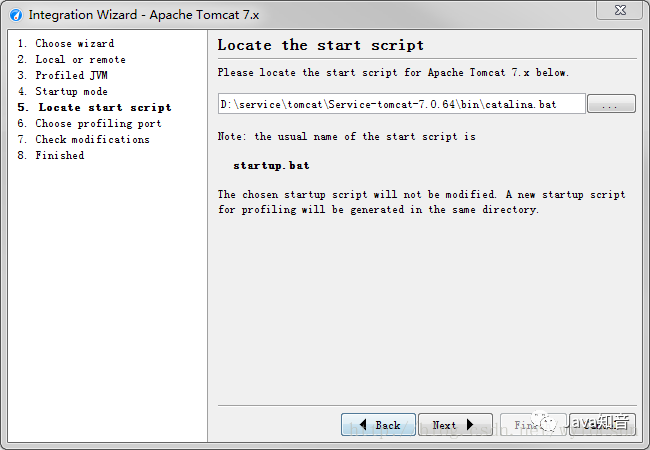
选择tomcat启动脚本
选择端口号默认就行
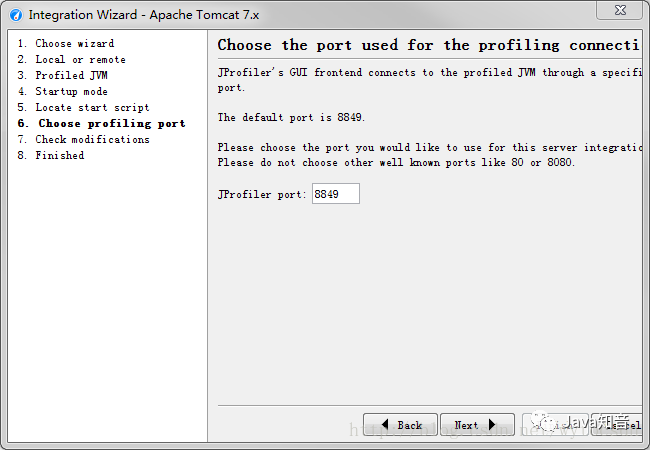
然后一直Next,最后成功。
完成!





 扫一扫
扫一扫


 1905
1905

 被折叠的 条评论
为什么被折叠?
被折叠的 条评论
为什么被折叠?
 到【灌水乐园】发言





