


 本文介绍了SCSS中的函数和占位符选择器的使用方法,通过示例展示了如何创建和调用函数以避免代码重复,并探讨了占位符选择器在简化CSS编译过程中的作用。此外,还提到了运算操作,包括比较运算符和避免除法运算的技巧。
函数
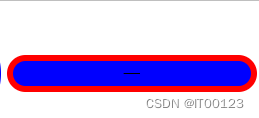
不用函数写按钮
.btn {
    width: 200px;
    height: 30px;
    border-radius: 15px;
    background-color: blue;
    border: 5px solid red;
    color: black;
}
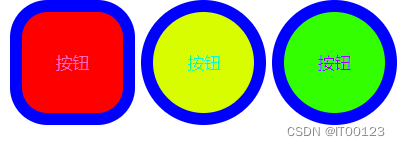
使用函数
@mixin a1($lift, $rikjh, $lk) {
    width: $lift;
    height: $lift;
    border-radius: $lk;
}
@mixin na($color, $b-col, $ww, $ro:blue) {
    background-color: $color;
    border: $ww solid $ro;
    color: $b-col;
}
button {
    &:nth-child(1) {
        @include a1(100px, 100px, 30px);
        @include na(red, hotpink, 10px);
    }
    &:nth-child(2) {
        @include a1(100px, 100px, 50px);
        @include na(rgb(215, 253, 0), rgb(0, 255, 213), 10px);
    }
    &:nth-child(3) {
        @include a1(100px, 100px, 50px);
        @include na(rgb(51, 255, 0), rgb(162, 0, 255), 10px);
    }
}
@mixin a1($lift, $rikjh, $lk) 函数 , 函数名字,(参数1,参数2,参数3)
@include a1(100px, 100px, 30px); 赋值,函数名字, 赋值(参数1,参数2,参数3)
2
.btn {
    width: 200px;
    height: 30px;
    border-radius: 15px;
}
.btn-lal {
    @extend .btn;
    background-color: blue;
    border: 5px solid red;
    color: black;
}
代码有重复的样式可以进行调用
占位符选择器%
占位符选择器(Placeholder Selector)是以%而不是.作为开始符的选择器. 它自身不会出现在编译后的CSS文件中, 只会出现在@extend了它的那些选择器中.
用%icon替换.icon会得到:
CSS中不会出现.icon类!
.error-icon, .info-icon {
  transition: background-color ease .2s;
  margin: 0 .5em;
}

.error-icon {
  /* error specific styles... */
}

.info-icon {
  /* info specific styles... */
}
运算
- % < <= > >= == !=
- 如果值是算数表达式的一部分
- 如果,或值的一部分,是变量或者函数的返回值
如果值被圆括号包裹 - 将被视为除法运算符号:
-
需要用变量,又不让 / 做除法,使用#{}包裹p { font: 10px/8px; // 10px/8px; $width: 1000px; width: $width/2; // 500px; width: round(1.5)/2; // 算除法 height: (500px/2); // 250px; margin-left: 5px + 8px/2px; // 9px; width: calc(100% - .5rem) } -
font: #{ $b } / #{ $a }





 扫一扫
扫一扫


 1668
1668

 被折叠的 条评论
为什么被折叠?
被折叠的 条评论
为什么被折叠?
 到【灌水乐园】发言





