


 这篇博客分享了在安装Rust时遇到的链接器`link.exe`缺失的问题及解决办法。作者指出,错误可能由于缺少Visual C++组件导致。解决方案是下载并安装特定版本的VS Community,确保安装时包含Visual C++选项,然后重启电脑。文中警告尝试安装visualcppbuildtools_full.exe可能会遇到问题,并建议按照提供的步骤操作更简便。
照着官网的说法去安装,然后执行
> cargo build
   Compiling rust-demo v0.1.0 (E:\rust\rust-demo)
error: linker `link.exe` not found
  |
  = note: 系统找不到指定的文件。 (os error 2)

note: the msvc targets depend on the msvc linker but `link.exe` was not found

note: please ensure that VS 2013, VS 2015, VS 2017 or VS 2019 was installed with the Visual C++ option

error: aborting due to previous error

error: could not compile `rust-demo`.

To learn more, run the command again with --verbose.
关于这个错误众说纷纭,可能他们说的都对,在他们的环境下。但是我尝试很多方式都没有解决。
最终解决方案:
1.去微软官网下载 vs_community__1980043881.1626916635.exe(后面这一串数字你应该清楚是版本号,不用在意)
2.选择下图红框安装,然后重启电脑即可
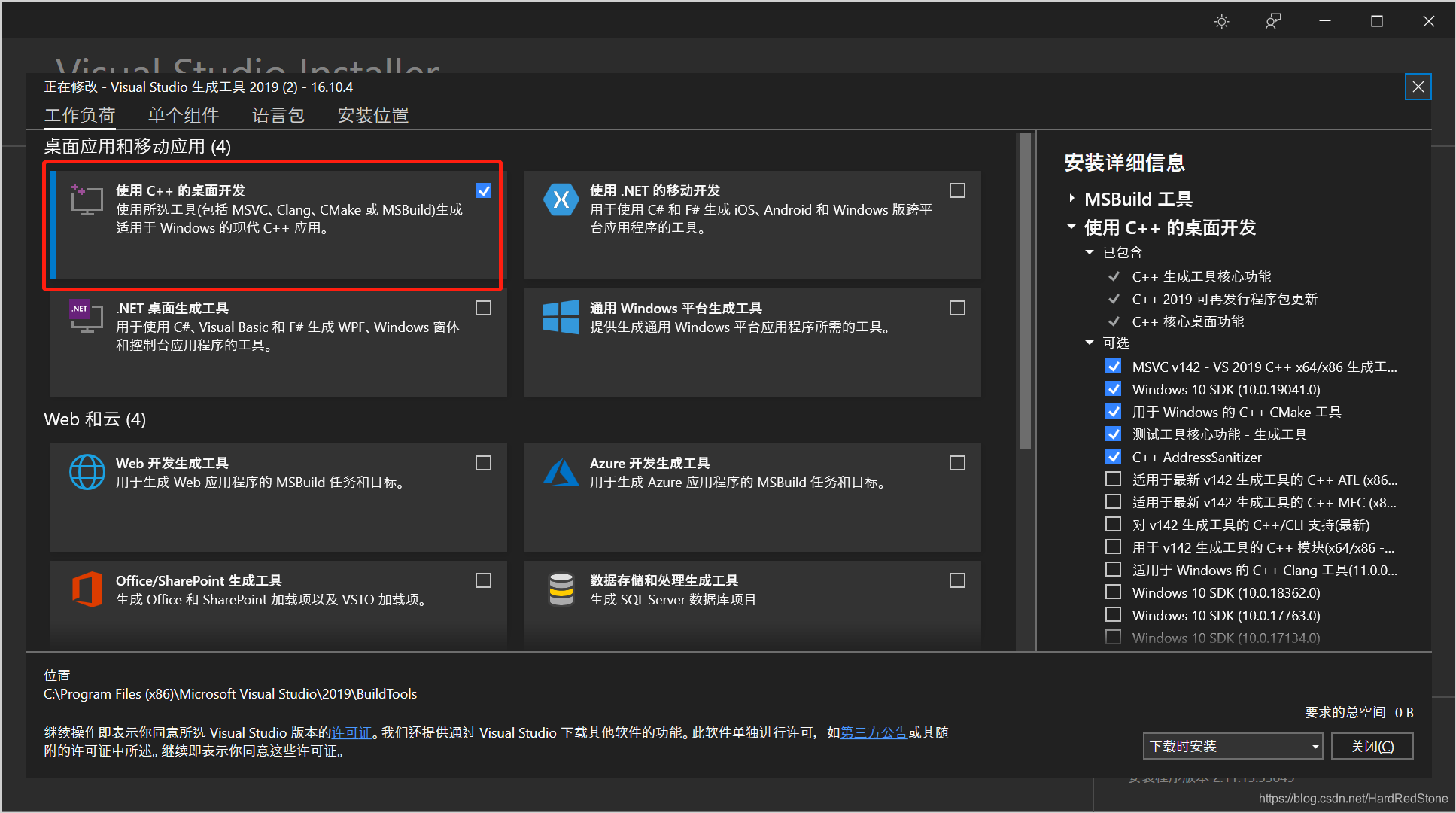
你如果硬要尝试去装visualcppbuildtools_full.exe,有可能遇到一堆问题装不上。这样子处理,简单一些。





 扫一扫
扫一扫


 2243
2243

 被折叠的 条评论
为什么被折叠?
被折叠的 条评论
为什么被折叠?
 到【灌水乐园】发言





