pytest框架—mark标记功能

一、mark标记

在实际工作中,我们要写的自动化用例会比较多,也不会都放在一个py文件中,如果有几十个py文件,上百个方法,而我们只想运行当中部分的用例时怎么办?

pytest提供了一个非常好用的mark功能,可以给测试用例打上各种各样的标签,运行用例时可以指定运行某个标签。mark功能作用就是灵活的管理和运行测试用例。

标签既可以打到方法上,也可以打到类上,标记的两种方式:

  • 直接标记类或方法或函数:@pytest.mark.标签名
  • 类属性:pytestmark = [pytest.mark.标签名, pytest.mark.标签名],需要注意的是属性名称是固定的
  • import pytest
import pytest


@pytest.mark.beta # 可以给类打标签

class TestLogin: # 标记类


@pytest.mark.qc

@pytest.mark.beta # 也可以多个标签

def test_login(self): # 标记方法

pass


@pytest.mark.smoke # 单个标签

def test_register(): # 标记函数

pass


class TestClass:

# 加一个 pytestmark的类属性

pytestmark = [pytest.mark.qc, pytest.mark.beta] # 标签存放在一个列表


pytest.main()
二、注册标签名

我们要想运行已经打好标记的函数,还需要对标签名进行注册,告诉pytest有哪些标签,如果不进行注册运行时(pytest的高级版本)可能会报警告让你进行注册。

我们只需要在项目根目录下创建一个pytest.ini文件,注意文件名是不可修改的,否则pytest会找不到。内容格式如下:

# pytest.ini

# 只能修改=右边的值

[pytest]

python_files = demo_*.py # 模块名以demo_开头

python_functions = demo_* # 方法名以demo_开头

python_classes = Demo* # 类名名以Demo开头


# 注册标签

markers =

qc

beta

smoke
三、运行指定的标签

通过命令行执行

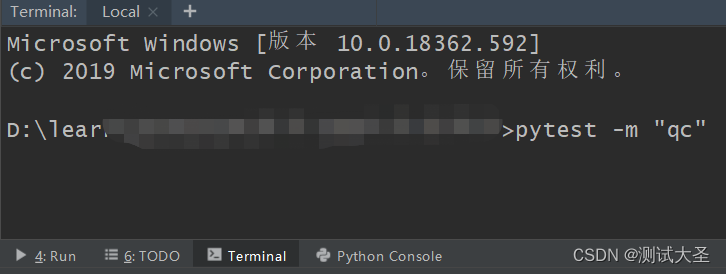
单个标签:pytest -m "标签名" (-m意思是执行标签mark),不想执行某个标签可以用not来取反,即pytest -m "not 标签名"

多个标签:可以加上判断,pytest -m "qc and beta" 或者 pytest -m "qc or beta" 效果是一样的

注意:标签名一定要加双引号,单引号是会报错的。
四、通过代码执行

这里普及一下,main()方法是可以接收不定长参数的,因此可以把要执行的命令放在一个列表中

if __name__ == '__main__':

pytest.main(['-m qc and beta', '-s']) # 标签名不需要加引号

关于pytest的指令,可以通过控制台执行pytest --help查看,上面举例中-s命令是指打印更加详细的信息,如果程序运行过程当中的print()信息打印不出来,可以加上-s可选参数,它是-- capture=no的缩写。

五、skip跳过标记

在维护测试用例的过程中,可能在一个阶段某些用例已经不需要了,或者在指定条件下是不需要运行的,那么我们就可以通过mark.skip跳过这些函数或者类,两种跳过方式:

  • 直接跳过: @pytest.mark.skip(reason = “原因”),这里原因是可选参数
  • 条件跳过,即满足某个条件才跳过:@pytest.mark.skipif(a == 1, reason = “原因”)
db_host = 'localhost'


@pytest.mark.skip("和现在的需求不符合") # 不满足当下了,或别人编写的暂时不能删的

def test_yuz(self):

pass


@pytest.mark.skipif(db_host == 'localhost', reason='只测试线上环境,不测试本地环境')

def test_develop_env(self):

pass

最后: 下方这份完整的软件测试视频教程已经整理上传完成,需要的朋友们可以自行领取【保证100%免费】

​​​软件测试面试文档

我们学习必然是为了找到高薪的工作,下面这些面试题是来自阿里、腾讯、字节等一线互联网大厂最新的面试资料,并且有字节大佬给出了权威的解答,刷完这一套面试资料相信大家都能找到满意的工作。

在这里插入图片描述

在这里插入图片描述

### Pytest Framework Mark Usage and Examples In the context of the pytest framework, `mark` decorators provide a way to categorize tests or modify their behavior. This functionality allows developers to selectively run specific subsets of tests based on custom criteria. #### Basic Syntax To apply marks within test functions, use the decorator syntax as shown below: ```python import pytest @pytest.mark.<marker_name> def test_example(): assert True ``` Marks can also be applied directly above individual test methods without using parentheses when no parameters are needed[^1]. #### Common Use Cases ##### Skipping Tests Conditionally Tests marked with `skipif` will not execute under certain conditions specified through expressions passed into this marker. ```python import sys import pytest @pytest.mark.skipif(sys.version_info < (3, 7), reason="requires python3.7 or higher") def test_python_version(): pass ``` ##### Expected Failures Marking tests that should fail but currently do not helps track issues over time until they eventually succeed. ```python @pytest.mark.xfail(reason="known issue") def test_known_issue(): raise Exception("This is an expected failure.") ``` ##### Custom Categories Creating user-defined markers enables grouping similar types of tests together for easier management during development cycles. ```python # conftest.py file where new markers may be registered. def pytest_configure(config): config.addinivalue_line( "markers", "slow: mark test as slow." ) @pytest.mark.slow def test_long_running_process(): """A hypothetical long-running process.""" import time time.sleep(5) assert True ``` When executing tests via command line interface, one could filter out all non-slow tests like so: ```bash pytest -v -m 'not slow' ``` Or conversely include only those tagged specifically as being part of the performance suite: ```bash pytest -v -m 'performance' ``` --related questions-- 1. How does one register additional markers beyond what comes pre-installed? 2. Can multiple markers coexist on single test definitions simultaneously? 3. What mechanisms exist inside pytest for handling parameterized testing scenarios alongside marking features? 4. Is there any impact from applying too many different kinds of marks across large projects?
评论
成就一亿技术人!
拼手气红包6.0元
还能输入1000个字符
 
红包 添加红包
表情包 插入表情
 条评论被折叠 查看
添加红包

请填写红包祝福语或标题

红包个数最小为10个

红包金额最低5元

当前余额3.43前往充值 >
需支付:10.00
成就一亿技术人!
领取后你会自动成为博主和红包主的粉丝 规则
hope_wisdom
发出的红包
实付
使用余额支付
点击重新获取
扫码支付
钱包余额 0

抵扣说明:

1.余额是钱包充值的虚拟货币,按照1:1的比例进行支付金额的抵扣。
2.余额无法直接购买下载,可以购买VIP、付费专栏及课程。

余额充值


