


一、CE环境设定
-
systemctl
# 系统控制器:用于管理系统中服务程序,查看服务状态、开启服务、关闭服务、 # 重启服务、设置\取消服务的开机自启动 systemctl start 服务名称 stop 服务名称 enable --now 服务名称 #设置开机自启且立即开启 disable --now 服务名称 #设置开机不自启且立即关闭 status 服务名称 # 查看服务的当前运行状态 restart 服务名称 # 重新启动服务 # selinux 设置永久关闭 vim /etc/selinux/config 22 SELINUX=disabled 重启系统
#步骤
1. 安装虚拟机
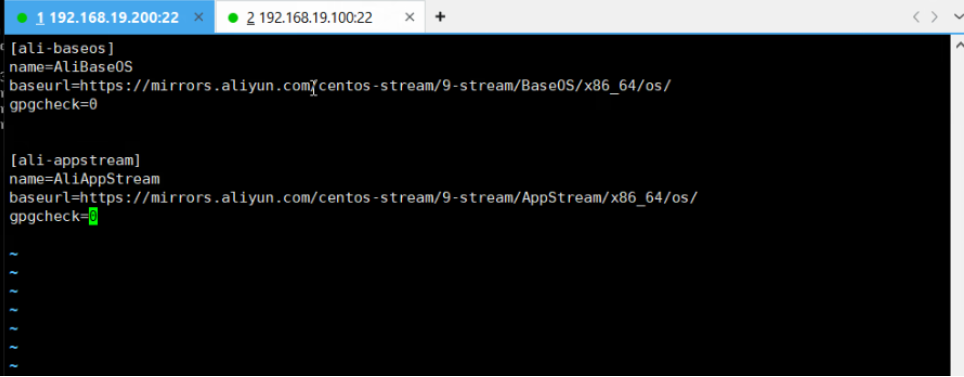
2. 配置虚拟机的软件仓库,安装必备软件 vim、bash-completion
[root@172 yum.repos.d]# dnf install vim bash-completion -y
3. 确认网络是自动连接
4. 关闭网络防火墙/selinux
5. 关机、clone
6. server设置ip xxx.xxx.xxx.100 client的ip主机位 200,修改相应的主机名称
7. 制作快照软件仓库:
二、定时任务
-
at一次性任务
-
使用方法 :
-
at now + n min/hour/day/week/month
[root@server ~]# at now + 1min warning: commands will be executed using /bin/sh at> touch /tmp/{1..10} at> <EOT> #ctrl + D ===== ^D -
at HH:MM / HH:mm YYYY-mm-dd
# 指定时间点创建定时任务,如果创建的时间已经过去 [root@server ~]# at 22:32 warning: commands will be executed using /bin/sh at> touch /tmp/{a..z} at> <EOT> # 那么将会设置到第二天去进行 [root@server ~]# at 22:30 warning: commands will be executed using /bin/sh at> ls at> <EOT> job 7 at Sat Oct 25 22:30:00 2025 [root@server ~]# at -l 7 Sat Oct 25 22:30:00 2025 a root # 不允许使用简化的日期格式 [root@server ~]# at 0:0 2026-1-1 Error in day of month. Last token seen: : Garbled time # 添加一个较远日期的定时任务 [root@server ~]# at 00:00 2026-01-01 warning: commands will be executed using /bin/sh at> echo "happy new year" at> <EOT> job 8 at Thu Jan 1 00:00:00 2026 [root@server ~]# at -l 7 Sat Oct 25 22:30:00 2025 a root 8 Thu Jan 1 00:00:00 2026 a root # 不允许创建一个过去时间段的定时任务 [root@server ~]# at 00:00 2025-01-01 at: refusing to create job destined in the past
-
-
选项:
-
-l : 查看一次性任务列表
# 查看还未执行的任务列表
[root@server ~]# at -l
5   Fri Oct 24 22:30:00 2025 a root
[root@server ~]# at -l
[root@server ~]#
-
-c
# 用来查看任务详情的命令,通常设定的任务在输出的倒数第二行 [root@server ~]# at -c 8 ... echo "happy new year" marcinDELIMITER1f84b651
-
-d
# 删除指定的任务
[root@server ~]# at -l
7   Sat Oct 25 22:30:00 2025 a root
8   Thu Jan  1 00:00:00 2026 a root
[root@server ~]# at -d 7
[root@server ~]# at -l
8   Thu Jan  1 00:00:00 2026 a root
[root@server ~]# at -d 8
[root@server ~]# at -l
-
-f
# 定时执行一个脚本文件
[root@server ~]# at -f ~/ll.sh 22:00
warning: commands will be executed using /bin/sh
job 10 at Sat Oct 25 22:00:00 2025
-
-
配置文件
-
at.allow :白名单,当白名单存在时,系统中的用户必须在白名单中才可以使用at命令。
-
at.deny :黑名单,不让使用at命令的用户可以加入到黑名单中。
注意:白名单优先级高于黑名单,所以系统中默认是没有白名单的,只有黑名单。
-
-
-
cron周期任务
-
选项:
-
-e 编辑当前用户的周期任务列表
[root@server etc]# crontab -e
crontab: installing new crontab
-
-l 查看定时任务列表
[root@server etc]# crontab -l 0 8 15 * 1 touch /tmp/{1..10} -
-r 清空定时任务
[root@server etc]# crontab -l 0 8 15 * 1 touch /tmp/{1..10} * * * * * rm -f /tmp/* [root@server etc]# crontab -r [root@server etc]# crontab -l no crontab for root -
-u 指定某个用户创建/清空/查看他的定时任务
[root@server etc]# crontab -u redhat -e
no crontab for redhat - using an empty one
crontab: installing new crontab
[root@server etc]# crontab -l
no crontab for root
[root@server etc]# crontab -u redhat -l
* * * * * rm -rf /tmp/*
-
-i 清空定时任务时进行提醒
[root@server etc]# crontab -u redhat -ir
crontab: really delete redhat's crontab? y
[root@server etc]# crontab -u redhat -l
no crontab for redhat
-
-
任务格式
-
个人任务:
* * * * * 命令/脚本 -
系统任务:
* * * * * 用户 命令/脚本
-
-
-
配置文件:
-
/etc/cron.deny 黑名单 他的优先级低于 白名单cron.allow, 只要白名单存在 黑名单就不生效
-
/etc/crontab 系统级别的定时任务 我们可以在其中指定某个用户 执行某个任务
-
/var/spool/cron/用户的名称 该目录中保存的是各个用户自己的定时任务,每个人定时任务文件用该用户名命名。
-
/etc/cron.d/ 用自定义的批量定时任务
-
/etc/cron.d/0hourly
-
-
/etc/cron.hourly/、/etc/cron.daily/、/etc/cron.weekly/、/etc/cron.monthly/
-
定时任务 每小时 每天 每周 每月的目录,可以再其中加入自己写的脚本
-
-
/etc/anacrontab
-
远程连接
-
简介远程连接技术
-
telnet : 已经不在使用,原因明文传输。
-
ssh及openssh:ssh是一个通信协议,openssh是具体一个实现。
-
-
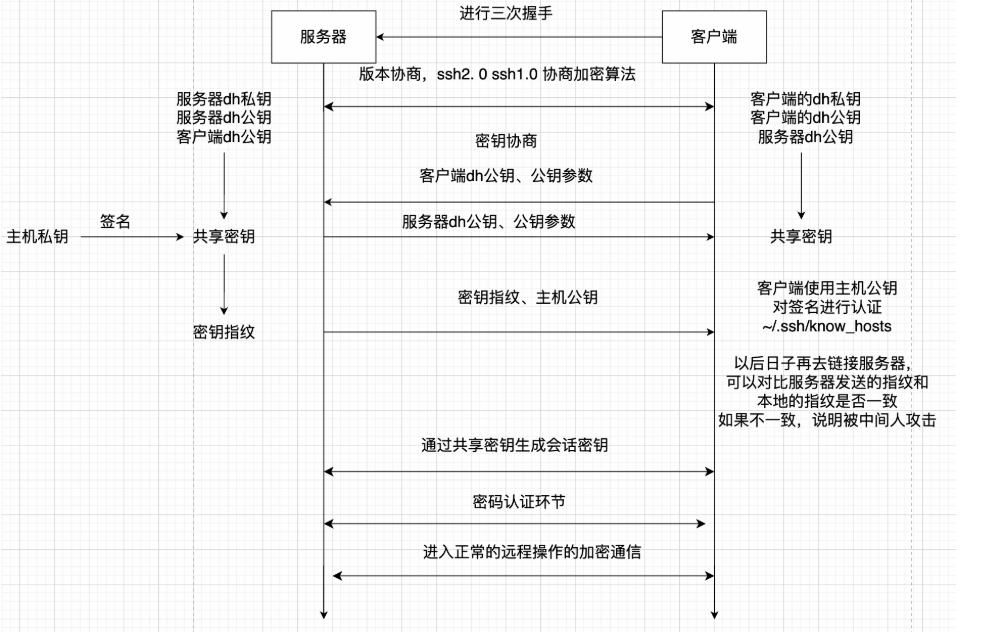
ssh连接过程
-





 扫一扫
扫一扫


 763
763

 被折叠的 条评论
为什么被折叠?
被折叠的 条评论
为什么被折叠?
 到【灌水乐园】发言





