




 本文介绍了如何在dhtmlxGantt中调整网格行大小,包括设置行高度和允许用户通过拖放方式调整。通过修改row_height和bar_height属性,或启用gantt.config.resize_rows选项,可以实现行高自定义。
这篇文章给大家讲解dhtmlxGantt如何调整网格的行大小。
可以更改网格中单独行的高度,dhtmlxGantt 库提供了两种管理行高的方法:
- 通过为必要的任务对象设置行的高度和任务栏的高度;
- 通过拖动网格行的底部边框。
gantt.config.columns = [
    {name:"wbs", label:"WBS", width:40, template:gantt.getWBSCode },
    {name:"text", label:"Task name", tree:true, width:170 },
    {name:"start_date", align:"center", width: 90},
    {name:"duration", align:"center", width: 60},
    {name:"add", width:40}
];
设置行高
您可以根据需要调整特定行的高度。

为此,您需要重新定义 的row_height 和 bar_height属性: 数据集中任务对象
gantt.parse({
    data: [
        { id: 11, text: "Project #1", type: "project", progress: 0.6, open: true,
            row_height: 70, bar_height: 60 },
        { id: 12, text: "Task #1", start_date: "03-04-2018", duration: "5",
            parent: "11", progress: 1, open: true },
        { id: 13, text: "Task #2", start_date: "03-04-2018", type: "project",
            parent: "11", progress: 0.5, open: true }
    ],
    links: []
});
或者您可以动态实现它:
gantt.getTask(11).row_height = 50;
gantt.getTask(11).bar_height = 25;
// re-render Gantt to apply the changes
gantt.render();
通过拖放调整行大小
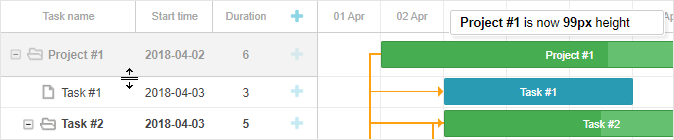
要让用户可以通过拖动行的底部边框来调整网格中的行大小,请将 gantt.config.resize_rows 选项设置为 true :
gantt.config.resize_rows = true;
gantt.config.min_task_grid_row_height : 选项提供了定义在调整大小期间可以为任务设置的最小行高的能力
gantt.config.min_task_grid_row_height = 45;
dhtmlxGantt是用于跨浏览器和跨平台应用程序的功能齐全的Gantt图表,可满足项目管理应用程序的所有需求,是最完善的甘特图图表库。更多DhtmlxGantt产品相关内容,欢迎您直接访问慧都网了解更多详情。





 扫一扫
扫一扫


 1万+
1万+

 被折叠的 条评论
为什么被折叠?
被折叠的 条评论
为什么被折叠?
 到【灌水乐园】发言





